
How to create Installer for Windows 7

crosuperman

New member
Local time
12:38 AM
Messages
5
Location
Split, Croatia
I searched Internet and this forum but I didn't find detail tutorial how to create Installer for Windows 7. To understand me better I mean how to create all files and folders which need to make ISO for Windows 7 (look picture below)? Which files need, which folders create, where to find (download) that files...?
I found this tutorial for Win XP, but not for Win 7.

If somebody have enough time and will to describe this in details step by step (with or without pictures), or if somebody know where to find tutorial about this to put link to tutorial, I would be very thankful.
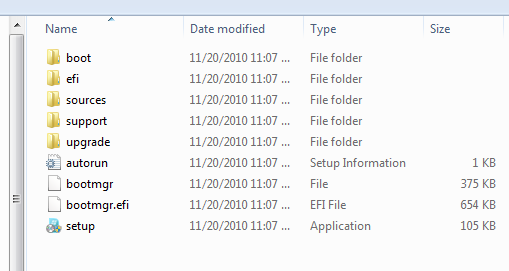
window10.png
 

My Computer My Computer

At a glance

Windows XP Professional x32DualCore Intel Celeron E1400 1600 MHzDDR2 2GBATI Radeon HD 4350
Computer type
PC/Desktop
Computer Manufacturer/Model Number
Custom build
OS
Windows XP Professional x32
CPU
DualCore Intel Celeron E1400 1600 MHz
Motherboard
Gigabyte GA-EP43-DS3L
Memory
DDR2 2GB
Graphics Card(s)
ATI Radeon HD 4350
Sound Card
Realtek ALC888
Monitor(s) Displays
SAMSUNG SyncMaster 793s
Screen Resolution
17''
Hard Drives
Western Digital EIDE Hard Drive 160 GB
PSU
400W
Case
Codegen C6061 Midi Tower
Keyboard
Chicony KB-9810
Browser
Firefox ESR 52.9.0
If you already have the files and folders all you need do is to create an image. What exactly are you trying to do and why?
 

My Computer My Computer

At a glance

Win 8 Release candidate 8400[email protected]4 gigsNvidia 9600M
Computer Manufacturer/Model Number
HP Pavillion dv-7 1005 Tx
OS
Win 8 Release candidate 8400
CPU
[email protected]
Memory
4 gigs
Graphics Card(s)
Nvidia 9600M
Sound Card
HD built-in
Monitor(s) Displays
17" Wxga
Screen Resolution
1440x900
Cooling
none
Internet Speed
45Mb down 5Mb up
.

I have no that files, I would create installation but I didn't know how to do it. What files need for installation, in which folders put that files...? I need full description of that process, on the end all that looks like on picture I posted; ready to create image.
 

My Computer My Computer

At a glance

Windows XP Professional x32DualCore Intel Celeron E1400 1600 MHzDDR2 2GBATI Radeon HD 4350
Computer type
PC/Desktop
Computer Manufacturer/Model Number
Custom build
OS
Windows XP Professional x32
CPU
DualCore Intel Celeron E1400 1600 MHz
Motherboard
Gigabyte GA-EP43-DS3L
Memory
DDR2 2GB
Graphics Card(s)
ATI Radeon HD 4350
Sound Card
Realtek ALC888
Monitor(s) Displays
SAMSUNG SyncMaster 793s
Screen Resolution
17''
Hard Drives
Western Digital EIDE Hard Drive 160 GB
PSU
400W
Case
Codegen C6061 Midi Tower
Keyboard
Chicony KB-9810
Browser
Firefox ESR 52.9.0
Are you trying to reinstall retail Win7 or Factory OEM? Do you have a Product key which came in the package or is affixed to the machine? This is needed for reinstall.

Either way the steps are pretty much the same in this tutorial which shows you how to get a perfect reinstall and contains everything you need to know: Clean Reinstall - Factory OEM Windows 7
 
I see you didn't understand what I exactly need. I will try clearly explain what I need.
There's many tutorials on Internet like: how to make ISO (Image) for Win 7, how to install Win 7... I know how to do it, but I don't know how to prepare all files for creating ISO (Image). Which files need, in which folder put that files...? On the end all that looks like on picture I posted in my first post. I need tutorial how to do that.

For example:

1. First you need create folder XXX (name of folder). Add file XY (name of file) in folder XXX. That file you can download from www. site . com (name of site).
2. Create folder YYY (name of folder). Add file XYZ (name of file) in folder YYY.
... ...
Now you prepared all files and folders and you are ready for create ISO (Image) for Windows 7.


I hope you understand it now what I need. I need tutorial.
 

My Computer My Computer

At a glance

Windows XP Professional x32DualCore Intel Celeron E1400 1600 MHzDDR2 2GBATI Radeon HD 4350
Computer type
PC/Desktop
Computer Manufacturer/Model Number
Custom build
OS
Windows XP Professional x32
CPU
DualCore Intel Celeron E1400 1600 MHz
Motherboard
Gigabyte GA-EP43-DS3L
Memory
DDR2 2GB
Graphics Card(s)
ATI Radeon HD 4350
Sound Card
Realtek ALC888
Monitor(s) Displays
SAMSUNG SyncMaster 793s
Screen Resolution
17''
Hard Drives
Western Digital EIDE Hard Drive 160 GB
PSU
400W
Case
Codegen C6061 Midi Tower
Keyboard
Chicony KB-9810
Browser
Firefox ESR 52.9.0
There is no reason to compile an ISO from files which is a lot of unnecessary trouble, because the ISO image file is already created for you and easily downloaded from the web. You only need to download it to burn to DVD or write to flash stick.

Are you trying to customize your Win7 installer ISO, as there are programs to help you do this?

What exactly do you need the ISO file for? If you would have answered this question earlier I might have already provided it for you.
 
You probably could do it using your installed version of windows 7.

It would be a very long job.

Windows 7 iso files are available on the internet, I have heard.


I see you didn't understand what I exactly need. I will try clearly explain what I need.
There's many tutorials on Internet like: how to make ISO (Image) for Win 7, how to install Win 7... I know how to do it, but I don't know how to prepare all files for creating ISO (Image). Which files need, in which folder put that files...? On the end all that looks like on picture I posted in my first post. I need tutorial how to do that.

For example:

1. First you need create folder XXX (name of folder). Add file XY (name of file) in folder XXX. That file you can download from www. site . com (name of site).
2. Create folder YYY (name of folder). Add file XYZ (name of file) in folder YYY.
... ...
Now you prepared all files and folders and you are ready for create ISO (Image) for Windows 7.


I hope you understand it now what I need. I need tutorial.
 

My Computers My Computers

  • At a glance

    7 X64i5 84002x8gb 3200mhz
    Computer type
    PC/Desktop
    OS
    7 X64
    CPU
    i5 8400
    Motherboard
    gigabyte b365m ds3h
    Memory
    2x8gb 3200mhz
    Hard Drives
    various
    PSU
    pure power 11 400w cm
    Case
    Coolermaster
    Cooling
    cryorig m9i
  • At a glance

    7x64g54008gb ddr4 2400
    Computer type
    PC/Desktop
    OS
    7x64
    CPU
    g5400
    Motherboard
    ga b365m ds3h
    Memory
    8gb ddr4 2400
    PSU
    xfx pro 450w
SIW2 got my point. I need all files from ISO. Look at picture in my first post. It's installation folders from ISO: boot, efi, sources, support, upgrade... Is there any site on Internet to download these files? Which file add to which folder?
 

My Computer My Computer

At a glance

Windows XP Professional x32DualCore Intel Celeron E1400 1600 MHzDDR2 2GBATI Radeon HD 4350
Computer type
PC/Desktop
Computer Manufacturer/Model Number
Custom build
OS
Windows XP Professional x32
CPU
DualCore Intel Celeron E1400 1600 MHz
Motherboard
Gigabyte GA-EP43-DS3L
Memory
DDR2 2GB
Graphics Card(s)
ATI Radeon HD 4350
Sound Card
Realtek ALC888
Monitor(s) Displays
SAMSUNG SyncMaster 793s
Screen Resolution
17''
Hard Drives
Western Digital EIDE Hard Drive 160 GB
PSU
400W
Case
Codegen C6061 Midi Tower
Keyboard
Chicony KB-9810
Browser
Firefox ESR 52.9.0
Those folders are what's extracted from the ISO image file. There is no reason to mess with the files unless you have a specific reason you want the files. The ISO image is what is used to burn to DVD or write to flash stick.

Is there some reason why you cannot tell us what you need this for? Do you not want to hear the actual way these things are done?
 
Hi Crosuperman,

You know you can download the entire iso already made from several places on the internet?

If you know that - yet you still want to build your own for the challenge - it should be possible .

The directory structure you need is already in winre.wim.

That is usually on your windows partition in a folder called Recovery\{somelongnumber}\winre.wim.

You would need to extract that to a folder on your drive (you can do that with 7-zip ) then add Install.wim to the "sources" folder.

If you like, you could change system32/winpeshl.ini from:

[LaunchApp]
AppPath=X:\sources\recovery\recenv.exe

to:

[LaunchApp]
AppPath=X:\setup.exe

Or, you can leave it pointing recenv.exe, and just use the command prompt to navigate to setup.exe if you want to reinstall.

You will need to make your own Install.wim.

That is not difficult.

Boot into windows 7, and run this command:

View attachment runsysprep.zip

After it has done that, the machine will shutdown.

You then need to use another operating system - or boot the windows 7 repair cd and capture your windows drive into a .wim file - call it install.wim and save it into the "sources" folder.

It is probably easier if you have put GImageX - AutoItScriptor some other wim capture tool into whatever o/s or boot media you are going to use to do that.

Next, you need to create an ISO.

You can boot back into windows 7 to do this - ( because it has been sysprepped- it will set itself up again - you enter a new user name - so you will have 2 admin accounts - you can just delete one later if you like.)

You can use any number of apps to make a bootable iso.

NOTE - you will have captured your current windows 7 installation - with all the updates and programs.

It will be very big.

You will have trouble fitting it on a dvd.

You may need to split it.

There is some difficulty with making a bootable iso that size - from memory, I think you need to specify the file layout if it is over 4gb:

http://technet.microsoft.com/en-us/library/cc749036(v=ws.10).aspx
 

My Computers My Computers

  • At a glance

    7 X64i5 84002x8gb 3200mhz
    Computer type
    PC/Desktop
    OS
    7 X64
    CPU
    i5 8400
    Motherboard
    gigabyte b365m ds3h
    Memory
    2x8gb 3200mhz
    Hard Drives
    various
    PSU
    pure power 11 400w cm
    Case
    Coolermaster
    Cooling
    cryorig m9i
  • At a glance

    7x64g54008gb ddr4 2400
    Computer type
    PC/Desktop
    OS
    7x64
    CPU
    g5400
    Motherboard
    ga b365m ds3h
    Memory
    8gb ddr4 2400
    PSU
    xfx pro 450w
Does that make any sense?

I have made my own versions - but I haven't done it exactly as described above.

I may give it a go now.

I might try it with Vista because I have just captured a sysprepped install.wim of that.
 

My Computers My Computers

  • At a glance

    7 X64i5 84002x8gb 3200mhz
    Computer type
    PC/Desktop
    OS
    7 X64
    CPU
    i5 8400
    Motherboard
    gigabyte b365m ds3h
    Memory
    2x8gb 3200mhz
    Hard Drives
    various
    PSU
    pure power 11 400w cm
    Case
    Coolermaster
    Cooling
    cryorig m9i
  • At a glance

    7x64g54008gb ddr4 2400
    Computer type
    PC/Desktop
    OS
    7x64
    CPU
    g5400
    Motherboard
    ga b365m ds3h
    Memory
    8gb ddr4 2400
    PSU
    xfx pro 450w
If you download the iso and open it up, it will look exactly like your pic. You don`t create the files and folders, Microsoft does. As everyone has ask what are you trying to do ?
 

My Computer My Computer

At a glance

Windows 10 Pro x64Intel Core i7 6700KGSkill TridentZ RGB 16GB 3600 16-16-16-36EVGA GTX 980 Ti SC x2
Computer type
PC/Desktop
Computer Manufacturer/Model Number
Skylake Special #666
OS
Windows 10 Pro x64
CPU
Intel Core i7 6700K
Motherboard
Asus Sabertooth Z170 Mark 1
Memory
GSkill TridentZ RGB 16GB 3600 16-16-16-36
Graphics Card(s)
EVGA GTX 980 Ti SC x2
Sound Card
Realtek High Definition
Monitor(s) Displays
AOC G2460PG
Screen Resolution
1920 x 1080 144Hz
Hard Drives
Samsung 860 Pro 256GB, Seagate Barracuda 4TB x2
PSU
EVGA 1000 P2, EVGA White Custom Braided Cables
Case
Corsair Vengeance C70 Gunmetal Black
Cooling
Corsair H100i v2, Corsair ML120 x2, Thermal Grizzly Kryonaut
Keyboard
Logitech G910 Orion Spectrum
Mouse
Logitech G700s
Internet Speed
Verizon Fios Quantum Gateway 75/75
Antivirus
Windows Defender, Malwarebytes Free 3.8.3
Browser
Chrome
Other Info
Corsair SP120 x4, LG Blu-ray Drive, Durabrand HT-395 100 Watt Dolby Digital Amp, Corsair H2100 Wireless 7.1 Headset
I think he is doing it for fun and as a learning experience.

What is wrong with that?
 

My Computers My Computers

  • At a glance

    7 X64i5 84002x8gb 3200mhz
    Computer type
    PC/Desktop
    OS
    7 X64
    CPU
    i5 8400
    Motherboard
    gigabyte b365m ds3h
    Memory
    2x8gb 3200mhz
    Hard Drives
    various
    PSU
    pure power 11 400w cm
    Case
    Coolermaster
    Cooling
    cryorig m9i
  • At a glance

    7x64g54008gb ddr4 2400
    Computer type
    PC/Desktop
    OS
    7x64
    CPU
    g5400
    Motherboard
    ga b365m ds3h
    Memory
    8gb ddr4 2400
    PSU
    xfx pro 450w
Nothing "wrong" with that at all. Of course, he could tell us and then people wouldn't have to guess. ;)

Knowing "why" someone wants to do something usually makes it easier to better advise them as to "how" to do it. :)
 

My Computer My Computer

At a glance

Main - Windows 7 Pro SP1 64-Bit; 2nd - Window...Main - Core i7 2600K; 2nd - Core i7 920Main - 16GB Corsair Vengeance; 2nd - 12GB Cor...Main - XFX Radeon 6870 1GB; 2nd - XFX Radeon ...
Computer Manufacturer/Model Number
Self
OS
Main - Windows 7 Pro SP1 64-Bit; 2nd - Windows Server 2008 R2
CPU
Main - Core i7 2600K; 2nd - Core i7 920
Motherboard
Main - Asus P8Z68-V Pro/Gen3; 2nd - Gigabyte GA-EX58-UDR3
Memory
Main - 16GB Corsair Vengeance; 2nd - 12GB Corsair Vengeance
Graphics Card(s)
Main - XFX Radeon 6870 1GB; 2nd - XFX Radeon 4870 1GB
Sound Card
Both: Onboard Realtek Azalia
Monitor(s) Displays
Main - Hann 25" + I-INC 25" + Acer 23"; 2nd - Upgrading Soon
Screen Resolution
Main - 1920x1080 (All Three Monitors); 2nd - Upgrading Soon
Hard Drives
Main - (1) Crucial M4 128GB (Boot)
Main - (1) Seagate 2TB 64MB Cache (Data)
Main - (1) Seagate 2TB 64MB Cache (Data Backup)
2nd - (1) Intel X25-M SSD 80GB (Boot)
2nd - (3) Seagate 1TB 32MB Cache (Data Backup)
2nd - (1) Seagate 320GB (Because)
PSU
Main - OCZ 600W Modular; 2nd - OCZ 600W
Case
Main - Thermaltake Element G; 2nd - NZXT something or other
Cooling
Main - Corsair H80; 2nd - Prolimatech Megahalems
Keyboard
Main - Razer Reclusa; 2nd - Old MS Keyboard
Mouse
Main - Logitech MX Revolution; 2nd - Old MS Mouse
Internet Speed
20Mbps Time-Warner Cable
First, thank you all for you advices and suggestions.
Second, I still use Windows XP and I'm satisfied with it for now. I plan to change from XP to Win 7 maybe next year, not yet.
I remember I found a few yeras ago on Internet site where located all files (with option for download each of them) which included in installation folders for OS XP, Vista (maybe Win 7). Now i forget what's the site. I'm sure there is some site on Internet like that.
I know I can download complete ISO, extract it and then have all files, but i think there's site with individual files from ISO with download option. If somebody know that site let me know.

Thank you. :cool:
 

My Computer My Computer

At a glance

Windows XP Professional x32DualCore Intel Celeron E1400 1600 MHzDDR2 2GBATI Radeon HD 4350
Computer type
PC/Desktop
Computer Manufacturer/Model Number
Custom build
OS
Windows XP Professional x32
CPU
DualCore Intel Celeron E1400 1600 MHz
Motherboard
Gigabyte GA-EP43-DS3L
Memory
DDR2 2GB
Graphics Card(s)
ATI Radeon HD 4350
Sound Card
Realtek ALC888
Monitor(s) Displays
SAMSUNG SyncMaster 793s
Screen Resolution
17''
Hard Drives
Western Digital EIDE Hard Drive 160 GB
PSU
400W
Case
Codegen C6061 Midi Tower
Keyboard
Chicony KB-9810
Browser
Firefox ESR 52.9.0
Back
Top