How to create multi-boot flash drive

LanguidLegend

New member
Local time
4:52 PM
Messages
7
Does anyone know of a way to take several different ISO's (multiple Windows ISO's, Ubuntu, Hiren's Boot CD, etc.) and put them onto a flash drive from which I can boot and select one?
I've tried several different utilities thus far - unetbootin, YUMI, XBoot - but none have allowed me to successfully add all my images.

Any input would be appreciated!
 

My Computer

Computer Manufacturer/Model Number
Compaq Presario
OS
Windows 7 Ultimate 32bit
To do it with Win7 and Vista either 32- or 64-bit or mixed, write the Win7 ISO to stick using UltraISO trial version: on File tab open ISO, on Bootable tab Write Disk Image, Format, Write. This extracts the files to stick. Sweep them into a folder for storage when not booting - they must be out in root to boot.

Now you can extract the other Win7 and Vista ISO's into their own folders to use the same way to boot the stick which is already bootsected with /nt60.

As for the other tools you mention, if they use nt60 to boot then you can try to get them to boot the same way placing extracted files into the root with no other bootable ISO's extracted in root at time (keep in folders). If not you may need to install GRUB or another boot manager to stick to boot them - more trouble than I'm willing to do on the 16gb tools stick I carry in my pocket which has everything I need stored alongside the ISO's.
 

My Computer

Computer type
Laptop
Computer Manufacturer/Model Number
Hewlett-Packard/G62-107SA Notebook
OS
Microsoft Windows 7 Home Premium 64-bit Service Pack 1
CPU
Intel(R) Core(TM) i3 CPU M 330 @ 2.13GHz
Motherboard
Hewlett-Packard 1425
Memory
8 GB DDR3
Graphics Card(s)
Intel(R) HD Graphics
Sound Card
Realtek High Definition Audio
Monitor(s) Displays
Builtin
Screen Resolution
1366 x 768 x 32 bits (4294967296 colors) @ 60 Hz
Hard Drives
250 GB SATA Hard Disk Drive 7200 rpm
2TB Seagate GoFlex USB 2 Drive
1TB Iomega Prestige USB 2 Drive
1.5TB Iomega Prestige USB 2 Drive (Samsung)
2TB WD MyBook Live NAS.
Mouse
Logitech Anywhere MX
Internet Speed
152 Mbs download 10 Mbs upload
Antivirus
Norton 360
Browser
Chrome
Perhaps not XP and Vista unless these will work as an "Unlisted ISO". Why don't you try it? It only takes a few minutes to create the USB.
 

My Computer

Computer type
Laptop
Computer Manufacturer/Model Number
Hewlett-Packard/G62-107SA Notebook
OS
Microsoft Windows 7 Home Premium 64-bit Service Pack 1
CPU
Intel(R) Core(TM) i3 CPU M 330 @ 2.13GHz
Motherboard
Hewlett-Packard 1425
Memory
8 GB DDR3
Graphics Card(s)
Intel(R) HD Graphics
Sound Card
Realtek High Definition Audio
Monitor(s) Displays
Builtin
Screen Resolution
1366 x 768 x 32 bits (4294967296 colors) @ 60 Hz
Hard Drives
250 GB SATA Hard Disk Drive 7200 rpm
2TB Seagate GoFlex USB 2 Drive
1TB Iomega Prestige USB 2 Drive
1.5TB Iomega Prestige USB 2 Drive (Samsung)
2TB WD MyBook Live NAS.
Mouse
Logitech Anywhere MX
Internet Speed
152 Mbs download 10 Mbs upload
Antivirus
Norton 360
Browser
Chrome
I set out on a similar task about a year ago. Take a look at my thread.

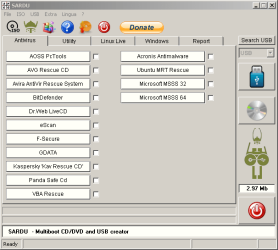
If memory serves, I ended up using a utility called SARDU to complete it.
sardu.png
 

My Computer

Computer Manufacturer/Model Number
Custom
OS
Windows 7 Ultimate x64
CPU
Intel i5-2500k
Motherboard
ASUS P8Z68-V Pro/GEN3
Memory
16GB
Graphics Card(s)
2x Radeon HD7970 Crossfire
Sound Card
On-Board / Logitech G930
Monitor(s) Displays
3x Dell u2412m
Screen Resolution
5760x1200
Hard Drives
Toshiba thns064gg2bbaa SSD
Seagate Barracuda 7200.12 ST31000528AS 1TB
Intel RST SSD caching enabled
PSU
Corsair AX850
Case
Corsair Obsidian 650D
Cooling
Corsair H100
Keyboard
Logitech Illuminated
Mouse
Logitech M510 Wireless
Internet Speed
1Mb/s
Yes. I have tried SARDU. I never got it to work with windows install disks but I must admit I didn't really try too hard as I only had the one install disk and YUMI worked with that,
 

My Computer

Computer type
Laptop
Computer Manufacturer/Model Number
Hewlett-Packard/G62-107SA Notebook
OS
Microsoft Windows 7 Home Premium 64-bit Service Pack 1
CPU
Intel(R) Core(TM) i3 CPU M 330 @ 2.13GHz
Motherboard
Hewlett-Packard 1425
Memory
8 GB DDR3
Graphics Card(s)
Intel(R) HD Graphics
Sound Card
Realtek High Definition Audio
Monitor(s) Displays
Builtin
Screen Resolution
1366 x 768 x 32 bits (4294967296 colors) @ 60 Hz
Hard Drives
250 GB SATA Hard Disk Drive 7200 rpm
2TB Seagate GoFlex USB 2 Drive
1TB Iomega Prestige USB 2 Drive
1.5TB Iomega Prestige USB 2 Drive (Samsung)
2TB WD MyBook Live NAS.
Mouse
Logitech Anywhere MX
Internet Speed
152 Mbs download 10 Mbs upload
Antivirus
Norton 360
Browser
Chrome
Yes. I have tried SARDU. I never got it to work with windows install disks but I must admit I didn't really try too hard as I only had the one install disk and YUMI worked with that,

Just throwing out options was all. I used YUMI for another pen-drive project and, it too, worked fairly well. Personally, I found SARDU pretty painless and who doesn't like options? :D

sarduwin.png
 

My Computer

Computer Manufacturer/Model Number
Custom
OS
Windows 7 Ultimate x64
CPU
Intel i5-2500k
Motherboard
ASUS P8Z68-V Pro/GEN3
Memory
16GB
Graphics Card(s)
2x Radeon HD7970 Crossfire
Sound Card
On-Board / Logitech G930
Monitor(s) Displays
3x Dell u2412m
Screen Resolution
5760x1200
Hard Drives
Toshiba thns064gg2bbaa SSD
Seagate Barracuda 7200.12 ST31000528AS 1TB
Intel RST SSD caching enabled
PSU
Corsair AX850
Case
Corsair Obsidian 650D
Cooling
Corsair H100
Keyboard
Logitech Illuminated
Mouse
Logitech M510 Wireless
Internet Speed
1Mb/s
True.
 

My Computer

Computer type
Laptop
Computer Manufacturer/Model Number
Hewlett-Packard/G62-107SA Notebook
OS
Microsoft Windows 7 Home Premium 64-bit Service Pack 1
CPU
Intel(R) Core(TM) i3 CPU M 330 @ 2.13GHz
Motherboard
Hewlett-Packard 1425
Memory
8 GB DDR3
Graphics Card(s)
Intel(R) HD Graphics
Sound Card
Realtek High Definition Audio
Monitor(s) Displays
Builtin
Screen Resolution
1366 x 768 x 32 bits (4294967296 colors) @ 60 Hz
Hard Drives
250 GB SATA Hard Disk Drive 7200 rpm
2TB Seagate GoFlex USB 2 Drive
1TB Iomega Prestige USB 2 Drive
1.5TB Iomega Prestige USB 2 Drive (Samsung)
2TB WD MyBook Live NAS.
Mouse
Logitech Anywhere MX
Internet Speed
152 Mbs download 10 Mbs upload
Antivirus
Norton 360
Browser
Chrome
Sardu looks really good. Can you add all of those you want just by ticking multiple boxes? Do they conflict at all?
 
I didn't have any conflicts.
Have the ISO's on hand for each of the packages you want to install.
When you mouseover a package inside SARDU it will show the path and expected name of the ISO (allows you to install newer versions using wildcard's I believe?... been a while Greg)
That's pretty much it. Click, boom, bang.

Some FAQ's here and vid toots.

Ageeb

edit:
I ended up putting these on:

AntiVirus Rescue's
- Gdata
- Kaspersky
- F-Secure
- Panda

Utilities
- Macrium Rescue
- Parted Magic
- Clonezilla

Windows
- Windows 7 SP1 x86/x64 AIO installer
- Vista 32b recovery
- Vista 64b recovery
- 7 32b recovery
- 7 64b recovery
 

My Computer

Computer Manufacturer/Model Number
Custom
OS
Windows 7 Ultimate x64
CPU
Intel i5-2500k
Motherboard
ASUS P8Z68-V Pro/GEN3
Memory
16GB
Graphics Card(s)
2x Radeon HD7970 Crossfire
Sound Card
On-Board / Logitech G930
Monitor(s) Displays
3x Dell u2412m
Screen Resolution
5760x1200
Hard Drives
Toshiba thns064gg2bbaa SSD
Seagate Barracuda 7200.12 ST31000528AS 1TB
Intel RST SSD caching enabled
PSU
Corsair AX850
Case
Corsair Obsidian 650D
Cooling
Corsair H100
Keyboard
Logitech Illuminated
Mouse
Logitech M510 Wireless
Internet Speed
1Mb/s
Just a note. The Macrium Rescue supported by SARDU is the Linux version. That is one of the reasons I went with YUMI the PE disk works fine as an unlisted ISO.
 

My Computer

Computer type
Laptop
Computer Manufacturer/Model Number
Hewlett-Packard/G62-107SA Notebook
OS
Microsoft Windows 7 Home Premium 64-bit Service Pack 1
CPU
Intel(R) Core(TM) i3 CPU M 330 @ 2.13GHz
Motherboard
Hewlett-Packard 1425
Memory
8 GB DDR3
Graphics Card(s)
Intel(R) HD Graphics
Sound Card
Realtek High Definition Audio
Monitor(s) Displays
Builtin
Screen Resolution
1366 x 768 x 32 bits (4294967296 colors) @ 60 Hz
Hard Drives
250 GB SATA Hard Disk Drive 7200 rpm
2TB Seagate GoFlex USB 2 Drive
1TB Iomega Prestige USB 2 Drive
1.5TB Iomega Prestige USB 2 Drive (Samsung)
2TB WD MyBook Live NAS.
Mouse
Logitech Anywhere MX
Internet Speed
152 Mbs download 10 Mbs upload
Antivirus
Norton 360
Browser
Chrome
Just a note. The Macrium Rescue supported by SARDU is the Linux version. That is one of the reasons I went with YUMI the PE disk works fine as an unlisted ISO.
Please tell me more about YUMI - it failed for me last night.

I used
Universal USB Installer – Easy as 1 2 3 | USB Pen Drive Linux
That used a Linux ISO from OCZ to give me a functional Boot Flash Drive that performs a Secure ATA Erase on my OCZ SSD.
I wish to include on a single Boot Flash Drive the same Linux ISO from OCZ
plus a 64 bit Macrium Reflect WinPE Rescue ISO.
Unfortunately the universal-usb-installer appears to be restricted to a single ISO.

I tried both YUMI-0.0.8.3.exe and YUMI-0.0.8.4.exe from
YUMI - Multiboot USB Creator (Windows) | USB Pen Drive Linux
That produced a Bootable Flash Drive that included both ISO's.

UNFORTUNATELY
After launching the Linux ISO to check that it was viable I tried to close,
and it insisted upon me logging in with user name and password,
neither of which I know and neither of which I have encountered before when using that Linux ISO.
The only way I could terminate the Linux nonsense and reboot was via Ctrl-Alt-Del.
This problem did not appear when I used the universal-usb-installer.

UNFORTUNATELY
When I tried the WinPE ISO it loaded all its files but one,
and then gave a fatal error that it was missing
\Windows\System32\Drivers\Lsi-fc.sys
with a status of 0xc0000098.
I was unable to terminate by anything other than holding in the Power switch for 5 Seconds.

QUESTION
Is YUMI only suitable for 32 bit Windows XP installations,
and unsuitable for 64 bit WinPE Boot Rescue ISO's ?

UNFORTUNATELY
As a result of Linux misadventures and or my shutdown techniques
( which I have previous used without any consequences )
I no longer have a spare Flash Drive.
Windows Explorer wants to format it and then says it is write protected,
Both Windows Disc Management and Minitool Partition Wizard say that it is Active,
and both are unable to make it inactive and both are unable to format it.

REGRETABLY
That was my only spare Flash Drive.

SUPPLEMENTARY.
If possible I prefer a Multi-Boot that will allow me to transition from the Linux ISO to the WinPE ISO,
but WITHOUT going through any reboot/restart because my SSD became unbootable.
I spent an hour fighting my BIOS to make it recognise that the SSD was actually eligible for Boot Priority,
After which it booted.
I suspect that either
Linux calamities had damaged the CMOS settings,
or the fact that the BIOS saw an absolutely empty SSD during the Linux to WinPE transition caused it to cancel all Boot Priority settings,
even though a Boot Restart never caused this grief previously when the SSD was empty.

A petty irritation was that as a result of yesterday,
I now no longer saw the Boot Progress Screen,
and I had to work through all the BIOS settings before I found the option to again disable the OEM LOGO during Boot.

 

My Computer

Computer Manufacturer/Model Number
ASUSTeK Computer INC. M3A32-MVP DELUXE (CPU 1)
OS
Windows 7 Ultimate 64 bit SP1 x64
CPU
AMD Phenom X4 9500
Motherboard
ASUSTeK M3A32-MVP Deluxe (CPU 1)
Memory
8 GB
Graphics Card(s)
ATI Radeon HD 4600 Series
Sound Card
AMD High Definition Audio Device
Monitor(s) Displays
SyncMaster (1680x1050@60Hz)
Hard Drives
59GB OCZ-VERTEX2 ATA Device
+
977GB SAMSUNG HD103SJ ATA Device
+
625GB WDC WD6401AALS-00L3B2 ATA Device
I'm not familiar with the Linux ISO from OCZ so I can't comment on that. YUMI is quite happy loading a Macrium 64bit WinPE disk. That is what I use.
 

My Computer

Computer type
Laptop
Computer Manufacturer/Model Number
Hewlett-Packard/G62-107SA Notebook
OS
Microsoft Windows 7 Home Premium 64-bit Service Pack 1
CPU
Intel(R) Core(TM) i3 CPU M 330 @ 2.13GHz
Motherboard
Hewlett-Packard 1425
Memory
8 GB DDR3
Graphics Card(s)
Intel(R) HD Graphics
Sound Card
Realtek High Definition Audio
Monitor(s) Displays
Builtin
Screen Resolution
1366 x 768 x 32 bits (4294967296 colors) @ 60 Hz
Hard Drives
250 GB SATA Hard Disk Drive 7200 rpm
2TB Seagate GoFlex USB 2 Drive
1TB Iomega Prestige USB 2 Drive
1.5TB Iomega Prestige USB 2 Drive (Samsung)
2TB WD MyBook Live NAS.
Mouse
Logitech Anywhere MX
Internet Speed
152 Mbs download 10 Mbs upload
Antivirus
Norton 360
Browser
Chrome
Yumi will not boot multiple ISO's on my Kingston Data Traveler USB 3.0 flash stick. I've tried everything but it will only boot one Win7 ISO at a time I write with UltraISO.

Should I try Sardu?
 
I'm really confused by the trouble people have been having with YUMI - it has always worked for me. It doesn't touch any BIOS settings, so I think thats a red herring.

   Tip
The trick with the "Unlisted ISO" option of YUMI is that they must NOT have spaces in the ISO name

This is the Macrium Linux Rescue ISO written using YUMI - works perfectly every time on several systems, as does the more flexible WinPE:

http://www.sevenforums.com/tutorials/218920-macrium-reflect-create-bootable-rescue-usb-drive.html
 

My Computer

Computer type
PC/Desktop
Computer Manufacturer/Model Number
Golden Mk. I.4
OS
Windows 10 Pro x64 ; Xubuntu x64
CPU
Intel i7 860 @ 2.80 GHz O/C'ed to 4.0GHz
Motherboard
Gigabyte P55A-UD3R Rev.1. Award BIOS F13
Memory
16GB Corsair Vengance DDR3 @ 661 MHz Dual Channel (9-9-9-24)
Graphics Card(s)
EVGA NVidia GTX 560 1024MB
Sound Card
Realtek Integrated
Monitor(s) Displays
Dual Samsung SyncMaster 2494HS
Screen Resolution
1920*1080 and 1920*1080
Hard Drives
1*Samsung 840 EVO 120GB SSD;
1*OCZ Vertex 2 60GB SSD;
2*Samsung F3 SpinPoint 1TB in RAID0;
1*Samsung F1 SpinPoint 1TB;
2*Western Digital 1TB External USB 3.0
1*Western Digital 500GB External USB 3.0
1*Seagate 500GB External USB 2.0
PSU
Thermaltake ToughPower QFan 750W
Case
Thermaltake Element S VK60001W2Z
Cooling
Corsair H60 Water Cooling, 2*230mm and 2*80mm case fans
Keyboard
Logitech G110
Mouse
Logitech MX518
You can only use one if installed as a Windows installation disk but you can use multiple WinPE ISO's if you load them as Unsupported ISOs. Some work and some don't. A Win7 recovery iso works as does the Macrium recovery disk. Windows defender offline however does not.
 

My Computer

Computer type
Laptop
Computer Manufacturer/Model Number
Hewlett-Packard/G62-107SA Notebook
OS
Microsoft Windows 7 Home Premium 64-bit Service Pack 1
CPU
Intel(R) Core(TM) i3 CPU M 330 @ 2.13GHz
Motherboard
Hewlett-Packard 1425
Memory
8 GB DDR3
Graphics Card(s)
Intel(R) HD Graphics
Sound Card
Realtek High Definition Audio
Monitor(s) Displays
Builtin
Screen Resolution
1366 x 768 x 32 bits (4294967296 colors) @ 60 Hz
Hard Drives
250 GB SATA Hard Disk Drive 7200 rpm
2TB Seagate GoFlex USB 2 Drive
1TB Iomega Prestige USB 2 Drive
1.5TB Iomega Prestige USB 2 Drive (Samsung)
2TB WD MyBook Live NAS.
Mouse
Logitech Anywhere MX
Internet Speed
152 Mbs download 10 Mbs upload
Antivirus
Norton 360
Browser
Chrome
I'm really confused by the trouble people have been having with YUMI - it has always worked for me. It doesn't touch any BIOS settings, so I think thats a red herring.

   Tip
The trick with the "Unlisted ISO" is that they must NOT have spaces in the ISO name

This is the Macrium Linux Rescue ISO written using YUMI - works perfectly every time on several systems, as does the more flexible WinPE:

http://www.sevenforums.com/tutorials/218920-macrium-reflect-create-bootable-rescue-usb-drive.html

Good point. I came across that on my first attempt
 

My Computer

Computer type
Laptop
Computer Manufacturer/Model Number
Hewlett-Packard/G62-107SA Notebook
OS
Microsoft Windows 7 Home Premium 64-bit Service Pack 1
CPU
Intel(R) Core(TM) i3 CPU M 330 @ 2.13GHz
Motherboard
Hewlett-Packard 1425
Memory
8 GB DDR3
Graphics Card(s)
Intel(R) HD Graphics
Sound Card
Realtek High Definition Audio
Monitor(s) Displays
Builtin
Screen Resolution
1366 x 768 x 32 bits (4294967296 colors) @ 60 Hz
Hard Drives
250 GB SATA Hard Disk Drive 7200 rpm
2TB Seagate GoFlex USB 2 Drive
1TB Iomega Prestige USB 2 Drive
1.5TB Iomega Prestige USB 2 Drive (Samsung)
2TB WD MyBook Live NAS.
Mouse
Logitech Anywhere MX
Internet Speed
152 Mbs download 10 Mbs upload
Antivirus
Norton 360
Browser
Chrome
Thanks for the feedback.

I will try again later when I have another Flash Drive to spare,
and probably after the next YUMI update.

My WinPE ISO is less than 200 MB with a normal (no space) 10 character name + 3 character ISO extension.
and the Linux ISO is about 50 MB with the name ocz-tools-320.iso.
Should I try changing that to a normal alphabet name without the '-' characters ?

QUESTION
After all the "approved" ISO's there are at the bottom
Try an Unlisted ISO
Try an Unlisted ISO (Run from RAM)
Please advise what are the pros and cons of (Run from RAM) ?

Regards
Alan
 

My Computer

Computer Manufacturer/Model Number
ASUSTeK Computer INC. M3A32-MVP DELUXE (CPU 1)
OS
Windows 7 Ultimate 64 bit SP1 x64
CPU
AMD Phenom X4 9500
Motherboard
ASUSTeK M3A32-MVP Deluxe (CPU 1)
Memory
8 GB
Graphics Card(s)
ATI Radeon HD 4600 Series
Sound Card
AMD High Definition Audio Device
Monitor(s) Displays
SyncMaster (1680x1050@60Hz)
Hard Drives
59GB OCZ-VERTEX2 ATA Device
+
977GB SAMSUNG HD103SJ ATA Device
+
625GB WDC WD6401AALS-00L3B2 ATA Device
I don't know about the hyphens none of mine have them but I do have underscores so it is not limited to alpanumeric. The reason a blank is not allowed is the menu search function doesn't support blanks.

I don't use "Run from RAM". It may slow down the boot as I think it reads the entire ISO into memory before the boot.
 

My Computer

Computer type
Laptop
Computer Manufacturer/Model Number
Hewlett-Packard/G62-107SA Notebook
OS
Microsoft Windows 7 Home Premium 64-bit Service Pack 1
CPU
Intel(R) Core(TM) i3 CPU M 330 @ 2.13GHz
Motherboard
Hewlett-Packard 1425
Memory
8 GB DDR3
Graphics Card(s)
Intel(R) HD Graphics
Sound Card
Realtek High Definition Audio
Monitor(s) Displays
Builtin
Screen Resolution
1366 x 768 x 32 bits (4294967296 colors) @ 60 Hz
Hard Drives
250 GB SATA Hard Disk Drive 7200 rpm
2TB Seagate GoFlex USB 2 Drive
1TB Iomega Prestige USB 2 Drive
1.5TB Iomega Prestige USB 2 Drive (Samsung)
2TB WD MyBook Live NAS.
Mouse
Logitech Anywhere MX
Internet Speed
152 Mbs download 10 Mbs upload
Antivirus
Norton 360
Browser
Chrome
Back
Top