
How to create my own folder links in the Start Menu

bigseb

Same old, same old
Power User
VIP
Local time
8:24 PM
Messages
722
Location
Lutterworth, Leicestershire
On the right hand side you have buttons (User, Pictures, Music, Video,etc) that I don't want/use. Would like to change some of these for my needs. Played around with it a bit but without luck. How do I do this?
 

My Computer My Computer

At a glance

Windows 7 x64 ProfessionalIntel Core i7-870 Lynnfield 2.93 GHzKingston Hyper X 1333MHz DDR3 4x4GbNvidia GTS 250
Computer type
PC/Desktop
Computer Manufacturer/Model Number
Own build
OS
Windows 7 x64 Professional
CPU
Intel Core i7-870 Lynnfield 2.93 GHz
Motherboard
Intel Whitesburg P55 LGA1156
Memory
Kingston Hyper X 1333MHz DDR3 4x4Gb
Graphics Card(s)
Nvidia GTS 250
Monitor(s) Displays
AOC Q3279VWF 31.5"
Screen Resolution
2560x1440
Hard Drives
Western Digital 1000GB Hard Drive (SATA 3.0Gb/s, 7200rpm, 32MB Cache)
Verbatim 500GB (External)
PSU
650W
Case
Coolermaster HAF 912
Cooling
Stock
Keyboard
Logitech
Mouse
Logitech
Antivirus
Avira
Browser
Firefox
Other Info
LG OptDrive 24x SATA DVDRW Lightscribe
The tutorial below will help you to show or hide (User, Pictures, Music, Video,etc) buttons, Hint follow step #3

Start Menu - Customize

I am not sure if you can rename these folders as it may require a registry edit or the folders are contained in a hidden system file that I do not know the location of and may also require additional permissions for modification.
 

My Computer My Computer

At a glance

Windows 10 Pro x 2/Windows 11 HomeIntel i7 2600K @ 3.40 GHzCorsair Vengeance 16GB DDR3 1600MHz CL8 Dual ...EVGA GeForce RTX 3080 XC3 ULTRA GAMING 10GB G...
Computer type
PC/Desktop
Computer Manufacturer/Model Number
My own abomination, I call it the Money Pit
OS
Windows 10 Pro x 2/Windows 11 Home
CPU
Intel i7 2600K @ 3.40 GHz
Motherboard
ASUS Sabertooth P67
Memory
Corsair Vengeance 16GB DDR3 1600MHz CL8 Dual Channel Kit
Graphics Card(s)
EVGA GeForce RTX 3080 XC3 ULTRA GAMING 10GB GDDR6X
Sound Card
Onboard Realtek or Nvidia High Definition Audio (HDMI)
Monitor(s) Displays
Samsung JS7000 50" SUHD TV or Samsung 27" FHD 60Hz 8ms GTG V
Screen Resolution
1920 x 1080
Hard Drives
1 x Samsung 870 EVO 250 GB SSD (Windows 10 Pro), 1 x Samsung 850 EVO 250 GB SSD (Windows 10 Pro)
PSU
Corsair AX860 - 860W Modular Power Supply
Case
Phanteks Enthoo Luxe Full Tower Case - Black
Cooling
CORSAIR Hydro Series H150i PRO RGB 360mm Liquid CPU Cooler
Keyboard
Logitech K830 Illuminated Living-Room Keyboard
Mouse
Logitech MX Anywhere 2S Wireless Mouse
Internet Speed
100 Mbps
Antivirus
ESET Internet Security
Browser
Latest Version Of Firefox & Microsoft Edge Chromium Stable
Other Info
LG Super Multi Blue Internal Blu-ray Disk Rewriter - BH10LS30
6x2 HDMI Switcher (6 inputs, 2 outputs) so I can send the output of my Cable Box, Roku, or any my 4 computers to either my TV or Monitor separately or simultaneously.
Thanks I'll check it out now.
 

My Computer My Computer

At a glance

Windows 7 x64 ProfessionalIntel Core i7-870 Lynnfield 2.93 GHzKingston Hyper X 1333MHz DDR3 4x4GbNvidia GTS 250
Computer type
PC/Desktop
Computer Manufacturer/Model Number
Own build
OS
Windows 7 x64 Professional
CPU
Intel Core i7-870 Lynnfield 2.93 GHz
Motherboard
Intel Whitesburg P55 LGA1156
Memory
Kingston Hyper X 1333MHz DDR3 4x4Gb
Graphics Card(s)
Nvidia GTS 250
Monitor(s) Displays
AOC Q3279VWF 31.5"
Screen Resolution
2560x1440
Hard Drives
Western Digital 1000GB Hard Drive (SATA 3.0Gb/s, 7200rpm, 32MB Cache)
Verbatim 500GB (External)
PSU
650W
Case
Coolermaster HAF 912
Cooling
Stock
Keyboard
Logitech
Mouse
Logitech
Antivirus
Avira
Browser
Firefox
Other Info
LG OptDrive 24x SATA DVDRW Lightscribe
Read through it but it's not what I want. Pity.

I find Windows 7 to be a bit confusing with all its Libraries and folders and favourites etc etc. ( yes I changed the subject somewhat ;) ). Seems rather quirky to me.
 

My Computer My Computer

At a glance

Windows 7 x64 ProfessionalIntel Core i7-870 Lynnfield 2.93 GHzKingston Hyper X 1333MHz DDR3 4x4GbNvidia GTS 250
Computer type
PC/Desktop
Computer Manufacturer/Model Number
Own build
OS
Windows 7 x64 Professional
CPU
Intel Core i7-870 Lynnfield 2.93 GHz
Motherboard
Intel Whitesburg P55 LGA1156
Memory
Kingston Hyper X 1333MHz DDR3 4x4Gb
Graphics Card(s)
Nvidia GTS 250
Monitor(s) Displays
AOC Q3279VWF 31.5"
Screen Resolution
2560x1440
Hard Drives
Western Digital 1000GB Hard Drive (SATA 3.0Gb/s, 7200rpm, 32MB Cache)
Verbatim 500GB (External)
PSU
650W
Case
Coolermaster HAF 912
Cooling
Stock
Keyboard
Logitech
Mouse
Logitech
Antivirus
Avira
Browser
Firefox
Other Info
LG OptDrive 24x SATA DVDRW Lightscribe
it seems pretty simple to me on the right hand side take music for example right click on it select rename and change the name to whatever folder you want it to be then right click it again select properties remove the shortcut already there ie users my music. and add your own folder that you want there.
 

My Computer My Computer

At a glance

Microsoft Windows 7 Home Premium 64-bit 7600IIx4 amd athelon 635 processor2x2gbati radeon HD 5450
Computer Manufacturer/Model Number
Hewlett packard/p6512uk
OS
Microsoft Windows 7 Home Premium 64-bit 7600
CPU
IIx4 amd athelon 635 processor
Motherboard
FOXCONN 2AA9
Memory
2x2gb
Graphics Card(s)
ati radeon HD 5450
Sound Card
(1) Realtek High Definition Audio (2) AMD High Definition
Monitor(s) Displays
samsung lcd tv 32"
Screen Resolution
1360x 768
Hard Drives
(1) WDC WD10 01FAES-60Z2A0 SATA Disk Device (2) Maxtor OneTouch USB Device (3) ST310003 33AS USB Device (4) WD My Book 1111 USB Device
PSU
?
Cooling
air!
Keyboard
wireless hp
Mouse
wireless Hp,optical
Internet Speed
1.10mb/s
Antivirus
MSE
Browser
Firefox
it seems pretty simple to me on the right hand side take music for example right click on it select rename and change the name to whatever folder you want it to be then right click it again select properties remove the shortcut already there ie users my music. and add your own folder that you want there.

Doesn't work :( Was the first thing I tried but it just keeps reverting back.
 

My Computer My Computer

At a glance

Windows 7 x64 ProfessionalIntel Core i7-870 Lynnfield 2.93 GHzKingston Hyper X 1333MHz DDR3 4x4GbNvidia GTS 250
Computer type
PC/Desktop
Computer Manufacturer/Model Number
Own build
OS
Windows 7 x64 Professional
CPU
Intel Core i7-870 Lynnfield 2.93 GHz
Motherboard
Intel Whitesburg P55 LGA1156
Memory
Kingston Hyper X 1333MHz DDR3 4x4Gb
Graphics Card(s)
Nvidia GTS 250
Monitor(s) Displays
AOC Q3279VWF 31.5"
Screen Resolution
2560x1440
Hard Drives
Western Digital 1000GB Hard Drive (SATA 3.0Gb/s, 7200rpm, 32MB Cache)
Verbatim 500GB (External)
PSU
650W
Case
Coolermaster HAF 912
Cooling
Stock
Keyboard
Logitech
Mouse
Logitech
Antivirus
Avira
Browser
Firefox
Other Info
LG OptDrive 24x SATA DVDRW Lightscribe
Here's maybe a better description of what I want to do (see attached).

Example.jpg

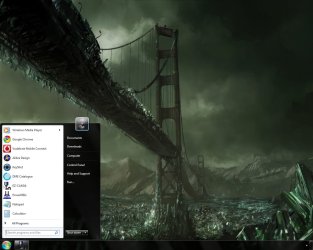
In the Start Menu there are on the top right two buttons: Documents and Downloads. I want to add two more: Applications and Work.

Any ideas?
 

My Computer My Computer

At a glance

Windows 7 x64 ProfessionalIntel Core i7-870 Lynnfield 2.93 GHzKingston Hyper X 1333MHz DDR3 4x4GbNvidia GTS 250
Computer type
PC/Desktop
Computer Manufacturer/Model Number
Own build
OS
Windows 7 x64 Professional
CPU
Intel Core i7-870 Lynnfield 2.93 GHz
Motherboard
Intel Whitesburg P55 LGA1156
Memory
Kingston Hyper X 1333MHz DDR3 4x4Gb
Graphics Card(s)
Nvidia GTS 250
Monitor(s) Displays
AOC Q3279VWF 31.5"
Screen Resolution
2560x1440
Hard Drives
Western Digital 1000GB Hard Drive (SATA 3.0Gb/s, 7200rpm, 32MB Cache)
Verbatim 500GB (External)
PSU
650W
Case
Coolermaster HAF 912
Cooling
Stock
Keyboard
Logitech
Mouse
Logitech
Antivirus
Avira
Browser
Firefox
Other Info
LG OptDrive 24x SATA DVDRW Lightscribe
Bump.

I would really like to get this sorted out.

Thanks
 

My Computer My Computer

At a glance

Windows 7 x64 ProfessionalIntel Core i7-870 Lynnfield 2.93 GHzKingston Hyper X 1333MHz DDR3 4x4GbNvidia GTS 250
Computer type
PC/Desktop
Computer Manufacturer/Model Number
Own build
OS
Windows 7 x64 Professional
CPU
Intel Core i7-870 Lynnfield 2.93 GHz
Motherboard
Intel Whitesburg P55 LGA1156
Memory
Kingston Hyper X 1333MHz DDR3 4x4Gb
Graphics Card(s)
Nvidia GTS 250
Monitor(s) Displays
AOC Q3279VWF 31.5"
Screen Resolution
2560x1440
Hard Drives
Western Digital 1000GB Hard Drive (SATA 3.0Gb/s, 7200rpm, 32MB Cache)
Verbatim 500GB (External)
PSU
650W
Case
Coolermaster HAF 912
Cooling
Stock
Keyboard
Logitech
Mouse
Logitech
Antivirus
Avira
Browser
Firefox
Other Info
LG OptDrive 24x SATA DVDRW Lightscribe
From Microsoft's web site.

You can add or remove items, such as Computer, Control Panel, and Pictures, that appear on the right side of the Start menu. You can also change some items so that they appear as links or menus.


  1. Open Taskbar and Start Menu Properties by clicking the Start button
    4f6cbd09-148c-4dd8-b1f2-48f232a2fd33.jpg
    , clicking Control Panel, clicking Appearance and Personalization, and then clicking Taskbar and Start Menu.
  2. Click the Start Menu tab, and then click Customize.
  3. In the Customize Start Menu dialog box, select the options in the list that you want, click OK, and then click OK again.
 
Last edited:

My Computer My Computer

At a glance

Windows 7 Pro/32 Academic. Build 7600Intel 2.3 Duo core4 GB DDRNvidia GeForce 9500 GT
Computer Manufacturer/Model Number
Custom Build
OS
Windows 7 Pro/32 Academic. Build 7600
CPU
Intel 2.3 Duo core
Motherboard
EliteGroup G31T-M
Memory
4 GB DDR
Graphics Card(s)
Nvidia GeForce 9500 GT
Sound Card
Built in
Monitor(s) Displays
Viewsonic 15" 4:3
Screen Resolution
1280 x 1024
Hard Drives
WD Caviar Black 750 GB
WD 250 GB External
PSU
Antec 450w
Keyboard
Standard windows
Mouse
Logitech USB
Internet Speed
Bellsouth DSL 6.0
On the right side, you cannot add any entries - just change the existing ones. But you can add folder shortcuts to the left side. Just make a shortcut of the subject folder on the desktop, drag it into the Win orb on the bottom left and drop it there.
 

My Computer My Computer

At a glance

Vista, Windows7, Mint Mate, Zorin, Windows 8from 1.6GHz Duo to i7
Computer Manufacturer/Model Number
HP, Dell, Gateway, Toshiba - 4 laptops and 2 desktops
OS
Vista, Windows7, Mint Mate, Zorin, Windows 8
CPU
from 1.6GHz Duo to i7
Monitor(s) Displays
2x HP w2207
Hard Drives
5x HDD, 7x SSD, 12x Externals
Keyboard
with trackball - no mices
Mouse
Trackball mice
Internet Speed
DSL 6000
If you prefer to have one click icons, for folders, directly on your taskbar:

Right-click
on the taskbar and then go to "Toolbars" -> and select "New toolbar" you can set up icons for your folders.

The detailed explanation: Windows Safety Tips, Hotkeys and Shorcuts
 

My Computer My Computer

At a glance

Windows 7 Home Premium 64bit
OS
Windows 7 Home Premium 64bit
On the right side, you cannot add any entries - just change the existing ones. But you can add folder shortcuts to the left side. Just make a shortcut of the subject folder on the desktop, drag it into the Win orb on the bottom left and drop it there.
That's not entirely true. You can't add anything you want willy nilly but Windows does offer several items you can add to the right hand side of the start menu.

Connect to
Downloads
Favorites
Home group
Network
Recorded TV
Recent items
Run command
System administrative tools
Videos
 

My Computer My Computer

At a glance

Windows 7 Pro/32 Academic. Build 7600Intel 2.3 Duo core4 GB DDRNvidia GeForce 9500 GT
Computer Manufacturer/Model Number
Custom Build
OS
Windows 7 Pro/32 Academic. Build 7600
CPU
Intel 2.3 Duo core
Motherboard
EliteGroup G31T-M
Memory
4 GB DDR
Graphics Card(s)
Nvidia GeForce 9500 GT
Sound Card
Built in
Monitor(s) Displays
Viewsonic 15" 4:3
Screen Resolution
1280 x 1024
Hard Drives
WD Caviar Black 750 GB
WD 250 GB External
PSU
Antec 450w
Keyboard
Standard windows
Mouse
Logitech USB
Internet Speed
Bellsouth DSL 6.0
On the right side, you cannot add any entries - just change the existing ones. But you can add folder shortcuts to the left side. Just make a shortcut of the subject folder on the desktop, drag it into the Win orb on the bottom left and drop it there.
That's not entirely true. You can't add anything you want willy nilly but Windows does offer several items you can add to the right hand side of the start menu.

Connect to
Downloads
Favorites
Home group
Network
Recorded TV
Recent items
Run command
System administrative tools
Videos
Yeah, but that is the standard menu.
 

My Computer My Computer

At a glance

Vista, Windows7, Mint Mate, Zorin, Windows 8from 1.6GHz Duo to i7
Computer Manufacturer/Model Number
HP, Dell, Gateway, Toshiba - 4 laptops and 2 desktops
OS
Vista, Windows7, Mint Mate, Zorin, Windows 8
CPU
from 1.6GHz Duo to i7
Monitor(s) Displays
2x HP w2207
Hard Drives
5x HDD, 7x SSD, 12x Externals
Keyboard
with trackball - no mices
Mouse
Trackball mice
Internet Speed
DSL 6000
I think what I want to do is just not possible

:(
 

My Computer My Computer

At a glance

Windows 7 x64 ProfessionalIntel Core i7-870 Lynnfield 2.93 GHzKingston Hyper X 1333MHz DDR3 4x4GbNvidia GTS 250
Computer type
PC/Desktop
Computer Manufacturer/Model Number
Own build
OS
Windows 7 x64 Professional
CPU
Intel Core i7-870 Lynnfield 2.93 GHz
Motherboard
Intel Whitesburg P55 LGA1156
Memory
Kingston Hyper X 1333MHz DDR3 4x4Gb
Graphics Card(s)
Nvidia GTS 250
Monitor(s) Displays
AOC Q3279VWF 31.5"
Screen Resolution
2560x1440
Hard Drives
Western Digital 1000GB Hard Drive (SATA 3.0Gb/s, 7200rpm, 32MB Cache)
Verbatim 500GB (External)
PSU
650W
Case
Coolermaster HAF 912
Cooling
Stock
Keyboard
Logitech
Mouse
Logitech
Antivirus
Avira
Browser
Firefox
Other Info
LG OptDrive 24x SATA DVDRW Lightscribe
Is there some reason you would prefer having them in the start menu; as opposed to, directly on the taskbar?

Since the taskbar is visible before the start menu is, this saves you time. Here is what I mean:

toolbarexample.png


The icons are set to large.

Also, you can make a hotkey for any folder by making a shorcut for it, and then right-click on that shorcut, go to "Properties" and under the "Shortcut" tab enter a ctrl+alt+x or ctrl+shift+x hotkey in the "Shortcut key" area.
 
Last edited:

My Computer My Computer

At a glance

Windows 7 Home Premium 64bit
OS
Windows 7 Home Premium 64bit
A few other points worth covering are:


  • I noticed that your Windows Explorer button (top icon next to the start button in my image below) is gone. Do you realize that right-clicking on that shows: all recently visited folders, and includes an area where you can pin any folder you want.
windowsexplorerprev.jpg


  • You could right-click the start-button and go to "Properties" then "Customize", where you will select "Favorites menu". You could then clear that out and put the folders you want in there; or you could right-click on "Favorites" in the start menu and click "Properties" and go to the "Location" tab where you can set the path to your desired folder. This might be the closest to what you want.

  • In that same menu you selected "Favorites Menu"-- I enable "Recent items", this is all of the files you have recently been to.
So with the Start-menu, 'Windows Explorer button' and "Recent items" you can view all of the programs, folders and files you have recently visited the most.

Long story short, custom toolbars are still the fastest way (by mouse) to open a folder or program in Windows 7.
 
Last edited:

My Computer My Computer

At a glance

Windows 7 Home Premium 64bit
OS
Windows 7 Home Premium 64bit
I don't disagree

but

I like a very uncluttered desktop. That means no desktop icons, nothing on the taskbar, etc. In fact I actually get rid of the task bar altogether so that just the Start button remains hence the original question.
 

My Computer My Computer

At a glance

Windows 7 x64 ProfessionalIntel Core i7-870 Lynnfield 2.93 GHzKingston Hyper X 1333MHz DDR3 4x4GbNvidia GTS 250
Computer type
PC/Desktop
Computer Manufacturer/Model Number
Own build
OS
Windows 7 x64 Professional
CPU
Intel Core i7-870 Lynnfield 2.93 GHz
Motherboard
Intel Whitesburg P55 LGA1156
Memory
Kingston Hyper X 1333MHz DDR3 4x4Gb
Graphics Card(s)
Nvidia GTS 250
Monitor(s) Displays
AOC Q3279VWF 31.5"
Screen Resolution
2560x1440
Hard Drives
Western Digital 1000GB Hard Drive (SATA 3.0Gb/s, 7200rpm, 32MB Cache)
Verbatim 500GB (External)
PSU
650W
Case
Coolermaster HAF 912
Cooling
Stock
Keyboard
Logitech
Mouse
Logitech
Antivirus
Avira
Browser
Firefox
Other Info
LG OptDrive 24x SATA DVDRW Lightscribe
I keep a clear desktop as well and use auto-hide; but 'getting rid' of the taskbar 'altogether' serves no point; and having a small icon (which you can make look anyway you wish) for two folders, is not cluttering anything. You have been given practical solutions that are more efficient than your request; if your conceptual model of an 'uncluttered' computer denies you from making use of beneficial features, then that is a self-limiting model. Good luck.
 

My Computer My Computer

At a glance

Windows 7 Home Premium 64bit
OS
Windows 7 Home Premium 64bit
I keep a clear desktop as well and use auto-hide; but 'getting rid' of the taskbar 'altogether' serves no point; and having a small icon (which you can make look anyway you wish) for two folders, is not cluttering anything. You have been given practical solutions that are more efficient than your request; if your conceptual model of an 'uncluttered' computer denies you from making use of beneficial features, then that is a self-limiting model. Good luck.

That's not in any way helpful. How I work and want my PC to look/function is my business and not for you judge. I come to this forum to seek assistance in achieving what I want. If you can't help then please don't.
 

My Computer My Computer

At a glance

Windows 7 x64 ProfessionalIntel Core i7-870 Lynnfield 2.93 GHzKingston Hyper X 1333MHz DDR3 4x4GbNvidia GTS 250
Computer type
PC/Desktop
Computer Manufacturer/Model Number
Own build
OS
Windows 7 x64 Professional
CPU
Intel Core i7-870 Lynnfield 2.93 GHz
Motherboard
Intel Whitesburg P55 LGA1156
Memory
Kingston Hyper X 1333MHz DDR3 4x4Gb
Graphics Card(s)
Nvidia GTS 250
Monitor(s) Displays
AOC Q3279VWF 31.5"
Screen Resolution
2560x1440
Hard Drives
Western Digital 1000GB Hard Drive (SATA 3.0Gb/s, 7200rpm, 32MB Cache)
Verbatim 500GB (External)
PSU
650W
Case
Coolermaster HAF 912
Cooling
Stock
Keyboard
Logitech
Mouse
Logitech
Antivirus
Avira
Browser
Firefox
Other Info
LG OptDrive 24x SATA DVDRW Lightscribe
I keep a clear desktop as well and use auto-hide; but 'getting rid' of the taskbar 'altogether' serves no point; and having a small icon (which you can make look anyway you wish) for two folders, is not cluttering anything. You have been given practical solutions that are more efficient than your request; if your conceptual model of an 'uncluttered' computer denies you from making use of beneficial features, then that is a self-limiting model. Good luck.

That's not in any way helpful. How I work and want my PC to look/function is my business and not for you judge. I come to this forum to seek assistance in achieving what I want. If you can't help then please don't.

My statement was not meant as an attack. "...if your conceptual model of an 'uncluttered' computer denies you from making use of beneficial features, then that is a self-limiting model." This is in fact a helpful statement if: I help you to modify your model, allowing you to make use of the possibilities you are unnecessarily limiting yourself from choosing.

However, I will admit, that internet forums may not be the right place to encourage psychological breakthroughs. :sick:

Furthermore, I also put time and effort into providing you with the closest options based on your desires. Subsequently telling me, "If you can't help then please don't." amounts to the reciprocation I have received from trying to help you.
 
Last edited:

My Computer My Computer

At a glance

Windows 7 Home Premium 64bit
OS
Windows 7 Home Premium 64bit
Back
Top