
JavaScript is disabled. For a better experience, please enable JavaScript in your browser before proceeding.
You are using an out of date browser. It may not display this or other websites correctly.
You should upgrade or use an
alternative browser .
Solved How to create visual style installer (.exe)?
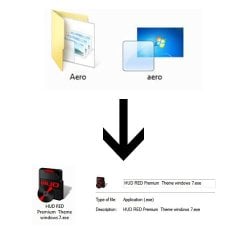
How to change the normal (.theme) & (.msstyles) in to .exe, like HUD theme by Mr.Grim? See picture below: -
Thank You
Jerry ☮ 1956-2019 R.I.P.
I'm not sure how it's done that all but have you thought about contacting Mr.Grim and asking him how it's done?
Jerry
Computer type Laptop Computer Manufacturer/Model Number Sager NP9170 OS Win 7 Pro x64 / Win 10 Pro CPU Intel(R) Core(TM) i7-3630QM CPU @ 2.40GHz Motherboard CLEVO P170EM Memory 12 GB Graphics Card(s) (1) Intel(R) HD Graphics 4000 (2) NVIDIA GeForce GTX 675M Sound Card (1) Realtek High Definition Audio (2) Intel(R) Display Aud Monitor(s) Displays 17.3 Screen Resolution 1920x1080 Hard Drives (1) Samsung 860 EVO 500GB(OS) (1) Samsung 860 EVO 500GB(Data) Keyboard Backlite Antivirus MSE, Malwarebytes Pro Browser Firefox Other Info DESKTOP: Custom-built.
OS: Win 10 Pro x64.
CASE: Rosewill R5.
CPU: Intel I5 4670K CPU @ 3.40GHz.
CPU COOLER: Cool Master Hyper 212 EVO.
MOTHERBOARD: Asus Z87-A.
MEMORY: Kingston HyperX 2x4 GB.
GPU: Nvidia Geforce 650 TI.
PSU: Corsair TX750.
DRIVES: (1) Samsung 840 120 GB SSD (2) Western Digital blue 500 GB 7200 RPM.
I'm not sure how it's done that all but have you thought about contacting Mr.Grim and asking him how it's done?
Jerry
As always, thank for the reply
, As you suggest, I managed to find the way from one theme designers who are using the same way as Mr. Grim on
Youtube ( He using Winrar) and also I found another very interesting way here by Using sofware call
Windows Skin Pack Installer by hameddanger. Now my problem solve
Again,thank for the suggestion
٩͡[๏̯͡๏]۶
You may see this..... it might be helpful for you.
VIDEO
Computer type PC/Desktop Computer Manufacturer/Model Number Self Assembled OS Microsoft Windows 10 Pro Insider Preview 64-bit CPU Intel(R) Core(TM) i3-4130 CPU @ 3.40GHz Motherboard Gigabyte Technology Co., Ltd. B85M-D3H Memory Corsair Vengence 4GB x2 (8.00GB Dual-Channel DDR3 @ 798MHz) Graphics Card(s) 2047MB GeForce GTS 450 (ZOTAC International) Sound Card Onboard (Realtek High Definition Audio) Monitor(s) Displays LG Flatron E2040T Screen Resolution 1600x900 Hard Drives Western Digital 1 TB
Seagate 500 GB PSU Corsair VS550 Case Cooler Master K380 Cooling Cooler Master Seidon 120V Plus Keyboard Logitech MK260r Mouse Logitech MK260r Internet Speed PMPL Broadband Antivirus Windows Defender + MBAM Browser Firefox Other Info Dell Studio 15" Laptop
Jerry ☮ 1956-2019 R.I.P.
Thank you for posting back I sure others will see this and fine it helpful.
Thank you 2 Archie
Jerry
Computer type Laptop Computer Manufacturer/Model Number Sager NP9170 OS Win 7 Pro x64 / Win 10 Pro CPU Intel(R) Core(TM) i7-3630QM CPU @ 2.40GHz Motherboard CLEVO P170EM Memory 12 GB Graphics Card(s) (1) Intel(R) HD Graphics 4000 (2) NVIDIA GeForce GTX 675M Sound Card (1) Realtek High Definition Audio (2) Intel(R) Display Aud Monitor(s) Displays 17.3 Screen Resolution 1920x1080 Hard Drives (1) Samsung 860 EVO 500GB(OS) (1) Samsung 860 EVO 500GB(Data) Keyboard Backlite Antivirus MSE, Malwarebytes Pro Browser Firefox Other Info DESKTOP: Custom-built.
OS: Win 10 Pro x64.
CASE: Rosewill R5.
CPU: Intel I5 4670K CPU @ 3.40GHz.
CPU COOLER: Cool Master Hyper 212 EVO.
MOTHERBOARD: Asus Z87-A.
MEMORY: Kingston HyperX 2x4 GB.
GPU: Nvidia Geforce 650 TI.
PSU: Corsair TX750.
DRIVES: (1) Samsung 840 120 GB SSD (2) Western Digital blue 500 GB 7200 RPM.
You may see this..... it might be helpful for you.
VIDEO
Many thanks