How can I apply a visual style, but keep the default taskbar?

dracho

New member
Local time
12:14 AM
Messages
5
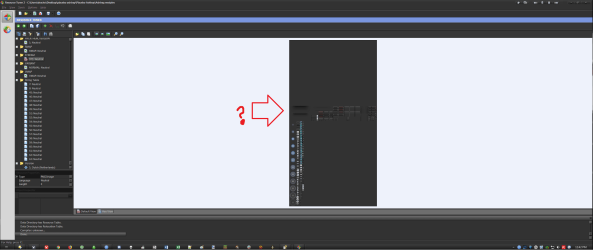
See attached screenshot - these are all the files contained in the download for Placebo Ashtray (found on deviantart). Can I delete or edit the files pertaining to the taskbar? Which ones? I cannot open the .msstyles file with any program I've tried so far.

Alternatively, I would keep the Ashtray taskbar if the icons were closer together. On default Windows installations, without tweaked themes, I run 7+ Taskbar Tweaker to remove extra space between icons, and the spacing that results is perfect. However, that feature does nothing when I have a visual style applied.

Thanks very much!

(P.S. for anyone wondering, I use Directory Opus, with my own custom toolbars, as my Windows Explorer replacement.)

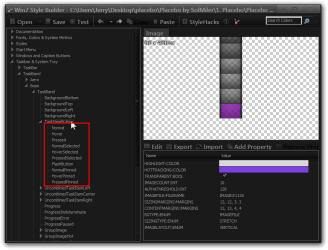
Edit: See second screenshot. I opened the .msstyle in Resource Tuner and I may have found a graphic that looks like the taskbar... possibly... ? I wonder if I could edit the graphic to make that smaller... or if the width is stored as a variable somewhere... :sick:
 

Attachments

  • placebo.png
    placebo.png
    50.5 KB · Views: 4
  • taskbar1.png
    taskbar1.png
    59.4 KB · Views: 4
Last edited:

My Computer My Computer

Computer type
PC/Desktop
Computer Manufacturer/Model Number
Custom
OS
Windows 7 Ultimate x64
CPU
i7 6700k
Motherboard
GA-X170-WS ECC
Memory
4GB DDR4
Graphics Card(s)
GTX 1060 6GB
Hard Drives
256 GB NVMe SSD
2x 5TB HDDs
Antivirus
Avira
Browser
Vivaldi
Welcome to the Seven Forums


The spacing on the tasbar buttons is hard coded.
The numbers for the taskbar and buttons are below(these numbers may or may not be the same in other custom themes.


bottom
926-1171-1173
top
927-1172-1174
left
928-1175-1177
right
929-1176-1178
button-1155-1156-1157-1158
vertical button-1165-1166-1167-1168
The buttons have up to 10 states(see screen shot).


Jerry
Win7 Style Builder - CUsersJerryDesktopplaceboPlacebo by SolMiler1. PlaceboPlacebo AshtrayAshtra.png
 

My Computer My Computer

Computer type
Laptop
Computer Manufacturer/Model Number
Sager NP9170
OS
Win 7 Pro x64 / Win 10 Pro
CPU
Intel(R) Core(TM) i7-3630QM CPU @ 2.40GHz
Motherboard
CLEVO P170EM
Memory
12 GB
Graphics Card(s)
(1) Intel(R) HD Graphics 4000 (2) NVIDIA GeForce GTX 675M
Sound Card
(1) Realtek High Definition Audio (2) Intel(R) Display Aud
Monitor(s) Displays
17.3
Screen Resolution
1920x1080
Hard Drives
(1) Samsung 860 EVO 500GB(OS) (1) Samsung 860 EVO 500GB(Data)
Keyboard
Backlite
Antivirus
MSE, Malwarebytes Pro
Browser
Firefox
Other Info
DESKTOP: Custom-built.
OS: Win 10 Pro x64.
CASE: Rosewill R5.
CPU: Intel I5 4670K CPU @ 3.40GHz.
CPU COOLER: Cool Master Hyper 212 EVO.
MOTHERBOARD: Asus Z87-A.
MEMORY: Kingston HyperX 2x4 GB.
GPU: Nvidia Geforce 650 TI.
PSU: Corsair TX750.
DRIVES: (1) Samsung 840 120 GB SSD (2) Western Digital blue 500 GB 7200 RPM.
Thanks so much, Jerry! :D

Unfortunately, I only have Resource Tuner 2, but I believe I'm on the right track... My next thought is to save those resources (1155 - 1158 and 1165-1168) as .PNG files, edit them to be physically thinner, cutting out the middle section, then... I guess I would Delete those resources in the style and then Add my edited resources back in...? I've never actually used the program.

It seems like if I could manage that, I wouldn't need to mess with the rest of the taskbar at all... (I do like it, I just wanted less wasted space horizontally.) Would you concur?

Thanks again, this is an amazing start. I've asked similar questions several times and no one has helped like you already have! Just out of curiosity, how did you find which numbers (resources?) to look for? Also, are you sure there aren't any you missed? (I guess I will find out once I test my editing and replacing theory!) :party:
 
Last edited:

My Computer My Computer

Computer type
PC/Desktop
Computer Manufacturer/Model Number
Custom
OS
Windows 7 Ultimate x64
CPU
i7 6700k
Motherboard
GA-X170-WS ECC
Memory
4GB DDR4
Graphics Card(s)
GTX 1060 6GB
Hard Drives
256 GB NVMe SSD
2x 5TB HDDs
Antivirus
Avira
Browser
Vivaldi
Just about any Resource editor will work to replace the images. I use windows style builder Ave's Windows7 Style Builder it makes editing the .msstyles very easy, and that's how I find the images numbers. That should be all the numbers for the taskbar and buttons unless you need the tray and clock.


This tutorial may help using a Resource editor Icons - Change Using Resource Hacker


Jerry
 

My Computer My Computer

Computer type
Laptop
Computer Manufacturer/Model Number
Sager NP9170
OS
Win 7 Pro x64 / Win 10 Pro
CPU
Intel(R) Core(TM) i7-3630QM CPU @ 2.40GHz
Motherboard
CLEVO P170EM
Memory
12 GB
Graphics Card(s)
(1) Intel(R) HD Graphics 4000 (2) NVIDIA GeForce GTX 675M
Sound Card
(1) Realtek High Definition Audio (2) Intel(R) Display Aud
Monitor(s) Displays
17.3
Screen Resolution
1920x1080
Hard Drives
(1) Samsung 860 EVO 500GB(OS) (1) Samsung 860 EVO 500GB(Data)
Keyboard
Backlite
Antivirus
MSE, Malwarebytes Pro
Browser
Firefox
Other Info
DESKTOP: Custom-built.
OS: Win 10 Pro x64.
CASE: Rosewill R5.
CPU: Intel I5 4670K CPU @ 3.40GHz.
CPU COOLER: Cool Master Hyper 212 EVO.
MOTHERBOARD: Asus Z87-A.
MEMORY: Kingston HyperX 2x4 GB.
GPU: Nvidia Geforce 650 TI.
PSU: Corsair TX750.
DRIVES: (1) Samsung 840 120 GB SSD (2) Western Digital blue 500 GB 7200 RPM.
Back
Top