How to Customize OEM Support Information in ( Windows 7) iso

maargueb

New member
Local time
10:02 AM
Messages
12
How to Customize OEM Support Information in ( Windows 7) ISO

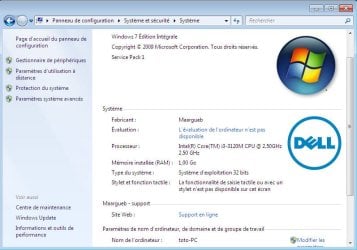
I want to make a logo for Windows like this picture

https://www.sevenforums.com/attachments/tutorials/41959d1486569873t-system-support-information-custom.jpg

I add. Logo to Windows inside the ISO file using the power iso program

sources\$OEM$\$$\System32\ OEM logos.

https://i.postimg.cc/Wzpm0zK3/1623684617231-44444444444444.jpg

After installing Windows, the logo is not placed inside Windows ????????
 

My Computer My Computer

At a glance

pc wind 7 pro 32 bit
Computer type
PC/Desktop
OS
pc wind 7 pro 32 bit
It needs some kind of script or manifest to go along to get imported, you cannot just add a picture there alone.

Or you could just mount the wim file and add it from there, then it will be copied even if it is only a picture. But then you would have to repeat it for each edition (index) one by one.
 
Last edited:

My Computer My Computer

At a glance

Microsoft® Windows 7 Professional 64-bitIntel(R) Pentium(R) Dual CPU T2310 @ 1.46GHz4,00 GB(1) Mobile Intel(R) 965 Express Chipset Famil...
Computer type
Laptop
Computer Manufacturer/Model Number
HP Compaq 6720s
OS
Microsoft® Windows 7 Professional 64-bit
CPU
Intel(R) Pentium(R) Dual CPU T2310 @ 1.46GHz
Motherboard
Hewlett-Packard 30D8
Memory
4,00 GB
Graphics Card(s)
(1) Mobile Intel(R) 965 Express Chipset Family (2) Mobile
Sound Card
(1) Bluetooth Hands-free Audio (2) Bluetooth Stereo Audio
Screen Resolution
1280 x 800 x 32 bits (4294967296 colors) @ 59 Hz
Hard Drives
(1) Hitachi HTS542516K9SA00 ATA Device (2) Multi Flash Reader USB Device
It needs some kind of script or manifest to go along to get imported, you cannot just add a picture there alone.

Or you could just mount the wim file and add it from there, then it will be copied even if it is only a picture. But then you would have to repeat it for each edition (index) one by one.

What is this script..?
knowing that I want to install a system w10 ltsc
 

My Computer My Computer

At a glance

pc wind 7 pro 32 bit
Computer type
PC/Desktop
OS
pc wind 7 pro 32 bit
Get an iso from DELL and see how they do it.
 

My Computers My Computers

  • At a glance

    7 X64i5 84002x8gb 3200mhz
    Computer type
    PC/Desktop
    OS
    7 X64
    CPU
    i5 8400
    Motherboard
    gigabyte b365m ds3h
    Memory
    2x8gb 3200mhz
    Hard Drives
    various
    PSU
    pure power 11 400w cm
    Case
    Coolermaster
    Cooling
    cryorig m9i
  • At a glance

    7x64g54008gb ddr4 2400
    Computer type
    PC/Desktop
    OS
    7x64
    CPU
    g5400
    Motherboard
    ga b365m ds3h
    Memory
    8gb ddr4 2400
    PSU
    xfx pro 450w
What part dont you understand?

1. download an iso file from one of the oems, e.g. Dell.

2. look inside that iso at their oem folder and see how they do it.

- - - Updated - - -

How to Customize OEM Support Information in ( Windows 7) ISO

knowing that I want to install a system w10 ltsc

What does that mean? For windows 7 installation media an unattend xml file is used.

I havent checked what they do in win10 iso files.

This is from dell win7 iso you can copy what dell have done.
View attachment OEM.zip


For example:

In the unattend.xml, change

<OEMInformation>
<Logo>%SystemRoot%\system32\oem\SystemLogo.bmp</Logo>
<Manufacturer>Dell</Manufacturer>
<SupportURL>http://support.dell.com</SupportURL>
</OEMInformation>

TO

<OEMInformation>
<Logo>%SystemRoot%\system32\oem\SystemLogo.bmp</Logo>
<Manufacturer>Maargueb</Manufacturer>
<SupportURL>http://support.Maargueb.com</SupportURL>
</OEMInformation>

If you have a logo you want to put in, then call it SystemLogo.bmp and put it in

OEM\$$\system32\OEM folder

If you have a wallpaper background picture you want to put in, then put it in

OEM\$$\web\wallpaper

and point at it by changing

<Themes>
<DesktopBackground>%SystemRoot%\web\wallpaper\Dell\Win7 LtBlue 1920x1200.jpg</DesktopBackground>
<ThemeName>Dell</ThemeName>
<WindowColor>FROST</WindowColor>
<BrandIcon>%SystemRoot%\system32\oem\ThemeLogo.png</BrandIcon>
<DefaultThemesOff>false</DefaultThemesOff>

TO

<Themes>
<DesktopBackground>%SystemRoot%\web\wallpaper\Maarguebspicture.jpg</DesktopBackground>
<ThemeName>Maargueb</ThemeName>
<WindowColor>FROST</WindowColor>
<BrandIcon>%SystemRoot%\system32\oem\ThemeLogo.png</BrandIcon>
<DefaultThemesOff>false</DefaultThemesOff>
</Themes>
</Themes>

and in OEM\$$\system32\OEM\ie.bat

change

:defaults
cscript %systemroot%\system32\oem\TextAppend.vbs /Append: /File:"%ProgramFiles%\Internet Exp...s(X86)%\Internet Explorer\Signup\install.ins"
 
Last edited:

My Computers My Computers

  • At a glance

    7 X64i5 84002x8gb 3200mhz
    Computer type
    PC/Desktop
    OS
    7 X64
    CPU
    i5 8400
    Motherboard
    gigabyte b365m ds3h
    Memory
    2x8gb 3200mhz
    Hard Drives
    various
    PSU
    pure power 11 400w cm
    Case
    Coolermaster
    Cooling
    cryorig m9i
  • At a glance

    7x64g54008gb ddr4 2400
    Computer type
    PC/Desktop
    OS
    7x64
    CPU
    g5400
    Motherboard
    ga b365m ds3h
    Memory
    8gb ddr4 2400
    PSU
    xfx pro 450w
File name: unattend.xml
<Themes>
<DesktopBackground>%SystemRoot%\web\wallpaper\Maarguebspicture.jpg</DesktopBackground>
<ThemeName>Maargueb</ThemeName>
<WindowColor>FROST</WindowColor>
<BrandIcon>%SystemRoot%\system32\oem\ThemeLogo.png</BrandIcon>
<DefaultThemesOff>false</DefaultThemesOff>
</Themes>
</Themes>

============
Is the method correct?

Source\$OEM$ \ $$\system32\OEM folder. ----
------>SystemLogo.bmp
unattend.xml


Source\$OEM$ \$$\web\wallpaper ---->wallpaper background.jpg
unattend.xml

Source\$OEM$ \$$\system32\OEM\ie.bat ---------->ie.bat
 

My Computer My Computer

At a glance

pc wind 7 pro 32 bit
Computer type
PC/Desktop
OS
pc wind 7 pro 32 bit
You should have :
\sources\$OEM$\$$\setup\scripts\oobe.cmd
\sources\$OEM$\$$\setup\scripts\unattend.xml

\sources\$OEM$\$$\system32\OEM\ie.bat
\sources\$OEM$\$$\system32\OEM\textappend.vbs
\sources\$OEM$\$$\system32\OEM\Systemlogo.bmp
\sources\$OEM$\$$\system32\OEM\ThemeLogo.png

\sources\$OEM$\$$\web\wallpaper\maargueb.jpg

Themelogo and systemlogo have to be the correct size - same size dell is using

oobe.cmd
Code:
@echo off

:CUSTOMIZATIONS
if not exist %systemroot%\panther mkdir %systemroot%\panther 
if not exist %systemroot%\panther\unattend.xml copy %systemroot%\setup\scripts\unattend.xml %systemroot%\panther\unattend.xml
call %systemroot%\system32\oem\ie.bat


:CLEANUP
del /F /Q %systemroot%\setup\scripts\oobe.cmd
 

My Computers My Computers

  • At a glance

    7 X64i5 84002x8gb 3200mhz
    Computer type
    PC/Desktop
    OS
    7 X64
    CPU
    i5 8400
    Motherboard
    gigabyte b365m ds3h
    Memory
    2x8gb 3200mhz
    Hard Drives
    various
    PSU
    pure power 11 400w cm
    Case
    Coolermaster
    Cooling
    cryorig m9i
  • At a glance

    7x64g54008gb ddr4 2400
    Computer type
    PC/Desktop
    OS
    7x64
    CPU
    g5400
    Motherboard
    ga b365m ds3h
    Memory
    8gb ddr4 2400
    PSU
    xfx pro 450w
thank you

The method worked for me

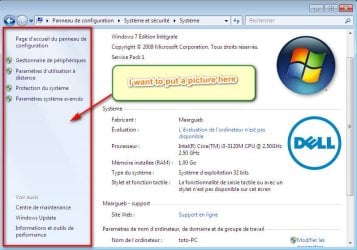
44444444.jpg
Question:

How do I put a picture?

55555.jpg

==================
Do you use this method for Windows 10
 

My Computer My Computer

At a glance

pc wind 7 pro 32 bit
Computer type
PC/Desktop
OS
pc wind 7 pro 32 bit
I dont know about win10.

I dont think you can put a picture where you indicated.
 
Last edited:

My Computers My Computers

  • At a glance

    7 X64i5 84002x8gb 3200mhz
    Computer type
    PC/Desktop
    OS
    7 X64
    CPU
    i5 8400
    Motherboard
    gigabyte b365m ds3h
    Memory
    2x8gb 3200mhz
    Hard Drives
    various
    PSU
    pure power 11 400w cm
    Case
    Coolermaster
    Cooling
    cryorig m9i
  • At a glance

    7x64g54008gb ddr4 2400
    Computer type
    PC/Desktop
    OS
    7x64
    CPU
    g5400
    Motherboard
    ga b365m ds3h
    Memory
    8gb ddr4 2400
    PSU
    xfx pro 450w
Thanks for your help,:-)
 

My Computer My Computer

At a glance

pc wind 7 pro 32 bit
Computer type
PC/Desktop
OS
pc wind 7 pro 32 bit
:-)
 

My Computers My Computers

  • At a glance

    7 X64i5 84002x8gb 3200mhz
    Computer type
    PC/Desktop
    OS
    7 X64
    CPU
    i5 8400
    Motherboard
    gigabyte b365m ds3h
    Memory
    2x8gb 3200mhz
    Hard Drives
    various
    PSU
    pure power 11 400w cm
    Case
    Coolermaster
    Cooling
    cryorig m9i
  • At a glance

    7x64g54008gb ddr4 2400
    Computer type
    PC/Desktop
    OS
    7x64
    CPU
    g5400
    Motherboard
    ga b365m ds3h
    Memory
    8gb ddr4 2400
    PSU
    xfx pro 450w
Back
Top