Hi Guys,
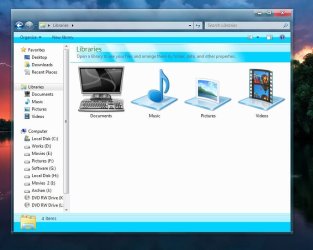
I wanted to customized the icons on my folders but it is not as easy as I thought it would be, I'll explain. For example, Documents, My Music, My Videos & My Pictures are all Windows default folders so they're difficult to modified! When I right click on one of these folders, under the "Customize Tab", there is none option to change the Icons but I know it can be done.
The new folders i created myself like for example, my games, well all I did is right click on the folder itself and click Properties. After that, I click on the "Customize Tab", I chose "Change Icon" and I browse for my new icon that I want to add instead of the old one.
Now, my question is, do you have an idea on how to customized the Icons on these Folders ?
Thanks in advance,
Yannik A
I wanted to customized the icons on my folders but it is not as easy as I thought it would be, I'll explain. For example, Documents, My Music, My Videos & My Pictures are all Windows default folders so they're difficult to modified! When I right click on one of these folders, under the "Customize Tab", there is none option to change the Icons but I know it can be done.
The new folders i created myself like for example, my games, well all I did is right click on the folder itself and click Properties. After that, I click on the "Customize Tab", I chose "Change Icon" and I browse for my new icon that I want to add instead of the old one.
Now, my question is, do you have an idea on how to customized the Icons on these Folders ?
Thanks in advance,
Yannik A
My Computer
At a glance
Windows 7 Home Premium 64bit.Intel Core i7 CPU6.00 GB RAMATI Radeon HD 5700 Series
- OS
- Windows 7 Home Premium 64bit.
- CPU
- Intel Core i7 CPU
- Motherboard
- Gigabyte X58A-UD3R
- Memory
- 6.00 GB RAM
- Graphics Card(s)
- ATI Radeon HD 5700 Series
- Sound Card
- Creative Sb-X-Fi
- Monitor(s) Displays
- Acer 24 inch
- Screen Resolution
- 1400 X 1050
- Hard Drives
- 1 Tb
- Case
- NZXT Mid Tower
- Mouse
- Kensington Expert Mouse
- Internet Speed
- Cable