Solved How to cut the lines of a pdf file

Franky

New member
Member
VIP
Local time
11:25 PM
Messages
472
Location
Kurdistan
Hi to all,

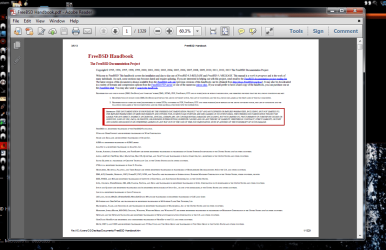
I have a PDF file (FreeBSD Handbook). I want to print it in paper (A4 size) and read it because reading it from screen hurts my eyes. My problem is that the lines are very tiny and long. If I print the pages in A4 size the lines/words will not be readable. If you look at the picture below you find out my problem. The solution in my mind is to somehow cut the lines and then print the lines in a bigger size. This way, the context will fit into the size of A4 paper and also readable. Is anyone aware of a tool or way to do that solution?

Thanks.
 

Attachments
  • Capture.PNG
    Capture.PNG
    94.6 KB · Views: 9

My Computer My Computer

At a glance

windows 7 32-bitIntel(R) Core(TM) i3-2120 CPU @ 3.30GHz4.00 GBNVIDIA GeForce GTS 450
Computer type
PC/Desktop
OS
windows 7 32-bit
CPU
Intel(R) Core(TM) i3-2120 CPU @ 3.30GHz
Motherboard
Gigabyte Technology Co., Ltd. P61A-D3
Memory
4.00 GB
Graphics Card(s)
NVIDIA GeForce GTS 450
Sound Card
(1) NVIDIA High Definition Audio (2) NVIDIA Virtual Audio
Monitor(s) Displays
Samsung
Hard Drives
ST500DM002-1BC142 ATA Device
Internet Speed
1 Mbps
Antivirus
KIS 2013
Browser
chrome
You might try PDF Xchange Editor. It's free. Only thing is the online help seems a bit broken.
 

My Computer My Computer

At a glance

Windows 7 32 bitAMD 5200+ dual core2 GBNVidia GeForce 6150SE 128 MB
Computer Manufacturer/Model Number
HP Media Center
OS
Windows 7 32 bit
CPU
AMD 5200+ dual core
Memory
2 GB
Graphics Card(s)
NVidia GeForce 6150SE 128 MB
Monitor(s) Displays
CRT
Screen Resolution
1280x1024
Hard Drives
500 GB Sata internal :

SIIG USB 3.0 docking stations w/WD Caviar Black 6 Gb/s drives
Keyboard
PS/2
Mouse
PS/2 Wheel Mouse
Other Info
SIIG USB 3.0 PCIexpress card.
For quick and dirty do a screen snip and then look at the JPEG in any photo viewer. Very easy to enlarge on the screen for reading
Art.
 

My Computer My Computer

At a glance

Win7 sp1 Pro 64bit / XP sp2 Pro (games only)Intel Core 2 Duo E8400 @ 3.00GHz8.00 GB Dual-Channel DDR2 @ 400MHz (5-5-5-18)1024MB GeForce GTX 560
Computer type
PC/Desktop
Computer Manufacturer/Model Number
Home built
OS
Win7 sp1 Pro 64bit / XP sp2 Pro (games only)
CPU
Intel Core 2 Duo E8400 @ 3.00GHz
Motherboard
Intel Corporation DP35DP (CPU1)
Memory
8.00 GB Dual-Channel DDR2 @ 400MHz (5-5-5-18)
Graphics Card(s)
1024MB GeForce GTX 560
Sound Card
NVIDIA High Definition Audio
Monitor(s) Displays
SyncMaster (2048x1152@60Hz)
Hard Drives
240GB Sandisc Extreme Pro SSD
244GB Seagate ST3250410AS
488GB Seagate ST500DM002-1BD142
931GB Western Digital WDC WD1003FZEX
PSU
Corsair 720
Case
ATX
Keyboard
HID Keyboard Device Logitech
Mouse
HID-compliant mouse Microsoft
Other Info
TSSTcorp CDDVDW SH-S223L

HL-DT-ST BD-RE BH12LS35
Convert to Word document or text file.

If you use a PDF Reader that can convert/ export to .doc/ .docx or .txt formats then you can edit the resulting document and make the text any size you like!
 

My Computer My Computer

At a glance

Microsoft Windows 7 Home Premium 64-bit 7601 ...AMD C-60 APU with Radeon(tm) HD Graphics4.00 GBAMD Radeon HD 6290 Graphics
Computer type
Laptop
Computer Manufacturer/Model Number
ASUS
OS
Microsoft Windows 7 Home Premium 64-bit 7601 Multiprocessor Free Service Pack 1
CPU
AMD C-60 APU with Radeon(tm) HD Graphics
Motherboard
ASUSTeK COMPUTER INC. X501U
Memory
4.00 GB
Graphics Card(s)
AMD Radeon HD 6290 Graphics
Sound Card
(1) AMD High Definition Audio Device (2) Realtek High Defi
Screen Resolution
1366 x 768 x 32 bits (4294967296 colors) @ 60 Hz
Hard Drives
Hitachi HTS545050A7E380 SATA Disk Device
Antivirus
Comodo CIS & FW, SecureAplus App Whitelisting, Threatfire
Browser
Cyberfox 64bit, Opera 64bit, Airfox
Other Info
Spy-The-Spy, HitmanPro.Alert, Norton Connect Safe, MJRegWatcher, BitDefender TrafficLight, Voodoo Shield, Zemana AntiMalware
While viewing the PDF file, can't you use the View tab then zoom to increase the font size?
 

My Computer My Computer

At a glance

Windows 10 Pro X64Intel Quad Core i7-4770 @ 3.4Ghz16.0GB PC3-12800 DDR3 SDRAM 1600 MHzIntel Integrated HD Graphics
Computer type
PC/Desktop
Computer Manufacturer/Model Number
Lenovo IdeaCenter 450
OS
Windows 10 Pro X64
CPU
Intel Quad Core i7-4770 @ 3.4Ghz
Memory
16.0GB PC3-12800 DDR3 SDRAM 1600 MHz
Graphics Card(s)
Intel Integrated HD Graphics
Sound Card
Realtek HD Audio
Monitor(s) Displays
HP 22" LCD
Screen Resolution
1680 x 1050
Hard Drives
250GB Samsung EVO SATA-3 SSD
2TB Seagate ST2000DM001 SATA-2
1.5TB Seagate ST3150041AS SATA
Keyboard
Dell USB
Mouse
Lenovo USB
Internet Speed
Cable via Road Runner 3MB Upload, 30MB Download
Antivirus
Windows Defender, MBAM Pro, MBAE
Browser
Seamonkey
Other Info
UEFI/GPT
PLDS DVD-RW DH16AERSH
Check out some of the alternatives to Adobe reader. I use Nitro PDF Reader - wait for the download action bar and click save (click anywhere on the window to dismiss the newsletter dialog).

But if you stick with Adobe, see: Adobe Reader XI - features

Read the way you like
Choose reading mode to fit more content on the screen or two-up mode to view page spreads. Use familiar keyboard shortcuts like print, zoom, and find within the browser.

Convert PDFs to Microsoft Word or Excel
Avoid retyping. Use the Adobe ExportPDF online service to turn your PDF files into editable Word or Excel files with fonts, tables, and formatting preserved.
 

My Computer My Computer

At a glance

x64 (6.3.9600) Win8.1 Pro & soon dual boot x6...AMD A6-3420M APU with Radeon(tm) HD Graphics6.00 GBAMD Radeon(TM) HD 6520G
Computer type
Laptop
Computer Manufacturer/Model Number
HP Pavilion dv6-6c10us
OS
x64 (6.3.9600) Win8.1 Pro & soon dual boot x64 (6.1.7601) Win7_SP1 HomePrem
CPU
AMD A6-3420M APU with Radeon(tm) HD Graphics
Motherboard
Hewlett-Packard 1805
Memory
6.00 GB
Graphics Card(s)
AMD Radeon(TM) HD 6520G
Sound Card
(1) AMD High Definition Audio Device (2) IDT High Definiti
Monitor(s) Displays
HP W2072a 20" LCD (1600 x 900) @ 60 Hz
Screen Resolution
1366 x 768 x 32 bits (4294967296 colors) @ 60 Hz
Hard Drives
ST640LM0 00 HM641JI SATA Disk Device
Keyboard
Logitech k520 wireless KB
Mouse
Logitech m320 wireless mouse (bundled with KB)
Internet Speed
15/5 | 54 MB Wireless 'n'
Antivirus
Realtime: Defender or Avast | On-demand: Malwarebytes, ESET
Browser
IE 11 on Win8, IE 10 on win 7
Other Info
Media: [Gimp, Audacity, VLC] || Comm: [WEmail 2012, Skype] || Productivity: [OpenOffice,| Textpad] || Utils: [Sysinternals, cCleaner, Speccy, Defraggler]
I think one solution is to first convert the pdf to Word and modify it into the Word then convert the modified to pdf and finally print at A4 size.
I installed the "PDF Xchange Editor" but apparently it doesn't have an option to convert to Word.
Please notice that my purpose is to print the book in A4 size in readable mode.
My reader is abode reader XI and it has a way to convert, "save as other" option, but it wants me to sign up and when I click on that, it takes me into that address (http://www.adobe.com/go/ipmreaderepdf3_11_0_6) which will not be opened ("This webpage is not available").
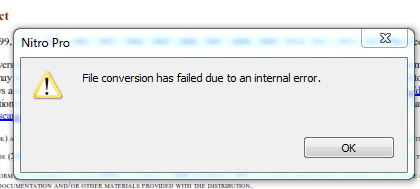
At the end I arrived to " Nitro PDF Reader". I clicked on convert button (to Word) and it started to converting but the below image was the outcome!:(
I added that pdf to my "iBook" in my iPhone. It exactly has did what I'm saying. It cut the lines to fit into the size of the screen without any difference (except that) with the original one.
 

Attachments

  • 1.PNG
    1.PNG
    8.6 KB · Views: 31
Last edited:

My Computer My Computer

At a glance

windows 7 32-bitIntel(R) Core(TM) i3-2120 CPU @ 3.30GHz4.00 GBNVIDIA GeForce GTS 450
Computer type
PC/Desktop
OS
windows 7 32-bit
CPU
Intel(R) Core(TM) i3-2120 CPU @ 3.30GHz
Motherboard
Gigabyte Technology Co., Ltd. P61A-D3
Memory
4.00 GB
Graphics Card(s)
NVIDIA GeForce GTS 450
Sound Card
(1) NVIDIA High Definition Audio (2) NVIDIA Virtual Audio
Monitor(s) Displays
Samsung
Hard Drives
ST500DM002-1BC142 ATA Device
Internet Speed
1 Mbps
Antivirus
KIS 2013
Browser
chrome
Most of the free converters do it with a printer driver. You can find Word printer drivers that print other formats to a Word file. Just the same way Bullzip printer driver prints other formats to a PDF file. Just search the freeware download sites.
 

My Computer My Computer

At a glance

Windows 7 32 bitAMD 5200+ dual core2 GBNVidia GeForce 6150SE 128 MB
Computer Manufacturer/Model Number
HP Media Center
OS
Windows 7 32 bit
CPU
AMD 5200+ dual core
Memory
2 GB
Graphics Card(s)
NVidia GeForce 6150SE 128 MB
Monitor(s) Displays
CRT
Screen Resolution
1280x1024
Hard Drives
500 GB Sata internal :

SIIG USB 3.0 docking stations w/WD Caviar Black 6 Gb/s drives
Keyboard
PS/2
Mouse
PS/2 Wheel Mouse
Other Info
SIIG USB 3.0 PCIexpress card.
Thank you MilesAhead. I searched for another type of the book and fortunately found a good one just like I would want. I printed it and now everything is OK. That last file contains about 1900 pages while the first one is 1300 and that's why because the last is modified and it's lines are broken.
Thanks for your responses.
 

My Computer My Computer

At a glance

windows 7 32-bitIntel(R) Core(TM) i3-2120 CPU @ 3.30GHz4.00 GBNVIDIA GeForce GTS 450
Computer type
PC/Desktop
OS
windows 7 32-bit
CPU
Intel(R) Core(TM) i3-2120 CPU @ 3.30GHz
Motherboard
Gigabyte Technology Co., Ltd. P61A-D3
Memory
4.00 GB
Graphics Card(s)
NVIDIA GeForce GTS 450
Sound Card
(1) NVIDIA High Definition Audio (2) NVIDIA Virtual Audio
Monitor(s) Displays
Samsung
Hard Drives
ST500DM002-1BC142 ATA Device
Internet Speed
1 Mbps
Antivirus
KIS 2013
Browser
chrome
Glad you resolved it. :)
 

My Computer My Computer

At a glance

Windows 7 32 bitAMD 5200+ dual core2 GBNVidia GeForce 6150SE 128 MB
Computer Manufacturer/Model Number
HP Media Center
OS
Windows 7 32 bit
CPU
AMD 5200+ dual core
Memory
2 GB
Graphics Card(s)
NVidia GeForce 6150SE 128 MB
Monitor(s) Displays
CRT
Screen Resolution
1280x1024
Hard Drives
500 GB Sata internal :

SIIG USB 3.0 docking stations w/WD Caviar Black 6 Gb/s drives
Keyboard
PS/2
Mouse
PS/2 Wheel Mouse
Other Info
SIIG USB 3.0 PCIexpress card.
Great news Kurdman,

The link I posted for Nitro was for the free reader, I'm guessing that you opted to use the full Nitro PDF application (noted Pro in your post). I understand why, it just wasn't what I recommended.

I hope that you elected the trial of Nitro PDF Pro when you downloaded it and did not purchase it. I rarely, if ever, recommend that a member purchase an application when there is a viable free version.

I could not find specific information on the Nitro trail, other than it being a 14 day trial. I don't know the mechanism Nitro uses at the end of the trail, but you should opt out of the trial before 14 days to avoid a charge.

Thanks Miles, I think your "free app" / "printer driver" post was more to the point. Most importantly, that was what helped Kurman resolve the thread.

Bill
.
 

My Computer My Computer

At a glance

x64 (6.3.9600) Win8.1 Pro & soon dual boot x6...AMD A6-3420M APU with Radeon(tm) HD Graphics6.00 GBAMD Radeon(TM) HD 6520G
Computer type
Laptop
Computer Manufacturer/Model Number
HP Pavilion dv6-6c10us
OS
x64 (6.3.9600) Win8.1 Pro & soon dual boot x64 (6.1.7601) Win7_SP1 HomePrem
CPU
AMD A6-3420M APU with Radeon(tm) HD Graphics
Motherboard
Hewlett-Packard 1805
Memory
6.00 GB
Graphics Card(s)
AMD Radeon(TM) HD 6520G
Sound Card
(1) AMD High Definition Audio Device (2) IDT High Definiti
Monitor(s) Displays
HP W2072a 20" LCD (1600 x 900) @ 60 Hz
Screen Resolution
1366 x 768 x 32 bits (4294967296 colors) @ 60 Hz
Hard Drives
ST640LM0 00 HM641JI SATA Disk Device
Keyboard
Logitech k520 wireless KB
Mouse
Logitech m320 wireless mouse (bundled with KB)
Internet Speed
15/5 | 54 MB Wireless 'n'
Antivirus
Realtime: Defender or Avast | On-demand: Malwarebytes, ESET
Browser
IE 11 on Win8, IE 10 on win 7
Other Info
Media: [Gimp, Audacity, VLC] || Comm: [WEmail 2012, Skype] || Productivity: [OpenOffice,| Textpad] || Utils: [Sysinternals, cCleaner, Speccy, Defraggler]
Thanks Miles, I think your "free app" / "printer driver" post was more to the point. Most importantly, that was what helped Kurman resolve the thread.

Bill
.

Thanks for the kind words.
b0228.gif
 

My Computer My Computer

At a glance

Windows 7 32 bitAMD 5200+ dual core2 GBNVidia GeForce 6150SE 128 MB
Computer Manufacturer/Model Number
HP Media Center
OS
Windows 7 32 bit
CPU
AMD 5200+ dual core
Memory
2 GB
Graphics Card(s)
NVidia GeForce 6150SE 128 MB
Monitor(s) Displays
CRT
Screen Resolution
1280x1024
Hard Drives
500 GB Sata internal :

SIIG USB 3.0 docking stations w/WD Caviar Black 6 Gb/s drives
Keyboard
PS/2
Mouse
PS/2 Wheel Mouse
Other Info
SIIG USB 3.0 PCIexpress card.
that was what helped Kurman resolve the thread..
I only searched on freebsd website and found the desired pdf book. But I completely appreciate the responses of all you had for helping me.
 
Last edited:

My Computer My Computer

At a glance

windows 7 32-bitIntel(R) Core(TM) i3-2120 CPU @ 3.30GHz4.00 GBNVIDIA GeForce GTS 450
Computer type
PC/Desktop
OS
windows 7 32-bit
CPU
Intel(R) Core(TM) i3-2120 CPU @ 3.30GHz
Motherboard
Gigabyte Technology Co., Ltd. P61A-D3
Memory
4.00 GB
Graphics Card(s)
NVIDIA GeForce GTS 450
Sound Card
(1) NVIDIA High Definition Audio (2) NVIDIA Virtual Audio
Monitor(s) Displays
Samsung
Hard Drives
ST500DM002-1BC142 ATA Device
Internet Speed
1 Mbps
Antivirus
KIS 2013
Browser
chrome
that was what helped Kurman resolve the thread..
I only searched on freebsd website and found the desired pdf book. But I completely appreciate the responses all of you had for helping me.

There you go Bill. The system stopped you from Repping me or a reason. Damned AI. :devil:
 

My Computer My Computer

At a glance

Windows 7 32 bitAMD 5200+ dual core2 GBNVidia GeForce 6150SE 128 MB
Computer Manufacturer/Model Number
HP Media Center
OS
Windows 7 32 bit
CPU
AMD 5200+ dual core
Memory
2 GB
Graphics Card(s)
NVidia GeForce 6150SE 128 MB
Monitor(s) Displays
CRT
Screen Resolution
1280x1024
Hard Drives
500 GB Sata internal :

SIIG USB 3.0 docking stations w/WD Caviar Black 6 Gb/s drives
Keyboard
PS/2
Mouse
PS/2 Wheel Mouse
Other Info
SIIG USB 3.0 PCIexpress card.
There you go Bill. The system stopped you from Repping me for a reason. Damned AI. :devil:

Miles: These things are getting way too smart! Now if only there were a way to get machines to work in a logical manner.

Take my bank for instance, it processes payments before transfers... that always makes the account short of funds and the bank automatically transfers money to cover it (for an overdraft protection fee, of course). When my transfer to cover the payment is processed next, I have excess funds in the account (always good to have excess funds). I have to call the bank, request that the fee be waived and the excess funds be returned to the other account. Sheesh!

It is logical of course, if the bank wants to generate revenue through fees, but I think it's almost criminal.

It might be standard accounting practices to process payments first, I forget.

Anyway.... I still appreciate your clarity.


Kurdman: there always are more than one way to solve an issue. I'm glad you found one that satisfies your requirements. If in the future you need to convert a different document, you have a good basis in Miles' suggestions to process that document. There are some good PDF readers out there that do more than Adobe reader (plus they all seem to be light weight - less than Adobe).

I was helping on a different thread (unrelated to PDfs actually) where members offered what they used - I'll see if I can locate that thread, it had a good list of PDF readers with some explanation of the features and functionality.

Other than that, if you're satisfied with the solution you found, please mark the thread as solved - thanks.

Bill
.
 

My Computer My Computer

At a glance

x64 (6.3.9600) Win8.1 Pro & soon dual boot x6...AMD A6-3420M APU with Radeon(tm) HD Graphics6.00 GBAMD Radeon(TM) HD 6520G
Computer type
Laptop
Computer Manufacturer/Model Number
HP Pavilion dv6-6c10us
OS
x64 (6.3.9600) Win8.1 Pro & soon dual boot x64 (6.1.7601) Win7_SP1 HomePrem
CPU
AMD A6-3420M APU with Radeon(tm) HD Graphics
Motherboard
Hewlett-Packard 1805
Memory
6.00 GB
Graphics Card(s)
AMD Radeon(TM) HD 6520G
Sound Card
(1) AMD High Definition Audio Device (2) IDT High Definiti
Monitor(s) Displays
HP W2072a 20" LCD (1600 x 900) @ 60 Hz
Screen Resolution
1366 x 768 x 32 bits (4294967296 colors) @ 60 Hz
Hard Drives
ST640LM0 00 HM641JI SATA Disk Device
Keyboard
Logitech k520 wireless KB
Mouse
Logitech m320 wireless mouse (bundled with KB)
Internet Speed
15/5 | 54 MB Wireless 'n'
Antivirus
Realtime: Defender or Avast | On-demand: Malwarebytes, ESET
Browser
IE 11 on Win8, IE 10 on win 7
Other Info
Media: [Gimp, Audacity, VLC] || Comm: [WEmail 2012, Skype] || Productivity: [OpenOffice,| Textpad] || Utils: [Sysinternals, cCleaner, Speccy, Defraggler]
Take my bank for instance, it processes payments before transfers
Yeah. I remember being quite peeved how they work that angle. Now with all the electronic money what I want to know is, why is it a "business day" when I buy something(the amount is pulled from my account instantly) but it's not a "business day" when I deposit some money? (Nothing is ever added to my account on the weekend.) For example if I transfer some money to my ATM card today, I won't be able to access it until Monday.

Edit: I think this phenomenon is called "float." The buoyancy somehow always works in the bank's favor. :)
 

My Computer My Computer

At a glance

Windows 7 32 bitAMD 5200+ dual core2 GBNVidia GeForce 6150SE 128 MB
Computer Manufacturer/Model Number
HP Media Center
OS
Windows 7 32 bit
CPU
AMD 5200+ dual core
Memory
2 GB
Graphics Card(s)
NVidia GeForce 6150SE 128 MB
Monitor(s) Displays
CRT
Screen Resolution
1280x1024
Hard Drives
500 GB Sata internal :

SIIG USB 3.0 docking stations w/WD Caviar Black 6 Gb/s drives
Keyboard
PS/2
Mouse
PS/2 Wheel Mouse
Other Info
SIIG USB 3.0 PCIexpress card.
Back
Top