How to deal with System 5 Error?

MalcolmW

New member
Member
VIP
Local time
11:48 PM
Messages
37
Location
Mid-Cheshire UK

Attachments

  • system error 5.jpg
    system error 5.jpg
    18.9 KB · Views: 452

My Computer My Computer

At a glance

Windows 7 Home Premium SP1
Computer type
PC/Desktop
Computer Manufacturer/Model Number
Medion Akoya P5204 D (MD7659)pl
OS
Windows 7 Home Premium SP1
Monitor(s) Displays
Asus
Cooling
As fitted
Keyboard
Medion GB KB-0837
Mouse
MSU0718T
Internet Speed
24Mbps
Antivirus
F-Prot 6 for Windows
Browser
Firefox 21; IE10

My Computer My Computer

At a glance

Systems 1 and 2: Windows 7 Enterprise x64, Wi...System 1: i7 [email protected], System 2: AMD FX-41...System 1: 8GB System 2: 8GBSystem 1: ATI FirePro V4800 System 2: Radeon ...
Computer Manufacturer/Model Number
Dell and Custom
OS
Systems 1 and 2: Windows 7 Enterprise x64, Win 8 Developer
CPU
System 1: i7 [email protected], System 2: AMD FX-4100 Zambezi 3.6G
Motherboard
System 1:Dell 06NWYK System 2: ASUS M5A97 AM3+
Memory
System 1: 8GB System 2: 8GB
Graphics Card(s)
System 1: ATI FirePro V4800 System 2: Radeon HD 6850
Sound Card
System 1: onboard System 2: onboard
Monitor(s) Displays
System1: Viewsonic HDMI 24"
Screen Resolution
System 1: 1920x1080 System 2: 1920x1080
Hard Drives
System 1: Mirrored .5B drives System 2: Seagate Barracuda ST1000DM003 1TB 7200 RPM 64MB Cache SATA 6.0Gb/s
Case
System 1: Dell System 2: Cooler Master
Internet Speed
10 MBPS

Thank you for your response.

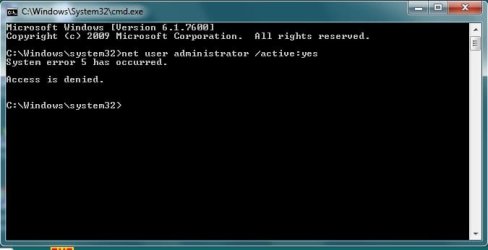
The screen shot with my OP is of an elevated command prompt. To the best of my knowledge opening a non elevated command prompt will return: C:\Users\[name] as the prompt.

Whereas opening an elevated command prompt will return:
C:\Windows\system32 as the prompt. This is as shown in my screen shot.

So I can confirm that the system 5 error occurs from an elevated command prompt. I would be glad of any guidance as to how I can deal with this error.

Malcolm Walker
 

My Computer My Computer

At a glance

Windows 7 Home Premium SP1
Computer type
PC/Desktop
Computer Manufacturer/Model Number
Medion Akoya P5204 D (MD7659)pl
OS
Windows 7 Home Premium SP1
Monitor(s) Displays
Asus
Cooling
As fitted
Keyboard
Medion GB KB-0837
Mouse
MSU0718T
Internet Speed
24Mbps
Antivirus
F-Prot 6 for Windows
Browser
Firefox 21; IE10

My Computer My Computer

At a glance

Windows 7 Ultimate x64 SP1Intel Core i3 530 2.93 Ghz Clarkdale4 GB OCZ DDR3 1600 (PC12800) Low Voltage Desk...Nvidia GeForce GTX 550 Ti with 1 GB of RAM
OS
Windows 7 Ultimate x64 SP1
CPU
Intel Core i3 530 2.93 Ghz Clarkdale
Motherboard
ASRock P55 PRO/USB3 LGA 1156
Memory
4 GB OCZ DDR3 1600 (PC12800) Low Voltage Desktop Memory
Graphics Card(s)
Nvidia GeForce GTX 550 Ti with 1 GB of RAM
Sound Card
Realtek HD ALC892
Monitor(s) Displays
20'' eMachines E202HDbmd Glare Panel Widescreen
Screen Resolution
1600 x 900
Hard Drives
Western Digital 1 TB Caviar Black Edition (7200 RPM) SATA
Hitachi Deskstar 500 GB (7200 RPM) SATA
Samsung SpinPoint 400 GB (7200 RPM) SATA
PSU
Rosewill Xtreme Series RX750-D-B ATX12V v2.2 & EPS12V (750W)
Case
Cooler Master Centurion 534 RC-534-KKN2-GP Mid-Tower
Cooling
Standard Case Fans and Stock CPU Heatsink
Keyboard
Microsoft Wireless Optical Desktop Elite
Mouse
Microsoft Wireless Optical Desktop Elite
Internet Speed
7.1 Mbps Verizon DSL
If you are running an elevated command prompt, the title (top of window border) will say Administrator:Command Prompt
 

My Computer My Computer

At a glance

Windows 10 Pro x64, Windows 8.1 Pro x64, Wind...INTEL i9-7920X LGA 206664 GB (4 X 16 GB) G-Skill V Series DDR4 3200 ...EVGA GTX 1060 SC 3 GB
Computer type
PC/Desktop
Computer Manufacturer/Model Number
Custom Built
OS
Windows 10 Pro x64, Windows 8.1 Pro x64, Windows 7 Ultimate x64 SP1,
CPU
INTEL i9-7920X LGA 2066
Motherboard
Gigabyte X299-WU8 F3
Memory
64 GB (4 X 16 GB) G-Skill V Series DDR4 3200 Quad Channel
Graphics Card(s)
EVGA GTX 1060 SC 3 GB
Sound Card
Realtek Onboard ALC1220
Monitor(s) Displays
2 x Samsung S27E310
Screen Resolution
1920x1080
Hard Drives
Samsung 2 x 970 EVO Plus 500 GB NVMe
1 x 6TB WD 6003FZBX SATA
1 x 6TB WD 60EFRX SATA
12 x 3TB WD 30EFRX SATA
PSU
Seasonic X-1050
Case
Thermaltake Armor+
Cooling
Corsair H80i V2 Liquid AOI Cooler
Keyboard
Logitech G510s
Mouse
Logitech MX Master 2S
Internet Speed
200 Mb/s
Antivirus
ESET NOD32 13.1
Browser
EDGE (Dev, Canary, Beta), Chrome
Other Info
ASUS RT-AC68U router
Malwarebytes 4.0.4
If you are running an elevated command prompt, the title (top of window border) will say Administrator:Command Prompt

Then on my system the right click context menu command `Run as an Administrator' is not working as detailed elsewhere in this forum and in other Websites. So I'll rephrase my request:

How do I open a command prompt as the hidden Administrator?

Or

How do I open Computer Management as the hidden Administrator in order to be able to enable the Administrator account and then log-in to Windows as the Administrator?

Malcolm Walker
 
Last edited:

My Computer My Computer

At a glance

Windows 7 Home Premium SP1
Computer type
PC/Desktop
Computer Manufacturer/Model Number
Medion Akoya P5204 D (MD7659)pl
OS
Windows 7 Home Premium SP1
Monitor(s) Displays
Asus
Cooling
As fitted
Keyboard
Medion GB KB-0837
Mouse
MSU0718T
Internet Speed
24Mbps
Antivirus
F-Prot 6 for Windows
Browser
Firefox 21; IE10

I have looked in detail at MSKB article 555644 and have not found anything to assist me. The check list in italics follows with my comments in plain type.

1. Verity correct time zone and clock synchronization:
To do this administrator rights are needed. Administrator rights are not available to me - hence the need to enable the hidden Administrator.
Windows Time Service Technical Reference
http://technet2.microsoft.com/Windo...a0fcd250-e5f7-41b3-b0e8-240f8236e2101033.mspx

Going to this URL returns:
Server Error in '/WINDOWSSERVER' Application. Runtime Error

2. Verity correct permissions on the remote host.
Tip: A useful that can be used is: (GPResult.exe) Command Line Tool
How to Use the Group Policy Results (GPResult.exe) Command Line Tool
3. Open the required ports on the remote computer.

As I am not accessing a remote computer I wonder how items 2 and 3 could be relevant?

4. Verity that the computer account is active and the computer connect to the domain.
Tip: A useful that can be used is: Netdom.exe Command Line Tool Netdom.exe
Netdom Overview: Networking and Communications

The article at this URL is dated 28th March 2003 and relates to network connections applicable to Windows Server 2003, Windows Server 2003 R2, Windows Server 2003 with SP1, Windows Server 2003 with SP2. There is no reference to Windows 7

5. Verity correct replication in the Active Directory Replication.
Troubleshooting File Replication Service
Network issues seem to be related to the File Replication Service.

To sum up the commonly stated method of making the hidden Adminstrator account available at Windows log-in doesn't work on my system. So does it work for any of the contributors to this thread? Or maybe I have a rogue upgrade to Windows 7 from XP Home? I did follow the upgrade instructions very carefully at the time.

Gentlemen of the Windows SevenForums I need your help.

Malcolm Walker
 

My Computer My Computer

At a glance

Windows 7 Home Premium SP1
Computer type
PC/Desktop
Computer Manufacturer/Model Number
Medion Akoya P5204 D (MD7659)pl
OS
Windows 7 Home Premium SP1
Monitor(s) Displays
Asus
Cooling
As fitted
Keyboard
Medion GB KB-0837
Mouse
MSU0718T
Internet Speed
24Mbps
Antivirus
F-Prot 6 for Windows
Browser
Firefox 21; IE10
Go to c:\windows\system32\cmd.exe.
Right click cmd.exe and select Run as Administrator".

I don't know why your system doesn't elevate from the normal command prompt.
 

My Computer My Computer

At a glance

Windows 10 Pro x64, Windows 8.1 Pro x64, Wind...INTEL i9-7920X LGA 206664 GB (4 X 16 GB) G-Skill V Series DDR4 3200 ...EVGA GTX 1060 SC 3 GB
Computer type
PC/Desktop
Computer Manufacturer/Model Number
Custom Built
OS
Windows 10 Pro x64, Windows 8.1 Pro x64, Windows 7 Ultimate x64 SP1,
CPU
INTEL i9-7920X LGA 2066
Motherboard
Gigabyte X299-WU8 F3
Memory
64 GB (4 X 16 GB) G-Skill V Series DDR4 3200 Quad Channel
Graphics Card(s)
EVGA GTX 1060 SC 3 GB
Sound Card
Realtek Onboard ALC1220
Monitor(s) Displays
2 x Samsung S27E310
Screen Resolution
1920x1080
Hard Drives
Samsung 2 x 970 EVO Plus 500 GB NVMe
1 x 6TB WD 6003FZBX SATA
1 x 6TB WD 60EFRX SATA
12 x 3TB WD 30EFRX SATA
PSU
Seasonic X-1050
Case
Thermaltake Armor+
Cooling
Corsair H80i V2 Liquid AOI Cooler
Keyboard
Logitech G510s
Mouse
Logitech MX Master 2S
Internet Speed
200 Mb/s
Antivirus
ESET NOD32 13.1
Browser
EDGE (Dev, Canary, Beta), Chrome
Other Info
ASUS RT-AC68U router
Malwarebytes 4.0.4
Go to c:\windows\system32\cmd.exe.
Right click cmd.exe and select Run as Administrator".
Thank you but unfortunately the behaviour remains consistent with the same error message being returned:
(The command prompt window is titled C:\Windows\System32\cmd.exe that from another reply in this thread indicates the command prompt is not elevated.)

Microsoft Windows [Version 6.1.7600]
Copyright (c) 2009 Microsoft Corporation. All rights reserved.
C:\Windows\System32>net user administrator /active:yes
System error 5 has occurred.
Access is denied.
C:\Windows\System32>

I don't know why your system doesn't elevate from the normal command prompt.
Then it surely follows that as my system doesn't appear to elevate the command prompt has to be related to the System 5 error. I'll try searching on that error again and will report in due course.

In the meantime my thanks to the contributors to this thread; for your interest and the time you have taken to respond. It is very much appreciated.

Malcolm Walker
 

My Computer My Computer

At a glance

Windows 7 Home Premium SP1
Computer type
PC/Desktop
Computer Manufacturer/Model Number
Medion Akoya P5204 D (MD7659)pl
OS
Windows 7 Home Premium SP1
Monitor(s) Displays
Asus
Cooling
As fitted
Keyboard
Medion GB KB-0837
Mouse
MSU0718T
Internet Speed
24Mbps
Antivirus
F-Prot 6 for Windows
Browser
Firefox 21; IE10
If you are running an elevated command prompt, the title (top of window border) will say Administrator:Command Prompt

Then on my system the right click context menu command `Run as an Administrator' is not working as detailed elsewhere in this forum and in other Websites. So I'll rephrase my request:

How do I open a command prompt as the hidden Administrator?

Or

How do I open Computer Management as the hidden Administrator in order to be able to enable the Administrator account and then log-in to Windows as the Administrator?

Malcolm Walker

Try creating a shortcut to CMD on the desktop:
  1. Click the Start Orb :orb:
  2. Type "cmd" (without quotes) in the search box
  3. Right-Click "cmd" in the search results, then click "Copy"
  4. Right-click an unused part of the desktop, then click "Paste Shortcut"
  5. Right-click the new "cmd - Shortcut", then select "Properties"
  6. In the "Shortcut" tab, click the "Advanced" button
  7. Add a checkmark to the "Run as administrator" box
  8. Click OK
  9. Click OK
  10. Open the command prompt window using the shortcut on the desktop you've just creaated, and try running the "net user administrator /active:yes"
Although my advice to you would be to leave the built-in adminstrators account turned of for security, and then rather try to figure out why the normal right-click-run-as-administrator" isn't working...
 

My Computer My Computer

At a glance

Windows 7 Professional 32-bit SP1AMD A4/A63.00GB EDOVMware SVGA 3D
Computer type
PC/Desktop
Computer Manufacturer/Model Number
Virtual Machine
OS
Windows 7 Professional 32-bit SP1
CPU
AMD A4/A6
Motherboard
Intel Corporation 440BX Desktop Reference Platform
Memory
3.00GB EDO
Graphics Card(s)
VMware SVGA 3D
Sound Card
High Definition Audio Device
Monitor(s) Displays
Generic Non-PnP Monitor on VMware SVGA 3D
Screen Resolution
1440x900
Hard Drives
1 x 60GB VMware Virtual SATA Hard Drive ATA Device
Antivirus
Kaspersky Total Security
Thank you but I had tried your suggestion with the same outcome:
System error 5 has occurred. Access is denied.

As I do not have an account with administrator rights in my system I have a need to enable the hidden Administrator account so that I can implement changes to the users accounts. Otherwise this matter would not be an issue for me.

Malcolm Walker
 

My Computer My Computer

At a glance

Windows 7 Home Premium SP1
Computer type
PC/Desktop
Computer Manufacturer/Model Number
Medion Akoya P5204 D (MD7659)pl
OS
Windows 7 Home Premium SP1
Monitor(s) Displays
Asus
Cooling
As fitted
Keyboard
Medion GB KB-0837
Mouse
MSU0718T
Internet Speed
24Mbps
Antivirus
F-Prot 6 for Windows
Browser
Firefox 21; IE10
Thank you but I had tried your suggestion with the same outcome:
System error 5 has occurred. Access is denied.

As I do not have an account with administrator rights in my system I have a need to enable the hidden Administrator account so that I can implement changes to the users accounts. Otherwise this matter would not be an issue for me.

Malcolm Walker

How many user accounts are setup on the computer? If you're the only one, then there is no way (other than user account corruption or malware/virus infection) that you can be a standard user.

If you ARE the only user account, then you are the Administrator, although in Windows Vista and Windows 7, the administrator is reduced in rights for normal use, and is elevated only when needed, which is the cornerstone of UAC, and why it works so well.

Have you lowered, or worse, turned off your UAC settings? Try settings you UAC levels back to defaults, and try the "Run as Administrator" again.

Whatever the outcome, there is more going on here than just a "simple error message"...
 

My Computer My Computer

At a glance

Windows 7 Professional 32-bit SP1AMD A4/A63.00GB EDOVMware SVGA 3D
Computer type
PC/Desktop
Computer Manufacturer/Model Number
Virtual Machine
OS
Windows 7 Professional 32-bit SP1
CPU
AMD A4/A6
Motherboard
Intel Corporation 440BX Desktop Reference Platform
Memory
3.00GB EDO
Graphics Card(s)
VMware SVGA 3D
Sound Card
High Definition Audio Device
Monitor(s) Displays
Generic Non-PnP Monitor on VMware SVGA 3D
Screen Resolution
1440x900
Hard Drives
1 x 60GB VMware Virtual SATA Hard Drive ATA Device
Antivirus
Kaspersky Total Security
I am curious, if you go to Computer Management then Local Users and Groups and click on Users, do you see Administrator listed there? If so, if you double click on Administrator, can you uncheck the option to have the account disabled? And if this is possible, does the Administrator then show up on the login screen?
 

My Computer My Computer

At a glance

Windows 7 Ultimate x64 SP1Intel Core i3 530 2.93 Ghz Clarkdale4 GB OCZ DDR3 1600 (PC12800) Low Voltage Desk...Nvidia GeForce GTX 550 Ti with 1 GB of RAM
OS
Windows 7 Ultimate x64 SP1
CPU
Intel Core i3 530 2.93 Ghz Clarkdale
Motherboard
ASRock P55 PRO/USB3 LGA 1156
Memory
4 GB OCZ DDR3 1600 (PC12800) Low Voltage Desktop Memory
Graphics Card(s)
Nvidia GeForce GTX 550 Ti with 1 GB of RAM
Sound Card
Realtek HD ALC892
Monitor(s) Displays
20'' eMachines E202HDbmd Glare Panel Widescreen
Screen Resolution
1600 x 900
Hard Drives
Western Digital 1 TB Caviar Black Edition (7200 RPM) SATA
Hitachi Deskstar 500 GB (7200 RPM) SATA
Samsung SpinPoint 400 GB (7200 RPM) SATA
PSU
Rosewill Xtreme Series RX750-D-B ATX12V v2.2 & EPS12V (750W)
Case
Cooler Master Centurion 534 RC-534-KKN2-GP Mid-Tower
Cooling
Standard Case Fans and Stock CPU Heatsink
Keyboard
Microsoft Wireless Optical Desktop Elite
Mouse
Microsoft Wireless Optical Desktop Elite
Internet Speed
7.1 Mbps Verizon DSL
I am curious, if you go to Computer Management then Local Users and Groups and click on Users, do you see Administrator listed there? If so, if you double click on Administrator, can you uncheck the option to have the account disabled? And if this is possible, does the Administrator then show up on the login screen?

Thank you for your interest. Administrator is listed but the answer is No as `Access is Denied' with no further information. Also the right click context menu does not include `Run as Administrator' when starting Computer Management from Start | Search | Computer Management.

However from Control Panel | Administrative Tools | Computer Management can be started with `Run as an Administrator' but regrettably the same error message is returned again bereft of any further information.
 

My Computer My Computer

At a glance

Windows 7 Home Premium SP1
Computer type
PC/Desktop
Computer Manufacturer/Model Number
Medion Akoya P5204 D (MD7659)pl
OS
Windows 7 Home Premium SP1
Monitor(s) Displays
Asus
Cooling
As fitted
Keyboard
Medion GB KB-0837
Mouse
MSU0718T
Internet Speed
24Mbps
Antivirus
F-Prot 6 for Windows
Browser
Firefox 21; IE10
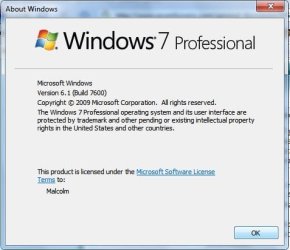
Are you sure you have 7 Professional and not 7 Home Premium.?

Type winver in Search.
 

My Computer My Computer

At a glance

Vista Ultimate 32 bit, Win 7 Pro 32 bit, Win ...Intel i5 CPU 750 @ 2.67 GHZ, OC 3.7 GHZ4 GigNvidia GeForce GTS450
Computer Manufacturer/Model Number
Home build.
OS
Vista Ultimate 32 bit, Win 7 Pro 32 bit, Win 7 Pro 64 bit
CPU
Intel i5 CPU 750 @ 2.67 GHZ, OC 3.7 GHZ
Motherboard
Asus P7P55D
Memory
4 Gig
Graphics Card(s)
Nvidia GeForce GTS450
Monitor(s) Displays
Acer 24"
Screen Resolution
1440 x 900
Hard Drives
1000 GIG
1000 GIG
PSU
650
Case
Antec Nine Hundred Two
Internet Speed
14 MB (APPROX)
I am curious, if you go to Computer Management then Local Users and Groups and click on Users, do you see Administrator listed there? If so, if you double click on Administrator, can you uncheck the option to have the account disabled? And if this is possible, does the Administrator then show up on the login screen?

Thank you for your interest. Administrator is listed but the answer is No as `Access is Denied' with no further information. Also the right click context menu does not include `Run as Administrator' when starting Computer Management from Start | Search | Computer Management.

However from Control Panel | Administrative Tools | Computer Management can be started with `Run as an Administrator' but regrettably the same error message is returned again bereft of any further information.

Again, have you adjusted your UAC settings in any way, and what happens if you reset UAC back to default settings?
 

My Computer My Computer

At a glance

Windows 7 Professional 32-bit SP1AMD A4/A63.00GB EDOVMware SVGA 3D
Computer type
PC/Desktop
Computer Manufacturer/Model Number
Virtual Machine
OS
Windows 7 Professional 32-bit SP1
CPU
AMD A4/A6
Motherboard
Intel Corporation 440BX Desktop Reference Platform
Memory
3.00GB EDO
Graphics Card(s)
VMware SVGA 3D
Sound Card
High Definition Audio Device
Monitor(s) Displays
Generic Non-PnP Monitor on VMware SVGA 3D
Screen Resolution
1440x900
Hard Drives
1 x 60GB VMware Virtual SATA Hard Drive ATA Device
Antivirus
Kaspersky Total Security
Whatever the outcome, there is more going on here than just a "simple error message"...

This is the situation:
From Control Panel | Users Accounts three users are listed:
TestNet - Administrator
Malcolm - Standard
Guest - Guest account is off

From a Command Prompt Run as Administrator returns:
Microsoft Windows [Version 6.1.7600]
Copyright (c) 2009 Microsoft Corporation. All rights reserved.
C:\Windows\System32>net users
User accounts for \\TESTNET
-----------------------------------------------------------------
Administrator Guest another*
Malcolm Testnet
The command completed successfully.
C:\Windows\System32>
*`another' is the user I need to delete.

I turned UAC off sometime ago and the option to turn it back on is not available to the Adminstrator Testnet and although the option appears for the Standard user Malcolm, apart from a screen flicker, nothing happens when it is clicked or double clicked.
 

My Computer My Computer

At a glance

Windows 7 Home Premium SP1
Computer type
PC/Desktop
Computer Manufacturer/Model Number
Medion Akoya P5204 D (MD7659)pl
OS
Windows 7 Home Premium SP1
Monitor(s) Displays
Asus
Cooling
As fitted
Keyboard
Medion GB KB-0837
Mouse
MSU0718T
Internet Speed
24Mbps
Antivirus
F-Prot 6 for Windows
Browser
Firefox 21; IE10

Attachments

  • winver.jpg
    winver.jpg
    25.8 KB · Views: 12

My Computer My Computer

At a glance

Windows 7 Home Premium SP1
Computer type
PC/Desktop
Computer Manufacturer/Model Number
Medion Akoya P5204 D (MD7659)pl
OS
Windows 7 Home Premium SP1
Monitor(s) Displays
Asus
Cooling
As fitted
Keyboard
Medion GB KB-0837
Mouse
MSU0718T
Internet Speed
24Mbps
Antivirus
F-Prot 6 for Windows
Browser
Firefox 21; IE10
:thumbsup:
 

My Computer My Computer

At a glance

Vista Ultimate 32 bit, Win 7 Pro 32 bit, Win ...Intel i5 CPU 750 @ 2.67 GHZ, OC 3.7 GHZ4 GigNvidia GeForce GTS450
Computer Manufacturer/Model Number
Home build.
OS
Vista Ultimate 32 bit, Win 7 Pro 32 bit, Win 7 Pro 64 bit
CPU
Intel i5 CPU 750 @ 2.67 GHZ, OC 3.7 GHZ
Motherboard
Asus P7P55D
Memory
4 Gig
Graphics Card(s)
Nvidia GeForce GTS450
Monitor(s) Displays
Acer 24"
Screen Resolution
1440 x 900
Hard Drives
1000 GIG
1000 GIG
PSU
650
Case
Antec Nine Hundred Two
Internet Speed
14 MB (APPROX)
Whatever the outcome, there is more going on here than just a "simple error message"...

This is the situation:
From Control Panel | Users Accounts three users are listed:
TestNet - Administrator
Malcolm - Standard
Guest - Guest account is off

From a Command Prompt Run as Administrator returns:
Microsoft Windows [Version 6.1.7600]
Copyright (c) 2009 Microsoft Corporation. All rights reserved.
C:\Windows\System32>net users
User accounts for \\TESTNET
-----------------------------------------------------------------
Administrator Guest another*
Malcolm Testnet
The command completed successfully.
C:\Windows\System32>
*`another' is the user I need to delete.

I turned UAC off sometime ago and the option to turn it back on is not available to the Adminstrator Testnet and although the option appears for the Standard user Malcolm, apart from a screen flicker, nothing happens when it is clicked or double clicked.

Login to the TestNet account, then change "Malcolm" to administrator, log off, then login to Malcolm
 

My Computer My Computer

At a glance

Windows 7 Professional 32-bit SP1AMD A4/A63.00GB EDOVMware SVGA 3D
Computer type
PC/Desktop
Computer Manufacturer/Model Number
Virtual Machine
OS
Windows 7 Professional 32-bit SP1
CPU
AMD A4/A6
Motherboard
Intel Corporation 440BX Desktop Reference Platform
Memory
3.00GB EDO
Graphics Card(s)
VMware SVGA 3D
Sound Card
High Definition Audio Device
Monitor(s) Displays
Generic Non-PnP Monitor on VMware SVGA 3D
Screen Resolution
1440x900
Hard Drives
1 x 60GB VMware Virtual SATA Hard Drive ATA Device
Antivirus
Kaspersky Total Security
Back
Top