How to delete my local Win7 syslog entries? CCleaner does not help.

pstein

New member
Member
VIP
Local time
6:47 PM
Messages
244
Just for fun I downloaded the very good free and easy utility tools
LastActivityView from here: LastActivityView - View the latest computer activity in Windows operating system

and

MyEventViewer from here Alternative to standard event viewer of Windows

and run them.

Much to my surprise it shows ALL my activities since I setup my Win7 system in 2010.

I always thought that CCleaner would clean such entries but does not. Once again CCleaner failed for a security task.

So I ask here in this forum: How can I delete all my syslog entries?

Peter
 

My Computer My Computer

At a glance

win7pro 64bit
Computer type
PC/Desktop
OS
win7pro 64bit
Here is an SF tutorial that might help:
http://www.sevenforums.com/tutorials/25480-event-viewer-one-click-clear.html

I run CCleaner file cleanup periodically to cleanup unneeded junk.
I ran TFC a day or two ago for the first time and it removed apx 800 MB - that surprised me!

I don't think of these utilities so much as "security" tools, to me they are clean-up tools ...
They may help with security, hopefully they help with performance, they do help with regaining some space ...
Maybe I'm wrong and someone will correct me.

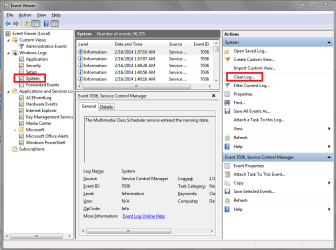
For fun I looked in Event Viewer and it has a "Clear Log..." option.
That's something you could try.

I never bothered with deleting Event History as it never caused an issue for me.
This system is Win 7 32 Bit installed in 2009.

EVLSP01.PNG
 

My Computer My Computer

At a glance

Multi-Boot W7_Pro_x64 W8.1_Pro_x64 W10_Pro_x6...AMD Athlon II x4 6206GB GSkill DDR2 800AMD 4670 GPU + AMD 4200 IGP
Computer type
PC/Desktop
Computer Manufacturer/Model Number
home built
OS
Multi-Boot W7_Pro_x64 W8.1_Pro_x64 W10_Pro_x64 +Linux_VMs +Chromium_VM
CPU
AMD Athlon II x4 620
Motherboard
Gigabyte GA-MA785G-UD3H
Memory
6GB GSkill DDR2 800
Graphics Card(s)
AMD 4670 GPU + AMD 4200 IGP
Sound Card
on board Realtek ALC889A
Monitor(s) Displays
RCA 40" LCD TV, Insignia 32" LCD TV, HP 15" LCD monitor
Screen Resolution
1680 x 1050
Hard Drives
OCZ Vertex 3 120GB,
Samsung F3 1TB (3),
Several others - WD, Seagate, Hitachi, ...
PSU
Corsair 500 W
Case
Rosewill mid tower
Cooling
CM 90mm rifle
Keyboard
Gyration wireless, Logitech wireless, Dell USB wired
Mouse
Gyration wireless, Logitech wireless, V7 USB wired
Internet Speed
Spectrum - 100Mbps D / 10Mbps U
Antivirus
Avast, MBAM3, EMET, WinPatrol
Browser
Pale Moon, Firefox, IE
Other Info
2 multi-boot PC's
Mainly HTPC/Office/Gen purpose (no gaming).
Trendnet USB KVM.
LG DVD burner/Blue Ray Player.
Tray system for removable SATA backup drives.

Not currently OCd, under-volted.
I use Hybrid sleep, rarely re-boot or shutdown.

Hauppauge HD-PVR, Avermedia PCIe TV Tuner, Hauppauge PCI TV Tuner.

My Computer My Computer

At a glance

x64 (6.3.9600) Win8.1 Pro & soon dual boot x6...AMD A6-3420M APU with Radeon(tm) HD Graphics6.00 GBAMD Radeon(TM) HD 6520G
Computer type
Laptop
Computer Manufacturer/Model Number
HP Pavilion dv6-6c10us
OS
x64 (6.3.9600) Win8.1 Pro & soon dual boot x64 (6.1.7601) Win7_SP1 HomePrem
CPU
AMD A6-3420M APU with Radeon(tm) HD Graphics
Motherboard
Hewlett-Packard 1805
Memory
6.00 GB
Graphics Card(s)
AMD Radeon(TM) HD 6520G
Sound Card
(1) AMD High Definition Audio Device (2) IDT High Definiti
Monitor(s) Displays
HP W2072a 20" LCD (1600 x 900) @ 60 Hz
Screen Resolution
1366 x 768 x 32 bits (4294967296 colors) @ 60 Hz
Hard Drives
ST640LM0 00 HM641JI SATA Disk Device
Keyboard
Logitech k520 wireless KB
Mouse
Logitech m320 wireless mouse (bundled with KB)
Internet Speed
15/5 | 54 MB Wireless 'n'
Antivirus
Realtime: Defender or Avast | On-demand: Malwarebytes, ESET
Browser
IE 11 on Win8, IE 10 on win 7
Other Info
Media: [Gimp, Audacity, VLC] || Comm: [WEmail 2012, Skype] || Productivity: [OpenOffice,| Textpad] || Utils: [Sysinternals, cCleaner, Speccy, Defraggler]
Clearing Windows History

Hi,

I could be wrong but I don't think that it's possible to clear all those entries as shown by LastActivityView.

On my machine I run the batch file mentioned to clear Event Logs on a regular basis but only to free up space (if everything is working correctly).

You can clear out some of those entries by using UserAssistView - Decrypt and displays the list of all UserAssist items in the Registry

and

CleanAfterMe - Clean Registry entries and files in your system

You might want to take a look at Prefetch and what is recorded in it:

Computer Forensics/E-Discovery Tips/Tricks and Information: Updated Prefetch Parser......

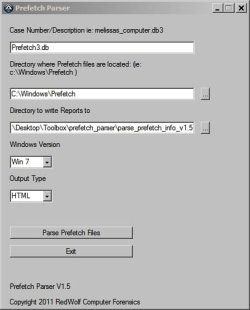
This program must be run as administrator and you must type a case numer with the .db extension. Additionally you must choose Windows 7 as the version of Windows. You must write the report into the same directory as the program and it's probably best to choose .html format for the report.

Prefetch Parser.jpg

You can clear prefetch and windows history and lots of other stuff using Privazer but it's not particularly easy to get to grips with. See here:

http://www.sevenforums.com/software/316912-privazer-pc-cleaner.html

and read pages 3 to 7 here carefully:

http://www.sevenforums.com/browsers...at-vs-index-dat-files-how-clear-delete-3.html

Folder view history is stored in Windows Shell Bags but deleting entries for existing folders will totally reset your folder view and template settings.

As far as I can work out it's not possible to clear your system of all history/ logs / registry entries/ .dat containers and databases where activity is recorded but if you run UserAssistView after cleaning up a bit - you should find that the list of entries has been reduced.

I don't believe it's possible to clear the list completely. See the following article:

https://stackoverflow.com/questions...rograms-pull-data-for-the-installed-on-column
 
Last edited:

My Computer My Computer

At a glance

Microsoft Windows 7 Home Premium 64-bit 7601 ...AMD C-60 APU with Radeon(tm) HD Graphics4.00 GBAMD Radeon HD 6290 Graphics
Computer type
Laptop
Computer Manufacturer/Model Number
ASUS
OS
Microsoft Windows 7 Home Premium 64-bit 7601 Multiprocessor Free Service Pack 1
CPU
AMD C-60 APU with Radeon(tm) HD Graphics
Motherboard
ASUSTeK COMPUTER INC. X501U
Memory
4.00 GB
Graphics Card(s)
AMD Radeon HD 6290 Graphics
Sound Card
(1) AMD High Definition Audio Device (2) Realtek High Defi
Screen Resolution
1366 x 768 x 32 bits (4294967296 colors) @ 60 Hz
Hard Drives
Hitachi HTS545050A7E380 SATA Disk Device
Antivirus
Comodo CIS & FW, SecureAplus App Whitelisting, Threatfire
Browser
Cyberfox 64bit, Opera 64bit, Airfox
Other Info
Spy-The-Spy, HitmanPro.Alert, Norton Connect Safe, MJRegWatcher, BitDefender TrafficLight, Voodoo Shield, Zemana AntiMalware
Back
Top