OK, I wouldn't leave it to mystify me. The clue is that when you reboot it kicks in.
When time permits, enable the device and then perform a clean boot. Then step by step try to find out which service/ startup is trying to kick up the drive. May be you will find the culprit.
Its a USB device or so Windows thinks. If I delete it, when I reboot and Windows starts it detects it and installs it. However, as there is no physical device ???
There are no unknown devices listed in the USB section of Device Manager.
My Computer
Computer type
PC/Desktop
Computer Manufacturer/Model Number
My Own Build
OS
Windows 10 64 bit
CPU
Intel i7 6700K
Motherboard
ASUS ROG Maximus VIII Hero
Memory
16GB Corsair Dominator
Graphics Card(s)
Intel CPU Graphics
Sound Card
RealTek
Monitor(s) Displays
27" Dell S2719dgf
Screen Resolution
2560X1440
Hard Drives
1 TB Samsung 850 EVO SSD for Win 10 Pro
500GB Samsung 850 EVO SSD for Win 10 Insider
2 TB drive for backup
PSU
EVGA Supernova 750G2
Case
BeQuiet Silent Base 600
Cooling
Deepcool Captain 120EX
Keyboard
Microsoft Wireless 2000
Mouse
Microsoft wireless
Internet Speed
100 MB/sec (Cable)
Antivirus
Microsoft Defender and Malwarebytes
Browser
Edge/Firefox
Other Info
Cakewalk (Sonar) by BandLab and Studio One 4.1 Pro recording studio software. MOTU 896Mk3 Hybrid recording interface, Frontier Tranzport wireless control unit, Behringer X-Touch Control Surface.
Five USB connected optical drives for CD Audio production using Nero BurningROM
Gyration wireless, Logitech wireless, Dell USB wired
Mouse
Gyration wireless, Logitech wireless, V7 USB wired
Internet Speed
Spectrum - 100Mbps D / 10Mbps U
Antivirus
Avast, MBAM3, EMET, WinPatrol
Browser
Pale Moon, Firefox, IE
Other Info
2 multi-boot PC's
Mainly HTPC/Office/Gen purpose (no gaming).
Trendnet USB KVM.
LG DVD burner/Blue Ray Player.
Tray system for removable SATA backup drives.
Not currently OCd, under-volted.
I use Hybrid sleep, rarely re-boot or shutdown.
Hauppauge HD-PVR, Avermedia PCIe TV Tuner, Hauppauge PCI TV Tuner.
How about a printer?
I have an all-in-one printer that has a USB port and whether it has anything plugged into it or not it shows up on my system as another disk. Disk 3 in Disk Management with "No Media" label.
Any chance it is something similar?
My Computer
Computer type
PC/Desktop
Computer Manufacturer/Model Number
Home Built - Jan 2013
OS
Windows 7 64 Bit Home Premium SP1
CPU
i7-3820
Motherboard
Asus P9X79-PRO - Bios 4608
Memory
GSkill F3-14900CL9Q - 16GB
Graphics Card(s)
EVGA GeForce GTX660 - Driver 352.86
Sound Card
On board Realtek ALC898
Monitor(s) Displays
Acer S271HL
Screen Resolution
1920 x 1080
Hard Drives
#1- Samsung 840 Pro Series
#2- Western Digital WD1002FAEX Sata3 Black
#3- Western Digital WD1002FAEX Sata3 Black
PSU
Corsair CMPSU-850TX-V2 - 850 watt (by Seasonic)
Case
Corsair Obsidian 550D
Cooling
Standard 3 120mm case fans, Cooler Master Hyper 212 EVO
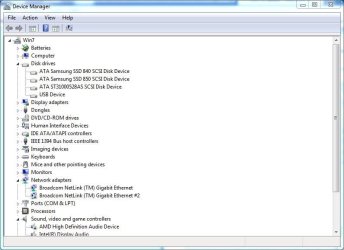
No virtual machines. Very "vanilla" system since I use it for my recording studio, and as I've previously noted the same thing in Win 8.1 (dual boot system). The drive is listed in the Device Manager, under Disk Drives as "USB Device".
It would seem to be something on the motherboard or BIOS since both OS' have the same thing. The BIOS has not been changed (its a 2012 BIOS the last one ASRock issued for this Z77 motherboard) so that would seem to eliminate it. No USB device is being detected by the BIOS that I can see.
My Computer
Computer type
PC/Desktop
Computer Manufacturer/Model Number
My Own Build
OS
Windows 10 64 bit
CPU
Intel i7 6700K
Motherboard
ASUS ROG Maximus VIII Hero
Memory
16GB Corsair Dominator
Graphics Card(s)
Intel CPU Graphics
Sound Card
RealTek
Monitor(s) Displays
27" Dell S2719dgf
Screen Resolution
2560X1440
Hard Drives
1 TB Samsung 850 EVO SSD for Win 10 Pro
500GB Samsung 850 EVO SSD for Win 10 Insider
2 TB drive for backup
PSU
EVGA Supernova 750G2
Case
BeQuiet Silent Base 600
Cooling
Deepcool Captain 120EX
Keyboard
Microsoft Wireless 2000
Mouse
Microsoft wireless
Internet Speed
100 MB/sec (Cable)
Antivirus
Microsoft Defender and Malwarebytes
Browser
Edge/Firefox
Other Info
Cakewalk (Sonar) by BandLab and Studio One 4.1 Pro recording studio software. MOTU 896Mk3 Hybrid recording interface, Frontier Tranzport wireless control unit, Behringer X-Touch Control Surface.
Five USB connected optical drives for CD Audio production using Nero BurningROM
In your case Disk 4 is shown as Removable M:, No Media . It also has a drive letter M. (It is not the same as fireberd's problem.)
So it could be a Card Reader, Printer with a card Reader, or any other USB connected device that may have escaped your attention.
If you are sure that you have none of it, then be sure to disconnect any and all USB connected devices from the front and rear USB ports. Physically check it. No other USB connected USB port plugged in devices except your USB Keyboard and USB mouse. Disconnect your network too so that you do not see any network connected device .
Then run the drive cleanup as in my post #14.
Reboot and check whether your stuck M: drive gets released.
I just booted Ubuntu Linux to see what it shows. I'm not a Linux expert but from what I see, only the 3 "real" drives are listed by Ubuntu. Not "USB Drive" as Windows 7/8.1 show.
My Computer
Computer type
PC/Desktop
Computer Manufacturer/Model Number
My Own Build
OS
Windows 10 64 bit
CPU
Intel i7 6700K
Motherboard
ASUS ROG Maximus VIII Hero
Memory
16GB Corsair Dominator
Graphics Card(s)
Intel CPU Graphics
Sound Card
RealTek
Monitor(s) Displays
27" Dell S2719dgf
Screen Resolution
2560X1440
Hard Drives
1 TB Samsung 850 EVO SSD for Win 10 Pro
500GB Samsung 850 EVO SSD for Win 10 Insider
2 TB drive for backup
PSU
EVGA Supernova 750G2
Case
BeQuiet Silent Base 600
Cooling
Deepcool Captain 120EX
Keyboard
Microsoft Wireless 2000
Mouse
Microsoft wireless
Internet Speed
100 MB/sec (Cable)
Antivirus
Microsoft Defender and Malwarebytes
Browser
Edge/Firefox
Other Info
Cakewalk (Sonar) by BandLab and Studio One 4.1 Pro recording studio software. MOTU 896Mk3 Hybrid recording interface, Frontier Tranzport wireless control unit, Behringer X-Touch Control Surface.
Five USB connected optical drives for CD Audio production using Nero BurningROM
I ran the suggested USB drive cleanup program, which is basically a registry program, and it didn't fix it.
If its a registry problem, both Windows 7 and Windows 8.1 are seeing the exact same thing.
My Computer
Computer type
PC/Desktop
Computer Manufacturer/Model Number
My Own Build
OS
Windows 10 64 bit
CPU
Intel i7 6700K
Motherboard
ASUS ROG Maximus VIII Hero
Memory
16GB Corsair Dominator
Graphics Card(s)
Intel CPU Graphics
Sound Card
RealTek
Monitor(s) Displays
27" Dell S2719dgf
Screen Resolution
2560X1440
Hard Drives
1 TB Samsung 850 EVO SSD for Win 10 Pro
500GB Samsung 850 EVO SSD for Win 10 Insider
2 TB drive for backup
PSU
EVGA Supernova 750G2
Case
BeQuiet Silent Base 600
Cooling
Deepcool Captain 120EX
Keyboard
Microsoft Wireless 2000
Mouse
Microsoft wireless
Internet Speed
100 MB/sec (Cable)
Antivirus
Microsoft Defender and Malwarebytes
Browser
Edge/Firefox
Other Info
Cakewalk (Sonar) by BandLab and Studio One 4.1 Pro recording studio software. MOTU 896Mk3 Hybrid recording interface, Frontier Tranzport wireless control unit, Behringer X-Touch Control Surface.
Five USB connected optical drives for CD Audio production using Nero BurningROM
In your case, I would just like to repeat what I had said in my post #21 after drive clean-up failed to correct the problem which makes it clear that it isn't a non-existing drive. It kicks up with Windows whether 7 or 8.1 or so it looks.
"OK, I wouldn't leave it to mystify me. The clue is that when you reboot it kicks in.
When time permits, enable the device and then perform a clean boot. Then step by step try to find out which service/ startup is trying to kick up the drive. May be you will find the culprit."
(Boozad's case looks different and is not comparable with your problem and so you can't draw lessons from each other )
EDIT: I also vaguely remember that in the past some motherboards came out with a bit of built-in solid state memory, to enable faster booting/smart caching or something like that. You can check your motherboard's documentation and specs for this feature. My only doubt is if it indeed had such memory that could show up as a fixed drive, you should have seen it from the beginning and not all of a sudden now.( Your ASROCK Z77 does seem to have this integrated SSD -Intel Smart Response Technology)
Run the DriveCleanup tool again. Then download the 32 or 64-bit version of DevManView as appropriate for your machine. Confirm Unknown Disk still showing in Disk Mgmt. Then run DevManView Ctl-A to select all items, Ctl-S to save. BE SURE to change the Save As type to Tab Delimited Text. Then save and upload the file
Confusing as some device and its driver (whether real or virtual) must be present if Windows keeps enumerating the device even after its been uninstalled
I assume you've checked the Disk devices. I'd also count the number of USB Mass Storage and USB Composite devices in DevManager under USB. Uninstall the device again. Then count those devices again to one of them have disappeared
I'm hesitant to run DriveCleanup tool again. It didn't fix or find it the first time and I was in panic mode when I tried to setup for a recording session that same day as my Roland Studio-Capture recording interface unit was missing and my bank of USB connected burner drives were also missing. I had to reinstall the Studio-Capture to get it going, the burner drives reinstalled when I powered them on.
Somewhere there is a "logical" explanation for the unknown USB Disk 3. If I were to do a clean reinstall it would take weeks to get my recording studio back working and I would have to do it to both Win 7 and Win 8.1.
My Computer
Computer type
PC/Desktop
Computer Manufacturer/Model Number
My Own Build
OS
Windows 10 64 bit
CPU
Intel i7 6700K
Motherboard
ASUS ROG Maximus VIII Hero
Memory
16GB Corsair Dominator
Graphics Card(s)
Intel CPU Graphics
Sound Card
RealTek
Monitor(s) Displays
27" Dell S2719dgf
Screen Resolution
2560X1440
Hard Drives
1 TB Samsung 850 EVO SSD for Win 10 Pro
500GB Samsung 850 EVO SSD for Win 10 Insider
2 TB drive for backup
PSU
EVGA Supernova 750G2
Case
BeQuiet Silent Base 600
Cooling
Deepcool Captain 120EX
Keyboard
Microsoft Wireless 2000
Mouse
Microsoft wireless
Internet Speed
100 MB/sec (Cable)
Antivirus
Microsoft Defender and Malwarebytes
Browser
Edge/Firefox
Other Info
Cakewalk (Sonar) by BandLab and Studio One 4.1 Pro recording studio software. MOTU 896Mk3 Hybrid recording interface, Frontier Tranzport wireless control unit, Behringer X-Touch Control Surface.
Five USB connected optical drives for CD Audio production using Nero BurningROM
I just ran the USB Device View from the same site that has the DevManView. There is nothing listed in the USB Dev View with any name even close to the Device Manger "USB Device" or any code listed for the device in the Properties Details panel. Or for the "Disk 3".
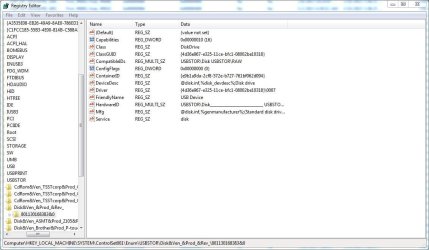
However, DevManView has he device listed and when linked to the Registry it shows the device.
Here is the DevManView for the device and the Registry listing
Attachments
Dev Man view.JPG
24.8 KB
· Views: 2
USB Disk 3.JPG
81.7 KB
· Views: 3
My Computer
Computer type
PC/Desktop
Computer Manufacturer/Model Number
My Own Build
OS
Windows 10 64 bit
CPU
Intel i7 6700K
Motherboard
ASUS ROG Maximus VIII Hero
Memory
16GB Corsair Dominator
Graphics Card(s)
Intel CPU Graphics
Sound Card
RealTek
Monitor(s) Displays
27" Dell S2719dgf
Screen Resolution
2560X1440
Hard Drives
1 TB Samsung 850 EVO SSD for Win 10 Pro
500GB Samsung 850 EVO SSD for Win 10 Insider
2 TB drive for backup
PSU
EVGA Supernova 750G2
Case
BeQuiet Silent Base 600
Cooling
Deepcool Captain 120EX
Keyboard
Microsoft Wireless 2000
Mouse
Microsoft wireless
Internet Speed
100 MB/sec (Cable)
Antivirus
Microsoft Defender and Malwarebytes
Browser
Edge/Firefox
Other Info
Cakewalk (Sonar) by BandLab and Studio One 4.1 Pro recording studio software. MOTU 896Mk3 Hybrid recording interface, Frontier Tranzport wireless control unit, Behringer X-Touch Control Surface.
Five USB connected optical drives for CD Audio production using Nero BurningROM
Could you please upload the DevManView report? (remember to Save As Tab Delimited Text)
/* EDIT */
Close DevMgr if open
Then Computer->Properties->Advanced . Add an Environment Variable: create new SYSTEM variable
Code:
devmgr_show_nonpresent_devices
set value = 1.
Open DevMgr. Click View->Show Hidden Devices
Open DevMgr. View->Device by Connection. Look for it again. Expand all items and have a look through all. (Especially look if any "virtual" sounding bus is listed among the devices.) This is may well be a virtual device which is one reason it isn't listed under USB or by USB View.
From your prior post, looks like you already know it will probably appear listed as simply USB Device
The device is shown in the Device Manager as USB Dev. Here is the screen shot of the Device Manager (I had posted this earlier in this thread).
Also the screenshot from the DevManView report is the device. I previously posted that screenshot and the listing in the registry.
Attachments
Dev Man view.JPG
53 KB
· Views: 0
My Computer
Computer type
PC/Desktop
Computer Manufacturer/Model Number
My Own Build
OS
Windows 10 64 bit
CPU
Intel i7 6700K
Motherboard
ASUS ROG Maximus VIII Hero
Memory
16GB Corsair Dominator
Graphics Card(s)
Intel CPU Graphics
Sound Card
RealTek
Monitor(s) Displays
27" Dell S2719dgf
Screen Resolution
2560X1440
Hard Drives
1 TB Samsung 850 EVO SSD for Win 10 Pro
500GB Samsung 850 EVO SSD for Win 10 Insider
2 TB drive for backup
PSU
EVGA Supernova 750G2
Case
BeQuiet Silent Base 600
Cooling
Deepcool Captain 120EX
Keyboard
Microsoft Wireless 2000
Mouse
Microsoft wireless
Internet Speed
100 MB/sec (Cable)
Antivirus
Microsoft Defender and Malwarebytes
Browser
Edge/Firefox
Other Info
Cakewalk (Sonar) by BandLab and Studio One 4.1 Pro recording studio software. MOTU 896Mk3 Hybrid recording interface, Frontier Tranzport wireless control unit, Behringer X-Touch Control Surface.
Five USB connected optical drives for CD Audio production using Nero BurningROM
Oh. When you earlier said the device didn't appear anywhere in DevMgr I assumed you had checked and accounted for all the entries under Disk.
No problem. We got it now. We can move on from here. So, again View->Device by Connection. Look for USB Device. See what its parent devices are. Take a snapshot



 )
)