Solved How to disable glow animation in progress bar

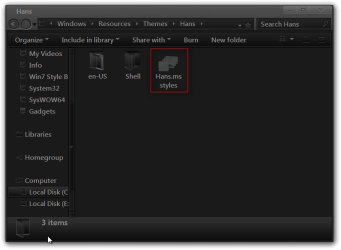
yep!! and the Hans forlder has its content

Hans.theme has this content:
; Copyright © Microsoft Corp.
[Theme]
; Windows 7 - IDS_THEME_DISPLAYNAME_AERO
DisplayName=Hans
SetLogonBackground=0
; Computer - SHIDI_SERVER
[CLSID\{20D04FE0-3AEA-1069-A2D8-08002B30309D}\DefaultIcon]
DefaultValue=%SystemRoot%\System32\imageres.dll,-109
; UsersFiles - SHIDI_USERFILES
[CLSID\{59031A47-3F72-44A7-89C5-5595FE6B30EE}\DefaultIcon]
DefaultValue=%SystemRoot%\System32\imageres.dll,-123
; Network - SHIDI_MYNETWORK
[CLSID\{F02C1A0D-BE21-4350-88B0-7367FC96EF3C}\DefaultIcon]
DefaultValue=%SystemRoot%\System32\imageres.dll,-25
; Recycle Bin - SHIDI_RECYCLERFULL SHIDI_RECYCLER
[CLSID\{645FF040-5081-101B-9F08-00AA002F954E}\DefaultIcon]
Full=%SystemRoot%\System32\imageres.dll,-54
Empty=%SystemRoot%\System32\imageres.dll,-55
[Control Panel\Cursors]
AppStarting=%SystemRoot%\cursors\aero_working.ani
Arrow=%SystemRoot%\cursors\aero_arrow.cur
Crosshair=
Hand=%SystemRoot%\cursors\aero_link.cur
Help=%SystemRoot%\cursors\aero_helpsel.cur
IBeam=
No=%SystemRoot%\cursors\aero_unavail.cur
NWPen=%SystemRoot%\cursors\aero_pen.cur
SizeAll=%SystemRoot%\cursors\aero_move.cur
SizeNESW=%SystemRoot%\cursors\aero_nesw.cur
SizeNS=%SystemRoot%\cursors\aero_ns.cur
SizeNWSE=%SystemRoot%\cursors\aero_nwse.cur
SizeWE=%SystemRoot%\cursors\aero_ew.cur
UpArrow=%SystemRoot%\cursors\aero_up.cur
Wait=%SystemRoot%\cursors\aero_busy.ani
DefaultValue=Windows Aero
[email protected],-1020
[Control Panel\Desktop]
Wallpaper=%SystemRoot%\web\wallpaper\Windows\img0.jpg
TileWallpaper=0
WallpaperStyle=10
Pattern=
[VisualStyles]
Path=%ResourceDir%\Themes\Hans\Hans.msstyles
ColorStyle=NormalColor
Size=NormalSize
ColorizationColor=0x6B74B8FC
Transparency=1
[boot]
SCRNSAVE.EXE=
[MasterThemeSelector]
MTSM=DABJDKT
[Sounds]
; IDS_SCHEME_DEFAULT
SchemeName=@%SystemRoot%\System32\mmres.dll,-800
 

My Computer My Computer

At a glance

Windows 7 Professional x64Intel i7-2600K8 gigASUS GTX570
OS
Windows 7 Professional x64
CPU
Intel i7-2600K
Motherboard
ASUS P8Z68 DELUXE/GEN3
Memory
8 gig
Graphics Card(s)
ASUS GTX570
Monitor(s) Displays
Samsung Syncmaster 206bw
Hard Drives
no harddisk: 2x SSD 128MB raid0
hee!! I noticed that Path=%ResourceDir%\Themes\Hans\Hans.msstyles
does not exist!
the file Hans.msstyles is missing. There is only Aero.msstyles
 

My Computer My Computer

At a glance

Windows 7 Professional x64Intel i7-2600K8 gigASUS GTX570
OS
Windows 7 Professional x64
CPU
Intel i7-2600K
Motherboard
ASUS P8Z68 DELUXE/GEN3
Memory
8 gig
Graphics Card(s)
ASUS GTX570
Monitor(s) Displays
Samsung Syncmaster 206bw
Hard Drives
no harddisk: 2x SSD 128MB raid0
Every time you try to use it it turns to the washed out grey classic theme look? If so that sometimes happens when UxStyle has stopped working and then you have to switch to the default Aero theme then turn off and on unsigned themes in services and then try the theme I even have to do that on my own machine once in a while. If that does not work try one more thing that would be to uninstall UxStyle restart your computer and then try that second tutorial and use Universal Theme Patcher and see what happens if that doesn't work then I will start over and make the theme again and see what happens.
Jerry
 

My Computer My Computer

At a glance

Win 7 Pro x64 / Win 10 ProIntel(R) Core(TM) i7-3630QM CPU @ 2.40GHz12 GB(1) Intel(R) HD Graphics 4000 (2) NVIDIA GeFo...
Computer type
Laptop
Computer Manufacturer/Model Number
Sager NP9170
OS
Win 7 Pro x64 / Win 10 Pro
CPU
Intel(R) Core(TM) i7-3630QM CPU @ 2.40GHz
Motherboard
CLEVO P170EM
Memory
12 GB
Graphics Card(s)
(1) Intel(R) HD Graphics 4000 (2) NVIDIA GeForce GTX 675M
Sound Card
(1) Realtek High Definition Audio (2) Intel(R) Display Aud
Monitor(s) Displays
17.3
Screen Resolution
1920x1080
Hard Drives
(1) Samsung 860 EVO 500GB(OS) (1) Samsung 860 EVO 500GB(Data)
Keyboard
Backlite
Antivirus
MSE, Malwarebytes Pro
Browser
Firefox
Other Info
DESKTOP: Custom-built.
OS: Win 10 Pro x64.
CASE: Rosewill R5.
CPU: Intel I5 4670K CPU @ 3.40GHz.
CPU COOLER: Cool Master Hyper 212 EVO.
MOTHERBOARD: Asus Z87-A.
MEMORY: Kingston HyperX 2x4 GB.
GPU: Nvidia Geforce 650 TI.
PSU: Corsair TX750.
DRIVES: (1) Samsung 840 120 GB SSD (2) Western Digital blue 500 GB 7200 RPM.
please read my previous reply. we crossed.
 

My Computer My Computer

At a glance

Windows 7 Professional x64Intel i7-2600K8 gigASUS GTX570
OS
Windows 7 Professional x64
CPU
Intel i7-2600K
Motherboard
ASUS P8Z68 DELUXE/GEN3
Memory
8 gig
Graphics Card(s)
ASUS GTX570
Monitor(s) Displays
Samsung Syncmaster 206bw
Hard Drives
no harddisk: 2x SSD 128MB raid0
The Hans.msstyles is not in the Hans folder?
Jerry
Hans.png
 

My Computer My Computer

At a glance

Win 7 Pro x64 / Win 10 ProIntel(R) Core(TM) i7-3630QM CPU @ 2.40GHz12 GB(1) Intel(R) HD Graphics 4000 (2) NVIDIA GeFo...
Computer type
Laptop
Computer Manufacturer/Model Number
Sager NP9170
OS
Win 7 Pro x64 / Win 10 Pro
CPU
Intel(R) Core(TM) i7-3630QM CPU @ 2.40GHz
Motherboard
CLEVO P170EM
Memory
12 GB
Graphics Card(s)
(1) Intel(R) HD Graphics 4000 (2) NVIDIA GeForce GTX 675M
Sound Card
(1) Realtek High Definition Audio (2) Intel(R) Display Aud
Monitor(s) Displays
17.3
Screen Resolution
1920x1080
Hard Drives
(1) Samsung 860 EVO 500GB(OS) (1) Samsung 860 EVO 500GB(Data)
Keyboard
Backlite
Antivirus
MSE, Malwarebytes Pro
Browser
Firefox
Other Info
DESKTOP: Custom-built.
OS: Win 10 Pro x64.
CASE: Rosewill R5.
CPU: Intel I5 4670K CPU @ 3.40GHz.
CPU COOLER: Cool Master Hyper 212 EVO.
MOTHERBOARD: Asus Z87-A.
MEMORY: Kingston HyperX 2x4 GB.
GPU: Nvidia Geforce 650 TI.
PSU: Corsair TX750.
DRIVES: (1) Samsung 840 120 GB SSD (2) Western Digital blue 500 GB 7200 RPM.
nope! there is only aero.msstyles
just check your zip file

should i just rename it?
 

My Computer My Computer

At a glance

Windows 7 Professional x64Intel i7-2600K8 gigASUS GTX570
OS
Windows 7 Professional x64
CPU
Intel i7-2600K
Motherboard
ASUS P8Z68 DELUXE/GEN3
Memory
8 gig
Graphics Card(s)
ASUS GTX570
Monitor(s) Displays
Samsung Syncmaster 206bw
Hard Drives
no harddisk: 2x SSD 128MB raid0
Yes! i solved the problem.

I renamed aero.msstyles into Hans.msstyles and now it works!!

thanks!!

:)
 

My Computer My Computer

At a glance

Windows 7 Professional x64Intel i7-2600K8 gigASUS GTX570
OS
Windows 7 Professional x64
CPU
Intel i7-2600K
Motherboard
ASUS P8Z68 DELUXE/GEN3
Memory
8 gig
Graphics Card(s)
ASUS GTX570
Monitor(s) Displays
Samsung Syncmaster 206bw
Hard Drives
no harddisk: 2x SSD 128MB raid0
I must apologize that was my mistake I forgot to rename the .msstyles and the aero.msstyles.mui in the en-US folder.
I just redid it and posting the correct zip now Delete the theme folder in the theme file that I gave you earlier and used the new one.
Jerry
 

Attachments

My Computer My Computer

At a glance

Win 7 Pro x64 / Win 10 ProIntel(R) Core(TM) i7-3630QM CPU @ 2.40GHz12 GB(1) Intel(R) HD Graphics 4000 (2) NVIDIA GeFo...
Computer type
Laptop
Computer Manufacturer/Model Number
Sager NP9170
OS
Win 7 Pro x64 / Win 10 Pro
CPU
Intel(R) Core(TM) i7-3630QM CPU @ 2.40GHz
Motherboard
CLEVO P170EM
Memory
12 GB
Graphics Card(s)
(1) Intel(R) HD Graphics 4000 (2) NVIDIA GeForce GTX 675M
Sound Card
(1) Realtek High Definition Audio (2) Intel(R) Display Aud
Monitor(s) Displays
17.3
Screen Resolution
1920x1080
Hard Drives
(1) Samsung 860 EVO 500GB(OS) (1) Samsung 860 EVO 500GB(Data)
Keyboard
Backlite
Antivirus
MSE, Malwarebytes Pro
Browser
Firefox
Other Info
DESKTOP: Custom-built.
OS: Win 10 Pro x64.
CASE: Rosewill R5.
CPU: Intel I5 4670K CPU @ 3.40GHz.
CPU COOLER: Cool Master Hyper 212 EVO.
MOTHERBOARD: Asus Z87-A.
MEMORY: Kingston HyperX 2x4 GB.
GPU: Nvidia Geforce 650 TI.
PSU: Corsair TX750.
DRIVES: (1) Samsung 840 120 GB SSD (2) Western Digital blue 500 GB 7200 RPM.
but then maybe I can rename my Hans.xxx files to aero.xxx files and replace the original aero.xxx files, then I do not need UxStyle to run!!
Is that logical thinking?
:D
 

My Computer My Computer

At a glance

Windows 7 Professional x64Intel i7-2600K8 gigASUS GTX570
OS
Windows 7 Professional x64
CPU
Intel i7-2600K
Motherboard
ASUS P8Z68 DELUXE/GEN3
Memory
8 gig
Graphics Card(s)
ASUS GTX570
Monitor(s) Displays
Samsung Syncmaster 206bw
Hard Drives
no harddisk: 2x SSD 128MB raid0
Yes! i solved the problem.

I renamed aero.msstyles into Hans.msstyles and now it works!!

thanks!!

:)
Good deal and you are welcome sorry I did not have that correct the first time.
Jerry
 

My Computer My Computer

At a glance

Win 7 Pro x64 / Win 10 ProIntel(R) Core(TM) i7-3630QM CPU @ 2.40GHz12 GB(1) Intel(R) HD Graphics 4000 (2) NVIDIA GeFo...
Computer type
Laptop
Computer Manufacturer/Model Number
Sager NP9170
OS
Win 7 Pro x64 / Win 10 Pro
CPU
Intel(R) Core(TM) i7-3630QM CPU @ 2.40GHz
Motherboard
CLEVO P170EM
Memory
12 GB
Graphics Card(s)
(1) Intel(R) HD Graphics 4000 (2) NVIDIA GeForce GTX 675M
Sound Card
(1) Realtek High Definition Audio (2) Intel(R) Display Aud
Monitor(s) Displays
17.3
Screen Resolution
1920x1080
Hard Drives
(1) Samsung 860 EVO 500GB(OS) (1) Samsung 860 EVO 500GB(Data)
Keyboard
Backlite
Antivirus
MSE, Malwarebytes Pro
Browser
Firefox
Other Info
DESKTOP: Custom-built.
OS: Win 10 Pro x64.
CASE: Rosewill R5.
CPU: Intel I5 4670K CPU @ 3.40GHz.
CPU COOLER: Cool Master Hyper 212 EVO.
MOTHERBOARD: Asus Z87-A.
MEMORY: Kingston HyperX 2x4 GB.
GPU: Nvidia Geforce 650 TI.
PSU: Corsair TX750.
DRIVES: (1) Samsung 840 120 GB SSD (2) Western Digital blue 500 GB 7200 RPM.
but then maybe I can rename my Hans.xxx files to aero.xxx files and replace the original aero.xxx files, then I do not need UxStyle to run!!
Is that logical thinking?
:D
No that will not work I have try it.
Jerry
 

My Computer My Computer

At a glance

Win 7 Pro x64 / Win 10 ProIntel(R) Core(TM) i7-3630QM CPU @ 2.40GHz12 GB(1) Intel(R) HD Graphics 4000 (2) NVIDIA GeFo...
Computer type
Laptop
Computer Manufacturer/Model Number
Sager NP9170
OS
Win 7 Pro x64 / Win 10 Pro
CPU
Intel(R) Core(TM) i7-3630QM CPU @ 2.40GHz
Motherboard
CLEVO P170EM
Memory
12 GB
Graphics Card(s)
(1) Intel(R) HD Graphics 4000 (2) NVIDIA GeForce GTX 675M
Sound Card
(1) Realtek High Definition Audio (2) Intel(R) Display Aud
Monitor(s) Displays
17.3
Screen Resolution
1920x1080
Hard Drives
(1) Samsung 860 EVO 500GB(OS) (1) Samsung 860 EVO 500GB(Data)
Keyboard
Backlite
Antivirus
MSE, Malwarebytes Pro
Browser
Firefox
Other Info
DESKTOP: Custom-built.
OS: Win 10 Pro x64.
CASE: Rosewill R5.
CPU: Intel I5 4670K CPU @ 3.40GHz.
CPU COOLER: Cool Master Hyper 212 EVO.
MOTHERBOARD: Asus Z87-A.
MEMORY: Kingston HyperX 2x4 GB.
GPU: Nvidia Geforce 650 TI.
PSU: Corsair TX750.
DRIVES: (1) Samsung 840 120 GB SSD (2) Western Digital blue 500 GB 7200 RPM.
thank you very much for your work and patience
 

My Computer My Computer

At a glance

Windows 7 Professional x64Intel i7-2600K8 gigASUS GTX570
OS
Windows 7 Professional x64
CPU
Intel i7-2600K
Motherboard
ASUS P8Z68 DELUXE/GEN3
Memory
8 gig
Graphics Card(s)
ASUS GTX570
Monitor(s) Displays
Samsung Syncmaster 206bw
Hard Drives
no harddisk: 2x SSD 128MB raid0
You're welcome anytime
 

My Computer My Computer

At a glance

Win 7 Pro x64 / Win 10 ProIntel(R) Core(TM) i7-3630QM CPU @ 2.40GHz12 GB(1) Intel(R) HD Graphics 4000 (2) NVIDIA GeFo...
Computer type
Laptop
Computer Manufacturer/Model Number
Sager NP9170
OS
Win 7 Pro x64 / Win 10 Pro
CPU
Intel(R) Core(TM) i7-3630QM CPU @ 2.40GHz
Motherboard
CLEVO P170EM
Memory
12 GB
Graphics Card(s)
(1) Intel(R) HD Graphics 4000 (2) NVIDIA GeForce GTX 675M
Sound Card
(1) Realtek High Definition Audio (2) Intel(R) Display Aud
Monitor(s) Displays
17.3
Screen Resolution
1920x1080
Hard Drives
(1) Samsung 860 EVO 500GB(OS) (1) Samsung 860 EVO 500GB(Data)
Keyboard
Backlite
Antivirus
MSE, Malwarebytes Pro
Browser
Firefox
Other Info
DESKTOP: Custom-built.
OS: Win 10 Pro x64.
CASE: Rosewill R5.
CPU: Intel I5 4670K CPU @ 3.40GHz.
CPU COOLER: Cool Master Hyper 212 EVO.
MOTHERBOARD: Asus Z87-A.
MEMORY: Kingston HyperX 2x4 GB.
GPU: Nvidia Geforce 650 TI.
PSU: Corsair TX750.
DRIVES: (1) Samsung 840 120 GB SSD (2) Western Digital blue 500 GB 7200 RPM.
Back
Top