How to disable mouse-pointer information when moving objects in win7?

userinitsbits

New member
Local time
11:07 AM
Messages
3
Hello World,

My Problem>
Whenever I 'drag n drop' an object (lets say e.g. from one folder into another) and about to hover over the said destination I get an additional notification thingy (in its typical MS inherited ugliness and uselessness) attached to my mouse pointer > see: screenshot. How do I disable it?

notification thingy:
notif.jpg


Any advise is appreciated, and sorry for my potato-cam res. - screenshots are not possible when dragging objects around, but looks 'Disco' thou...
 

My Computer

Computer type
PC/Desktop
OS
win7x64
Hi userinitsbits-

I've never seen that before. In Control Panel, Mouse, Pointers, what is the Scheme set to?
 

My Computer

Computer type
Laptop
Computer Manufacturer/Model Number
Dell M6500 Precision Work Station
OS
Windows 7 Pro SP1 64 bit
Memory
8 GB
Screen Resolution
1920x
Internet Speed
30 Mbps
Antivirus
Norton Security
Browser
IE 11
Hi userinitsbits-

I've never seen that before. In Control Panel, Mouse, Pointers, what is the Scheme set to?

Hey,

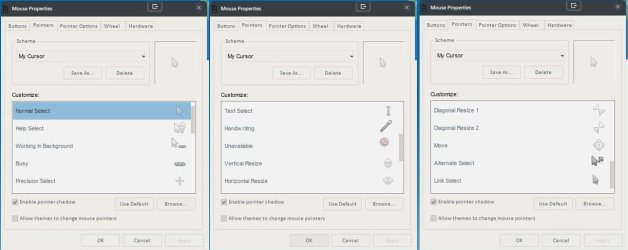
I use a Mouse Setting (Pointer, etc.) which is a set that I created myself. "Allow Themes" is Disabled. It appears only this way whenever I move (drag) e.g. a folder, image, etc. from Desktop into the open Explorer (and vice versa) or if I work in Explorer windows. If I move things around on the Desktop only or work from inside a Software I do not have this problem. It's strange and that's why I want to turn it off. Not only because it is breaking my Theme but also because it is bluntly an annoying MS-Harassment!

I might have to add - Even if I think it is NOT related- that my Win7 is UltraUXThemePatch(ed) to run a Theme called "Dash". Since the orginal "Dash-Theme" is gone I can give only a Win10 preview here: URL="https://www.deviantart.com/realitydoesnotexist/art/Dash-469871236. I further modified some .dll's in Sys32 and WoW64 for Icons I use from here>> URL="https://www.deviantart.com/blazezone/art/blzos-DUO-icons-Beta-3-759896035 + some I created myself based on "Blzos". Even so, I not have any interference with things I 'ResourceHacker'(ed).
 

Attachments

  • mouse.jpg
    mouse.jpg
    236.4 KB · Views: 2
Last edited:

My Computer

Computer type
PC/Desktop
OS
win7x64
Since you have a custom setup, I wouldn't know what to tell you. If you disable pointer shadow, does that help?

Hopefully, someone else will jump in here.
 

My Computer

Computer type
Laptop
Computer Manufacturer/Model Number
Dell M6500 Precision Work Station
OS
Windows 7 Pro SP1 64 bit
Memory
8 GB
Screen Resolution
1920x
Internet Speed
30 Mbps
Antivirus
Norton Security
Browser
IE 11
Since you have a custom setup, I wouldn't know what to tell you. If you disable pointer shadow, does that help?

Hopefully, someone else will jump in here.

Nope! Same.. Unfortunately. Even if I allow the Themes to change mouse pointers. Nothing. Would be nice if there is an easy way to turn it off instead to "Here we go again!" by having to crawl through all the .dll's, .ini's and whatnots.
 

My Computer

Computer type
PC/Desktop
OS
win7x64
Maybe it's in the "whatnots." :D

Good luck.
 

My Computer

Computer type
Laptop
Computer Manufacturer/Model Number
Dell M6500 Precision Work Station
OS
Windows 7 Pro SP1 64 bit
Memory
8 GB
Screen Resolution
1920x
Internet Speed
30 Mbps
Antivirus
Norton Security
Browser
IE 11
Back
Top