
jaffamuffin
New member
- Local time
- 10:07 PM
- Messages
- 16
Hi all
I have followed various guides on the internet to achieve this but it does not seem to work.
I have found I like my task bar to be big icons and always combine, no labels. I think this is pretty default. I used to use a 3 high non combine task bar in WinXP, but anyway.
But when have e.g. mulitple windows open, and I click the taskbar icon I want a Text list of my open windows, not the Thumbnails ..
If I open e.g. 11 windows, I get what I want. Please see pictures.
If you look at the thumbnail image you will see it is nearly impossible to tell actually which window is which, as they all look the same, and Windows helpfully cuts of the title of the window. :/
How ever if I open a couple more windows I get a nice text list that lets me choose exactly what I want.
How do I get a text list ALL THE TIME?
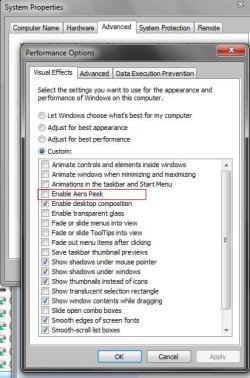
I have diabled Aero Peek in the taskbar property setting but I beleive this is just for Desktop only. I have rad that disabling it in Computer properties -- see attached screen shot should fix it, but I have done this, restarted and it's still showing me thumbnails.
How do I fix this ? Cheers all
I have followed various guides on the internet to achieve this but it does not seem to work.
I have found I like my task bar to be big icons and always combine, no labels. I think this is pretty default. I used to use a 3 high non combine task bar in WinXP, but anyway.
But when have e.g. mulitple windows open, and I click the taskbar icon I want a Text list of my open windows, not the Thumbnails ..
If I open e.g. 11 windows, I get what I want. Please see pictures.
If you look at the thumbnail image you will see it is nearly impossible to tell actually which window is which, as they all look the same, and Windows helpfully cuts of the title of the window. :/
How ever if I open a couple more windows I get a nice text list that lets me choose exactly what I want.
How do I get a text list ALL THE TIME?
I have diabled Aero Peek in the taskbar property setting but I beleive this is just for Desktop only. I have rad that disabling it in Computer properties -- see attached screen shot should fix it, but I have done this, restarted and it's still showing me thumbnails.
How do I fix this ? Cheers all
Attachments


My Computer
At a glance
win 7 6420gb
- Computer type
- PC/Desktop
- Computer Manufacturer/Model Number
- hp xeon workstation
- OS
- win 7 64
- Memory
- 20gb


