Barn the Man
New member
- Local time
- 5:08 AM
- Messages
- 10
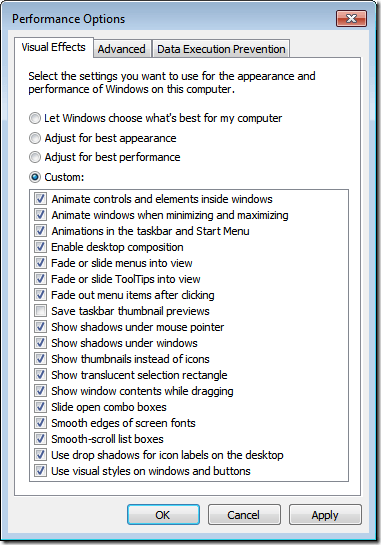
I'm new to Windows 7 and currently am running 7 Pro on my PC although there are a lot of things that I do like about 7 there are a lot I don't. I tried to customize my PC with a paid version of WindowBlinds. It is a 7 theme and compatible but it still has some of the Aero items still attached (light blue shading on bars, highlights and the like).
How do I totally eliminate Aero so I can do a full customization to my liking? Any help will be most appreciated!
How do I totally eliminate Aero so I can do a full customization to my liking? Any help will be most appreciated!
My Computer
- Computer Manufacturer/Model Number
- HP dc7600c Desktop
- OS
- Windows 7 Professional 32 bit SP 1
- CPU
- 2.00 GB Dual-Channel DDR2 @ 331MHz (5-5-5-15) Intel D-950
- Motherboard
- HP-09F0H-Southbridge Model 82801GB
- Memory
- 2.00 GB Dual-Channel DDR2 @ 331MHz (5-5-5-15)
- Graphics Card(s)
- Intel(R) 82945G Express Chipset Family Memory 256 MB Memor
- Sound Card
- High Definition Audio Device
- Monitor(s) Displays
- Name W2240 on Intel 82945G Express Chipset Family Current Re
- Screen Resolution
- 1920 x 1080
- Hard Drives
- 733GB Seagate ST3750528AS ATA Device (SATA) 750 GB SATA-II 3.0Gb/s
- Keyboard
- Microsoft Wireless 800 HID
- Mouse
- Microsoft Wireless 1000 HID
- Other Info
- Optical Drives: HL-DT-ST DVD+-RW GSA-H21L ATA Device
Media Type DVD Writer
Name HL-DT-ST DVD+-RW