How to enable Gpu scaling???

Sup3rnova01

New member
Local time
11:25 PM
Messages
8
Hello everyone

I spent all day to figure out how to enable Gpu scaling but no way.
It was working a couple of days ago untill I didn't mess around and now I'm not able to fit the image in the full panel.

I tried to lower the screen resolution as I did a search and apparently once that is done it should work but not in my case.

Please help me out if you have a solution

Thank you in advance
 

My Computer My Computer

Computer Manufacturer/Model Number
Dell dimension 9150
OS
windows 7
CPU
P 4
Graphics Card(s)
ati radeon x600
Monitor(s) Displays
DELL 1905fp
I don't use ATI cards, but there will be an option in Catalyst Control Centre to set the monitor scaling. Update your graphic drivers to the latest version and have a look.
 

My Computer My Computer

Computer type
PC/Desktop
Computer Manufacturer/Model Number
Custom Built
OS
Windows 8.1 Pro x64
CPU
Intel Core i7 4790k
Motherboard
MSI Z97S Krait Edition
Memory
8GB Corsair Dominator 1600MHz
Graphics Card(s)
MSI TwinFrozr GeForce GTX770
Sound Card
ASUS Xonar DX/XD 7.1
Monitor(s) Displays
Dell 24" S2409W + Dell 20" E207WFP
Screen Resolution
1920x1080 + 1680x1050
Hard Drives
1x 120GB OCZ Agility 3, 1x 750GB Western Digital Caviar Black, 1x 1TB Western Digital Caviar Blue
PSU
Corsair HX850 modular
Case
Fractal Design Define R4
Cooling
Corsair H60 w/ twin Corsair SP120 fans
Keyboard
Logitech G510S Keyboard
Mouse
Logitech G500S Laser Mouse
Internet Speed
40Mbps
Antivirus
Microsoft Security Essentials
Browser
Google Chrome
Other Info
LG Blu-Ray player
Hi Everlong

There is one option but is greyed out! I tried also to update my graphic drivers from device manager hardware update wizard but there are none avalaible.

what do u think I should do?
 

My Computer My Computer

Computer Manufacturer/Model Number
Dell dimension 9150
OS
windows 7
CPU
P 4
Graphics Card(s)
ati radeon x600
Monitor(s) Displays
DELL 1905fp

My Computer My Computer

Computer type
PC/Desktop
Computer Manufacturer/Model Number
Custom Built
OS
Windows 8.1 Pro x64
CPU
Intel Core i7 4790k
Motherboard
MSI Z97S Krait Edition
Memory
8GB Corsair Dominator 1600MHz
Graphics Card(s)
MSI TwinFrozr GeForce GTX770
Sound Card
ASUS Xonar DX/XD 7.1
Monitor(s) Displays
Dell 24" S2409W + Dell 20" E207WFP
Screen Resolution
1920x1080 + 1680x1050
Hard Drives
1x 120GB OCZ Agility 3, 1x 750GB Western Digital Caviar Black, 1x 1TB Western Digital Caviar Blue
PSU
Corsair HX850 modular
Case
Fractal Design Define R4
Cooling
Corsair H60 w/ twin Corsair SP120 fans
Keyboard
Logitech G510S Keyboard
Mouse
Logitech G500S Laser Mouse
Internet Speed
40Mbps
Antivirus
Microsoft Security Essentials
Browser
Google Chrome
Other Info
LG Blu-Ray player
I checked that as well and I have the latest drivers..any other soulution?
 

My Computer My Computer

Computer Manufacturer/Model Number
Dell dimension 9150
OS
windows 7
CPU
P 4
Graphics Card(s)
ati radeon x600
Monitor(s) Displays
DELL 1905fp
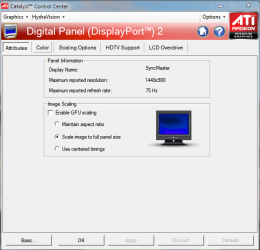
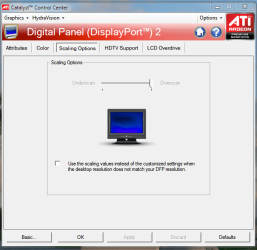
First off, you do have the Catalyst 10.2 driver package installed, right?
If not: ATI Catalystâ„¢ Legacy Display Driver

Also, this (lower on the page on the Driver Download Page)
Note: AMD’s DirectX 9 ATI Radeon graphics accelerators are not officially supported under Windows 7. If the user chooses to, they can install the ATI Catalyst Windows Vista graphics driver under Windows 7. Please be aware that none of the new Windows 7 graphics driver (WDDM 1.1) features are supported (as the Windows Vista level graphics driver is limited to WDDM 1.0 level support). Using the ATI Catalyst Windows Vista driver under Windows 7 is not officially supported by AMD, and as such AMD will not provide any form of customer support for users running in this configuration
 

Attachments

  • scaling 1.PNG
    scaling 1.PNG
    24.6 KB · Views: 225
  • scaling 2.PNG
    scaling 2.PNG
    27.3 KB · Views: 133
Last edited:

My Computer My Computer

Computer Manufacturer/Model Number
Rig 1
OS
Windows 7 Ultimate x64
CPU
AMD Phenom II X4 940 Black Edition @ 3.4GHz (AM2+)
Motherboard
Gigabyte GA-MA790X-UD4P (AM2+)
Memory
Corsair CM2X4096-8500C5 (4 X 2GB)
Graphics Card(s)
XFX Radeon HD 5770 / Diamond Radeon HD 5770 CrossFireX
Sound Card
Asus Xonar DS (PCI)
Monitor(s) Displays
Samsung SyncMaster 932bw+ (3)
Screen Resolution
4320x900
Hard Drives
OCZ Vertex 2 80 GB - Windows 7 System --
WD Caviar Black 1TB - Music, Movies, Vids, Pics --
WD Caviar Black 640GB - User Profiles & Games --
WD My Book 320GB external
PSU
Corsair CMPSU-750TX
Case
Cooler Master HAF 932
Cooling
Corsair Hydro Series H50
Keyboard
Logitech Desktop Wave
Mouse
Logitech LX8 Laser
Internet Speed
20 down / 2 up
Other Info
LG GGC-H20L Blu-Ray / HDDVD combo --
Hauppauge HVR-1250 --
Silverstone MFP-51 --
Logitech Webcam C600
Hello Mpcrsc562

Hi have the Catalyst 10.2 driver. Unfortunately I cannot see the picture that you attached.

What I am trying to do is to Enable GPU scaling to scale the image to full panel size.

In Catalyst Advanced ->DTV(DVI) -> ATTRIBUTES -> IMAGE SCALING SECTION

I don't know as I said what I did but the other day when I first plug the cable DVI from my pc to the tv HDMI it worked.

Please let me know if you got any idea.

Thank you
 

My Computer My Computer

Computer Manufacturer/Model Number
Dell dimension 9150
OS
windows 7
CPU
P 4
Graphics Card(s)
ati radeon x600
Monitor(s) Displays
DELL 1905fp
The funny thing is that I tried to reinstall the 10.2 drivers and come up in the device manager as ADI RADEON X300/X550/X1050 driver version 8.593.100.0 driver date 10/02/2010 and I tried to updated and it did updated with the driver version 8.162.00 date 03/08/2010. Does it make any sense???

If this can help:
Display manager:
Selected display on: Radeon X600 256MB Hypermemory:
Dell 1905FP + Panasonic TV (Clone)
Desktop area:1280x1020 colour quality: High(32 Bit) Refresh rate:60Hz
Monitor information:
DDC:supported
Display name:Dell 1905Fp
Maximum reported solution:1920x1080
Maximum reported refresh rate:75Hz
Monitor attributes:
Use extended display identification data(Edid) or driver defaults is ticked
HDTV modes supported by this display gives you the option to choose: Do I need to thick one of the 2???
Add 720p60 in this display manager (NTSC)
Add 1080i30 in this display manager (NTSC)
And to finish in the Panel information section gives the information about the digital panel and gives you the choice for Dvi settings, do I need to thick one of those you think?
 

My Computer My Computer

Computer Manufacturer/Model Number
Dell dimension 9150
OS
windows 7
CPU
P 4
Graphics Card(s)
ati radeon x600
Monitor(s) Displays
DELL 1905fp
I'm trying to tinker with my system to see what's up with the scaling feature. Prior to my current setup, I had a two monitor cloned display. In CCC, I never had the box checked to enable GPU scaling.... Even with my current setup, the box is not checked to enable GPU scaling. I'll post back if I find something out.
 

My Computer My Computer

Computer Manufacturer/Model Number
Rig 1
OS
Windows 7 Ultimate x64
CPU
AMD Phenom II X4 940 Black Edition @ 3.4GHz (AM2+)
Motherboard
Gigabyte GA-MA790X-UD4P (AM2+)
Memory
Corsair CM2X4096-8500C5 (4 X 2GB)
Graphics Card(s)
XFX Radeon HD 5770 / Diamond Radeon HD 5770 CrossFireX
Sound Card
Asus Xonar DS (PCI)
Monitor(s) Displays
Samsung SyncMaster 932bw+ (3)
Screen Resolution
4320x900
Hard Drives
OCZ Vertex 2 80 GB - Windows 7 System --
WD Caviar Black 1TB - Music, Movies, Vids, Pics --
WD Caviar Black 640GB - User Profiles & Games --
WD My Book 320GB external
PSU
Corsair CMPSU-750TX
Case
Cooler Master HAF 932
Cooling
Corsair Hydro Series H50
Keyboard
Logitech Desktop Wave
Mouse
Logitech LX8 Laser
Internet Speed
20 down / 2 up
Other Info
LG GGC-H20L Blu-Ray / HDDVD combo --
Hauppauge HVR-1250 --
Silverstone MFP-51 --
Logitech Webcam C600
I'm sorry, I don't have anything :(.

I took apart my X-fire and played with the scaling feature, but could not duplicate your problem.
 

My Computer My Computer

Computer Manufacturer/Model Number
Rig 1
OS
Windows 7 Ultimate x64
CPU
AMD Phenom II X4 940 Black Edition @ 3.4GHz (AM2+)
Motherboard
Gigabyte GA-MA790X-UD4P (AM2+)
Memory
Corsair CM2X4096-8500C5 (4 X 2GB)
Graphics Card(s)
XFX Radeon HD 5770 / Diamond Radeon HD 5770 CrossFireX
Sound Card
Asus Xonar DS (PCI)
Monitor(s) Displays
Samsung SyncMaster 932bw+ (3)
Screen Resolution
4320x900
Hard Drives
OCZ Vertex 2 80 GB - Windows 7 System --
WD Caviar Black 1TB - Music, Movies, Vids, Pics --
WD Caviar Black 640GB - User Profiles & Games --
WD My Book 320GB external
PSU
Corsair CMPSU-750TX
Case
Cooler Master HAF 932
Cooling
Corsair Hydro Series H50
Keyboard
Logitech Desktop Wave
Mouse
Logitech LX8 Laser
Internet Speed
20 down / 2 up
Other Info
LG GGC-H20L Blu-Ray / HDDVD combo --
Hauppauge HVR-1250 --
Silverstone MFP-51 --
Logitech Webcam C600
ok..no problem
thanks a lot
 

My Computer My Computer

Computer Manufacturer/Model Number
Dell dimension 9150
OS
windows 7
CPU
P 4
Graphics Card(s)
ati radeon x600
Monitor(s) Displays
DELL 1905fp
now i can see the pictures displayed that u sent me. Basically I don't have scale image to full size but "Use centered timings".
Have you got any idea if I should if this has anything to do with the options HDTV mo0des supported by the display and predefined and custom hd format? what's the one that u selected with ur screen? All this is driving me crazy now!
 

My Computer My Computer

Computer Manufacturer/Model Number
Dell dimension 9150
OS
windows 7
CPU
P 4
Graphics Card(s)
ati radeon x600
Monitor(s) Displays
DELL 1905fp
By the way my CCC looks totally different from the pictures that u sent..how come?

thanks a lot for ur patience by the way
 

My Computer My Computer

Computer Manufacturer/Model Number
Dell dimension 9150
OS
windows 7
CPU
P 4
Graphics Card(s)
ati radeon x600
Monitor(s) Displays
DELL 1905fp
now i can see the pictures displayed that u sent me. Basically I don't have scale image to full size but "Use centered timings".
Have you got any idea if I should if this has anything to do with the options HDTV mo0des supported by the display and predefined and custom hd format? what's the one that u selected with ur screen? All this is driving me crazy now!

You're saying that you don't have the option to use "Scale image to full panel size?" Can you put a click the box to "Enable GPU scaling?" And how different does your CCC look? To take a screenshot, click Start > type snip in the Search programs and files box > select the image to capture > save it / name it. Next, start a reply > scroll down to manage attachments and push button > push Browse to find the screenshot image you just saved, then click upload > close the window after upload > click Submit Reply.
 

My Computer My Computer

Computer Manufacturer/Model Number
Rig 1
OS
Windows 7 Ultimate x64
CPU
AMD Phenom II X4 940 Black Edition @ 3.4GHz (AM2+)
Motherboard
Gigabyte GA-MA790X-UD4P (AM2+)
Memory
Corsair CM2X4096-8500C5 (4 X 2GB)
Graphics Card(s)
XFX Radeon HD 5770 / Diamond Radeon HD 5770 CrossFireX
Sound Card
Asus Xonar DS (PCI)
Monitor(s) Displays
Samsung SyncMaster 932bw+ (3)
Screen Resolution
4320x900
Hard Drives
OCZ Vertex 2 80 GB - Windows 7 System --
WD Caviar Black 1TB - Music, Movies, Vids, Pics --
WD Caviar Black 640GB - User Profiles & Games --
WD My Book 320GB external
PSU
Corsair CMPSU-750TX
Case
Cooler Master HAF 932
Cooling
Corsair Hydro Series H50
Keyboard
Logitech Desktop Wave
Mouse
Logitech LX8 Laser
Internet Speed
20 down / 2 up
Other Info
LG GGC-H20L Blu-Ray / HDDVD combo --
Hauppauge HVR-1250 --
Silverstone MFP-51 --
Logitech Webcam C600
"
It's come to my attention that some people think GPU scaling is broken as it is grayed out. Well its not broken, it just doesn't enable unless you are using a lower than native resolution. So change your desktop to a lower res and then you can alter the setting as much as you like. After that you can put your monitor back to native res.
"

From Catalyst Forums.
 

My Computer My Computer

OS
What do you think?
"
It's come to my attention that some people think GPU scaling is broken as it is grayed out. Well its not broken, it just doesn't enable unless you are using a lower than native resolution. So change your desktop to a lower res and then you can alter the setting as much as you like. After that you can put your monitor back to native res.
"

From Catalyst Forums.


There ya go! Check this out and see if it helps.
Thanks for the input quantum112.
 

My Computer My Computer

Computer Manufacturer/Model Number
Rig 1
OS
Windows 7 Ultimate x64
CPU
AMD Phenom II X4 940 Black Edition @ 3.4GHz (AM2+)
Motherboard
Gigabyte GA-MA790X-UD4P (AM2+)
Memory
Corsair CM2X4096-8500C5 (4 X 2GB)
Graphics Card(s)
XFX Radeon HD 5770 / Diamond Radeon HD 5770 CrossFireX
Sound Card
Asus Xonar DS (PCI)
Monitor(s) Displays
Samsung SyncMaster 932bw+ (3)
Screen Resolution
4320x900
Hard Drives
OCZ Vertex 2 80 GB - Windows 7 System --
WD Caviar Black 1TB - Music, Movies, Vids, Pics --
WD Caviar Black 640GB - User Profiles & Games --
WD My Book 320GB external
PSU
Corsair CMPSU-750TX
Case
Cooler Master HAF 932
Cooling
Corsair Hydro Series H50
Keyboard
Logitech Desktop Wave
Mouse
Logitech LX8 Laser
Internet Speed
20 down / 2 up
Other Info
LG GGC-H20L Blu-Ray / HDDVD combo --
Hauppauge HVR-1250 --
Silverstone MFP-51 --
Logitech Webcam C600
For older directx9 ati gpu's, the fix lies in the registry.

Here's the fix from Resolution, Aspect Ratio & Black Bars! How to stretch screen?
hackstor said:
Open up regedit
HKLM\System\ControlSet001\Control\GraphicsDrivers\Configuration
Click on display listed, should see 00 subkey and if multiple displays 01. Click those and change scaling to 3
Reboot.

No need for ati control panel. I use this at college I work for.

A guy made a program that does this for you, but only works on the first display listed in the registry. Search agentgod ati fix


This fix worked fine for my ati mobility radeon x2300
 

My Computer My Computer

Computer Manufacturer/Model Number
HP 6910p
OS
Windows 7 Professional 64bit / Arch Linux x86_64
CPU
Intel Core2Duo T7100
Memory
4 GB
Graphics Card(s)
ATi Mobility Radeon x2300
Hard Drives
Fujitsu MJA2500BH G2 500GB
Mouse
Microsoft Wireless Mouse 5000
Other Info
MATSHITA DVD-RAM UJ-842S ATA Device
Back
Top