
How to extend Primary Hard dirve memory.

Kum

New member
Local time
5:54 PM
Messages
2
Hi All,
I have a problem with extending my primay hard disk dirve meomory space for window 7 and hope that I can resolve without losing any of my file.

Here is my situation:
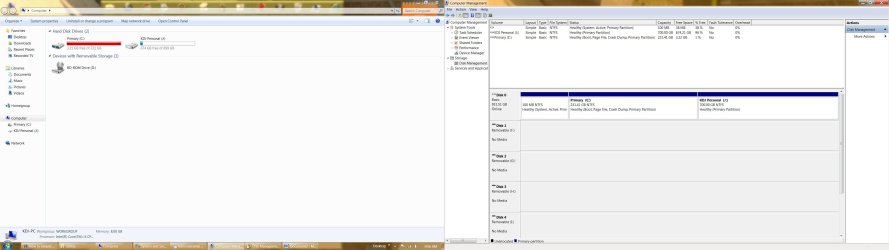
I have 2 hard disk drives C: (Primary- 231GB- 3.21free ) and J: (699GB -674GB free. After installing window 7, I'm using this dirve to save all my works). Now my primary Hard drive is almost full (only 3.21GB free) and I wanted to extend the memory space. Now I have two questions

1. How can I extend some more memory space into C: drive without deleting/formation J: drive?

2. I’m saving all my works in my J: drive I don’t know how did this primary C: drive memory got used. Is there any way I can see what is in this C: so that I can delete/move unnecessary things and make more space or

Advance thanks!

Cheers.
 

Attachments
  • memory sapce.jpg
    memory sapce.jpg
    189.8 KB · Views: 72
Last edited:

My Computer My Computer

OS
windows 7 Home 64bit
Hello Kum.

Firstly, it would help if you post a screenshot of your disk management layout.

http://www.sevenforums.com/tutorials/9733-screenshots-files-upload-post-seven-forums.html


There are several things you can do to regain drive space on your C drive.
  1. Uninstall any programs you don't use.
  2. Move personal data such as photos, music, videos etc to your J drive or an external drive.
  3. Run Disk CLeanup. Regaining computer hard disk drive space.
  4. Defrag your C Drive.
  5. How to Regain Some Hard Drive Space - wikiHow
  6. Forty Ways To Free Up Disk Space
 
Last edited:

My Computer My Computer

Computer Manufacturer/Model Number
HP Pavilion Elite 495UK
OS
Windows 7 Ultimate SP1 64-Bit
CPU
Intel Core i7 870 @ 2.93GHz
Motherboard
MSI 2A9C (CPU1)
Memory
8Gb Dual-Channel DDR3 @ 664MHz
Graphics Card(s)
nVidia GeForce GTX 460 1024MB dedicated RAM
Sound Card
Realtek HD Audio
Monitor(s) Displays
HP2310i
Screen Resolution
1920 x 1080
Hard Drives
1x1954GB Hitachi HDS22020ALA 330 (RAID), 1x1954GB Hitachi External for backup and storage
PSU
460W
Case
HP Elite
Cooling
Air cooled
Keyboard
Logitech K750 solar-powered keyboard
Mouse
Logitech Wireless M180 mouse
Internet Speed
2Mb
Other Info
Pure Avanti Flow Internet Radio with iPod Dock, 64Gb iPod, HP USB Speakers, Sony MDR-V500 Headphones, Sony Vaio F-Series Laptop
It would be far easier and less chance of breaking things to just move any documents/movies/music/etc to the other partition than trying to contract one and extend the other.

If C is full from installed programs, again it would be easier to uninstall them from C and then install them to the other partition.
 

My Computer My Computer

Computer type
PC/Desktop
Computer Manufacturer/Model Number
Me
OS
Win 7 Ultimate x64
CPU
FX-8350 @ 4.6 GHz so far
Motherboard
Asus M5A97 EVO
Memory
ADATA XPG V1 Series Black 8GB DDR3 1600
Graphics Card(s)
Sapphire R9 270x Dual-X
Sound Card
Xonar DGX w/ Corsair Vengence 1300
Monitor(s) Displays
Acer S232HL Abid
Screen Resolution
1920x1080
Hard Drives
120 GB OCZ Vertex 3
500 GB Seagate 7200.12
PSU
Antec Earthwatts 650W Green
Case
Antec Three Hundred
Cooling
Cooler Master 212 EVO
Keyboard
Logitech G510
Mouse
Logitech G500s
Internet Speed
35000/3000
Another way is open Computer, Expand C\, highlight files to move and drag to J\. Hold the Shift button before dropping and release the mouse first to MOVE, otherwise it will COPY.
Be careful not to move any system files, since your OS is on C\.
As Stormy said, if there is alot of program installed to C\, you'd need to uninstall them and reinstall by pointing them to J\ instead of C\.
 

My Computer My Computer

Computer type
PC/Desktop
Computer Manufacturer/Model Number
Home Built Desktop By DataTech
OS
Windows 7 Ultimate X64 SP1
CPU
Intel i5-2550K, Differing ~4.4-4.8GHz No built in GPU
Motherboard
ASUS P8Z68-V PRO/GEN3
Memory
16GB G.Skill Sniper 1866MHz @ 2133MHz 2x8GB
Graphics Card(s)
ASUS GTX650TIB-DC2OC-2GD5, (650TI Boost)
Sound Card
Onboard Realtek 5-1
Monitor(s) Displays
Samsung P2570HD
Screen Resolution
1920x1080
Hard Drives
Samsung 840 Pro 256GB SSD for OS, 500GB Seagate Constellation (Enterprise drive) for Data
PSU
Corsair HX650W
Case
Inwin Dragon Rider
Cooling
Hyper 212 EVO w/two Noctua fans, push-pull, @1300 RPM
Keyboard
E-Z Eyes, bright yellow keys with large characters
Mouse
steelseries SENSEI Laser Pro Gaming
Internet Speed
48-51Mbs Mbs down, 11 Mbs up Xfinity Cable
Antivirus
Norton Internet Security 2013
Browser
IE 10, Opera, Pale Moon if needed
Other Info
4 case fans, LG BluRay-RE, ASUS DVD-RW, Mr. Fusion power supply, 1.21 gigawatts.
Hello Kum, welcome to Seven Forums!


Have a look at this tutorial at the first link below, use only Step One to Move/Resize the left side of the J: partition to create unallocated space, when the Resize is complete close the Partition Wizard program and re-start the PC and use Windows 7 disk management to extend the C: partition into the new created unallocated space.
First download the Partition Wizard Bootable Disk (PWBD) ISO file to the desktop, be sure to get the PWBD and not the installed version; scroll down to see the download link for the bootable CD ISO file at this link below.
Then use ImgBurn to burn the ISO to a CD, at no greater than 4x speed with a verify; it was designed for use and works best from a CD rather that a then boot the created CD to make the changes.
Be sure to post back with any further questions you may have and to keep us informed.
 

My Computer My Computer

Computer Manufacturer/Model Number
* BFK Customs *
OS
W 7 64-bit Ultimate
CPU
Intel Q9550 Yorkfield
Motherboard
ASUS P5Q Pro
Memory
8GB Dominator 8500C5D
Graphics Card(s)
ATI : XFX 5870
Sound Card
Realtek HD Audio 7-1
Monitor(s) Displays
1x 47" LCD HDMI & 3x 26" LCD HDMI
Screen Resolution
1920x1080P & 1920x1200
Hard Drives
1x 80GB Intel X25-M G2 SSD : 1x 500GB & 1x 640GB WD Caviar Black(s)
PSU
Corsair 620HX
Case
Cooler Master RC-690
Cooling
Tuniq Tower 120, 2x 140mm and 3x 120mm case fans
Keyboard
Microsoft 500
Mouse
Razer Diamondback 3G
Internet Speed
14 Mb/s
Other Info
1x Koutech 3Gb/s SATA HDD Hot Swap Rack
Back
Top