
How to figure out VK_ virtual key for a key?

MarcG

New member
Member
Local time
9:07 AM
Messages
30
Location
Indianapolis
Hi folks,

Quick summary: what's a good way to press a key on a keyboard and have some utility tell me what VK_XXX it is? I have an Adesso wireless keyboard that has a cluster of media center keys, and I want to custom map them in Media Player Classic Home Cinema (MPC-HC). Attached is a pic of the keyboard with keys I'm trying to figure out highlighted in red.

I'm working to integrate MPC-HC into WMC/Media browser following Damian's guide:
http://www.mediasmartserver.net/2010/01/29/guide-using-mpc-hc-as-your-video-player-in-wmc-media-browser/

For WAF reasons, I want the experience of watching an MKV in MPCHC to be functionally as close to watching recorded TV in WMC as possible. This means setting up 30 second skip forward and 5 second skip back, or as close to it as possible, using the same keys WMC uses (the >| and |< keys that give +30 seconds and -5 seconds for recorded TV).

In MPCHC these keys seem to move from one chapter to the next. I never use chapter stuff… just want them to be jump forward large and jump backward medium in MPCHC. Went into MPC-HC Options… Keys... and assigned Jump Forward (Large) to VK_Next (no modifier) and Jump Backward (medium) to VK_Prior (no modifier). But these keys still do chapter movements, even if I clear out the entries for Next and Previous commands (which were the original commands to use VK_Prior and VK_Next) to none/blank.

Any thoughts here? I can assign the Jump commands to different keys and those work… but I seem to be missing something re: the VK_Next/Prior to get it to work like it does in WMC.

So I believe I've got the wrong VK_ identifier for the >| and |< keys.

The keys I'm talking about are part of a cluster on the far left of my keyboard next to pause, play, FF/RW, etc. keys.

Any help appreciated!
Marc
 

Attachments
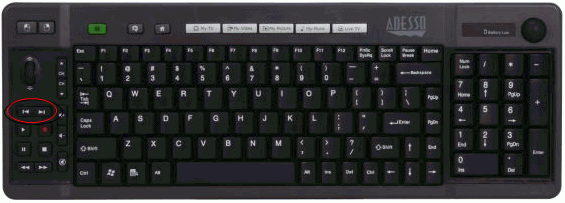
  • Snap1.gif
    Snap1.gif
    42.3 KB · Views: 210

My Computer My Computer

At a glance

Windows 7 RTM x64 (desktop), x32 (HTPC)
OS
Windows 7 RTM x64 (desktop), x32 (HTPC)
Hi folks,
Q uick summary: what's a good way to press a key on a keyboard and have some utility tell me what VK_XXX it is? I have an Adesso wireless keyboard that has a cluster of media center keys, and I want to custom map them in Media Player Classic Home Cinema (MPC-HC). Attached is a pic of the keyboard with keys I'm trying to figure out highlighted in red.
Any help appreciated!
Marc

Here ya go...

Virtual-Key Codes

However... you should not have to do that... MPC-HC on it's options/Keys page has a checkbox for "Global Meida Keys" that automatically maps to those keys.
 

My Computer My Computer

At a glance

XP Pro SP3 X86 / Win7 Pro X86Amd 64 x2 4200 (2.4ghz)Kingston DDR2 800 2gbNvidia GF-8400
Computer Manufacturer/Model Number
Homebrew
OS
XP Pro SP3 X86 / Win7 Pro X86
CPU
Amd 64 x2 4200 (2.4ghz)
Motherboard
Asus M2N-MX SE Plus
Memory
Kingston DDR2 800 2gb
Graphics Card(s)
Nvidia GF-8400
Sound Card
Realtek on Motherboard
Monitor(s) Displays
Acer x-193bw
Screen Resolution
1440 x 900
Hard Drives
Western Digital 500g
PSU
350watt In-Win
Case
In-Win
Cooling
Air
Keyboard
yes
Mouse
yes
Internet Speed
5mpbs
Other Info
Also ASRock ION 330 as HTPC (on XP).
Acer Aspire as GP netbook (on XP).
Some keys do not have a VK_* however I did find a program that will give a numerical code.
Keyboard Codes Display
 

My Computer My Computer

At a glance

Windows 10 Pro (x64)Intel Core i7-3930K (3.2GHz - 4.5GHz)4x Samsung 4GB PC3-12800 DDR3 (16GB 1600MHz)Nvidia Geforce GTX 690
Computer type
PC/Desktop
Computer Manufacturer/Model Number
Alienware Aurora ALX R4
OS
Windows 10 Pro (x64)
CPU
Intel Core i7-3930K (3.2GHz - 4.5GHz)
Motherboard
Alienware Aurora-R4 x79
Memory
4x Samsung 4GB PC3-12800 DDR3 (16GB 1600MHz)
Graphics Card(s)
Nvidia Geforce GTX 690
Sound Card
SteelSeries Siberia Elite
Monitor(s) Displays
Dell UltraSharp U3011
Screen Resolution
2560x1600
Hard Drives
Samsung 850 Pro 256 GB, Seagate 1TB Desktop Hybrid HDD, 2x Western Digital 4TB Green HDD
PSU
875W Some Dell PSU <.<
Case
Alienware Aurora ALX
Cooling
Custom Liquid Cooling (EK CPU & GPU blocks) dual EK 480RAD
Keyboard
Logitech G710+ Mechanical
Mouse
Logitech G700s
Internet Speed
Verizon Fios (50 mbps average)
Other Info
Server: Intel NUC D54250WYK: i5-4250U, 16GB, 256 GB mSATA, Windows Server 2012 R2
Thanks guys, I'll give this a whirl tonight. I'll admit to some confusion about that "Global Media Keys" checkbox in MPCHC. Checking it doesn't seem to do much at least not obviously. I'll poke around and report back.

Marc
 

My Computer My Computer

At a glance

Windows 7 RTM x64 (desktop), x32 (HTPC)
OS
Windows 7 RTM x64 (desktop), x32 (HTPC)
Thanks guys, I'll give this a whirl tonight. I'll admit to some confusion about that "Global Media Keys" checkbox in MPCHC. Checking it doesn't seem to do much at least not obviously. I'll poke around and report back.

Marc


I know you're trying to connect MPC-HC into something else in an effort to make playing movies on the computer as much like watching television as possible... but believe me, you don't actually need to do that. With a wireless keyboard you can simply find and click on the file you want and MPC-HC will perk up and play it for you...

The "Global Media Keys" allows you to have MPC-HC minimized in the taskbar and still have the media keys work... but it also activates half a dozen "undocumented" keys as well.

I work extensively with this software... it's my media player of choice for home theatre installations... and it's a good'n
 

My Computer My Computer

At a glance

XP Pro SP3 X86 / Win7 Pro X86Amd 64 x2 4200 (2.4ghz)Kingston DDR2 800 2gbNvidia GF-8400
Computer Manufacturer/Model Number
Homebrew
OS
XP Pro SP3 X86 / Win7 Pro X86
CPU
Amd 64 x2 4200 (2.4ghz)
Motherboard
Asus M2N-MX SE Plus
Memory
Kingston DDR2 800 2gb
Graphics Card(s)
Nvidia GF-8400
Sound Card
Realtek on Motherboard
Monitor(s) Displays
Acer x-193bw
Screen Resolution
1440 x 900
Hard Drives
Western Digital 500g
PSU
350watt In-Win
Case
In-Win
Cooling
Air
Keyboard
yes
Mouse
yes
Internet Speed
5mpbs
Other Info
Also ASRock ION 330 as HTPC (on XP).
Acer Aspire as GP netbook (on XP).
Thanks for the link to the program that gives the keycodes. Turns out the >| and |< keys don't seem to have VK_ assignments (they show up as unassigned in the utility). They are keycodes 176 and 177 according to the utility.
Now I'm trying how to figure out how to assign these in MPCHC. No matter what I do those two keys still cause chapter forward and back.

I'm not sure what the "Global Media Keys" checkbox in MPCHC does. I haven't noticed any change in what happens with it unchecked (default) or checked.

Any further help would be appreciated.

Marc
 

My Computer My Computer

At a glance

Windows 7 RTM x64 (desktop), x32 (HTPC)
OS
Windows 7 RTM x64 (desktop), x32 (HTPC)
Thanks for the link to the program that gives the keycodes. Turns out the >| and |< keys don't seem to have VK_ assignments (they show up as unassigned in the utility). They are keycodes 176 and 177 according to the utility.
Now I'm trying how to figure out how to assign these in MPCHC. No matter what I do those two keys still cause chapter forward and back.

I'm not sure what the "Global Media Keys" checkbox in MPCHC does. I haven't noticed any change in what happens with it unchecked (default) or checked.

Any further help would be appreciated.

Marc

In MPClassic the key codes you want to map to for the medium jump ahead and back are CRTL+VK_LEFT and CTRL+VK_RIGHT (10 second jumps)

If your keyboard won't remap to those keys, you can change MPClassic's internal keymap to suit... On Options -> Keys, scroll down to the JumpForward and JumpBack section, click in the Key column and open the pulldown... the two values you want are listed as... OEM_FJ_IJSHO and OEM_FJ_MASSHOU ... The big hint here is that they are listed in numerical order.
 

My Computer My Computer

At a glance

XP Pro SP3 X86 / Win7 Pro X86Amd 64 x2 4200 (2.4ghz)Kingston DDR2 800 2gbNvidia GF-8400
Computer Manufacturer/Model Number
Homebrew
OS
XP Pro SP3 X86 / Win7 Pro X86
CPU
Amd 64 x2 4200 (2.4ghz)
Motherboard
Asus M2N-MX SE Plus
Memory
Kingston DDR2 800 2gb
Graphics Card(s)
Nvidia GF-8400
Sound Card
Realtek on Motherboard
Monitor(s) Displays
Acer x-193bw
Screen Resolution
1440 x 900
Hard Drives
Western Digital 500g
PSU
350watt In-Win
Case
In-Win
Cooling
Air
Keyboard
yes
Mouse
yes
Internet Speed
5mpbs
Other Info
Also ASRock ION 330 as HTPC (on XP).
Acer Aspire as GP netbook (on XP).
In MPClassic the key codes you want to map to for the medium jump ahead and back are CRTL+VK_LEFT and CTRL+VK_RIGHT (10 second jumps)

If your keyboard won't remap to those keys, you can change MPClassic's internal keymap to suit... On Options -> Keys, scroll down to the JumpForward and JumpBack section, click in the Key column and open the pulldown... the two values you want are listed as... OEM_FJ_IJSHO and OEM_FJ_MASSHOU ... The big hint here is that they are listed in numerical order.

Thanks, I tried mapping the OEM_FJ_IJSHO and MASSHOU to the functions, but those two keys still caused chapter jumps instead of short back and forth movements. I'd really like to change this in MPCHC because I definitely DON'T want to do a remapping of the key at a level that will change how the key works in windows media center, since we use that for watching TV and such.

Any further help appreciated!

Marc
 

My Computer My Computer

At a glance

Windows 7 RTM x64 (desktop), x32 (HTPC)
OS
Windows 7 RTM x64 (desktop), x32 (HTPC)
In MPClassic the key codes you want to map to for the medium jump ahead and back are CRTL+VK_LEFT and CTRL+VK_RIGHT (10 second jumps)

If your keyboard won't remap to those keys, you can change MPClassic's internal keymap to suit... On Options -> Keys, scroll down to the JumpForward and JumpBack section, click in the Key column and open the pulldown... the two values you want are listed as... OEM_FJ_IJSHO and OEM_FJ_MASSHOU ... The big hint here is that they are listed in numerical order.

Thanks, I tried mapping the OEM_FJ_IJSHO and MASSHOU to the functions, but those two keys still caused chapter jumps instead of short back and forth movements. I'd really like to change this in MPCHC because I definitely DON'T want to do a remapping of the key at a level that will change how the key works in windows media center, since we use that for watching TV and such.

Any further help appreciated!

Marc

Ok... so go into MPClassic and change the key assignments... It's beyond easy to do...

Start MPC-HC ... type the letter O (as in Oscar)... now click on Keys... and there you are... you can set them up any way you wish.
 

My Computer My Computer

At a glance

XP Pro SP3 X86 / Win7 Pro X86Amd 64 x2 4200 (2.4ghz)Kingston DDR2 800 2gbNvidia GF-8400
Computer Manufacturer/Model Number
Homebrew
OS
XP Pro SP3 X86 / Win7 Pro X86
CPU
Amd 64 x2 4200 (2.4ghz)
Motherboard
Asus M2N-MX SE Plus
Memory
Kingston DDR2 800 2gb
Graphics Card(s)
Nvidia GF-8400
Sound Card
Realtek on Motherboard
Monitor(s) Displays
Acer x-193bw
Screen Resolution
1440 x 900
Hard Drives
Western Digital 500g
PSU
350watt In-Win
Case
In-Win
Cooling
Air
Keyboard
yes
Mouse
yes
Internet Speed
5mpbs
Other Info
Also ASRock ION 330 as HTPC (on XP).
Acer Aspire as GP netbook (on XP).
Ok... so go into MPClassic and change the key assignments... It's beyond easy to do...

Start MPC-HC ... type the letter O (as in Oscar)... now click on Keys... and there you are... you can set them up any way you wish.

Sadly it's not that easy. I go into the Keys section, and right there are the commands such as Jump Forward etc.. My problem is I don't know what to enter for the key assignments because apparently there are no VK_ names for the two keys I'd like to use, and I don't see any way to enter the key codes (176 and 177) I got from that utility in that Keys screen. Entering the hex equivalents as ASCII didn't work, nor did using the two OEM_ suggestions .

Any other thoughts? I know it sounds like it should be easy, but I'm clearly missing something. I think those keys are being captured some other way for the chapter skip purpose, and I'm looking for help getting around that, and figuring out what to enter in the Keys section.

Thanks!

Marc
 

My Computer My Computer

At a glance

Windows 7 RTM x64 (desktop), x32 (HTPC)
OS
Windows 7 RTM x64 (desktop), x32 (HTPC)
Sadly it's not that easy. I go into the Keys section, and right there are the commands such as Jump Forward etc.. My problem is I don't know what to enter for the key assignments because apparently there are no VK_ names for the two keys I'd like to use, and I don't see any way to enter the key codes (176 and 177) I got from that utility in that Keys screen. Entering the hex equivalents as ASCII didn't work, nor did using the two OEM_ suggestions .

if you click in the KEY column, it should produce a pulldown from which you have all 255 posible keys listed. Just select the keys you need... I already gave you the names that correspond with the values you need... so...
 

My Computer My Computer

At a glance

XP Pro SP3 X86 / Win7 Pro X86Amd 64 x2 4200 (2.4ghz)Kingston DDR2 800 2gbNvidia GF-8400
Computer Manufacturer/Model Number
Homebrew
OS
XP Pro SP3 X86 / Win7 Pro X86
CPU
Amd 64 x2 4200 (2.4ghz)
Motherboard
Asus M2N-MX SE Plus
Memory
Kingston DDR2 800 2gb
Graphics Card(s)
Nvidia GF-8400
Sound Card
Realtek on Motherboard
Monitor(s) Displays
Acer x-193bw
Screen Resolution
1440 x 900
Hard Drives
Western Digital 500g
PSU
350watt In-Win
Case
In-Win
Cooling
Air
Keyboard
yes
Mouse
yes
Internet Speed
5mpbs
Other Info
Also ASRock ION 330 as HTPC (on XP).
Acer Aspire as GP netbook (on XP).
SOLVED

OK, got it sorted!

Thanks for trying to help with the key stuff. Turns out none of those key codes work in terms of assigning them in the Key section, but what works is to assign an App Command to the Jump Forward/Backward command I wish. Those keys trigger a Media_NextTrack or Media_PreviousTrack event. Assigning those app command events to the desired Jump command makes it work out just fine.

I figured it out by looking into what things caused a Next/Previous chapter skip event; after clearing all the keys that cause it, and noticing that the two keys I'm interested in STILL caused those events, I looked into the app commands and found the Media_NextTrack/PreviousTrack things. Clearing them out from the chapter skip thing and assigning them to JumpForward (Large) and JumpBackward(medium) gives me what I wanted.

Yea!

Marc
 

My Computer My Computer

At a glance

Windows 7 RTM x64 (desktop), x32 (HTPC)
OS
Windows 7 RTM x64 (desktop), x32 (HTPC)
Back
Top