
How to find correct RAM replacement

lap1ngtong69

New member
Local time
9:41 AM
Messages
15
Location
Sutton-in-Ashfield, Notts
Hello Ladies & Gents,

Just a quick bit of info, Had BSOD problems and with help from you great people at sevenforums found it was a stick of bad RAM.

So, I am looking to replace this but want to make certain I replace it with the correct module. I tried the Crucial scanner which only added to confusion as that suggested DDR2 when Speccy and other info tools tell me it is DDR3 (and funnily enough the DDR2 Crucial suggested was about two and half times the price of the DDR3 I looked at????)

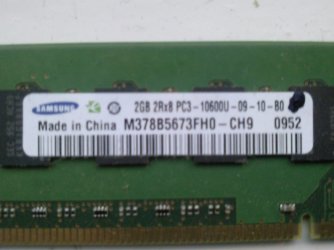
I've added a pic of the label on the RAM as an attachment (as I wasn't sure how to direct the "insert image" tool to the pic)

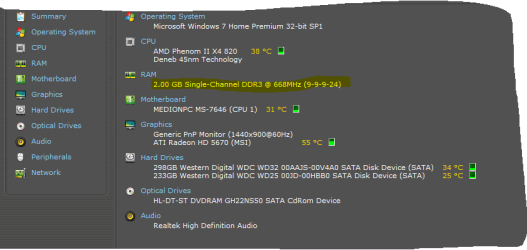
The RAM info tools like Speccy etc tell me it is DDR3@668Mhz (9-9-9-24) but this didn't correlate with anything at Crucial

I then read something about doubling it, Timings and BIOS settings etc which was a bit too techy too process!

and seeing as this is the place to learn all things Windows I thought I'd ask

Thx
 

Attachments
  • Photo0028.jpg
    Photo0028.jpg
    114.9 KB · Views: 2

My Computer My Computer

Computer Manufacturer/Model Number
Medion
OS
Microsoft Windows 7 Home Premium 32-bit 7601 Multiprocessor Free Service Pack 1
CPU
AMD Phenom(tm) II X4 820 Processor
Motherboard
MEDIONPC MS-7646
Memory
2.00 GB DDR3 @68 (9-9-9-24)
Graphics Card(s)
ATI Radeon HD 5670
Sound Card
(1) Realtek High Definition Audio (2) USB Audio Device (
Screen Resolution
1440 x 900 x 32 bits (4294967296 colors) @ 60 Hz
Hard Drives
(1) WDC WD25 00JD-00HBB0 SATA Disk Device (2) WDC WD32 00AAJS-00V4A0 SATA Disk Device (3) Generic CF Card Reader USB Device (4) Generic SD MS Reader USB Device (5) Generic SMC xD Reader USB Device
From the photo you provided, that particular stick is a 2GB PC3-10600, which is the same as a DDR3-1333Mhz. I don't know why Speccy is calling it a 668Mhz.

PC3-10600 DDR3

I'm not familiar with a Medion motherboard so I'm taking an educated guess that you have a home built computer and I'm further guessing it's a desktop and not a laptop. RAM sticks for desktop machines normally have 240 pins. You need to know how many GB per slot your motherboard can handle. Just as an example, if your board has 4 slots and the user manual says the board can handle 16GB, each slot can hold a 4GB stick. If the manual says it can handle 8GB total, each slot can have no more than 2GB. The latency (9-9-9-24) isn't all that important. A 7-7-7-12 (just as an example) would also work.

However, according to your system specs, you're using Windows 7 32-bit. Because of mathematical limitations, a 32-bit system will not have any added benefit beyond 4GB total RAM. With 4GB installed RAM you'd probably see only 3GB available because part of the RAM will be set aside for video card, installed devices like keyboard, mouse, etc. You'd have to clean install a 64-bit system to take advantage of any additional RAM beyond 4GB.

Modern motherboards usually work best with matched pairs of memory. So with a 32-bit system, if your board has two slots best performace would most likely be attained with 2 sticks of 2GB each. A four slot board could have either 4 sticks of 1GB each or 2 sticks of 2GB each. And if you went with 2x2GB, you'd have to check the user manual to find out which 2 slots to use. Sometimes the slots are numbered and you might have to use slots 1 and 3 for optimum performance. Or they might be color coded and you'd have to use a specific color for best performance.

HowStuffWorks "How RAM Works"

To answer your basic question of what memory to get, as long as the number of pins match your motherboard (probably 240 pins) any DDR3-1333Mhz or PC3-10600 should work keeping in mind the 4GB ceiling for a 32-bit operating system.

Hope I haven't totally confused you.
 

My Computer My Computer

Computer type
Laptop
Computer Manufacturer/Model Number
Sony Vaio VPCEB47GM Laptop
OS
Win 7 Pro 64-bit
CPU
Intel i5 2.4 Ghz
Memory
8GB DDR3
Graphics Card(s)
Intel HD 3000
Sound Card
IDT High Definition
Monitor(s) Displays
15.6 WGXA Anti-Glare LED
Screen Resolution
1280x800
Hard Drives
640Gb 7200rpm
Antivirus
MSE
Browser
Opera (primary) with IE9 backup
Thanks Marsmimar, no that clarified more than confused! Just wanted to make sure I was buying right module cos like I say..Crucial scanner was pointing me towards DDR2 at more than x2 price

Speccy info:
 

Attachments

  • Capture.PNG
    Capture.PNG
    15.8 KB · Views: 5

My Computer My Computer

Computer Manufacturer/Model Number
Medion
OS
Microsoft Windows 7 Home Premium 32-bit 7601 Multiprocessor Free Service Pack 1
CPU
AMD Phenom(tm) II X4 820 Processor
Motherboard
MEDIONPC MS-7646
Memory
2.00 GB DDR3 @68 (9-9-9-24)
Graphics Card(s)
ATI Radeon HD 5670
Sound Card
(1) Realtek High Definition Audio (2) USB Audio Device (
Screen Resolution
1440 x 900 x 32 bits (4294967296 colors) @ 60 Hz
Hard Drives
(1) WDC WD25 00JD-00HBB0 SATA Disk Device (2) WDC WD32 00AAJS-00V4A0 SATA Disk Device (3) Generic CF Card Reader USB Device (4) Generic SD MS Reader USB Device (5) Generic SMC xD Reader USB Device
I would buy crucial, i always do,if its wrong send it back. Their returns policy is excellent. You can do it from online account.
Their based in glasgow,and its free return postage, but just in case take to po and get a proof of posting receipt
Good luck
 

My Computer My Computer

Computer type
PC/Desktop
Computer Manufacturer/Model Number
gigabyte z77-d3sh
OS
win 7 home premium 64 bit
CPU
intel I5 3470 3.2ghz
Motherboard
gigabyte z77-d3sh
Memory
12gb
Graphics Card(s)
asus radeon 5450 512mb
Sound Card
no
Monitor(s) Displays
viewsonic
Screen Resolution
1920*1080
Hard Drives
Crucial m4 sata 3 SSD
PSU
0cz
Case
corair carbide 200
Cooling
corsair h60
Keyboard
wireless logitech
Internet Speed
60 mbs
Back
Top