Ram replacement

DrBejar

New member
Member
VIP
Local time
6:48 PM
Messages
188
Location
Bass Town
Hey everyone! :D
I have a quick question, i want to buy new ram for my pc, but not sure what to find to buy them. all i know is it's DDr2 and i want to go up to 8G of ram, i got 5G of ram at the moment.

Windows 7 professional 64bit
AMD Athlon 64x2 Dual core Processor 5400+
5G ram / ATi Radeon HD 4650 1G
480W power supply
going to upgrade video card to either 5850 and 5870
or ATI 5670 since it's a mid range causal gamer card.
 

My Computer

Computer Manufacturer/Model Number
ASUSTeK Computer INC
OS
Windows 7 Professional x64
CPU
AMD Athlon 64x2 Dual core Processor 5400+
Motherboard
ASUSTek Computer INC
Memory
5GB DDR2
Graphics Card(s)
ATi Radeon Hd 4650
Sound Card
Realtek High Definition Audio
Screen Resolution
1680x1024 AOC
Hard Drives
250GB
Internet Speed
28mbps
Welcome
The best advice that I can give you is, Do not buy 3gb of ram. This is called mix and match a big NO No. Go out and buy all that you need.
 

My Computer

Computer type
PC/Desktop
Computer Manufacturer/Model Number
Dell XPS 420
OS
Windows 10, Home Clean Install
CPU
Intel Core2 processsor Q8200(2.33Ghz 1333FSB) Quad Core Tech
Motherboard
Dell
Memory
6 gb
Graphics Card(s)
ATI Radeon 256MB HD3650
Sound Card
Intergrated 7.1 Channel Audio
Monitor(s) Displays
Dell SP2009W 20"
Hard Drives
640 GB Serial ATA Hard drive
Cooling
Fan
Keyboard
Dell USB Keyboard
Mouse
Dell Premium Optical USB
Internet Speed
DSL 2.85
I agree totally, do not mix and match RAM.

Run Crucial's memory scanner for best advice on what you can install and in what configuration.
 

My Computer

Computer Manufacturer/Model Number
HP Pavilion Elite 495UK
OS
Windows 7 Ultimate SP1 64-Bit
CPU
Intel Core i7 870 @ 2.93GHz
Motherboard
MSI 2A9C (CPU1)
Memory
8Gb Dual-Channel DDR3 @ 664MHz
Graphics Card(s)
nVidia GeForce GTX 460 1024MB dedicated RAM
Sound Card
Realtek HD Audio
Monitor(s) Displays
HP2310i
Screen Resolution
1920 x 1080
Hard Drives
1x1954GB Hitachi HDS22020ALA 330 (RAID), 1x1954GB Hitachi External for backup and storage
PSU
460W
Case
HP Elite
Cooling
Air cooled
Keyboard
Logitech K750 solar-powered keyboard
Mouse
Logitech Wireless M180 mouse
Internet Speed
2Mb
Other Info
Pure Avanti Flow Internet Radio with iPod Dock, 64Gb iPod, HP USB Speakers, Sony MDR-V500 Headphones, Sony Vaio F-Series Laptop
I assume that your motherboard supports dual channel memory, as you haven't listed the exact model in your specs. If you already have 2x2Gb matched dual-channel memory modules, then buy another 2x2Gb dual channel set of modules. If you don't already have a dual channel set, get 2 sets of 2x2Gb dual channel modules & be sure to place them in the correct dimm slots per ASUS' recommendations.

It would help greatly if you can get the specific model for your motherboard. You could go to RAM Memory Upgrade: Dell, Mac, Apple, HP, Compaq. USB drives, SSD at Crucial.com & run the system scan. It will give you the info you need to choose your ram. It is a great tool to use in your case - no matter whether you buy Crucial ram or not.

Sorry - After posting I noticed that SeaVixen beat me to it!
 

My Computer

Computer type
PC/Desktop
Computer Manufacturer/Model Number
Custom Build
OS
Windows 7 Professional 64 Bit SP1
CPU
Intel i7-3770K. Mild Overclock to 4.2 Ghz
Motherboard
ASUS Sabertooth Z77
Memory
Crucial Ballistix Sport 32GB DDR3-1600 (PC3-12800)
Graphics Card(s)
Intel 4000 - On CPU
Sound Card
On Board
Monitor(s) Displays
HP w2408h
Screen Resolution
1920 x 1200
Hard Drives
Samsung 840 Pro 256Gb SSD, --
Two - WDC WD1001FALS-00J7B0 SATA
PSU
Antec EarthWatts Green Series 650 Watt ATX
Case
Fractal Design Core 3000 ATX
Cooling
Corsair H80i Water Cooled
Keyboard
Logitech Illuminated
Mouse
Logitech Wireless Trackball M570 + Touchpad T650
Internet Speed
9.5 Mbps down - 25.4 Mbps upload
Antivirus
MSE
Browser
IE 10, Chrome
It makes a change TBoyd. It's not often I beat anybody at anything! :D
 

My Computer

Computer Manufacturer/Model Number
HP Pavilion Elite 495UK
OS
Windows 7 Ultimate SP1 64-Bit
CPU
Intel Core i7 870 @ 2.93GHz
Motherboard
MSI 2A9C (CPU1)
Memory
8Gb Dual-Channel DDR3 @ 664MHz
Graphics Card(s)
nVidia GeForce GTX 460 1024MB dedicated RAM
Sound Card
Realtek HD Audio
Monitor(s) Displays
HP2310i
Screen Resolution
1920 x 1080
Hard Drives
1x1954GB Hitachi HDS22020ALA 330 (RAID), 1x1954GB Hitachi External for backup and storage
PSU
460W
Case
HP Elite
Cooling
Air cooled
Keyboard
Logitech K750 solar-powered keyboard
Mouse
Logitech Wireless M180 mouse
Internet Speed
2Mb
Other Info
Pure Avanti Flow Internet Radio with iPod Dock, 64Gb iPod, HP USB Speakers, Sony MDR-V500 Headphones, Sony Vaio F-Series Laptop
Welcome
The best advice that I can give you is, Do not buy 3gb of ram. This is called mix and match a big NO No. Go out and buy all that you need.

i didnt put the ram in before.
it's 2G, 1G, 1G, 1G so i should buy 2x2G? or buy a whole new 4 set?
 

My Computer

Computer Manufacturer/Model Number
ASUSTeK Computer INC
OS
Windows 7 Professional x64
CPU
AMD Athlon 64x2 Dual core Processor 5400+
Motherboard
ASUSTek Computer INC
Memory
5GB DDR2
Graphics Card(s)
ATi Radeon Hd 4650
Sound Card
Realtek High Definition Audio
Screen Resolution
1680x1024 AOC
Hard Drives
250GB
Internet Speed
28mbps

My Computer

Computer Manufacturer/Model Number
ASUSTeK Computer INC
OS
Windows 7 Professional x64
CPU
AMD Athlon 64x2 Dual core Processor 5400+
Motherboard
ASUSTek Computer INC
Memory
5GB DDR2
Graphics Card(s)
ATi Radeon Hd 4650
Sound Card
Realtek High Definition Audio
Screen Resolution
1680x1024 AOC
Hard Drives
250GB
Internet Speed
28mbps
Go buy a whole new set. RAM is not that expensive. You never want to mix and match. Why open yourself for potential problems?
 

My Computer

Computer type
PC/Desktop
Computer Manufacturer/Model Number
Dell XPS 420
OS
Windows 10, Home Clean Install
CPU
Intel Core2 processsor Q8200(2.33Ghz 1333FSB) Quad Core Tech
Motherboard
Dell
Memory
6 gb
Graphics Card(s)
ATI Radeon 256MB HD3650
Sound Card
Intergrated 7.1 Channel Audio
Monitor(s) Displays
Dell SP2009W 20"
Hard Drives
640 GB Serial ATA Hard drive
Cooling
Fan
Keyboard
Dell USB Keyboard
Mouse
Dell Premium Optical USB
Internet Speed
DSL 2.85
I assume that your motherboard supports dual channel memory, as you haven't listed the exact model in your specs. If you already have 2x2Gb matched dual-channel memory modules, then buy another 2x2Gb dual channel set of modules. If you don't already have a dual channel set, get 2 sets of 2x2Gb dual channel modules & be sure to place them in the correct dimm slots per ASUS' recommendations.

It would help greatly if you can get the specific model for your motherboard. You could go to RAM Memory Upgrade: Dell, Mac, Apple, HP, Compaq. USB drives, SSD at Crucial.com & run the system scan. It will give you the info you need to choose your ram. It is a great tool to use in your case - no matter whether you buy Crucial ram or not.

Sorry - After posting I noticed that SeaVixen beat me to it!

it's all good, heres what i got, posting it to you so you can also see.
Memory upgrades from Crucial.com - Determine My Memory Needs
 

My Computer

Computer Manufacturer/Model Number
ASUSTeK Computer INC
OS
Windows 7 Professional x64
CPU
AMD Athlon 64x2 Dual core Processor 5400+
Motherboard
ASUSTek Computer INC
Memory
5GB DDR2
Graphics Card(s)
ATi Radeon Hd 4650
Sound Card
Realtek High Definition Audio
Screen Resolution
1680x1024 AOC
Hard Drives
250GB
Internet Speed
28mbps
Last edited:

My Computer

Computer Manufacturer/Model Number
ASUSTeK Computer INC
OS
Windows 7 Professional x64
CPU
AMD Athlon 64x2 Dual core Processor 5400+
Motherboard
ASUSTek Computer INC
Memory
5GB DDR2
Graphics Card(s)
ATi Radeon Hd 4650
Sound Card
Realtek High Definition Audio
Screen Resolution
1680x1024 AOC
Hard Drives
250GB
Internet Speed
28mbps

My Computer

Computer type
PC/Desktop
Computer Manufacturer/Model Number
Me
OS
Win 7 Ultimate x64
CPU
FX-8350 @ 4.6 GHz so far
Motherboard
Asus M5A97 EVO
Memory
ADATA XPG V1 Series Black 8GB DDR3 1600
Graphics Card(s)
Sapphire R9 270x Dual-X
Sound Card
Xonar DGX w/ Corsair Vengence 1300
Monitor(s) Displays
Acer S232HL Abid
Screen Resolution
1920x1080
Hard Drives
120 GB OCZ Vertex 3
500 GB Seagate 7200.12
PSU
Antec Earthwatts 650W Green
Case
Antec Three Hundred
Cooling
Cooler Master 212 EVO
Keyboard
Logitech G510
Mouse
Logitech G500s
Internet Speed
35000/3000

My Computer

Computer Manufacturer/Model Number
ASUSTeK Computer INC
OS
Windows 7 Professional x64
CPU
AMD Athlon 64x2 Dual core Processor 5400+
Motherboard
ASUSTek Computer INC
Memory
5GB DDR2
Graphics Card(s)
ATi Radeon Hd 4650
Sound Card
Realtek High Definition Audio
Screen Resolution
1680x1024 AOC
Hard Drives
250GB
Internet Speed
28mbps
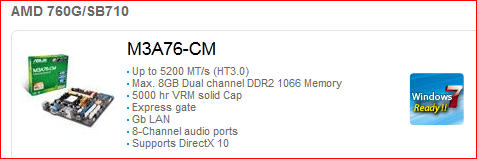
If you want slower that is up to you. The page for your motherboard is down at Asus at the moment, but your motherboard actually supports up to DDR2 1066,

m3a76.PNG

but it is definitely not worth the price difference for the little bit extra speed.

By the way a couple of things to consider if you do go to 8 GB,

1. If you plan on upgrading the rest of your computer any time in the near future and had intentions of moving the memory, you won't be able to as all AMD and Intel boards now take DDR3.

2. Don't be surprised if you do take it to 8 GB and this happens,

The system memory that is reported in the System Information dialog box in Windows Vista is less than you expect if 4 GB of RAM is installed

Note When the physical RAM that is installed on a computer equals the address space that is supported by the chipset, the total system memory that is available to the operating system is always less than the physical RAM that is installed. For example, consider a computer that has an Intel 975X chipset that supports 8 GB of address space. If you install 8 GB of RAM, the system memory that is available to the operating system will be reduced by the PCI configuration requirements. In this scenario, PCI configuration requirements reduce the memory that is available to the operating system by an amount that is between approximately 200 MB and approximately 1 GB. The reduction depends on the configuration.

Basically means that you will have somewhere around 7 GB available; could be a bit more or a bit less; depending on what is connected to the motherboard (which is pretty much everything from the video card to the sound card, etc).
 

My Computer

Computer type
PC/Desktop
Computer Manufacturer/Model Number
Me
OS
Win 7 Ultimate x64
CPU
FX-8350 @ 4.6 GHz so far
Motherboard
Asus M5A97 EVO
Memory
ADATA XPG V1 Series Black 8GB DDR3 1600
Graphics Card(s)
Sapphire R9 270x Dual-X
Sound Card
Xonar DGX w/ Corsair Vengence 1300
Monitor(s) Displays
Acer S232HL Abid
Screen Resolution
1920x1080
Hard Drives
120 GB OCZ Vertex 3
500 GB Seagate 7200.12
PSU
Antec Earthwatts 650W Green
Case
Antec Three Hundred
Cooling
Cooler Master 212 EVO
Keyboard
Logitech G510
Mouse
Logitech G500s
Internet Speed
35000/3000
A couple of good choices....

If anyone of you guys dont mind helping me pick the right ones on Amazon?
that's where i buy stuff and i feel more safe.
i will buy a whole new set to get to 8G of ram since each solt can hold max 2G.
please and thank you guys for helping me.

is this the right ram?
Amazon.com: PNY OPTIMA 4GB (2x2GB) Dual Channel Kit DDR2 667 MHz PC2-5300 Desktop DIMM Memory Modules MD4096KD2-667: Electronics

45$ for the 4G of ram

You should be fine with 2 sets of either:

Amazon.com: Corsair XMS2 4 GB (2 X 2 GB) PC2-6400 800 MHz 240-PIN DDR2 Dual-Channel Memory Kit - TWIN2X4096-6400C5: Electronics

OR

Amazon.com: Crucial Technology CT2CP25664AA800 4GB 2GBx2 240-pin DIMM DDR2 PC2-6400 Memory Kit: Electronics

PC2 6400 will give you a little more speed than your current ram & your motherboard will handle it easily.

Just remember when you get the sets, be sure to install the memory modules in the correct dimm slots. I'm not sure about your motherboard requirements for this. Many motherboards require you to install one set in dimm slots 1 & 3, and the other set in 2 & 4. Otherwise you will not be taking advantage of the dual-channel advantage. (See my edit below, - it's 1&2 and 3&4).

Another note - You can go with PC2 8500, but on rare occasions some motherboards have intermittent issues when running the fastest ram & maximum capacity that they are advertised to handle.

Edit - I just checked your motherboard manual & you need to install one matched ram set in dimms 1 & 2, and the other set in 3 & 4

I also noticed a note in the manual about limitations on 8 GB of PC2 8500, so I'd definitely go with the PC2 6400 to avoid any possible headaches!
 
Last edited:

My Computer

Computer type
PC/Desktop
Computer Manufacturer/Model Number
Custom Build
OS
Windows 7 Professional 64 Bit SP1
CPU
Intel i7-3770K. Mild Overclock to 4.2 Ghz
Motherboard
ASUS Sabertooth Z77
Memory
Crucial Ballistix Sport 32GB DDR3-1600 (PC3-12800)
Graphics Card(s)
Intel 4000 - On CPU
Sound Card
On Board
Monitor(s) Displays
HP w2408h
Screen Resolution
1920 x 1200
Hard Drives
Samsung 840 Pro 256Gb SSD, --
Two - WDC WD1001FALS-00J7B0 SATA
PSU
Antec EarthWatts Green Series 650 Watt ATX
Case
Fractal Design Core 3000 ATX
Cooling
Corsair H80i Water Cooled
Keyboard
Logitech Illuminated
Mouse
Logitech Wireless Trackball M570 + Touchpad T650
Internet Speed
9.5 Mbps down - 25.4 Mbps upload
Antivirus
MSE
Browser
IE 10, Chrome
If anyone of you guys dont mind helping me pick the right ones on Amazon?
that's where i buy stuff and i feel more safe.
i will buy a whole new set to get to 8G of ram since each solt can hold max 2G.
please and thank you guys for helping me.

is this the right ram?
Amazon.com: PNY OPTIMA 4GB (2x2GB) Dual Channel Kit DDR2 667 MHz PC2-5300 Desktop DIMM Memory Modules MD4096KD2-667: Electronics

45$ for the 4G of ram

You should be fine with 2 sets of either:

Amazon.com: Corsair XMS2 4 GB (2 X 2 GB) PC2-6400 800 MHz 240-PIN DDR2 Dual-Channel Memory Kit - TWIN2X4096-6400C5: Electronics

OR

Amazon.com: Crucial Technology CT2CP25664AA800 4GB 2GBx2 240-pin DIMM DDR2 PC2-6400 Memory Kit: Electronics

PC2 6400 will give you a little more speed than your current ram & your motherboard will handle it easily.

Just remember when you get the sets, be sure to install the memory modules in the correct dimm slots. I'm not sure about your motherboard requirements for this. Many motherboards require you to install one set in dimm slots 1 & 3, and the other set in 2 & 4. Otherwise you will not be taking advantage of the dual-channel advantage. (See my edit below, - it's 1&2 and 3&4).

Another note - You can go with PC2 8500, but on rare occasions some motherboards have intermittent issues when running the fastest ram & maximum capacity that they are advertised to handle.

Edit - I just checked your motherboard manual & you need to install one matched ram set in dimms 1 & 2, and the other set in 3 & 4

I also noticed a note in the manual about limitations on 8 GB of PC2 8500, so I'd definitely go with the PC2 6400 to avoid any possible headaches!


thank you very much for the help :D
going to buy them next week
 

My Computer

Computer Manufacturer/Model Number
ASUSTeK Computer INC
OS
Windows 7 Professional x64
CPU
AMD Athlon 64x2 Dual core Processor 5400+
Motherboard
ASUSTek Computer INC
Memory
5GB DDR2
Graphics Card(s)
ATi Radeon Hd 4650
Sound Card
Realtek High Definition Audio
Screen Resolution
1680x1024 AOC
Hard Drives
250GB
Internet Speed
28mbps
Back
Top