Solved How to find out my ram frequency !

HpBaxxter

New member
Local time
10:45 PM
Messages
55
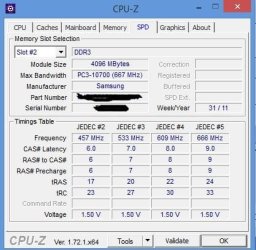
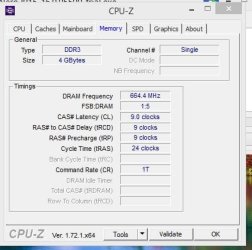
I want to buy an additional ram, but I didn't find out my ram frequency, help me please !

I looked at the ram and it appears pc3 10600s but Speccy and Cpu Z says 10700 !!!
is it 667 MHz or 667*2= 1333 MHz ?
 

Attachments
  • ram 2.JPG
    ram 2.JPG
    33.7 KB · Views: 9
  • ram.JPG
    ram.JPG
    41.9 KB · Views: 9
Last edited:

My Computer My Computer

At a glance

Windows 64bitI74 GB1GB
Computer type
PC/Desktop
Computer Manufacturer/Model Number
Dell
OS
Windows 64bit
CPU
I7
Memory
4 GB
Graphics Card(s)
1GB
Sound Card
SRS
Hard Drives
500 GB
Browser
IE 11
I looked at the ram and it appears pc3 10600s but Speccy and Cpu Z says 10700 !!!
is it 667 MHz or 667*2= 1333 MHz ?

Do you say "it appears pc3 10600s" because you personally opened the case and read that off the sticks?

What brand and model do you have right now?

DDR stands for "double data rate"; so it is 667*2=1333.

DDR3 1333 can be designated as PC3 10600 or PC3 10666. A few manufacturer's use the PC3 10700 designation, but that is less common.

You could also go to Crucial.com and let its configurator sniff your PC. It will make recommendations for compatible RAM.

Have you looked at the compatible memory list at the motherboard manufacturer's web site? You don't have to stick with what's listed, but those listed should be compatible for sure.

It's generally recommended to match all sticks exactly (brand, model, size, voltage, etc), but you can often get away with not doing that.
 

My Computer My Computer

At a glance

Windows 7 Home Premium SP1, 64-bitIntel Skylake i5-6600K, not overclocked8 GB HyperX DDR4-2666 (2 x 4 GB)none; graphics are integrated on CPU
Computer type
PC/Desktop
Computer Manufacturer/Model Number
Ignatz Special; 4 speed manual gearbox; factory air conditioning; one of one
OS
Windows 7 Home Premium SP1, 64-bit
CPU
Intel Skylake i5-6600K, not overclocked
Motherboard
AsRock Z170M Extreme 4, micro ATX
Memory
8 GB HyperX DDR4-2666 (2 x 4 GB)
Graphics Card(s)
none; graphics are integrated on CPU
Sound Card
onboard: Realtek ALC1150; external: USB Behringer UF0-202
Monitor(s) Displays
Dell S2340M 23 inch IPS
Screen Resolution
1600 x 900
Hard Drives
System: Crucial MX100 series SSD, 128 GB;
Data: Samsung Spinpoint 103SJ, 1 TB;
Backup: WD Caviar Green WD30EZRX-00D8PB0, 3 TB
PSU
Rosewill SilentNight 500 watt fanless, semi-modular
Case
Antec Solo II
Cooling
Noctua NH-U12S; Noctua F12 intake, Noctua S12A exhaust
Keyboard
Microsoft 200 6JH-00001 USB
Mouse
Dell or Microsoft optical wired; USB
Antivirus
Microsoft Security Essentials and Malwarebytes Premium
Browser
Pale Moon
Other Info
All fans PWM; speeds at idle: CPU circa 500 rpm; intake circa 600 rpm; exhaust circa 600 rpm; CPU temps 27 idle and 47 C load in a warm room (27 C/81 F) when running Intel Extreme Tuning Utility stress test.
I looked at the ram and it appears pc3 10600s but Speccy and Cpu Z says 10700 !!!
is it 667 MHz or 667*2= 1333 MHz ?

Do you say "it appears pc3 10600s" because you personally opened the case and read that off the sticks?

What brand and model do you have right now?

DDR stands for "double data rate"; so it is 667*2=1333.

DDR3 1333 can be designated as PC3 10600 or PC3 10666. A few manufacturer's use the PC3 10700 designation, but that is less common.

You could also go to Crucial.com and let its configurator sniff your PC. It will make recommendations for compatible RAM.

Have you looked at the compatible memory list at the motherboard manufacturer's web site? You don't have to stick with what's listed, but those listed should be compatible for sure.

It's generally recommended to match all sticks exactly (brand, model, size, voltage, etc), but you can often get away with not doing that.

Yes I opened the case its Samsung 4 gb 2Rx8 PC3- 10600S. I forget to upload photos, I uploaded them on the top.
So I must care about the frequency only ?
 

My Computer My Computer

At a glance

Windows 64bitI74 GB1GB
Computer type
PC/Desktop
Computer Manufacturer/Model Number
Dell
OS
Windows 64bit
CPU
I7
Memory
4 GB
Graphics Card(s)
1GB
Sound Card
SRS
Hard Drives
500 GB
Browser
IE 11
Yes I opened the case its Samsung 4 gb 2Rx8 PC3- 10600S. I forget to upload photos, I uploaded them on the top.
So I must care about the frequency only ?

No.

You must care about additional specs, particularly the voltage, non-ECC, unbuffered, 240 pin, DDR3.

Ideally, the identical brand and model. But that's not always possible and you can usually get away with other brands if the specs match otherwise.

For some reason, it looks like you blacked out the model number of your Samsung in that pic.

I'm guessing you now have just 1 stick of RAM, a 4 GB Samsung.

You could:

1: try to find another 4 GB Samsung stick with a matching model number, identical in as many respects as possible.

2: inspect the motherboard's qualified memory list as I mentioned earlier and buy only what's on that list.

3: go to Crucial.com and let its configurator sniff and make a recommendation, as I mentioned earlier. Crucial makes good RAM and there is a good chance it will work fine with your Samsung.

If you are in a lather about this, throw away your current RAM and buy a "kit" of two matched 4 GB sticks or two matched 8 GB sticks or whatever you want for a total and stay with ONLY the stuff mentioned on the manufacturer's list. That isn't what I'd do, but it's what you should do if you are in a high state of anxiety about it.
 

My Computer My Computer

At a glance

Windows 7 Home Premium SP1, 64-bitIntel Skylake i5-6600K, not overclocked8 GB HyperX DDR4-2666 (2 x 4 GB)none; graphics are integrated on CPU
Computer type
PC/Desktop
Computer Manufacturer/Model Number
Ignatz Special; 4 speed manual gearbox; factory air conditioning; one of one
OS
Windows 7 Home Premium SP1, 64-bit
CPU
Intel Skylake i5-6600K, not overclocked
Motherboard
AsRock Z170M Extreme 4, micro ATX
Memory
8 GB HyperX DDR4-2666 (2 x 4 GB)
Graphics Card(s)
none; graphics are integrated on CPU
Sound Card
onboard: Realtek ALC1150; external: USB Behringer UF0-202
Monitor(s) Displays
Dell S2340M 23 inch IPS
Screen Resolution
1600 x 900
Hard Drives
System: Crucial MX100 series SSD, 128 GB;
Data: Samsung Spinpoint 103SJ, 1 TB;
Backup: WD Caviar Green WD30EZRX-00D8PB0, 3 TB
PSU
Rosewill SilentNight 500 watt fanless, semi-modular
Case
Antec Solo II
Cooling
Noctua NH-U12S; Noctua F12 intake, Noctua S12A exhaust
Keyboard
Microsoft 200 6JH-00001 USB
Mouse
Dell or Microsoft optical wired; USB
Antivirus
Microsoft Security Essentials and Malwarebytes Premium
Browser
Pale Moon
Other Info
All fans PWM; speeds at idle: CPU circa 500 rpm; intake circa 600 rpm; exhaust circa 600 rpm; CPU temps 27 idle and 47 C load in a warm room (27 C/81 F) when running Intel Extreme Tuning Utility stress test.
Back
Top