How to fix a nuked user profile partition? Sans reinstall?

ThelastCanadian

New member
Local time
6:38 PM
Messages
29
Alright, so, long story short:
I was trying to make a RAMdisk. I succeeded wonderfully, but did not pay attention to the drive letter, assigning it to the same partition I maintain my user files on. It formatted everything.

The files aren't so important - though I'm sure I'll figure out in a week I lost something I would rather have.

However, I am encountering some problems now; I was wondering if anyone knew of a way to fully repair a Windows profile without reloading the operating system or creating another user profile.

Are there tools to fix this? As one example of an error I am now encountering, I cannot use any icons from imageres.dll to customize the user folders (which all show as normal folder icons).

Even if you don't have suggestions for a larger solution, fixing that one problem will probably get me back on the ground at least.
 

My Computer My Computer

At a glance

Win7 Home Premium 64x
OS
Win7 Home Premium 64x

My Computer My Computer

At a glance

Win7 Ultimate X64Intel i5 3570K8GB DDR3 1600Onboard
Computer type
PC/Desktop
Computer Manufacturer/Model Number
Pauly Special
OS
Win7 Ultimate X64
CPU
Intel i5 3570K
Motherboard
Gigabyte Z77X-DS3H
Memory
8GB DDR3 1600
Graphics Card(s)
Onboard
Sound Card
Onboard
Screen Resolution
1280x1024
Hard Drives
Samsung 840 Evo SSD (OS)
1TB Spinner (Data)
PSU
800W Arctic
Case
Cooler Master
Cooling
3x120mm Fans
Keyboard
MS Wireless
Mouse
MS Wireless
Internet Speed
20M
I have already used SFC /scannow. It has found and fixed corrupted files, but the problem persists.
 

My Computer My Computer

At a glance

Win7 Home Premium 64x
OS
Win7 Home Premium 64x
Can you post a screenshot of Drive Manager?

Also, softwares like AOMEI partition assistant have some partition recovery features.

Other programs that recover stuff I recommend is Recuva, that can recover files, but not where the file was in the folder structure.
 

My Computer My Computer

At a glance

Win 7 Pro 64-bit 7601AMD Phenom 9650 QuadCore, revision DR-B35 GB yes I run 2x 2GB and 1x 1GB, different b...NVIDIA GeForce 9800 GT 512 Mb, unknown manufa...
Computer type
PC/Desktop
Computer Manufacturer/Model Number
custom built
OS
Win 7 Pro 64-bit 7601
CPU
AMD Phenom 9650 QuadCore, revision DR-B3
Motherboard
ASUS M4A78
Memory
5 GB yes I run 2x 2GB and 1x 1GB, different brand, spank me.
Graphics Card(s)
NVIDIA GeForce 9800 GT 512 Mb, unknown manufacturer.
Sound Card
Crappy Realtek Integrated Audio
Monitor(s) Displays
Fujitsu Siemens P19-3P
Screen Resolution
1280 x 1024 x 32 bits @ 60 Hz Oh yeah, 4:3 rocks!
Hard Drives
(1) MAXTOR S TM3320613AS SATA Disk Device (2) STM35004 18AS SATA Disk Device (3) TOSHIBA USB 2.5"-HDD
PSU
whatever, around 450w
Case
Scavenged from old company PC, 10+ years old
Cooling
CPU fan, GPU fan, case fan, nothing fancy
Keyboard
Microsoft, PS/2, white.
Mouse
Optical, logitec.
Internet Speed
effective max speeds: 70-ish kB/s down 30-ish kB/s up
Antivirus
Avira, free edition.
Browser
Firefox with FXChrome to make it look like Google Chrome :P
Other Info
Was discarded by previous owner due to "horrible performance".
Was running Win Xp from a IDE drive. Yeah. Was a pain.
SATA II drive and Win7 and it zips away! Yay!
Can you post a screenshot of Drive Manager?

Also, softwares like AOMEI partition assistant have some partition recovery features.

Other programs that recover stuff I recommend is Recuva, that can recover files, but not where the file was in the folder structure.

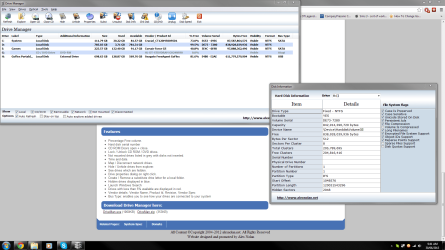
At this point in time I'm thinking partition restores might do more harm than good, but I'll keep it in mind if nothing else comes up. As for that screenshot, please see attached. C and E are SSD's, while D is my user partition. It only holds one user, myself.
 

Attachments

  • snipsnap.PNG
    snipsnap.PNG
    97.9 KB · Views: 5

My Computer My Computer

At a glance

Win7 Home Premium 64x
OS
Win7 Home Premium 64x
Back
Top