
Iknowwindows7
New member
- Local time
- 8:33 AM
- Messages
- 3
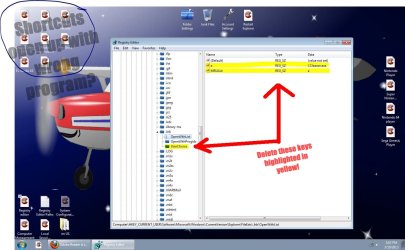
navigate to this key: HKEY_CURRENT_USER\Software\Microsoft\Windows\CurrentVersion\Explorer\FileExts\.lnk >> just delete the keys highlighted in yellow as shown in the photo below. and log off and back on again.. there... should be all fixed ..Hope This Helps..
Attachments
My Computer
At a glance
Windows 7 Ultimate 32 bit
- OS
- Windows 7 Ultimate 32 bit

 this is for a current user accounts.. i found this so that standard users won't need administrative permissions to merge a registry file like the ones in the link you gave me..


