how to fix audio problem in WIN 7

anna92

New member
Local time
8:15 PM
Messages
6
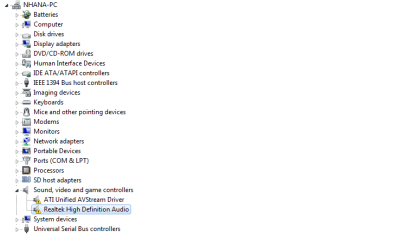
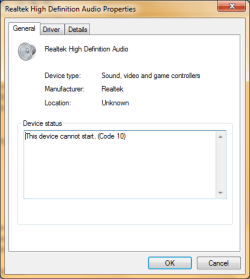
im having some difficulties in fixing my audio device. i googled n even went to youtube to learn to fix it but nothing changed. i did almost everything stated.i tried to update my driver but it said "device cannot start (code 10). help please.
im using acer aspire 4520.
 

Attachments

  • capture-20120429-155602l.png
    capture-20120429-155602l.png
    5.9 KB · Views: 28
  • capture-20120429-155705k.png
    capture-20120429-155705k.png
    11.6 KB · Views: 34
  • capture-20120429-155928l.png
    capture-20120429-155928l.png
    10.5 KB · Views: 22

My Computer My Computer

OS
Windows 7 Ultimate 32-bit
Code 10 is usually a driver error. Are you using the Acer supplied sound driver (or trying to install it)? If not that is the first step, many times non-vendor sound drivers will not work or not work correctly.

I see you also have what looks like HDMI audio from the ATI Video Card, that also has the Code 10. There can also be some type of conflict that is causing the Code 10. Disable the ATI audio in the Device Manager and see if that will allow you to install the Acer sound driver.
 

My Computer My Computer

Computer type
PC/Desktop
Computer Manufacturer/Model Number
My Own Build
OS
Windows 10 64 bit
CPU
Intel i7 6700K
Motherboard
ASUS ROG Maximus VIII Hero
Memory
16GB Corsair Dominator
Graphics Card(s)
Intel CPU Graphics
Sound Card
RealTek
Monitor(s) Displays
27" Dell S2719dgf
Screen Resolution
2560X1440
Hard Drives
1 TB Samsung 850 EVO SSD for Win 10 Pro
500GB Samsung 850 EVO SSD for Win 10 Insider
2 TB drive for backup
PSU
EVGA Supernova 750G2
Case
BeQuiet Silent Base 600
Cooling
Deepcool Captain 120EX
Keyboard
Microsoft Wireless 2000
Mouse
Microsoft wireless
Internet Speed
100 MB/sec (Cable)
Antivirus
Microsoft Defender and Malwarebytes
Browser
Edge/Firefox
Other Info
Cakewalk (Sonar) by BandLab and Studio One 4.1 Pro recording studio software. MOTU 896Mk3 Hybrid recording interface, Frontier Tranzport wireless control unit, Behringer X-Touch Control Surface.
Five USB connected optical drives for CD Audio production using Nero BurningROM
what's the difference between using acer supplied sound driver and installing it? sorry, im kinda new to this. i disabled ATI and also tried reinstall realtek before and didnt work.
 

My Computer My Computer

OS
Windows 7 Ultimate 32-bit
Many times, PC Vendors will have a custom OEM motherboard and chipset implementation which requires the vendor's drivers for a device to work properly. The sound chip vendor, such as Realtek has generic drivers and if the PC vendor does not do anything special then the generic sound chip vendor's drivers will work OK. I've seen statements on RealTek and IDT sites about this exact subject.

I do a lot of support on the Dell users forum and we see this specific problem frequently on there. Dell drivers must be used for all functions to work. In fact the generic chip vendor's drivers won't even install on some systems.

This may not be the problem with your specific situation, but the first step is to install the PC vendor's sound drivers.

 

My Computer My Computer

Computer type
PC/Desktop
Computer Manufacturer/Model Number
My Own Build
OS
Windows 10 64 bit
CPU
Intel i7 6700K
Motherboard
ASUS ROG Maximus VIII Hero
Memory
16GB Corsair Dominator
Graphics Card(s)
Intel CPU Graphics
Sound Card
RealTek
Monitor(s) Displays
27" Dell S2719dgf
Screen Resolution
2560X1440
Hard Drives
1 TB Samsung 850 EVO SSD for Win 10 Pro
500GB Samsung 850 EVO SSD for Win 10 Insider
2 TB drive for backup
PSU
EVGA Supernova 750G2
Case
BeQuiet Silent Base 600
Cooling
Deepcool Captain 120EX
Keyboard
Microsoft Wireless 2000
Mouse
Microsoft wireless
Internet Speed
100 MB/sec (Cable)
Antivirus
Microsoft Defender and Malwarebytes
Browser
Edge/Firefox
Other Info
Cakewalk (Sonar) by BandLab and Studio One 4.1 Pro recording studio software. MOTU 896Mk3 Hybrid recording interface, Frontier Tranzport wireless control unit, Behringer X-Touch Control Surface.
Five USB connected optical drives for CD Audio production using Nero BurningROM
oh, okay. thanks :) what should i do after installing the driver?
 

My Computer My Computer

OS
Windows 7 Ultimate 32-bit
Back
Top