how to fix network issues with possible IP conflicts

jcwood

New member
Local time
3:07 AM
Messages
7
the problem i'm trying to figure is out is why REC-PC-1 and FRONT-DESK-PC won't connect to the network after i have assigned fixed IPS. I have 2 x routers, a talktalk technicolor router for my IP phones and the 2nd is a netgear router for my network PCS and printers

If i set the DHCP to ON on both routers I can get FRONT-DESK PC online but not connected to the network. message is cable unplugged.

REC-1-PC could get online and on the network previously but now it says unrecognised network. no matter if i have both routers as DHCP ON

the technicolor router cannot be set to DHCP OFF - If i choose custom set up the router will not authenticate so i have to leave DHCP on


i've tried swapping the DSL lines, deleting all devices and setting up again on the netgear router table and having only 1 router on for phones and PCs together and there is always some connection problem or network problem

i've checked the ethernet points with different cables and sometimes its shows the connection is fine and then other days it shows unknown network. i also have a 48 port switch with a fixed IP assigned to the PCs router

192.168.0.3 FRONT-DESK-PC
192.168.0.5 REC-PC-2
192.168.0.4 REC-PC-1
192.168.0.239 48-PORT-SWITCH

FRONT-DESK-PC is running windows XP
REC-PC-1 cannot access the internal network or reach internet.
REC-PC-2 can reach network and internet

if i Ping the PCs i get packets sent 4, packets reached 4 , packets lost 0

any advice on how to get past the unrecognized network message and have all 3 x pcs seeing each other on the network would be really appreciated!

Thanks

Jamie
 

My Computer My Computer

Computer type
PC/Desktop
Computer Manufacturer/Model Number
ACER
OS
windows 7 32 bit
Browser
Chrome
Ok you can't have both routers handing out IP's through DHCP, you absolutely must turn off DHCP on one of those routers or it won't work. It's usually best to turn off DHCP on the secondary router. Both routers will be using the same gateway address from the router which is the DHCP server. It has to be this way if you want everything to work. ;)

As for the static IP's, you must assign IP's which are outside the range of DHCP IP's that the router is handing out, otherwise you will have an IP conflict.

So if the router's DHCP uses a range of 100 IP's from 192.168.0.2-192.168.0.101, then you must use IP's starting from 192.168.0.102 etc., or you can change the range of IP's that the router is using, either way you can't use IP's which can be included in the DHCP range.
 

My Computer My Computer

Computer type
PC/Desktop
Computer Manufacturer/Model Number
Home built
OS
Windows 7 Ult, Windows 8.1 Pro,
CPU
Q9650-4.275GHz, E8600 4.5GHz, E6750-3.8GHz
Motherboard
Evga 780i FTW
Memory
G.Skill PC2 9600 1200Mhz 5 5 5 15 2T
Graphics Card(s)
GTX480
Sound Card
Asus Xonar D2
Monitor(s) Displays
HannsG
Screen Resolution
1680X1050
Hard Drives
GSkill Phoenix Pro 120GB SSD
PSU
ThermalTake Toughpower 1000Watt modular
Case
ThermalTake XaserV
Cooling
Xigmatek S1283
Keyboard
Logitech G15
Mouse
Logitech G9
Internet Speed
T1
Hi

I have the 2 x routers running on separate adsl broadband lines.

The netgear router is 192.168.0.1 and the technicolor router is 192.168.1.254

If these 2 x routers are on different subnets would the dhcp being on turned on for the technicolor affect the range I use for the fixed ips on the netgear router?
 

My Computer My Computer

Computer type
PC/Desktop
Computer Manufacturer/Model Number
ACER
OS
windows 7 32 bit
Browser
Chrome
Hi

I have the 2 x routers running on separate adsl broadband lines.

The netgear router is 192.168.0.1 and the technicolor router is 192.168.1.254

If these 2 x routers are on different subnets would the dhcp being on turned on for the technicolor affect the range I use for the fixed ips on the netgear router?
 

My Computer My Computer

Computer type
PC/Desktop
Computer Manufacturer/Model Number
ACER
OS
windows 7 32 bit
Browser
Chrome
Hi

I have the 2 x routers running on separate adsl broadband lines.

The netgear router is 192.168.0.1 and the technicolor router is 192.168.1.254

If these 2 x routers are on different subnets would the dhcp being on turned on for the technicolor affect the range I use for the fixed ips on the netgear router?

Two different lines would create two different networks so one shouldn't effect the other.

Most likely the static IP's weren't set up correctly. If you want all PC's to see each other then put them on the same subnet, same router, same default gateway etc.
 

My Computer My Computer

Computer type
PC/Desktop
Computer Manufacturer/Model Number
Home built
OS
Windows 7 Ult, Windows 8.1 Pro,
CPU
Q9650-4.275GHz, E8600 4.5GHz, E6750-3.8GHz
Motherboard
Evga 780i FTW
Memory
G.Skill PC2 9600 1200Mhz 5 5 5 15 2T
Graphics Card(s)
GTX480
Sound Card
Asus Xonar D2
Monitor(s) Displays
HannsG
Screen Resolution
1680X1050
Hard Drives
GSkill Phoenix Pro 120GB SSD
PSU
ThermalTake Toughpower 1000Watt modular
Case
ThermalTake XaserV
Cooling
Xigmatek S1283
Keyboard
Logitech G15
Mouse
Logitech G9
Internet Speed
T1
Hi

I have the 2 x routers running on separate adsl broadband lines.

The netgear router is 192.168.0.1 and the technicolor router is 192.168.1.254

If these 2 x routers are on different subnets would the dhcp being on turned on for the technicolor affect the range I use for the fixed ips on the netgear router?

If you have two subnets then you will want a DHCP server on each subnet to provide the appropriate addresses (One for the 192.168.0.x and the other for the 192.68.1.x) since the scope would not match if only one was enabled.

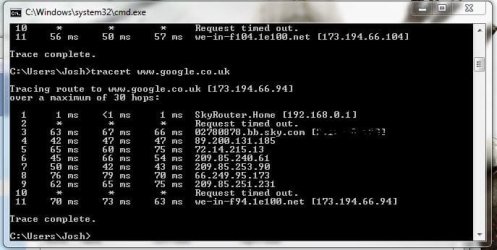
I am interested as to whether or not the devices are receiving the correct default gateway. On the machine unable to connect to the internet could you please enter the following in a command prompt:

Code:
tracert 173.194.66.94

If that works and you receive similar results to mine below then please enter this:

Code:
tracert www.google.co.uk

tracert.JPG

The IP address is http://www.google.co.uk .

You said you pinged the devices in the internal network, did you ping via computer name or ip address?

Many Thanks,
Josh
 
Last edited:

My Computer My Computer

Computer type
PC/Desktop
Computer Manufacturer/Model Number
Custom Built
OS
Windows 7 Professional x64 SP1 ; Windows Server 2012 R2 Standard
CPU
Intel Core i5 2400 @ 3.10GHz
Motherboard
Foxconn H67MP-S/-V/H67MP
Memory
8.0GB DDR3 @ 665MHz (2GBx4)
Graphics Card(s)
AMD Radeon HD 6870
Sound Card
Realtek High Definition Audio
Monitor(s) Displays
AOC 2243W & SMB1930NW
Screen Resolution
1440x900 & 1920x1080
Hard Drives
977GB Seagate ST31000524AS ATA Drive (SATA)
250GB WD iSCSI attached Drive
PSU
750W Gaming PSU
Case
Novatech Night
Cooling
Fan
Keyboard
Dell Standard PS/2 Keyboard
Mouse
R.A.T 07 Gaming Mouse
Internet Speed
Download: 10 Mbps Ping: 30ms Upload: 0.81 Mbps
Browser
Google Chrome
Other Info
Optiarc DVD RW AD-5260S ATA Device
Hi Josh

I tried pinging both IP address and web address but was unreachable

I tried the tracert 173.194.66.94 but this did not show any results.

at the moment the default gateway shows blank and the IP address when trying to get off the DHCP shows 169. etc

i have had more PCS drop off the network now so the problem is getting worse.

Thanks

Jamie
 

My Computer My Computer

Computer type
PC/Desktop
Computer Manufacturer/Model Number
ACER
OS
windows 7 32 bit
Browser
Chrome
169.x.x.x is an automatic address that Windows machines generate if they are unable to receive a DHCP Server.

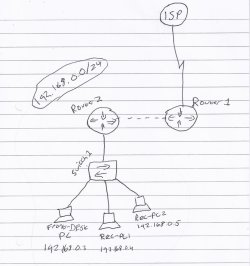
To better understand your current network configuration I have drawn your network topology. I do apologise if these questions have been answered before...

How is Router 2 and Router 1 connected? Ethernet? If so what cable is being used?

What is the subnet of Router 1? This is important as it can determine how many DHCP servers you need as well as what routes your router must take.

Are the PCs connected assigned addresses statically? If not could you please assign them statically for test purposes. Please enter the IP addresses you have stated with a subnet mask of 255.255.255.0

Please enter the default gateway of the IP address for Router 2 (Based on what you have said it should be 192.168.0.1)

For testing please use the following DNS servers for all machines:

Preferred: 8.8.4.4

Alternate: 8.8.8.8

Scan0001.jpg

Many Thanks,
Josh
 

My Computer My Computer

Computer type
PC/Desktop
Computer Manufacturer/Model Number
Custom Built
OS
Windows 7 Professional x64 SP1 ; Windows Server 2012 R2 Standard
CPU
Intel Core i5 2400 @ 3.10GHz
Motherboard
Foxconn H67MP-S/-V/H67MP
Memory
8.0GB DDR3 @ 665MHz (2GBx4)
Graphics Card(s)
AMD Radeon HD 6870
Sound Card
Realtek High Definition Audio
Monitor(s) Displays
AOC 2243W & SMB1930NW
Screen Resolution
1440x900 & 1920x1080
Hard Drives
977GB Seagate ST31000524AS ATA Drive (SATA)
250GB WD iSCSI attached Drive
PSU
750W Gaming PSU
Case
Novatech Night
Cooling
Fan
Keyboard
Dell Standard PS/2 Keyboard
Mouse
R.A.T 07 Gaming Mouse
Internet Speed
Download: 10 Mbps Ping: 30ms Upload: 0.81 Mbps
Browser
Google Chrome
Other Info
Optiarc DVD RW AD-5260S ATA Device
ip conficts

Hi

There are 2 x ADSL lines connected to the routers. (tecnicolor and netgear)

Technicolor is on subnet 192.168.1.254 - router set up has DHCP on in its basic settings. When I try to set it up on custom settings the router fails to authenticate and cannot link to the wired network

Netgear is on subnet 192.168.0.1 - router can have DHCP turned off or on quite easily but when i try altering the settings the technicolor router fails.

These are both connected by a 48 Port Switch as a bridging connection - i think there is a setting I can change on here that allows DHCP on or off, it is currently on static IP address 192.168.0.239 and default gateway 192.168.0.1

the DNS servers for the netgear router are set to receive off ISP and are blanked out

subnet masks are both 255.255.255.0
 

My Computer My Computer

Computer type
PC/Desktop
Computer Manufacturer/Model Number
ACER
OS
windows 7 32 bit
Browser
Chrome
Are the devices connected to the router or the switch? The issue may be because you are trying to merge two networks in one therefore the devices aren't receiving the correct default gateway.


On the switch do you have any VLANS configured? You cannot assign two DHCP servers on one broadcast domain (LAN). The only possibility to configure the addressing appropriately without the use of VLANS would be to have one router as a DHCP server and then to configure the other devices that you do not want to be apart of that addressing scheme given by the DHCP server statically. Typically I would setup DHCP server on the router that will service the phones since they may not allow static IP address management.

Please unplug the technicolour router and any IP phones (We will integrate this later after the PCs have been configured) so that the netgear is the main router with an internet connection (Disable DHCP on the netgear)

For the pcs setup a static IP address of the following and then test connection using PING command as well as the tracert command as listed earlier:

IP Address: 192.168.0.X (Replace X with a host number of your choice, this must be different on each device)

Subnet Mask: 255.255.255.0

Default Gateway: 192.168.0.1


As for the DNS servers could you please use the previous ones stated which are:

Preferred: 8.8.4.4

Alternate: 8.8.8.8

Please post back your results, as stated earlier I will help you to get the IP phones integrated after the PCs have been configured

Sorry if this has been long,
Josh! :)
 

My Computer My Computer

Computer type
PC/Desktop
Computer Manufacturer/Model Number
Custom Built
OS
Windows 7 Professional x64 SP1 ; Windows Server 2012 R2 Standard
CPU
Intel Core i5 2400 @ 3.10GHz
Motherboard
Foxconn H67MP-S/-V/H67MP
Memory
8.0GB DDR3 @ 665MHz (2GBx4)
Graphics Card(s)
AMD Radeon HD 6870
Sound Card
Realtek High Definition Audio
Monitor(s) Displays
AOC 2243W & SMB1930NW
Screen Resolution
1440x900 & 1920x1080
Hard Drives
977GB Seagate ST31000524AS ATA Drive (SATA)
250GB WD iSCSI attached Drive
PSU
750W Gaming PSU
Case
Novatech Night
Cooling
Fan
Keyboard
Dell Standard PS/2 Keyboard
Mouse
R.A.T 07 Gaming Mouse
Internet Speed
Download: 10 Mbps Ping: 30ms Upload: 0.81 Mbps
Browser
Google Chrome
Other Info
Optiarc DVD RW AD-5260S ATA Device
hi josh


thanks for the advice, i've had a few more problems over the weekend

i tried to reconfigure the network by starting with one router at at time and have got into a worse position. The 48 port switch has come off the network and I cannot access it. ive tried it's IP address 192.169.0.239 and this will not work and also the switch itself by ethernet cable will not allow me access. so no pcs in the building can receive a wired connection by ethernet and the phones router cannot either.

if i can't get onto the switch to see if the DHCP has somehow got DHCP on i cannot make any changes to turn it off which i think may be causing the problem. i've been reluctant to factory default the switch but not sure what else to try... not a great start to monday!

thanks
 

My Computer My Computer

Computer type
PC/Desktop
Computer Manufacturer/Model Number
ACER
OS
windows 7 32 bit
Browser
Chrome
i managed to get onto the switch and turn the DHCP back to off after it had factory reset. i checked the VLAN settings and there were 3 options there but all unchecked.
so currently there are no VLANS selected and the DHCP is off.

I still havent been able to bring back the wired pcs connections though after getting access to the switch.

not sure what to do from here?
 

My Computer My Computer

Computer type
PC/Desktop
Computer Manufacturer/Model Number
ACER
OS
windows 7 32 bit
Browser
Chrome
From my experience with cisco equipment it is advised to have all ports on one vlan and then create and assign ports to different ones. Could you create a vlan and assign all ports to it.

If you followed my previous post your netgear should be the only router connected to the switch at the moment with no DHCP server. For test purposes please manually assign a PC with a static IP address using the stack mentioned in the previous post - http://www.sevenforums.com/tutorials/15037-dns-addressing-how-change-windows-7-a.html - Follow this tutorial but also add an IP address, Subnet mask and Default gateway as listed in my previous post. Once done please test internet connectivity by pinging Google

Code:
ping www.google.com

If the machine receives internet connectivity then please post back and I will walk you through enabling the netgear router as a DHCP server.

Josh! :)
 

My Computer My Computer

Computer type
PC/Desktop
Computer Manufacturer/Model Number
Custom Built
OS
Windows 7 Professional x64 SP1 ; Windows Server 2012 R2 Standard
CPU
Intel Core i5 2400 @ 3.10GHz
Motherboard
Foxconn H67MP-S/-V/H67MP
Memory
8.0GB DDR3 @ 665MHz (2GBx4)
Graphics Card(s)
AMD Radeon HD 6870
Sound Card
Realtek High Definition Audio
Monitor(s) Displays
AOC 2243W & SMB1930NW
Screen Resolution
1440x900 & 1920x1080
Hard Drives
977GB Seagate ST31000524AS ATA Drive (SATA)
250GB WD iSCSI attached Drive
PSU
750W Gaming PSU
Case
Novatech Night
Cooling
Fan
Keyboard
Dell Standard PS/2 Keyboard
Mouse
R.A.T 07 Gaming Mouse
Internet Speed
Download: 10 Mbps Ping: 30ms Upload: 0.81 Mbps
Browser
Google Chrome
Other Info
Optiarc DVD RW AD-5260S ATA Device
Back
Top