How To Fix "Request Timeout" in My Internet Status

juliziz10

New member
Local time
5:17 AM
Messages
7
Location
PH
Hi Win7 Users,

I'm new to this forum and I would like to open a discussion how to fix my internet problem. I tried to contact the Costumer Support of my ISP but I think they cannot help me with this problem as I submit a lot of tickets and calls already but they are not able to make any steps how to fix this.

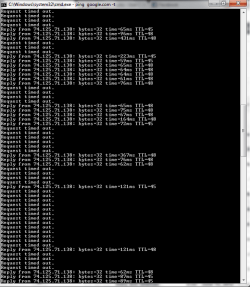
I'm actually having a bad internet connection. I run a Command Prompt (cmd) and type "ping google.com -t" (without quotes) to check my internet status. Here's my problem regarding my internet. See image below...

As you can see, that looks very2x slow and made me really mad most of the time. Does anyone have experience the same problem? Could you provide some helpful suggestions how to fix this?

Please comment below if I'm lacking any information regarding this problem. Will provide anything.

Thanks!

attachment.php
 

Attachments

  • internet problem.png
    internet problem.png
    16.3 KB · Views: 1,192

My Computer My Computer

OS
Windows 7 Ultimate x64
First off can i ask do you have internet connectivity in other words can you surf webpages and download files etc?
 

My Computer My Computer

Computer Manufacturer/Model Number
HP Compaq 6715B
OS
Windows 7 Ultimate x64
CPU
AMD turion 64x2 TL-64 2.2Ghz
Motherboard
HC030
Memory
Sodimm DDR2 4GB
Graphics Card(s)
ATI Radeon 1250 128MB IGP
Hard Drives
Fujitsu Siemens 500GB sata 3.0 Gb/s
Yes, I can download files and surf web pages ONLY IF there's no "Request timed out" on that status. If that "Reply from..." constantly moving that means I have a good internet connection and I can work well or play online games without being disconnected.
 

My Computer My Computer

OS
Windows 7 Ultimate x64
Is this a wired or wireless connection?

Pleas post an ipconfig /al for us to review.

Please download and install xirrus and post a screenshot if it is a wireless connection.

Link below:
Wi-Fi Inspector | Xirrus
 

My Computer My Computer

Computer Manufacturer/Model Number
HP Compaq 6715B
OS
Windows 7 Ultimate x64
CPU
AMD turion 64x2 TL-64 2.2Ghz
Motherboard
HC030
Memory
Sodimm DDR2 4GB
Graphics Card(s)
ATI Radeon 1250 128MB IGP
Hard Drives
Fujitsu Siemens 500GB sata 3.0 Gb/s
I actually have 8 units at home, 6 desktops and 2 laptops. So Im using both on wired and wireless connection, or you mean something more else?

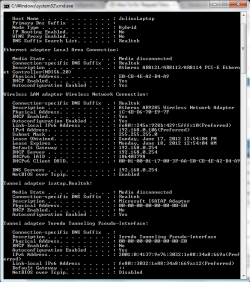
Here's the image you requested...

attachment.php


Anyway, Im not able to DL the Xirrus because I'm having an error on the download page.

Please let me know if there's anything that I could help with.


Thanks
 

My Computer My Computer

OS
Windows 7 Ultimate x64
Sorry my post should have read ipconfig /all for us to review please do another one and paste into your next reply.

Try downloading inssider from link belwo an alternative to xirrus.
inSSIDer Download | MetaGeek

Also does the timeouts happen on all machines?
 

My Computer My Computer

Computer Manufacturer/Model Number
HP Compaq 6715B
OS
Windows 7 Ultimate x64
CPU
AMD turion 64x2 TL-64 2.2Ghz
Motherboard
HC030
Memory
Sodimm DDR2 4GB
Graphics Card(s)
ATI Radeon 1250 128MB IGP
Hard Drives
Fujitsu Siemens 500GB sata 3.0 Gb/s
Hi,

Sorry, I missed to attache the image. Here it is..

attachment.php


Yes, it happen the same thing on other computers.

Will follow up the Xirrus

Thanks
 

Attachments

  • ipconfig all.png
    ipconfig all.png
    24.1 KB · Views: 1,154

My Computer My Computer

OS
Windows 7 Ultimate x64
I will await the inssider screenshot.
 

My Computer My Computer

Computer Manufacturer/Model Number
HP Compaq 6715B
OS
Windows 7 Ultimate x64
CPU
AMD turion 64x2 TL-64 2.2Ghz
Motherboard
HC030
Memory
Sodimm DDR2 4GB
Graphics Card(s)
ATI Radeon 1250 128MB IGP
Hard Drives
Fujitsu Siemens 500GB sata 3.0 Gb/s
I downloaded the software. What should I do next and which one should I take some screenshot.

Let me know, Thanks
 

My Computer My Computer

OS
Windows 7 Ultimate x64
Use xirrus if you have managed to download and install it rather than inssider.

the first screen what it opens up to is the page we need to see.
 

My Computer My Computer

Computer Manufacturer/Model Number
HP Compaq 6715B
OS
Windows 7 Ultimate x64
CPU
AMD turion 64x2 TL-64 2.2Ghz
Motherboard
HC030
Memory
Sodimm DDR2 4GB
Graphics Card(s)
ATI Radeon 1250 128MB IGP
Hard Drives
Fujitsu Siemens 500GB sata 3.0 Gb/s
OK, I hope I got this one right...

attachment.php
 

Attachments

  • inssider.png
    inssider.png
    73.6 KB · Views: 343

My Computer My Computer

OS
Windows 7 Ultimate x64
OK, I hope I get this one right...

217039d1340036964-how-fix-request-timeout-my-internet-status-inssider.png
 

My Computer My Computer

OS
Windows 7 Ultimate x64
Your wireless signal looks fine and channels no interference as no other wireless networks in the vicinity.

One thing tho you are using no security on your router and that is a security risk i suggest changing the security on the router to WPA2 AES and create a 26 character network key a mix of letters and numbers called a pre-shared key.

You will need to then need to delete the wireless profiles on all your computer's that use wireless and then re-connect to your router SSID and input the network key you have just assigned to the router it will make your wireless network more secure.

As for the timeouts please try and disable your firewall in the router as a test and see if timeouts persist.
 

My Computer My Computer

Computer Manufacturer/Model Number
HP Compaq 6715B
OS
Windows 7 Ultimate x64
CPU
AMD turion 64x2 TL-64 2.2Ghz
Motherboard
HC030
Memory
Sodimm DDR2 4GB
Graphics Card(s)
ATI Radeon 1250 128MB IGP
Hard Drives
Fujitsu Siemens 500GB sata 3.0 Gb/s
i have the same exact issue as this guy its a while now any help
 

My Computer My Computer

Computer type
PC/Desktop
OS
mscala
Hi Pedcam
Sart your own thread
AND update your Specs,

Roy
 

My Computer My Computer

Computer type
PC/Desktop
Computer Manufacturer/Model Number
medionl/Aspire 6930G/acer x55a
OS
W7 home premium 32bit/W7HP 64bit/w10 tp insider ring
CPU
E5300 dual core
Motherboard
medion MS7366
Memory
3gb
Graphics Card(s)
Nvidia Geforce 7100 Nforce 630i
Monitor(s) Displays
avixc
Internet Speed
n (isp resticted to 72)
Antivirus
mse/pands
Browser
palemoon
Other Info
Belkin Fd7050 n USB using Railink RT2870 drivers, more upto date
There are 3 things that can cause a ping to timeout indefinitely:
1. Router
2. Windows Firewall / Windows Registry: ICMP setting
3. 3rd Party Firewall / Security Software: ICMP setting


Essentially, ICMP must be allowed by all.
Some routers have an additional setting, Allow ping from WAN, which must be on in addition to allowing ICMP.
In command prompt, type ipconfig
Take the gateway number and put it in your browser.
Now you can look at your router settings.
In Windows Firewall under Advanced in inbound and outbound under core networking you will find ICMP. Consult your 3rd party security software settings for their ICMP setting.

This will fix the ping timeout error 99% of the time when you can still browse the internet.
If this doesn't fix it, system restore or redo your computer if you need ping.

However, your issue isn't indefinite timeout.
You made a mistake in TCP settings.
Likely you set time to live TTL to 64. This is erroneous.
It means any packet that takes longer will timeout.
It means your time to live is too short.
Firefox uses a TTL of 112, which might be needed in your case.
If the time exceeds the TTL then the packet is dropped and the request timeout.
If I ping www.sevenforums.com the time is 60 ms and the TTL is 115
The idea with TTL is suppose 100 packet take 60 ms, but one takes 400 ms...that's when TTL would kick in. But you don't want to be dropping any of those 100 packets and normally the delivery time of those 100 packets will vary by a maximum of 30 ms. TTL is only useful if you have a consistent big gap in packet delivery time i.e., from 60 ms to 200 ms kind of back and forth. In that case you would correct in saying a TTL of 90 ms would be best, but best only for that 1 site.
Other sites will be both slower and faster. For that reason, you ping your top 10 sites for at least 20 times, pick the highest time and add 10 ms for insurance.

Do you get it?
 

My Computer My Computer

Computer type
PC/Desktop
Computer Manufacturer/Model Number
Custom
OS
Windows 7 64 bit
CPU
4 GHZ
Motherboard
Gigabyte
Memory
16 GB
Graphics Card(s)
GTX 750
Antivirus
Antiviruses are extinct
Browser
Custom Firefox
Another thing, let's talk about largest MTU.
There's a misconception that 1500 is best; incorrect.
Enter the following in command prompt: ping www.sevenforums.com -f -l 1500
If there is a single timeout, then the MTU is too big.
In my case, I had to bring it down to 1100 for that site, so I would set it to 1100.
These kinds of effort really accumulate to reduce packet loss on a wireless network.

In fact, why not properly go through all TCP optimizer settings.
TCP Window Auto-Tuning, best to keep this to normal for lan and wan.
Windows Scaling heuristics works with the former setting, disable.
Congestion Control Privider: I'm just going to assume CTCP is the best algorithm.
Receive-Side Scaling (RSS): Enable unless single core
NetDMA: Relates to Lan built in the motherboard, requires bios setting: Disable for Wan.
DCA: Relates to Intel Lan: Disable for Wan.
Time to Live (TTL): should be left blank in most cases as it can do more harm than good
ECN Capability: If router supports, helps prevent packet loss: Enable
Checksum Offloading: This is for Lan: Disable for Wan
TCP Chimney Offload: This feature isn't in the advanced section of my driver for Wan, therefore I disable.
TCP 1323 options:
Window Scaling best to leave unchecked.
"Because some firewalls do not properly implement TCP Window Scaling, it can cause a user's Internet connection to malfunction..."
Timestamps should be checked because it helps fast internet, think 10Mbps+, keep steady performance rather than performance great one moment then to shit another moment.

Once again TCP Window Auto-tuning should be normal
Setting proper MTU
Window Scaling off
Timestamps on
TTL blank
Together these settings work to provide reliable internet.

Got it?

Moving on to Advanced Settings:
MaxConnections: 12
MaxConnections: 4
LocalPriority: 5
HostPriority: 6
DNSPriority: 7
NetbtPriority: 8
SynAttackProtect: Enabled 1
All 3 negativecache: 0
Network Throttling: disabled
SystemResponsiveness: gaming 0
LargeSystemCache: enabled 1
Size: Balanced 2
 
Last edited:

My Computer My Computer

Computer type
PC/Desktop
Computer Manufacturer/Model Number
Custom
OS
Windows 7 64 bit
CPU
4 GHZ
Motherboard
Gigabyte
Memory
16 GB
Graphics Card(s)
GTX 750
Antivirus
Antiviruses are extinct
Browser
Custom Firefox
Back
Top