How to get in contact with a harddrive ?

darkhorse

New member
Power User
Local time
4:00 PM
Messages
514
Location
Denmark
From a DVB-T2 receiver, I would install the HDD in a laptop.

I would check the HDD before, and connected it via an USB device to my W7 computer.

Here I can see, that it is difficult to get in touch with.

How can I tackle this, if at all possible ?.

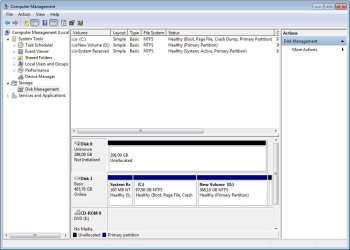
What I see in W7's manage is here.
 

Attachments
  • disk.jpg
    disk.jpg
    26.7 KB · Views: 8

My Computer My Computer

At a glance

Windows 7 UltimateE73004gNVIDIA GeForce 7300 LE
Computer type
PC/Desktop
Computer Manufacturer/Model Number
Homemade
OS
Windows 7 Ultimate
CPU
E7300
Motherboard
ASUS P5Q DeLuxe
Memory
4g
Graphics Card(s)
NVIDIA GeForce 7300 LE
Sound Card
N/A
Monitor(s) Displays
Acer
Screen Resolution
1600x1200
Hard Drives
Samsung HD503HI ATA Device
PSU
Seasonic
Case
ATX
Cooling
FAN
Keyboard
Logitech
Mouse
HP
Internet Speed
20/2
Antivirus
MSE
Browser
IE9, Chrome, Firefox

My Computer My Computer

At a glance

Windows 7 64 Bit Home Premium SP1i7-3820GSkill F3-14900CL9Q - 16GBEVGA GeForce GTX660 - Driver 352.86
Computer type
PC/Desktop
Computer Manufacturer/Model Number
Home Built - Jan 2013
OS
Windows 7 64 Bit Home Premium SP1
CPU
i7-3820
Motherboard
Asus P9X79-PRO - Bios 4608
Memory
GSkill F3-14900CL9Q - 16GB
Graphics Card(s)
EVGA GeForce GTX660 - Driver 352.86
Sound Card
On board Realtek ALC898
Monitor(s) Displays
Acer S271HL
Screen Resolution
1920 x 1080
Hard Drives
#1- Samsung 840 Pro Series
#2- Western Digital WD1002FAEX Sata3 Black
#3- Western Digital WD1002FAEX Sata3 Black
PSU
Corsair CMPSU-850TX-V2 - 850 watt (by Seasonic)
Case
Corsair Obsidian 550D
Cooling
Standard 3 120mm case fans, Cooler Master Hyper 212 EVO
Keyboard
MS KC-0405
Mouse
Intellimouse 5-button
Internet Speed
56 Mbits/Sec (on a good day)
Antivirus
Avast & Malwarebytes
Browser
Firefox
Other Info
Asus DVD - DRW-24B1ST 24X
Thank you very much for your reply.

I read the link you gave me, but had no luck.

After I connected the drive direct to my Windows 7 computer.

I still have issue with getting the disk initialized as the first screendump shows.

Attached find the attachment, that now shows the disk as it's directly connected.

Also I found a software, that can check if a disk is locked, but it tells it's not.

What can I do now ?
 

Attachments

  • directconnected.jpg
    directconnected.jpg
    74.7 KB · Views: 10

My Computer My Computer

At a glance

Windows 7 UltimateE73004gNVIDIA GeForce 7300 LE
Computer type
PC/Desktop
Computer Manufacturer/Model Number
Homemade
OS
Windows 7 Ultimate
CPU
E7300
Motherboard
ASUS P5Q DeLuxe
Memory
4g
Graphics Card(s)
NVIDIA GeForce 7300 LE
Sound Card
N/A
Monitor(s) Displays
Acer
Screen Resolution
1600x1200
Hard Drives
Samsung HD503HI ATA Device
PSU
Seasonic
Case
ATX
Cooling
FAN
Keyboard
Logitech
Mouse
HP
Internet Speed
20/2
Antivirus
MSE
Browser
IE9, Chrome, Firefox
Is there data on that hard drive that you are trying to keep?

If not, you could use Partition Wizard to try and format the drive NTFS. Just know that initializing the disk or formatting it will delete all of the data on the disk.
http://partitionwizard.com/download.html
(use the bootable CD, it is very useful for other problems too)
 

My Computer My Computer

At a glance

Windows 7 64 Bit Home Premium SP1i7-3820GSkill F3-14900CL9Q - 16GBEVGA GeForce GTX660 - Driver 352.86
Computer type
PC/Desktop
Computer Manufacturer/Model Number
Home Built - Jan 2013
OS
Windows 7 64 Bit Home Premium SP1
CPU
i7-3820
Motherboard
Asus P9X79-PRO - Bios 4608
Memory
GSkill F3-14900CL9Q - 16GB
Graphics Card(s)
EVGA GeForce GTX660 - Driver 352.86
Sound Card
On board Realtek ALC898
Monitor(s) Displays
Acer S271HL
Screen Resolution
1920 x 1080
Hard Drives
#1- Samsung 840 Pro Series
#2- Western Digital WD1002FAEX Sata3 Black
#3- Western Digital WD1002FAEX Sata3 Black
PSU
Corsair CMPSU-850TX-V2 - 850 watt (by Seasonic)
Case
Corsair Obsidian 550D
Cooling
Standard 3 120mm case fans, Cooler Master Hyper 212 EVO
Keyboard
MS KC-0405
Mouse
Intellimouse 5-button
Internet Speed
56 Mbits/Sec (on a good day)
Antivirus
Avast & Malwarebytes
Browser
Firefox
Other Info
Asus DVD - DRW-24B1ST 24X
Thanks for this info. Partition Recovery Wizard is running now, and it will take a while.

BB after it.
 

My Computer My Computer

At a glance

Windows 7 UltimateE73004gNVIDIA GeForce 7300 LE
Computer type
PC/Desktop
Computer Manufacturer/Model Number
Homemade
OS
Windows 7 Ultimate
CPU
E7300
Motherboard
ASUS P5Q DeLuxe
Memory
4g
Graphics Card(s)
NVIDIA GeForce 7300 LE
Sound Card
N/A
Monitor(s) Displays
Acer
Screen Resolution
1600x1200
Hard Drives
Samsung HD503HI ATA Device
PSU
Seasonic
Case
ATX
Cooling
FAN
Keyboard
Logitech
Mouse
HP
Internet Speed
20/2
Antivirus
MSE
Browser
IE9, Chrome, Firefox
You can also right click in Disk Management (as per your last picture) where it says 'Disk0' and initialize it from there.
 

My Computer My Computer

At a glance

Vista, Windows7, Mint Mate, Zorin, Windows 8from 1.6GHz Duo to i7
Computer Manufacturer/Model Number
HP, Dell, Gateway, Toshiba - 4 laptops and 2 desktops
OS
Vista, Windows7, Mint Mate, Zorin, Windows 8
CPU
from 1.6GHz Duo to i7
Monitor(s) Displays
2x HP w2207
Hard Drives
5x HDD, 7x SSD, 12x Externals
Keyboard
with trackball - no mices
Mouse
Trackball mice
Internet Speed
DSL 6000
@whs

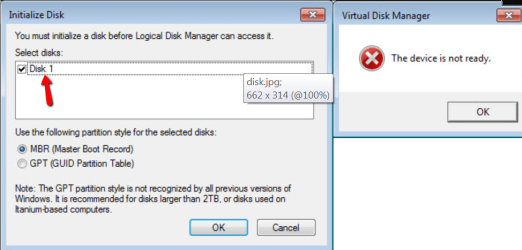
I tried that, but this option is not valid, as I get what is shown in my first screendump above this.

Any ideas why ?. Because the drive is not initialized ?. But this is what I can't do, or better this option is not possible.
 

My Computer My Computer

At a glance

Windows 7 UltimateE73004gNVIDIA GeForce 7300 LE
Computer type
PC/Desktop
Computer Manufacturer/Model Number
Homemade
OS
Windows 7 Ultimate
CPU
E7300
Motherboard
ASUS P5Q DeLuxe
Memory
4g
Graphics Card(s)
NVIDIA GeForce 7300 LE
Sound Card
N/A
Monitor(s) Displays
Acer
Screen Resolution
1600x1200
Hard Drives
Samsung HD503HI ATA Device
PSU
Seasonic
Case
ATX
Cooling
FAN
Keyboard
Logitech
Mouse
HP
Internet Speed
20/2
Antivirus
MSE
Browser
IE9, Chrome, Firefox
This is strange. When you got the error message, Disk1 was selected. But you wanted to initialize Disk0, did'nt you.
 

My Computer My Computer

At a glance

Vista, Windows7, Mint Mate, Zorin, Windows 8from 1.6GHz Duo to i7
Computer Manufacturer/Model Number
HP, Dell, Gateway, Toshiba - 4 laptops and 2 desktops
OS
Vista, Windows7, Mint Mate, Zorin, Windows 8
CPU
from 1.6GHz Duo to i7
Monitor(s) Displays
2x HP w2207
Hard Drives
5x HDD, 7x SSD, 12x Externals
Keyboard
with trackball - no mices
Mouse
Trackball mice
Internet Speed
DSL 6000
I have set up disk1 to be the one, that the system should boot to.

Disk0 is the temporary disk that is difficult to get initialized. It is temporary conencted. That's why it's disk0.

Anything wrong with that ?
 

My Computer My Computer

At a glance

Windows 7 UltimateE73004gNVIDIA GeForce 7300 LE
Computer type
PC/Desktop
Computer Manufacturer/Model Number
Homemade
OS
Windows 7 Ultimate
CPU
E7300
Motherboard
ASUS P5Q DeLuxe
Memory
4g
Graphics Card(s)
NVIDIA GeForce 7300 LE
Sound Card
N/A
Monitor(s) Displays
Acer
Screen Resolution
1600x1200
Hard Drives
Samsung HD503HI ATA Device
PSU
Seasonic
Case
ATX
Cooling
FAN
Keyboard
Logitech
Mouse
HP
Internet Speed
20/2
Antivirus
MSE
Browser
IE9, Chrome, Firefox
I am confused. On your pictures it is Disk0 that is not initialized.

2013-07-28_0926.png

But where you got the error message, you had selected Disk1 to be initialized.

2013-07-28_0927.png
 

My Computer My Computer

At a glance

Vista, Windows7, Mint Mate, Zorin, Windows 8from 1.6GHz Duo to i7
Computer Manufacturer/Model Number
HP, Dell, Gateway, Toshiba - 4 laptops and 2 desktops
OS
Vista, Windows7, Mint Mate, Zorin, Windows 8
CPU
from 1.6GHz Duo to i7
Monitor(s) Displays
2x HP w2207
Hard Drives
5x HDD, 7x SSD, 12x Externals
Keyboard
with trackball - no mices
Mouse
Trackball mice
Internet Speed
DSL 6000
@whs

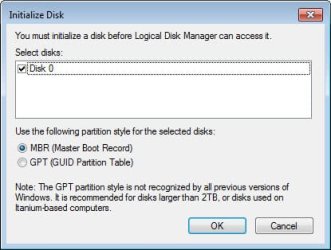
Sorry, here it is again, and the right disk is selected.

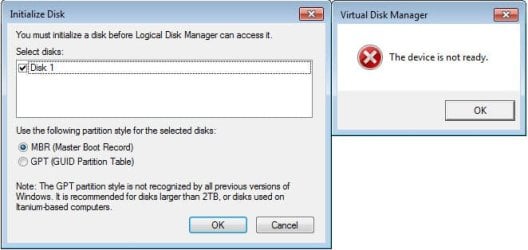
I have attached what I see, when the Computer Management starts up.

The window "Initialize Disk" starts up.

I have the MBR checked here.

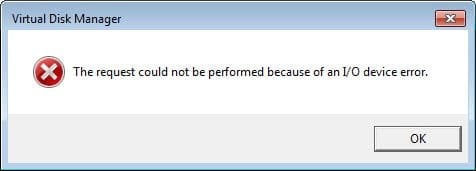
Clicking "OK" here, and the window "Virtual Disk Manager" appears.

The same procedure starts again, by right clicking Disk 0, and choose Intilialize Disk

Is it ok this time or ?. Sorry for having not made myself clear enough :confused:
 

Attachments

  • 1.jpg
    1.jpg
    21.9 KB · Views: 0
  • 2.jpg
    2.jpg
    9.5 KB · Views: 0
  • 3.jpg
    3.jpg
    8.4 KB · Views: 13

My Computer My Computer

At a glance

Windows 7 UltimateE73004gNVIDIA GeForce 7300 LE
Computer type
PC/Desktop
Computer Manufacturer/Model Number
Homemade
OS
Windows 7 Ultimate
CPU
E7300
Motherboard
ASUS P5Q DeLuxe
Memory
4g
Graphics Card(s)
NVIDIA GeForce 7300 LE
Sound Card
N/A
Monitor(s) Displays
Acer
Screen Resolution
1600x1200
Hard Drives
Samsung HD503HI ATA Device
PSU
Seasonic
Case
ATX
Cooling
FAN
Keyboard
Logitech
Mouse
HP
Internet Speed
20/2
Antivirus
MSE
Browser
IE9, Chrome, Firefox
@jumanji

Partition Wizard:

It detected the disk, and I ran the option to recover the partitions, but as I shall be away for some days, I stopped that again.

The disk as it is now is connected to a SATA port on the computer. It is installed as you say it.
 

My Computer My Computer

At a glance

Windows 7 UltimateE73004gNVIDIA GeForce 7300 LE
Computer type
PC/Desktop
Computer Manufacturer/Model Number
Homemade
OS
Windows 7 Ultimate
CPU
E7300
Motherboard
ASUS P5Q DeLuxe
Memory
4g
Graphics Card(s)
NVIDIA GeForce 7300 LE
Sound Card
N/A
Monitor(s) Displays
Acer
Screen Resolution
1600x1200
Hard Drives
Samsung HD503HI ATA Device
PSU
Seasonic
Case
ATX
Cooling
FAN
Keyboard
Logitech
Mouse
HP
Internet Speed
20/2
Antivirus
MSE
Browser
IE9, Chrome, Firefox
With Disk0 selected you got a different error message. It points to a problem on the disk. See whether running a chkdsk /r in command prompt can fix it.
 

My Computer My Computer

At a glance

Vista, Windows7, Mint Mate, Zorin, Windows 8from 1.6GHz Duo to i7
Computer Manufacturer/Model Number
HP, Dell, Gateway, Toshiba - 4 laptops and 2 desktops
OS
Vista, Windows7, Mint Mate, Zorin, Windows 8
CPU
from 1.6GHz Duo to i7
Monitor(s) Displays
2x HP w2207
Hard Drives
5x HDD, 7x SSD, 12x Externals
Keyboard
with trackball - no mices
Mouse
Trackball mice
Internet Speed
DSL 6000
My post,which I deleted immediately because I thought it was not appropriate :) before whs responds to your query, not only queried the results of PW but also said since the drive in question is installed as a second drive there was no need to run it - Partition Wizard - from a bootable CD, and you could as well install Partition Wizard in Windows and run it.

I was also not sure whether you want to bring the HDD on stream formatting it, or you want to recover any data from it before formatting.

Since you had run Partition Recovery Wizard, there is an intention to recover data.

Taking this into consideration I shall leave it to whs to respond to your query whether you should go ahead with initialising the drive.
 

My Computer My Computer

At a glance

Windows 7 Home Premium 32 bit
OS
Windows 7 Home Premium 32 bit
With Disk0 selected you got a different error message. It points to a problem on the disk. See whether running a chkdsk /r in command prompt can fix it.

I cannot give the disk a name, then how to use
Code:
chkdsk/r ?
 

My Computer My Computer

At a glance

Windows 7 UltimateE73004gNVIDIA GeForce 7300 LE
Computer type
PC/Desktop
Computer Manufacturer/Model Number
Homemade
OS
Windows 7 Ultimate
CPU
E7300
Motherboard
ASUS P5Q DeLuxe
Memory
4g
Graphics Card(s)
NVIDIA GeForce 7300 LE
Sound Card
N/A
Monitor(s) Displays
Acer
Screen Resolution
1600x1200
Hard Drives
Samsung HD503HI ATA Device
PSU
Seasonic
Case
ATX
Cooling
FAN
Keyboard
Logitech
Mouse
HP
Internet Speed
20/2
Antivirus
MSE
Browser
IE9, Chrome, Firefox
Try chkdsk 0: /r
 

My Computer My Computer

At a glance

Vista, Windows7, Mint Mate, Zorin, Windows 8from 1.6GHz Duo to i7
Computer Manufacturer/Model Number
HP, Dell, Gateway, Toshiba - 4 laptops and 2 desktops
OS
Vista, Windows7, Mint Mate, Zorin, Windows 8
CPU
from 1.6GHz Duo to i7
Monitor(s) Displays
2x HP w2207
Hard Drives
5x HDD, 7x SSD, 12x Externals
Keyboard
with trackball - no mices
Mouse
Trackball mice
Internet Speed
DSL 6000
I got this.

Code:
Microsoft Windows [Version 6.1.7601]
Copyright (c) 2009 Microsoft Corporation.  All rights reserved.

C:\Windows\system32>chkdsk 0: /r
The drive, the path, or the file name is not valid.

C:\Windows\system32>
 

My Computer My Computer

At a glance

Windows 7 UltimateE73004gNVIDIA GeForce 7300 LE
Computer type
PC/Desktop
Computer Manufacturer/Model Number
Homemade
OS
Windows 7 Ultimate
CPU
E7300
Motherboard
ASUS P5Q DeLuxe
Memory
4g
Graphics Card(s)
NVIDIA GeForce 7300 LE
Sound Card
N/A
Monitor(s) Displays
Acer
Screen Resolution
1600x1200
Hard Drives
Samsung HD503HI ATA Device
PSU
Seasonic
Case
ATX
Cooling
FAN
Keyboard
Logitech
Mouse
HP
Internet Speed
20/2
Antivirus
MSE
Browser
IE9, Chrome, Firefox
Hmm, I do not really remember how you specify the path to a drive that has no drive letter. Maybe some other member can step in and enlighten us. The 0: was just a guess but apparently it does not work.
 

My Computer My Computer

At a glance

Vista, Windows7, Mint Mate, Zorin, Windows 8from 1.6GHz Duo to i7
Computer Manufacturer/Model Number
HP, Dell, Gateway, Toshiba - 4 laptops and 2 desktops
OS
Vista, Windows7, Mint Mate, Zorin, Windows 8
CPU
from 1.6GHz Duo to i7
Monitor(s) Displays
2x HP w2207
Hard Drives
5x HDD, 7x SSD, 12x Externals
Keyboard
with trackball - no mices
Mouse
Trackball mice
Internet Speed
DSL 6000
I hope some other will knock on the door here to solve that question.

Your guess could have solved it, thanks

I'll be back again probably on wednesday or thursday due to a hospital visit.

Untill then all the best und auf wiederscreiben.
 

My Computer My Computer

At a glance

Windows 7 UltimateE73004gNVIDIA GeForce 7300 LE
Computer type
PC/Desktop
Computer Manufacturer/Model Number
Homemade
OS
Windows 7 Ultimate
CPU
E7300
Motherboard
ASUS P5Q DeLuxe
Memory
4g
Graphics Card(s)
NVIDIA GeForce 7300 LE
Sound Card
N/A
Monitor(s) Displays
Acer
Screen Resolution
1600x1200
Hard Drives
Samsung HD503HI ATA Device
PSU
Seasonic
Case
ATX
Cooling
FAN
Keyboard
Logitech
Mouse
HP
Internet Speed
20/2
Antivirus
MSE
Browser
IE9, Chrome, Firefox
My guess is that drive has a custom file structure/format that windows can't handle. It came out of a cable box right? Go to the drive makers web site and look for a utility to low level format the drive, or something that will wipe it clean by writing all zeros to it. Then see if windows will initialize it. Your not going to be able to recover any files on it, not easily anyway.
 

My Computer My Computer

At a glance

Windows 10 Education 64 bitAMD Phenom II X4 980 Black Edition Deneb 3.7GHz8GB 4GBx2 Kingston PC10600 DDR3 1333 MemoryZotac NVIDIA Geforce GT640 2 Gig DDR3 PCIe
Computer type
PC/Desktop
Computer Manufacturer/Model Number
Home Built
OS
Windows 10 Education 64 bit
CPU
AMD Phenom II X4 980 Black Edition Deneb 3.7GHz
Motherboard
Asus M4N68T-M V2 µATX Motherboard
Memory
8GB 4GBx2 Kingston PC10600 DDR3 1333 Memory
Graphics Card(s)
Zotac NVIDIA Geforce GT640 2 Gig DDR3 PCIe
Sound Card
VIA VT1708s High Definition Audio 8-channel Onboard
Monitor(s) Displays
22" LG E2242 1080p and 2 19" I-INC AG191D
Screen Resolution
1280x1024 - 1920x1080 - 1280x1024
Hard Drives
Crucial M100 256 GB SSD and 500 GB WD Blue SATA
PSU
Thermaltake TR 620
Case
Power Up Black ATX Mid-Tower Case
Cooling
Stock heatsink and fan
Keyboard
Logitech Wireless K350 Wave
Mouse
Logitech Wireless M570 Trackman Wheel
Internet Speed
80 Mbps Down 30 Mbps Up
Antivirus
Windows Defender
Browser
Internet Explorer 11
Other Info
HP DVD1040e Lightscribe - External USB2
Back
Top