Solved How to get rid of Windows XP on seperate hard drive?

Frank Cogburn

New member
Local time
6:59 AM
Messages
18
Hello all, my wife has Windows XP on her computer on one hard drive and Windows 7 on another separate hard drive. She no longer wants to use Windows XP and wants the hard drive it was on as a second hard drive for Windows 7. Can I just reformat the XP hard drive without messing up the boot options? Right now when she boots it says "earlier version Of Windows" or Windows 7, with Windows 7 being the highlighted choice. I don't want to mess her boot up so I need some guidance here. I'm not a complete stranger to computers but if I mess her computer up, the couch does not look to inviting! Thanks for any help!
 

My Computer My Computer

At a glance

Windowa7 Home Premiumx64
OS
Windowa7 Home Premiumx64
If Win7 or it's 100mb System Reserved partition is marked System Active then it has its own boot files onboard so it's safe to remove the XP HD.

If not please post back a screenshot of your maximized Disk Management drive map and listings:

1. Type Disk Management in Start :orb: Search box.
2. Open Disk Mgmt. window and maximize it.
3. Type Snipping Tool in Start Search box.
4. Open Snipping Tool, choose Rectangular Snip, click New, draw a box around full drive map and all listings.
5, Save Snip, attach using paper clip in Reply Box.

Tell us what is on each partition. We will give you the steps to safely remove XP HD.
 
Gregrocker, I will get this info to asap. It's on my wife computer so as soon as I can get her SevenForums account verified I will get back to you. Thank you, Frank Cogburn
 

My Computer My Computer

At a glance

Windowa7 Home Premiumx64
OS
Windowa7 Home Premiumx64
Just use your account.
 

My Computer My Computer

At a glance

Windows 10 Pro x64Intel Core i7 6700KGSkill TridentZ RGB 16GB 3600 16-16-16-36EVGA GTX 980 Ti SC x2
Computer type
PC/Desktop
Computer Manufacturer/Model Number
Skylake Special #666
OS
Windows 10 Pro x64
CPU
Intel Core i7 6700K
Motherboard
Asus Sabertooth Z170 Mark 1
Memory
GSkill TridentZ RGB 16GB 3600 16-16-16-36
Graphics Card(s)
EVGA GTX 980 Ti SC x2
Sound Card
Realtek High Definition
Monitor(s) Displays
AOC G2460PG
Screen Resolution
1920 x 1080 144Hz
Hard Drives
Samsung 860 Pro 256GB, Seagate Barracuda 4TB x2
PSU
EVGA 1000 P2, EVGA White Custom Braided Cables
Case
Corsair Vengeance C70 Gunmetal Black
Cooling
Corsair H100i v2, Corsair ML120 x2, Thermal Grizzly Kryonaut
Keyboard
Logitech G910 Orion Spectrum
Mouse
Logitech G700s
Internet Speed
Verizon Fios Quantum Gateway 75/75
Antivirus
Windows Defender, Malwarebytes Free 3.8.3
Browser
Chrome
Other Info
Corsair SP120 x4, LG Blu-ray Drive, Durabrand HT-395 100 Watt Dolby Digital Amp, Corsair H2100 Wireless 7.1 Headset
Just use your account.
I want her to have her own account so she can fix her own computer! I do not want to sleep on the couch!:D
 

My Computer My Computer

At a glance

Windowa7 Home Premiumx64
OS
Windowa7 Home Premiumx64
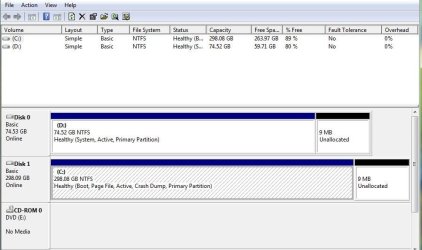
This is the Snipimage from my wife's computer. Sorry it has taken so long to respond. Her account has never been confirmed. Thanks for any help, Frank
 

Attachments

  • SnipImage.jpg
    SnipImage.jpg
    50.9 KB · Views: 8

My Computer My Computer

At a glance

Windowa7 Home Premiumx64
OS
Windowa7 Home Premiumx64
Mark Win7 partition Active in Disk Mgmt, power down to unplug the XP HD, boot into Win7 installation DVD or System Repair Disk, accept any offered repair, restart. If Win7 doesn't start boot back in to run Startup Repair - Run up to 3 Separate Times with reboots until Win7 starts and holds the System Active flags.

You can then plug back in XP HD, boot it if needed using one-time BIOS Boot menu key given on first screen. When ready you can move the data off and wipe it with Diskpart Clean Command, repartition in Disk Mgmt.
 
Thank you, I will try that and let you know results asap, Frank
 

My Computer My Computer

At a glance

Windowa7 Home Premiumx64
OS
Windowa7 Home Premiumx64
Done and done:D! Thank you! Now if the wife can get her account confirmed she can do her own fixin'!
 

My Computer My Computer

At a glance

Windowa7 Home Premiumx64
OS
Windowa7 Home Premiumx64
Back
Top