How to Get Seperate Headphones & Speaker Settings

BoggyP

New member
Local time
11:12 AM
Messages
11
Hi!

First time poster here looking for a bit of help. I want to pipe separate audio through my front jack which I use for headphones and back jack which I use for speakers. I have an on-board Realtek ALC888/1200 (according to everest). What I want is this:
http://www.sevenforums.com/attachme...hanging-jack-output-reassignments-fix-ado.jpg
Right now on my computer I have one option, speakers which encompass all the back jacks and the front audio jack. While under recording I do have separate mics. How can I separate the front jack into it's own option?

I'm using win7 home premium and I'm not sure if anything else is important, ask away if it is!

Thanks :D,
BoggyP

edit: Here's the issue:
audiov.png
 
Last edited:

My Computer My Computer

At a glance

Windows 7 Home Premium 64 bitCore i& 920 2.67 GHz12gbRadion 4850 1gb
Computer Manufacturer/Model Number
Acer M7720
OS
Windows 7 Home Premium 64 bit
CPU
Core i& 920 2.67 GHz
Motherboard
Acer FX58M (a variant of the X58)
Memory
12gb
Graphics Card(s)
Radion 4850 1gb
Sound Card
Onoard Realtek ALC888
Monitor(s) Displays
Acer H233H
Screen Resolution
1920*1080
When you plug in your headphones you get a settings dialog right? You should be able to set things through that and have it not effect the speakers. If not, try to download the latest Realtek drivers, that might give you an option.
 

My Computer My Computer

At a glance

W7 Ult. x64 | OS XIntel Mobile Core 2 Duo 2.93Ghz [T9800 Penryn]4096MB Samsung DDR3 Dual Channel [PC3-8500F 1...NVIDIA GeForce 9600M GT 512MB [G96M Rev. C1]
Computer Manufacturer/Model Number
Apple Macbook Pro (April 2009)
OS
W7 Ult. x64 | OS X
CPU
Intel Mobile Core 2 Duo 2.93Ghz [T9800 Penryn]
Motherboard
NVIDIA nForce 730i Rev. B1 [Mac-F2268EC8 (U2E1)]
Memory
4096MB Samsung DDR3 Dual Channel [PC3-8500F 1066Mhz]
Graphics Card(s)
NVIDIA GeForce 9600M GT 512MB [G96M Rev. C1]
Sound Card
SB X-Fi Surround 5.1 USB | Onboard Realtek (Disabled)
Monitor(s) Displays
Acer x223wbd 22" | Apple Anti-Glare 17" (Disabled)
Screen Resolution
{Current} 1440x900 {Acer} 1680x1050 {Apple} 1920x1200
Hard Drives
{Internal}
Seagate Momentus 320GB 2.5" 7200RPM [ST9320421AS]

{Externals}
LaCie 320GB USB 2.0 HDD [301284UR]
LaCie 750GB USB 2.0 FW400 eSATA HDD [301314U]
LaCie 1TB USB 2.0 HDD [301304UR]
PSU
Magsafe
Case
Aluminum/Unibody (MBP52)
Cooling
2 x 6000 RPM Fans
Keyboard
Logitech G-15v2 [PN 920-000379]
Mouse
Logitech G-9 [PN 910-000338]
Internet Speed
12Mbps/2.5Mbps w/ 24Mbps Speed Boost [Comcast]
Other Info
Logitech X-540 Speakers [PN 970223-0122]
Sennheiser PC-151 Headset
When you plug in your headphones you get a settings dialog right? You should be able to set things through that and have it not effect the speakers. If not, try to download the latest Realtek drivers, that might give you an option.
I tried that. I can't find the settings for it. When I plug them in the speakers turn off (unless I tell it to not use jack detection than identical sound comes out both).
Do you know where the settings might be located to enable multiple streaming?
 

My Computer My Computer

At a glance

Windows 7 Home Premium 64 bitCore i& 920 2.67 GHz12gbRadion 4850 1gb
Computer Manufacturer/Model Number
Acer M7720
OS
Windows 7 Home Premium 64 bit
CPU
Core i& 920 2.67 GHz
Motherboard
Acer FX58M (a variant of the X58)
Memory
12gb
Graphics Card(s)
Radion 4850 1gb
Sound Card
Onoard Realtek ALC888
Monitor(s) Displays
Acer H233H
Screen Resolution
1920*1080
It may be against the rules here, but in the interest of getting help:bump.

edit: The card supports this but I just can't find a way to use it.
 

My Computer My Computer

At a glance

Windows 7 Home Premium 64 bitCore i& 920 2.67 GHz12gbRadion 4850 1gb
Computer Manufacturer/Model Number
Acer M7720
OS
Windows 7 Home Premium 64 bit
CPU
Core i& 920 2.67 GHz
Motherboard
Acer FX58M (a variant of the X58)
Memory
12gb
Graphics Card(s)
Radion 4850 1gb
Sound Card
Onoard Realtek ALC888
Monitor(s) Displays
Acer H233H
Screen Resolution
1920*1080
bumping this again, I just have no idea what else to do. I've done so much Google searching and people asking and I need a little help.
 

My Computer My Computer

At a glance

Windows 7 Home Premium 64 bitCore i& 920 2.67 GHz12gbRadion 4850 1gb
Computer Manufacturer/Model Number
Acer M7720
OS
Windows 7 Home Premium 64 bit
CPU
Core i& 920 2.67 GHz
Motherboard
Acer FX58M (a variant of the X58)
Memory
12gb
Graphics Card(s)
Radion 4850 1gb
Sound Card
Onoard Realtek ALC888
Monitor(s) Displays
Acer H233H
Screen Resolution
1920*1080

Ok. As you can see my friend has a device advanced settings button.
I have this:


Now. He has a slighly different setup and card but has the option I've been looking for that I *know* the card supports. Is there a way without having to install realtek's stuff (maybe replace files) to replace my manager with his and attempt to do that without replacing the actual driver. That could work? maybe?
As you can see I am trying very hard to solve this. I could really use help.

edit: his system as almost identical to mine except I have the acer variant of his mobo and a different realtek onboard card.

edit 2: this is not just a me problem on many sites and forums I see similar problems whether it be to do the same thing or something different some people don't have the advanced settings button: http://www.sevenforums.com/sound-audio/29787-speaker-headphone-same-time-problem.html

edit 3: http://www.sevenforums.com/sound-au...t-working-realtek-hd-audio-windows-7-a-2.html this person's solution involves bios options I don't have thanks to Acer's beautifully locked bios. Now after rereading I don't think i'd have to make any changes to me bios since I have everything but the advanced settings dialogue. damn.

edit 4: It appears that some people have the realtek (not ASUS) version of the app with the advanced options available: http://www.blog.danamccall.com/wp-content/uploads/2008/08/realtek.jpg
Now I'm more lost than ever.

edit 5: Again. Same problem. No solution. http://www.vistax64.com/sound-audio/215057-no-advance-device-settings-realtek-hd-audio-manager.html

edit 6: I found in a random thread someone with the same model as me who had a headphones option as an input device separate from the back audio jacks. So I was right about the card supporting it.
 
Last edited:

My Computer My Computer

At a glance

Windows 7 Home Premium 64 bitCore i& 920 2.67 GHz12gbRadion 4850 1gb
Computer Manufacturer/Model Number
Acer M7720
OS
Windows 7 Home Premium 64 bit
CPU
Core i& 920 2.67 GHz
Motherboard
Acer FX58M (a variant of the X58)
Memory
12gb
Graphics Card(s)
Radion 4850 1gb
Sound Card
Onoard Realtek ALC888
Monitor(s) Displays
Acer H233H
Screen Resolution
1920*1080

My Computer My Computer

At a glance

Windows 7 Home Premium 64 bitCore i& 920 2.67 GHz12gbRadion 4850 1gb
Computer Manufacturer/Model Number
Acer M7720
OS
Windows 7 Home Premium 64 bit
CPU
Core i& 920 2.67 GHz
Motherboard
Acer FX58M (a variant of the X58)
Memory
12gb
Graphics Card(s)
Radion 4850 1gb
Sound Card
Onoard Realtek ALC888
Monitor(s) Displays
Acer H233H
Screen Resolution
1920*1080
In the controll panel that shows the plugs color schem for rear and front:

You try right clicking each port and choose: assign to?
 

My Computer My Computer

At a glance

Windows 7 Home Premium 64bitIntel Core i7 2700k8GB Mushkin Redline Ridgebacks @1866EVGA GTX570 SC
Computer Manufacturer/Model Number
Custom (Self Build)
OS
Windows 7 Home Premium 64bit
CPU
Intel Core i7 2700k
Motherboard
eVGA P67 SLI
Memory
8GB Mushkin Redline Ridgebacks @1866
Graphics Card(s)
EVGA GTX570 SC
Sound Card
XiFi Titanium HD
Monitor(s) Displays
LG W2453V
Screen Resolution
1920x1080
Hard Drives
Intel 320 80GB -- Intel X25-V 40GB --WD Black 1TB x2 -- WD Blue 640GB
PSU
Seasonic x750
Case
Corsair 600T SE White
Cooling
eVGA Superclocked CPU Cooler
Keyboard
Saitek Cyborg
Antivirus
Kaspersky
Browser
IE
Other Info
LG BD/DVD
When I right click it just gives the option "audio device settings" which links to that speaker section of the panel.

But thanks for trying, nice to know someone on this forum is reading this.
 

My Computer My Computer

At a glance

Windows 7 Home Premium 64 bitCore i& 920 2.67 GHz12gbRadion 4850 1gb
Computer Manufacturer/Model Number
Acer M7720
OS
Windows 7 Home Premium 64 bit
CPU
Core i& 920 2.67 GHz
Motherboard
Acer FX58M (a variant of the X58)
Memory
12gb
Graphics Card(s)
Radion 4850 1gb
Sound Card
Onoard Realtek ALC888
Monitor(s) Displays
Acer H233H
Screen Resolution
1920*1080
Im sure its being read, they just may not know the answer.

Unfortunatly,nor do I.
Thats the only thing I can suggest at this time.
I am very unfamiliar with onboard audio, as never really used it.
 

My Computer My Computer

At a glance

Windows 7 Home Premium 64bitIntel Core i7 2700k8GB Mushkin Redline Ridgebacks @1866EVGA GTX570 SC
Computer Manufacturer/Model Number
Custom (Self Build)
OS
Windows 7 Home Premium 64bit
CPU
Intel Core i7 2700k
Motherboard
eVGA P67 SLI
Memory
8GB Mushkin Redline Ridgebacks @1866
Graphics Card(s)
EVGA GTX570 SC
Sound Card
XiFi Titanium HD
Monitor(s) Displays
LG W2453V
Screen Resolution
1920x1080
Hard Drives
Intel 320 80GB -- Intel X25-V 40GB --WD Black 1TB x2 -- WD Blue 640GB
PSU
Seasonic x750
Case
Corsair 600T SE White
Cooling
eVGA Superclocked CPU Cooler
Keyboard
Saitek Cyborg
Antivirus
Kaspersky
Browser
IE
Other Info
LG BD/DVD
http://www.sevenforums.com/sound-audio/3756-latest-realtek-hd-audio-driver-version-46.html

I'm trying to install that driver (R1.64) but it says: Realtek HD Audio DriverInstall Failure!!
I was hoping that would fix it :/

Ya but I was really hoping that the guys who were discussing this would pipe in and give their two-cents.

Or

I don't have the ability or the know how to do it. But if someone had whatever was required they could find out what the effect of that check box for multi-streaming is. What happens when you check it and click ok and maybe that can be done manually?
 

My Computer My Computer

At a glance

Windows 7 Home Premium 64 bitCore i& 920 2.67 GHz12gbRadion 4850 1gb
Computer Manufacturer/Model Number
Acer M7720
OS
Windows 7 Home Premium 64 bit
CPU
Core i& 920 2.67 GHz
Motherboard
Acer FX58M (a variant of the X58)
Memory
12gb
Graphics Card(s)
Radion 4850 1gb
Sound Card
Onoard Realtek ALC888
Monitor(s) Displays
Acer H233H
Screen Resolution
1920*1080
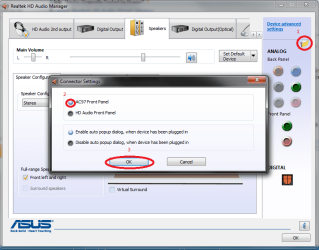
I'm not sure if this works for everyone, but this fixes the problems I had.
 

Attachments

  • this_worked_for_me.png
    this_worked_for_me.png
    46.9 KB · Views: 1,014

My Computer My Computer

At a glance

windows 7 ultimate 64bit
OS
windows 7 ultimate 64bit
Back
Top