Solved How to have three computers on the same network

keyboardface

New member
Member
Local time
2:03 AM
Messages
75
I'm clueless here...

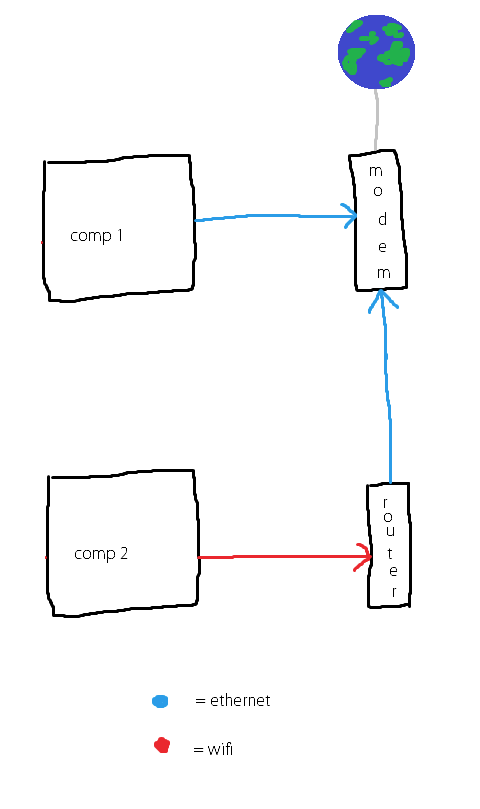
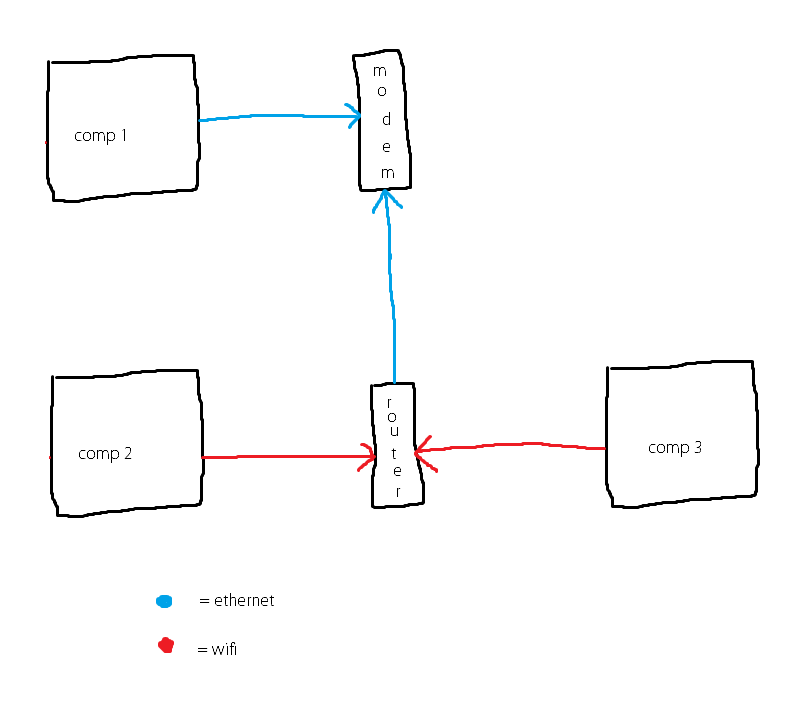
Computer 1 is plugged into the modem via ethernet.

Computers 2 and 3 connect to a router via WiFi, which is then connected to the modem via ethernet.

How do I get all three computers on the same network so they can share files between each other?
a47x2EX.png
 

My Computer

Computer type
PC/Desktop
OS
Windows 7 Ultimate x64
CPU
AMD FX 8120 Eight-Core 3.10 GHz
Memory
8GB DDR3
Graphics Card(s)
GeForce GTX 550 Ti
Sound Card
SoundBlaster Live! 24-Bit
What OS do all the PCs have?
 

My Computer

Computer type
PC/Desktop
Computer Manufacturer/Model Number
Home Built Desktop By DataTech
OS
Windows 7 Ultimate X64 SP1
CPU
Intel i5-2550K, Differing ~4.4-4.8GHz No built in GPU
Motherboard
ASUS P8Z68-V PRO/GEN3
Memory
16GB G.Skill Sniper 1866MHz @ 2133MHz 2x8GB
Graphics Card(s)
ASUS GTX650TIB-DC2OC-2GD5, (650TI Boost)
Sound Card
Onboard Realtek 5-1
Monitor(s) Displays
Samsung P2570HD
Screen Resolution
1920x1080
Hard Drives
Samsung 840 Pro 256GB SSD for OS, 500GB Seagate Constellation (Enterprise drive) for Data
PSU
Corsair HX650W
Case
Inwin Dragon Rider
Cooling
Hyper 212 EVO w/two Noctua fans, push-pull, @1300 RPM
Keyboard
E-Z Eyes, bright yellow keys with large characters
Mouse
steelseries SENSEI Laser Pro Gaming
Internet Speed
48-51Mbs Mbs down, 11 Mbs up Xfinity Cable
Antivirus
Norton Internet Security 2013
Browser
IE 10, Opera, Pale Moon if needed
Other Info
4 case fans, LG BluRay-RE, ASUS DVD-RW, Mr. Fusion power supply, 1.21 gigawatts.
Windows 8 on Comp 1, Windows 7 on 2 and 3.
 

My Computer

Computer type
PC/Desktop
OS
Windows 7 Ultimate x64
CPU
AMD FX 8120 Eight-Core 3.10 GHz
Memory
8GB DDR3
Graphics Card(s)
GeForce GTX 550 Ti
Sound Card
SoundBlaster Live! 24-Bit

My Computer

Computer type
PC/Desktop
Computer Manufacturer/Model Number
Home Built Desktop By DataTech
OS
Windows 7 Ultimate X64 SP1
CPU
Intel i5-2550K, Differing ~4.4-4.8GHz No built in GPU
Motherboard
ASUS P8Z68-V PRO/GEN3
Memory
16GB G.Skill Sniper 1866MHz @ 2133MHz 2x8GB
Graphics Card(s)
ASUS GTX650TIB-DC2OC-2GD5, (650TI Boost)
Sound Card
Onboard Realtek 5-1
Monitor(s) Displays
Samsung P2570HD
Screen Resolution
1920x1080
Hard Drives
Samsung 840 Pro 256GB SSD for OS, 500GB Seagate Constellation (Enterprise drive) for Data
PSU
Corsair HX650W
Case
Inwin Dragon Rider
Cooling
Hyper 212 EVO w/two Noctua fans, push-pull, @1300 RPM
Keyboard
E-Z Eyes, bright yellow keys with large characters
Mouse
steelseries SENSEI Laser Pro Gaming
Internet Speed
48-51Mbs Mbs down, 11 Mbs up Xfinity Cable
Antivirus
Norton Internet Security 2013
Browser
IE 10, Opera, Pale Moon if needed
Other Info
4 case fans, LG BluRay-RE, ASUS DVD-RW, Mr. Fusion power supply, 1.21 gigawatts.
Comp 1 and Comp 2 (let's ignore Comp 3 for now, it isn't important) aren't on the same network though, so they can't join the same homegroup.
 

My Computer

Computer type
PC/Desktop
OS
Windows 7 Ultimate x64
CPU
AMD FX 8120 Eight-Core 3.10 GHz
Memory
8GB DDR3
Graphics Card(s)
GeForce GTX 550 Ti
Sound Card
SoundBlaster Live! 24-Bit
Is there a specific need to have Comp 1 connected to the modem? Typically home routers will have at least 4 ethernet ports on them with one going to the modem. Since Comp 2 & 3 are using Wireless you should have available ports on your router to connect comp 1

May I also add that if your computer is connected to the router then you will receive a much greater security benefit since the router itself will typically have a firewall whereas a modem doesn't.

This tutorial should show you how to create a share for everyone on the network to access - http://www.sevenforums.com/tutorials/24232-sharing-permissions.html

Please note that the above tutorial may not work depending on the capabilities of your modem.

Could you also follow this tutorial on both comp 1 and 2 so that we can see if your ip configuration is setup to allow sharing - http://www.sevenforums.com/network-sharing/144365-network-posting-tips.html

Hope This Helps,
Josh! :)
 
Last edited:

My Computer

Computer type
PC/Desktop
Computer Manufacturer/Model Number
Custom Built
OS
Windows 7 Professional x64 SP1 ; Windows Server 2012 R2 Standard
CPU
Intel Core i5 2400 @ 3.10GHz
Motherboard
Foxconn H67MP-S/-V/H67MP
Memory
8.0GB DDR3 @ 665MHz (2GBx4)
Graphics Card(s)
AMD Radeon HD 6870
Sound Card
Realtek High Definition Audio
Monitor(s) Displays
AOC 2243W & SMB1930NW
Screen Resolution
1440x900 & 1920x1080
Hard Drives
977GB Seagate ST31000524AS ATA Drive (SATA)
250GB WD iSCSI attached Drive
PSU
750W Gaming PSU
Case
Novatech Night
Cooling
Fan
Keyboard
Dell Standard PS/2 Keyboard
Mouse
R.A.T 07 Gaming Mouse
Internet Speed
Download: 10 Mbps Ping: 30ms Upload: 0.81 Mbps
Browser
Google Chrome
Other Info
Optiarc DVD RW AD-5260S ATA Device

My Computer

Computer type
PC/Desktop
OS
Windows 7 Ultimate x64
CPU
AMD FX 8120 Eight-Core 3.10 GHz
Memory
8GB DDR3
Graphics Card(s)
GeForce GTX 550 Ti
Sound Card
SoundBlaster Live! 24-Bit
Ahh, that makes more sense now... Typically a modem can only service one client which slightly confused me since you had two connections to the modem

As stated in the previous post please complete the tutorial on comp 1 and 2 so I can see if your IP configurations are set up appropriately - http://www.sevenforums.com/network-sharing/144365-network-posting-tips.html

peer to peer sharing is only limited to one LAN/broadcast domain. If you have two different networks then sharing of files won't happen. Can I ask what router is currently acting as the DHCP server?

I can show you how to merge both separate LANs into one network if you wish.

Josh
 

My Computer

Computer type
PC/Desktop
Computer Manufacturer/Model Number
Custom Built
OS
Windows 7 Professional x64 SP1 ; Windows Server 2012 R2 Standard
CPU
Intel Core i5 2400 @ 3.10GHz
Motherboard
Foxconn H67MP-S/-V/H67MP
Memory
8.0GB DDR3 @ 665MHz (2GBx4)
Graphics Card(s)
AMD Radeon HD 6870
Sound Card
Realtek High Definition Audio
Monitor(s) Displays
AOC 2243W & SMB1930NW
Screen Resolution
1440x900 & 1920x1080
Hard Drives
977GB Seagate ST31000524AS ATA Drive (SATA)
250GB WD iSCSI attached Drive
PSU
750W Gaming PSU
Case
Novatech Night
Cooling
Fan
Keyboard
Dell Standard PS/2 Keyboard
Mouse
R.A.T 07 Gaming Mouse
Internet Speed
Download: 10 Mbps Ping: 30ms Upload: 0.81 Mbps
Browser
Google Chrome
Other Info
Optiarc DVD RW AD-5260S ATA Device
Let's ignore comp 3 for now.

0QcyuAv.png
 

My Computer

Computer type
PC/Desktop
OS
Windows 7 Ultimate x64
CPU
AMD FX 8120 Eight-Core 3.10 GHz
Memory
8GB DDR3
Graphics Card(s)
GeForce GTX 550 Ti
Sound Card
SoundBlaster Live! 24-Bit
I'll have to get back to you on this, Comp 1 being used all weekend. Thanks for the help so far.
 

My Computer

Computer type
PC/Desktop
OS
Windows 7 Ultimate x64
CPU
AMD FX 8120 Eight-Core 3.10 GHz
Memory
8GB DDR3
Graphics Card(s)
GeForce GTX 550 Ti
Sound Card
SoundBlaster Live! 24-Bit
No worries, post the configuration whenever you can and we will do our best to offer a solution :)

Josh!
 

My Computer

Computer type
PC/Desktop
Computer Manufacturer/Model Number
Custom Built
OS
Windows 7 Professional x64 SP1 ; Windows Server 2012 R2 Standard
CPU
Intel Core i5 2400 @ 3.10GHz
Motherboard
Foxconn H67MP-S/-V/H67MP
Memory
8.0GB DDR3 @ 665MHz (2GBx4)
Graphics Card(s)
AMD Radeon HD 6870
Sound Card
Realtek High Definition Audio
Monitor(s) Displays
AOC 2243W & SMB1930NW
Screen Resolution
1440x900 & 1920x1080
Hard Drives
977GB Seagate ST31000524AS ATA Drive (SATA)
250GB WD iSCSI attached Drive
PSU
750W Gaming PSU
Case
Novatech Night
Cooling
Fan
Keyboard
Dell Standard PS/2 Keyboard
Mouse
R.A.T 07 Gaming Mouse
Internet Speed
Download: 10 Mbps Ping: 30ms Upload: 0.81 Mbps
Browser
Google Chrome
Other Info
Optiarc DVD RW AD-5260S ATA Device
Comp 1 and Comp 2 (let's ignore Comp 3 for now, it isn't important) aren't on the same network though, so they can't join the same homegroup.
Sorry, you've lost me here. I thought you were trying to get them on the same network. :confused:
 

My Computer

Computer type
PC/Desktop
Computer Manufacturer/Model Number
Home Built Desktop By DataTech
OS
Windows 7 Ultimate X64 SP1
CPU
Intel i5-2550K, Differing ~4.4-4.8GHz No built in GPU
Motherboard
ASUS P8Z68-V PRO/GEN3
Memory
16GB G.Skill Sniper 1866MHz @ 2133MHz 2x8GB
Graphics Card(s)
ASUS GTX650TIB-DC2OC-2GD5, (650TI Boost)
Sound Card
Onboard Realtek 5-1
Monitor(s) Displays
Samsung P2570HD
Screen Resolution
1920x1080
Hard Drives
Samsung 840 Pro 256GB SSD for OS, 500GB Seagate Constellation (Enterprise drive) for Data
PSU
Corsair HX650W
Case
Inwin Dragon Rider
Cooling
Hyper 212 EVO w/two Noctua fans, push-pull, @1300 RPM
Keyboard
E-Z Eyes, bright yellow keys with large characters
Mouse
steelseries SENSEI Laser Pro Gaming
Internet Speed
48-51Mbs Mbs down, 11 Mbs up Xfinity Cable
Antivirus
Norton Internet Security 2013
Browser
IE 10, Opera, Pale Moon if needed
Other Info
4 case fans, LG BluRay-RE, ASUS DVD-RW, Mr. Fusion power supply, 1.21 gigawatts.
I'm clueless here...

Computer 1 is plugged into the modem via ethernet.

Computers 2 and 3 connect to a router via WiFi, which is then connected to the modem via ethernet.

How do I get all three computers on the same network so they can share files between each other?

a47x2EX.png

Two routers means you need to turn OFF DHCP on the secondary router. The first router will be handing out IP's through DHCP. Ethernet and WiFi makes no difference, they will all be on the same subnet/network.

It's also important that you use only the LAN port on the secondary router. Plug one of the first routers LAN ports into a LAN port on the secondary router. Do not use the WAN port on the secondary router.

Remember that once the secondary router picks up an IP from the first router, you will then need to access the secondary router through it's new IP which will be in the same subnet as the first router. This new IP should show up on the DHCP list of the first router.

This means that the secondary router will pick up the correct default gateway and IP in the correct subnet from the first router. This will create a common network for all machines connected to either router. After doing this you will have no problems setting up a Homegroup between all machines.

That is all there is to it. :)
 

My Computer

Computer type
PC/Desktop
Computer Manufacturer/Model Number
Home built
OS
Windows 7 Ult, Windows 8.1 Pro,
CPU
Q9650-4.275GHz, E8600 4.5GHz, E6750-3.8GHz
Motherboard
Evga 780i FTW
Memory
G.Skill PC2 9600 1200Mhz 5 5 5 15 2T
Graphics Card(s)
GTX480
Sound Card
Asus Xonar D2
Monitor(s) Displays
HannsG
Screen Resolution
1680X1050
Hard Drives
GSkill Phoenix Pro 120GB SSD
PSU
ThermalTake Toughpower 1000Watt modular
Case
ThermalTake XaserV
Cooling
Xigmatek S1283
Keyboard
Logitech G15
Mouse
Logitech G9
Internet Speed
T1
I'm clueless here...

Computer 1 is plugged into the modem via ethernet.

Computers 2 and 3 connect to a router via WiFi, which is then connected to the modem via ethernet.

How do I get all three computers on the same network so they can share files between each other?

a47x2EX.png

Two routers means you need to turn OFF DHCP on the secondary router. The first router will be handing out IP's through DHCP. Ethernet and WiFi makes no difference, they will all be on the same subnet/network.

It's also important that you use only the LAN port on the secondary router. Plug one of the first routers LAN ports into a LAN port on the secondary router. Do not use the WAN port on the secondary router.

Remember that once the secondary router picks up an IP from the first router, you will then need to access the secondary router through it's new IP which will be in the same subnet as the first router. This new IP should show up on the DHCP list of the first router.

This means that the secondary router will pick up the correct default gateway and IP in the correct subnet from the first router. This will create a common network for all machines connected to either router. After doing this you will have no problems setting up a Homegroup between all machines.

That is all there is to it. :)

When you say secondary router, which router do you mean?
 

My Computer

Computer type
PC/Desktop
OS
Windows 7 Ultimate x64
CPU
AMD FX 8120 Eight-Core 3.10 GHz
Memory
8GB DDR3
Graphics Card(s)
GeForce GTX 550 Ti
Sound Card
SoundBlaster Live! 24-Bit
I'm clueless here...

Computer 1 is plugged into the modem via ethernet.

Computers 2 and 3 connect to a router via WiFi, which is then connected to the modem via ethernet.

How do I get all three computers on the same network so they can share files between each other?

a47x2EX.png

Two routers means you need to turn OFF DHCP on the secondary router. The first router will be handing out IP's through DHCP. Ethernet and WiFi makes no difference, they will all be on the same subnet/network.

It's also important that you use only the LAN port on the secondary router. Plug one of the first routers LAN ports into a LAN port on the secondary router. Do not use the WAN port on the secondary router.

Remember that once the secondary router picks up an IP from the first router, you will then need to access the secondary router through it's new IP which will be in the same subnet as the first router. This new IP should show up on the DHCP list of the first router.

This means that the secondary router will pick up the correct default gateway and IP in the correct subnet from the first router. This will create a common network for all machines connected to either router. After doing this you will have no problems setting up a Homegroup between all machines.

That is all there is to it. :)

When you say secondary router, which router do you mean?

In this case it's the one you are using for wireless.

The dg834gt is a modem/router so that would be the one to use as the first router which has DHCP enabled.
 

My Computer

Computer type
PC/Desktop
Computer Manufacturer/Model Number
Home built
OS
Windows 7 Ult, Windows 8.1 Pro,
CPU
Q9650-4.275GHz, E8600 4.5GHz, E6750-3.8GHz
Motherboard
Evga 780i FTW
Memory
G.Skill PC2 9600 1200Mhz 5 5 5 15 2T
Graphics Card(s)
GTX480
Sound Card
Asus Xonar D2
Monitor(s) Displays
HannsG
Screen Resolution
1680X1050
Hard Drives
GSkill Phoenix Pro 120GB SSD
PSU
ThermalTake Toughpower 1000Watt modular
Case
ThermalTake XaserV
Cooling
Xigmatek S1283
Keyboard
Logitech G15
Mouse
Logitech G9
Internet Speed
T1
the trick is how you connect router to router. From the router#1 (that connected to the modem) connect to
router#2 using a LAN slot and leave the WAN slot of that router empty. You need to disable the DHCP service in
router#2 which will then cause router#1 to make all assignments (thus creating all connections on the same tcp subnet).

Technically, this converts router#2 into a simple switch without the NAT service.

Also, if router#2 is WiFi enabled, it can still provide all WiFi support. If router#1 or the modem have wifi,
I would disable both of them.

This setup allows the creation of a single subnet, but other issues need to be addressed if
one is interested in Print/File Sharing (eg workgroup names must match).
 

My Computer

Computer type
PC/Desktop
OS
win 7 pro 64bit
the trick is how you connect router to router. From the router#1 (that connected to the modem) connect to
router#2 using a LAN slot and leave the WAN slot of that router empty. You need to disable the DHCP service in
router#2 which will then cause router#1 to make all assignments (thus creating all connections on the same tcp subnet).

Technically, this converts router#2 into a simple switch without the NAT service.

Also, if router#2 is WiFi enabled, it can still provide all WiFi support. If router#1 or the modem have wifi,
I would disable both of them.

This setup allows the creation of a single subnet, but other issues need to be addressed if
one is interested in Print/File Sharing (eg workgroup names must match).

Why would you repeat what I just said, best to read the reply's first maybe. The first router is actually a combo unit modem/router. :)

And there is no reason to disable the wireless on either of those routers. You can set them both up with the same SSID, security password etc. if desired, or create two separate A/P's "on the same subnet" with different SSID's. Depends on the situation. The modem/router combo unit only has one access point.
 

My Computer

Computer type
PC/Desktop
Computer Manufacturer/Model Number
Home built
OS
Windows 7 Ult, Windows 8.1 Pro,
CPU
Q9650-4.275GHz, E8600 4.5GHz, E6750-3.8GHz
Motherboard
Evga 780i FTW
Memory
G.Skill PC2 9600 1200Mhz 5 5 5 15 2T
Graphics Card(s)
GTX480
Sound Card
Asus Xonar D2
Monitor(s) Displays
HannsG
Screen Resolution
1680X1050
Hard Drives
GSkill Phoenix Pro 120GB SSD
PSU
ThermalTake Toughpower 1000Watt modular
Case
ThermalTake XaserV
Cooling
Xigmatek S1283
Keyboard
Logitech G15
Mouse
Logitech G9
Internet Speed
T1
So it seems to have worked chev65, thanks! I turned DHCP off on the secondary router and then plugged the ethernet cable into an 'ethernet' port instead of the 'internet' port and I'm now able to access Comp 1 and vice versa, as well as it's printer.

How can I remove the original network that is no longer needed? I seem to have two networks now, the new one and the original.

EDIT: It disappeared after disabling and enabling the adapter :)
 
Last edited:

My Computer

Computer type
PC/Desktop
OS
Windows 7 Ultimate x64
CPU
AMD FX 8120 Eight-Core 3.10 GHz
Memory
8GB DDR3
Graphics Card(s)
GeForce GTX 550 Ti
Sound Card
SoundBlaster Live! 24-Bit
So it seems to have worked chev65, thanks! I turned DHCP off on the secondary router and then plugged the ethernet cable into an 'ethernet' port instead of the 'internet' port and I'm now able to access Comp 1 and vice versa, as well as it's printer.

How can I remove the original network that is no longer needed? I seem to have two networks now, the new one and the original.

EDIT: It disappeared after disabling and enabling the adapter :)

Good enough roastbeef, you shouldn't have any problems setting up a Homegroup now. :)
 

My Computer

Computer type
PC/Desktop
Computer Manufacturer/Model Number
Home built
OS
Windows 7 Ult, Windows 8.1 Pro,
CPU
Q9650-4.275GHz, E8600 4.5GHz, E6750-3.8GHz
Motherboard
Evga 780i FTW
Memory
G.Skill PC2 9600 1200Mhz 5 5 5 15 2T
Graphics Card(s)
GTX480
Sound Card
Asus Xonar D2
Monitor(s) Displays
HannsG
Screen Resolution
1680X1050
Hard Drives
GSkill Phoenix Pro 120GB SSD
PSU
ThermalTake Toughpower 1000Watt modular
Case
ThermalTake XaserV
Cooling
Xigmatek S1283
Keyboard
Logitech G15
Mouse
Logitech G9
Internet Speed
T1
Back
Top