
You are using an out of date browser. It may not display this or other websites correctly.
You should upgrade or use an
alternative browser.
How to hide file/folder count in file explorer when grouped?
Hello!
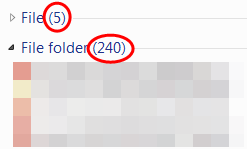
Is it possible to hide the file/folder count when grouped by "type"?
- Computer type
- Laptop
- Computer Manufacturer/Model Number
- Acer Aspire 5745G
- OS
- Genuine Windows® 7 Ultimate x64
- CPU
- Intel® Core™ i7-640M
- Motherboard
- Acer ZR7
- Memory
- 2GB X 2 Samsung DDR3-SDRAM(s)
- Graphics Card(s)
- NVIDIA® GeForce® GT 420M
- Sound Card
- Realtek High Definition Audio
- Monitor(s) Displays
- Generic PnP Monitor
- Screen Resolution
- 1366x768, HD, 16:9
- Hard Drives
- Hitachi HTS545050B9A300 (500GB)
- Keyboard
- Standard PS/2 Keyboard
- Mouse
- Synaptics PS/2 Port TouchPad
- Internet Speed
- 3.6 Mbps
- Antivirus
- Kaspersky Internet Security 2012
- Browser
- Google Chrome
Use 'sort by' instead of using 'group by'
Hello e46m3gtr
To begin, ungroup your files and folders, select
Group by >
(None).
Then choose
Sort by >
Type.
The
Sort by option is located just above the
Group by.
For Information on using 'Sort by' and 'Group by' see tutorial instructions :ar:
File and Folder Arrangement - Group by - Sort by - Arrange by
Last edited:
- Computer type
- PC/Desktop
- OS
- Windows 7 x64, Vista x64, 8.1 smartphone
- CPU
- Intel E8400 65W 64-bit
- Motherboard
- Gigabyte EP45-UD3LR
- Memory
- DDR2 2 x 2GB, 1GB x 2
- Graphics Card(s)
- XFX Radeon HD5750
- Sound Card
- AMD High Definition Audio; Realtek High Definition Audio
- Monitor(s) Displays
- iiyama prolite X2377HDS
- Screen Resolution
- 1920 x 1080
- Hard Drives
- 500GB 7200 rpm Seagate ST3500413AS 16MB, 500GB 5400 rpm Toshiba MQ02ABF050H 32MB, 200GB 7200 rpm Seagate ST3200820AS 8MB, 2TB 7200 rpm Western Digital WD20EZRX 64MB
- PSU
- Enermax Liberty Modular
- Case
- Antec P193 Midi Tower
- Keyboard
- Mionix ZIBAL 60
- Mouse
- Razer USB 2.0 Diamondback Mouse or Huion Graphics Tablet
- Browser
- Internet Explorer, Lunascape, Firefox, Opera, Avast Safezone