
How to i backup/revert Portable Hardrive/hardisk? Its not Unallocated

UserTempo

New member
Local time
11:54 PM
Messages
4
Post Edit: realised my thread title is wrong, it IS unallocated, not *not unallocated* my apologies
Hey guys, im not sure what happened that led to it being unallocated
In [Computer] I cant view the drive, went to [Manage/Disk management] and this was what i saw
Any solutions to restoring/backing up/recover the files inside?
*First time posting, so not sure about image* Here it is
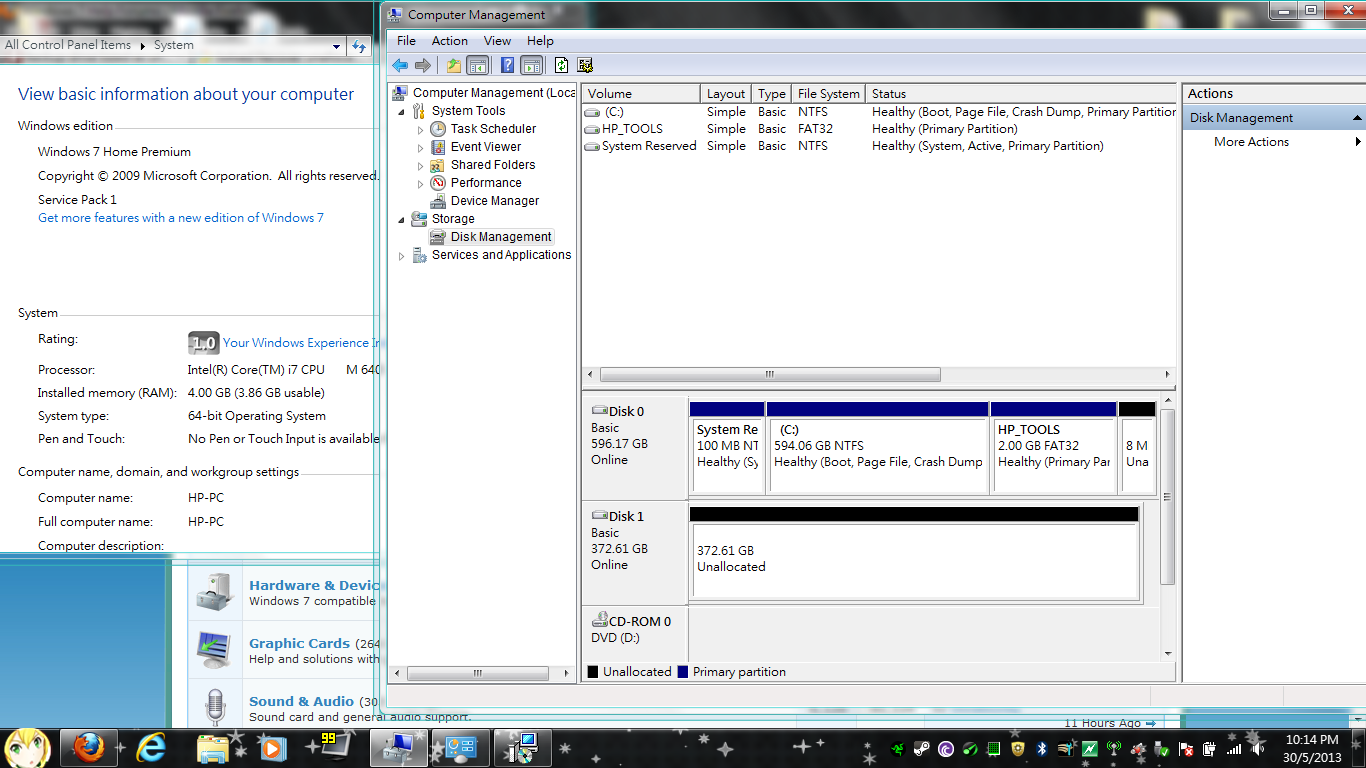
Bw6zbuw.png

Bw6zbuw
 
Last edited:

My Computer My Computer

At a glance

Windows 7 Home Premium 64bit
Computer type
PC/Desktop
Computer Manufacturer/Model Number
HP
OS
Windows 7 Home Premium 64bit
First thing I would try is plugging in the external drive to another computer just to rule out an issue with your HP.
Your image is very helpful
 

My Computer My Computer

At a glance

Windows 7 Home Premium 64bit
Computer type
Laptop
OS
Windows 7 Home Premium 64bit
Hi UserTempo,

Welcome to SevenForums.

Try the procedure given below. Do plug out all other external HDDs/ pen drives/ storage devices..

Download and install the latest version of MiniTools Partition Wizard Home Edition (Free) from Free download Magic Partition Manager Software, partition magic alternative, free partition magic, partition magic Windows 7 and server partition software - Partition Wizard Online

Run the Partition Recovery Wizard to recover the partition.

How to perform lost partition recovery and deleted partition recovery under Windows? Partition Recovery Help.

For further guidance, proceed to the topic in Recovery with Partition Wizard: SanDisk Cruzer Blade 16GB (In your case it will be the "unallocated" external drive.)

Recover a flash drive turned RAW – Partition Wizard and TestDisk.
 

My Computer My Computer

At a glance

Windows 7 Home Premium 32 bit
OS
Windows 7 Home Premium 32 bit
First thing I would try is plugging in the external drive to another computer just to rule out an issue with your HP.
Your image is very helpful
Hope it helped, In anycase, This Drive belongs to my dad, he tried it on his PC, but with similar results
you could say that this is the *another* computer :)
 

My Computer My Computer

At a glance

Windows 7 Home Premium 64bit
Computer type
PC/Desktop
Computer Manufacturer/Model Number
HP
OS
Windows 7 Home Premium 64bit

My Computer My Computer

At a glance

Vista, Windows7, Mint Mate, Zorin, Windows 8from 1.6GHz Duo to i7
Computer Manufacturer/Model Number
HP, Dell, Gateway, Toshiba - 4 laptops and 2 desktops
OS
Vista, Windows7, Mint Mate, Zorin, Windows 8
CPU
from 1.6GHz Duo to i7
Monitor(s) Displays
2x HP w2207
Hard Drives
5x HDD, 7x SSD, 12x Externals
Keyboard
with trackball - no mices
Mouse
Trackball mice
Internet Speed
DSL 6000
Just want to suggest that both your dad & you virus scan your computers and any other external drives you have. IF possible, once the files are recovered run a tool to check the health of the external drive before you use it again.
 

My Computer My Computer

At a glance

Windows 7 Home Premium 64bit
Computer type
Laptop
OS
Windows 7 Home Premium 64bit
Just want to suggest that both your dad & you virus scan your computers and any other external drives you have. IF possible, once the files are recovered run a tool to check the health of the external drive before you use it again.

1: The issue isn't fixed yet
2: The image taken was from my recently repaired labtop

Back on topic.Bump
 

My Computer My Computer

At a glance

Windows 7 Home Premium 64bit
Computer type
PC/Desktop
Computer Manufacturer/Model Number
HP
OS
Windows 7 Home Premium 64bit
Generally, we use a live Linux CD/pen drive to try and retrieve data from the internal drive/s when the computer for any reason becomes unbootable.

An external HDD can become RAW or unallocated due to sudden power loss when it is being written or read or when it is pulled out without using the safely remove option, amongst other reasons. In such cases the first sector gets corrupted and a partition recovery procedure is the first tried option.

Try Partition Recovery as enunciated in my post #3.

You may also use TestDisk to recover data. Both methods - using Partition Wizard or TestDisk are indicated in my thread I had referenced. But try Partition Wizard first since it is easier than TestDisk.
 

My Computer My Computer

At a glance

Windows 7 Home Premium 32 bit
OS
Windows 7 Home Premium 32 bit

My Computer My Computer

At a glance

Vista, Windows7, Mint Mate, Zorin, Windows 8from 1.6GHz Duo to i7
Computer Manufacturer/Model Number
HP, Dell, Gateway, Toshiba - 4 laptops and 2 desktops
OS
Vista, Windows7, Mint Mate, Zorin, Windows 8
CPU
from 1.6GHz Duo to i7
Monitor(s) Displays
2x HP w2207
Hard Drives
5x HDD, 7x SSD, 12x Externals
Keyboard
with trackball - no mices
Mouse
Trackball mice
Internet Speed
DSL 6000
Back
Top