How to increase video memory

geniulmalefic

Push the limits!
Member
VIP
Local time
7:22 PM
Messages
186
Location
Look behind you...
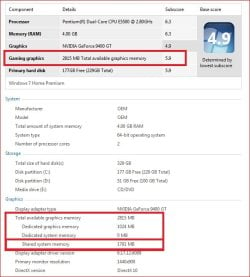
I have ATI Radeon HD 2400.On description it says I have a total video memory of 1023 MB,but is dedicated only 256,how can I increas it?
Thanks,here's a pic.
 

Attachments

  • Untitled.png
    Untitled.png
    53 KB · Views: 9,498

My Computer

Computer Manufacturer/Model Number
AMD Athlon 64x2 dual core 4400+
OS
Windows 7 Enterprise x64
CPU
2,3GHz
Motherboard
ASUS
Memory
2GB DDR2
Graphics Card(s)
ATI Radeon HD 2400
Sound Card
Realtek
Monitor(s) Displays
Benq G900W
Screen Resolution
1440x900
Hard Drives
160 GB
Go into your BIOS and check for 'dedicated video memory'
 

My Computer

Computer type
PC/Desktop
Computer Manufacturer/Model Number
Custom Build
OS
Windows 10 Pro x64, Arch Linux
CPU
Intel Core 2 Quad Q8200 OC'd 3.08GHz
Motherboard
Asus Rampage formula LGA775
Memory
8GB DDR2 900Mhz
Graphics Card(s)
MSI GT730 2GB GDDR5 (Kepler)
Sound Card
Supreme FX2
Monitor(s) Displays
Samsung LS22F350 LED
Screen Resolution
1080P
Hard Drives
Kingston SSDNow UV400 120GB, 500GB Hitachi, 2TB Samsung, 500GB Seagate FreeAgent, 640GB Samsung, 160GB Toshiba (Arch)
PSU
AeroCool 500W Bronze
Cooling
Cooler Master V6 + 3X fans
Keyboard
Prolink keyboard
Mouse
Logitech M705
Internet Speed
1MiB/s
Browser
Chrome Beta
memory

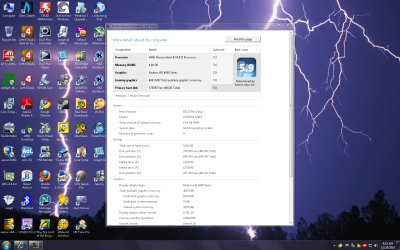
All my card is dedicated to graphics (1Gb)

Do your Bios support Full ram usage for 64bit??

What make are your Bios??

A Bios update did it for me,went from installed memory 3.25gb to 4gb so system didnt chew up ram

I have a question for you??

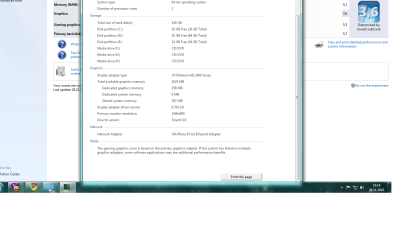
How did you get shared system memory so low??
 

Attachments

  • Capture.jpg
    Capture.jpg
    52.5 KB · Views: 7,827

My Computer

Computer type
PC/Desktop
OS
Windows 7 X64 Bit
CPU
Intel(R) Core(TM)i7-4771 CPU @ 3.50GH
Motherboard
Asus Sabertooth Z87
Memory
Corsair 4x8 Vengeance (32GB)
Graphics Card(s)
NVIDIA GeForce GTX780
Monitor(s) Displays
LG
Screen Resolution
1920x1080
PSU
Corsair CX750
Case
Corsair 200 series
Cooling
H80i Liquid Cooler
Keyboard
Microsoft
Mouse
Microsoft
Internet Speed
good times-500-850 kbs bad times-50-100 kbs
How did you get shared system memory so low??

Because he only has 2 GB of memory according to his specs, and that number is set by Windows dynamically based on the amount of system ram,

http://www.sevenforums.com/tutorials/89278-video-memory-virtualization-brief-guide.html

And to answer the original question, no you cannot increase the amount or memory on a video card. That can only be done with onboard video, and even then it and/or the bios has to support being able to allocate more system memory to graphics (not possible with most of Intel's latest graphics solutions as they have a fixed dedicated amount, and increases dynamically based on graphics need/usage).
 

My Computer

Computer type
PC/Desktop
Computer Manufacturer/Model Number
Me
OS
Win 7 Ultimate x64
CPU
FX-8350 @ 4.6 GHz so far
Motherboard
Asus M5A97 EVO
Memory
ADATA XPG V1 Series Black 8GB DDR3 1600
Graphics Card(s)
Sapphire R9 270x Dual-X
Sound Card
Xonar DGX w/ Corsair Vengence 1300
Monitor(s) Displays
Acer S232HL Abid
Screen Resolution
1920x1080
Hard Drives
120 GB OCZ Vertex 3
500 GB Seagate 7200.12
PSU
Antec Earthwatts 650W Green
Case
Antec Three Hundred
Cooling
Cooler Master 212 EVO
Keyboard
Logitech G510
Mouse
Logitech G500s
Internet Speed
35000/3000

My Computer

Computer Manufacturer/Model Number
AMD Athlon 64x2 dual core 4400+
OS
Windows 7 Enterprise x64
CPU
2,3GHz
Motherboard
ASUS
Memory
2GB DDR2
Graphics Card(s)
ATI Radeon HD 2400
Sound Card
Realtek
Monitor(s) Displays
Benq G900W
Screen Resolution
1440x900
Hard Drives
160 GB
I had to double check mine after seeing this thread but im pretty good I just need that ssd and that wei would be higher

Poor me bottle necked by a hhd :o
 

Attachments

  • wei 1.png
    wei 1.png
    509.5 KB · Views: 5,800

My Computer

Computer type
PC/Desktop
Computer Manufacturer/Model Number
CoreI7-6700K MrFingerIII Special Builds
OS
Windows 10 Home Premium 64bit sp1
CPU
Intel I7-6700K @ 4.6 Ghz 1.344 volts everyday OC
Motherboard
Asrock Fatality K6 Z170 Socket 1151
Memory
32GB G-Skill TridentZ 3200mhz 16-18-18-38 DDR4
Graphics Card(s)
Sli Gigabyte Windforce GTX 980 G1
Sound Card
AC97 Creative Rage Tactic 3D Headphones Bluetooth
Monitor(s) Displays
27" Asus ROG Swift PG278Q G-Sync 48" Vizio Smart HD TV
Screen Resolution
2560x1440p 27"- 48" Currently Gaming at 2560x1440p Res 2K
Hard Drives
250GB Samsung Evo840SSD Seagate baracuda 500 GB WD Mybook 500Gb 1TB Seagate Barracuda
PSU
HX1050w Corsair Silver 80plus certified crosfire/sli
Case
Enthod Pro Full Tower
Cooling
Corsair H110i GT 280 mm High Performance WaterBlock
Keyboard
Logitech wireless keyboard
Mouse
Logitech wireless mouse
Internet Speed
Cox Cable 100+ mb
Antivirus
WebRoot Spysweeper with Antivirus
Browser
IE-10, Chrome, Opera
Other Info
My Other Rig is a AMD FX8320E @4.6Ghz 16GB Ballistic Sport Ram
Mobo Asrock Fatality 990FX 120GB OCZ SSD 1TB Seagate Barracuda Corsair H75 Cooling PSU Corsair CX750
GPU GTX Gigabyte 970G1
I had to double check mine after seeing this thread but im pretty good I just need that ssd and that wei would be higher

Poor me bottle necked by a hhd :o

Ok,so...how do I double my video memory without risks.
step by step please!
 

My Computer

Computer Manufacturer/Model Number
AMD Athlon 64x2 dual core 4400+
OS
Windows 7 Enterprise x64
CPU
2,3GHz
Motherboard
ASUS
Memory
2GB DDR2
Graphics Card(s)
ATI Radeon HD 2400
Sound Card
Realtek
Monitor(s) Displays
Benq G900W
Screen Resolution
1440x900
Hard Drives
160 GB
Me double checking was just simply making sure the bios didn't have the dedicated feature on

Also since my card is a much more powerfull card it has no use for that

I saw you have a issue with yours and the memory is really low did you check you're pci e set up ?

basicly im saying exactly what the previous responses were just turn that feature off you should gain something if anything Disable it
 

My Computer

Computer type
PC/Desktop
Computer Manufacturer/Model Number
CoreI7-6700K MrFingerIII Special Builds
OS
Windows 10 Home Premium 64bit sp1
CPU
Intel I7-6700K @ 4.6 Ghz 1.344 volts everyday OC
Motherboard
Asrock Fatality K6 Z170 Socket 1151
Memory
32GB G-Skill TridentZ 3200mhz 16-18-18-38 DDR4
Graphics Card(s)
Sli Gigabyte Windforce GTX 980 G1
Sound Card
AC97 Creative Rage Tactic 3D Headphones Bluetooth
Monitor(s) Displays
27" Asus ROG Swift PG278Q G-Sync 48" Vizio Smart HD TV
Screen Resolution
2560x1440p 27"- 48" Currently Gaming at 2560x1440p Res 2K
Hard Drives
250GB Samsung Evo840SSD Seagate baracuda 500 GB WD Mybook 500Gb 1TB Seagate Barracuda
PSU
HX1050w Corsair Silver 80plus certified crosfire/sli
Case
Enthod Pro Full Tower
Cooling
Corsair H110i GT 280 mm High Performance WaterBlock
Keyboard
Logitech wireless keyboard
Mouse
Logitech wireless mouse
Internet Speed
Cox Cable 100+ mb
Antivirus
WebRoot Spysweeper with Antivirus
Browser
IE-10, Chrome, Opera
Other Info
My Other Rig is a AMD FX8320E @4.6Ghz 16GB Ballistic Sport Ram
Mobo Asrock Fatality 990FX 120GB OCZ SSD 1TB Seagate Barracuda Corsair H75 Cooling PSU Corsair CX750
GPU GTX Gigabyte 970G1
The only way is to by a card that has twice the memory of your current card. You cannot add memory to a video card.

That number you are looking at in the WEI (total video memory) is a combination of what is physically on the card, with the "shared" amount determined by the total amount of system ram and is not user configurable (explained in more detail in the link I posted previously).
 

My Computer

Computer type
PC/Desktop
Computer Manufacturer/Model Number
Me
OS
Win 7 Ultimate x64
CPU
FX-8350 @ 4.6 GHz so far
Motherboard
Asus M5A97 EVO
Memory
ADATA XPG V1 Series Black 8GB DDR3 1600
Graphics Card(s)
Sapphire R9 270x Dual-X
Sound Card
Xonar DGX w/ Corsair Vengence 1300
Monitor(s) Displays
Acer S232HL Abid
Screen Resolution
1920x1080
Hard Drives
120 GB OCZ Vertex 3
500 GB Seagate 7200.12
PSU
Antec Earthwatts 650W Green
Case
Antec Three Hundred
Cooling
Cooler Master 212 EVO
Keyboard
Logitech G510
Mouse
Logitech G500s
Internet Speed
35000/3000
Me double checking was just simply making sure the bios didn't have the dedicated feature on

Also since my card is a much more powerfull card it has no use for that

I saw you have a issue with yours and the memory is really low did you check you're pci e set up ?

basicly im saying exactly what the previous responses were just turn that feature off you should gain something if anything Disable it[/QUOTE
]How should I do that?
What menu should I acces?
 

My Computer

Computer Manufacturer/Model Number
AMD Athlon 64x2 dual core 4400+
OS
Windows 7 Enterprise x64
CPU
2,3GHz
Motherboard
ASUS
Memory
2GB DDR2
Graphics Card(s)
ATI Radeon HD 2400
Sound Card
Realtek
Monitor(s) Displays
Benq G900W
Screen Resolution
1440x900
Hard Drives
160 GB
The only way is to by a card that has twice the memory of your current card. You cannot add memory to a video card.

That number you are looking at in the WEI (total video memory) is a combination of what is physically on the card, with the "shared" amount determined by the total amount of system ram and is not user configurable (explained in more detail in the link I posted previously).


He has explained this to you the only way around this is to anty up and purchase a more powerfull card and doing that will require a good amount of power in a psu if you don't have one that meet the recommended specs

Stormy has done a great job with his imformation i would follow this If money is tight then you will have to make due but if you can spend a little for a upgrade then you should be looking in that direction also adding 2 more gigs of ram wouldnt hurt even though you are running 32 bit and it would be 3.25 usable those two things would bring you up by a tremendous scale
 

My Computer

Computer type
PC/Desktop
Computer Manufacturer/Model Number
CoreI7-6700K MrFingerIII Special Builds
OS
Windows 10 Home Premium 64bit sp1
CPU
Intel I7-6700K @ 4.6 Ghz 1.344 volts everyday OC
Motherboard
Asrock Fatality K6 Z170 Socket 1151
Memory
32GB G-Skill TridentZ 3200mhz 16-18-18-38 DDR4
Graphics Card(s)
Sli Gigabyte Windforce GTX 980 G1
Sound Card
AC97 Creative Rage Tactic 3D Headphones Bluetooth
Monitor(s) Displays
27" Asus ROG Swift PG278Q G-Sync 48" Vizio Smart HD TV
Screen Resolution
2560x1440p 27"- 48" Currently Gaming at 2560x1440p Res 2K
Hard Drives
250GB Samsung Evo840SSD Seagate baracuda 500 GB WD Mybook 500Gb 1TB Seagate Barracuda
PSU
HX1050w Corsair Silver 80plus certified crosfire/sli
Case
Enthod Pro Full Tower
Cooling
Corsair H110i GT 280 mm High Performance WaterBlock
Keyboard
Logitech wireless keyboard
Mouse
Logitech wireless mouse
Internet Speed
Cox Cable 100+ mb
Antivirus
WebRoot Spysweeper with Antivirus
Browser
IE-10, Chrome, Opera
Other Info
My Other Rig is a AMD FX8320E @4.6Ghz 16GB Ballistic Sport Ram
Mobo Asrock Fatality 990FX 120GB OCZ SSD 1TB Seagate Barracuda Corsair H75 Cooling PSU Corsair CX750
GPU GTX Gigabyte 970G1
question

i read all this page but what i think the original question and also my question is NOT "how do i increase dedicated video ram?" the question is "how do i take RAM and add it to SHARED RAM?"

I have a 1gb dedicated HD directx 11 video card and my SHARED VIDEO RAM is capping at 4gb but i have 16gb of ram and i would like to increase the SHARED VIDEO RAM to 8gb so the system will still have 8gb of ram and my SHARED VIDEO RAM can also sit at 8gb i cant find a setting in windows or bios, also i do not have an integrated video card at all in my rig. Is there any software i can download or buy that will allow this 4gb cap on SHARED VIDEO RAM to be passed other than buying a 2-4gb graphics card?

also im wondering if a person had 32gb of ram would they still get stuck with this 4gb cap on SHARED VIDEO RAM? windows7x64sp1
 

My Computer

OS
7
Short of hacking Windows to change how the algorithm works for determining how it is calculated, no there is no way to change it. That and even if you could, there would be little to zero benefit from doing so.
 

My Computer

Computer type
PC/Desktop
Computer Manufacturer/Model Number
Me
OS
Win 7 Ultimate x64
CPU
FX-8350 @ 4.6 GHz so far
Motherboard
Asus M5A97 EVO
Memory
ADATA XPG V1 Series Black 8GB DDR3 1600
Graphics Card(s)
Sapphire R9 270x Dual-X
Sound Card
Xonar DGX w/ Corsair Vengence 1300
Monitor(s) Displays
Acer S232HL Abid
Screen Resolution
1920x1080
Hard Drives
120 GB OCZ Vertex 3
500 GB Seagate 7200.12
PSU
Antec Earthwatts 650W Green
Case
Antec Three Hundred
Cooling
Cooler Master 212 EVO
Keyboard
Logitech G510
Mouse
Logitech G500s
Internet Speed
35000/3000
I have ATI Radeon HD 2400.On description it says I have a total video memory of 1023 MB,but is dedicated only 256,how can I increas it?
Thanks,here's a pic.


How To Increase Your Dedicated Graphics Memory - YouTube

1.Press "Del" or "F2" or "F10" on your keyboard to enter BIOS.

2.Using the arrow keys on your keyboard, navigate to the "Advanced Chipset Features" or some similar name , and press "Enter."

3.Navigate to "VGA Share Memory Size" or some similar option and press "Enter." Increase the video memory size by setting it to the maximum available value (for example, 512MB), and press "Enter."

4.find the option save & exit (f10) &press enter

5.Please Comment, Like, Share, And Enjoy
 

My Computer

Computer type
PC/Desktop
Computer Manufacturer/Model Number
N/A
OS
Windows 7 Ultimate 64 Bit
CPU
Intel Pentium G2020
Motherboard
Gigabyte Technology Co., Ltd. B75M-D3H
Memory
8.00GB Dual-Channel DDR3 @ 665MHz (9-9-9-24)
Graphics Card(s)
1024MB ATI AMD Radeon R7 200 Series (ATI AIB)
Sound Card
Realtek High Definition Audio
Monitor(s) Displays
LCD MONITOR (1360x768@60Hz)
Screen Resolution
1360x768@60Hz
Hard Drives
466GB Hitachi HDS721050DLE630 ATA Device (SATA)
1863GB Seagate ST2000DM001-1ER164 ATA Device (SATA)
PSU
Cooler Master Thunder 450W
Im having the same problem but with 32bit AMD Athlon X2. Someone help me!!!!!
 

My Computer

Computer type
Laptop
Computer Manufacturer/Model Number
HP
OS
Windows 7 Home Premium 32bit
CPU
AMD Athlon X2
Motherboard
???
Memory
???
Graphics Card(s)
NVIDIA Geforce
Hard Drives
???
Antivirus
Microsoft Security Essentials
Browser
Google chrome
You will only be lowering your usable memory by doing this.

As everyone has stated, get a new card with more memory on it, at least 2 GBs.
 

My Computer

Computer type
PC/Desktop
Computer Manufacturer/Model Number
Skylake Special #666
OS
Windows 10 Pro x64
CPU
Intel Core i7 6700K
Motherboard
Asus Sabertooth Z170 Mark 1
Memory
GSkill TridentZ RGB 16GB 3600 16-16-16-36
Graphics Card(s)
EVGA GTX 980 Ti SC x2
Sound Card
Realtek High Definition
Monitor(s) Displays
AOC G2460PG
Screen Resolution
1920 x 1080 144Hz
Hard Drives
Samsung 860 Pro 256GB, Seagate Barracuda 4TB x2
PSU
EVGA 1000 P2, EVGA White Custom Braided Cables
Case
Corsair Vengeance C70 Gunmetal Black
Cooling
Corsair H100i v2, Corsair ML120 x2, Thermal Grizzly Kryonaut
Keyboard
Logitech G910 Orion Spectrum
Mouse
Logitech G700s
Internet Speed
Verizon Fios Quantum Gateway 75/75
Antivirus
Windows Defender, Malwarebytes Free 3.8.3
Browser
Chrome
Other Info
Corsair SP120 x4, LG Blu-ray Drive, Durabrand HT-395 100 Watt Dolby Digital Amp, Corsair H2100 Wireless 7.1 Headset
Im having the same problem but with 32bit AMD Athlon X2. Someone help me!!!!!

According to your System Specs, you have an Nvidia GeForce video card. This hack only applies to the situation where you have on-board memory (NOT a video card) and the BIOS provides an option to set the amount of system memory dedicated to video.
 

My Computer

Computer type
PC/Desktop
Computer Manufacturer/Model Number
Custom
OS
Win7 Pro 32-bit, Win8 Pro 32-bit
CPU
AMD Phenom II X6 1090T
Motherboard
Gigabyte
Memory
4GB ddr3 1300
Graphics Card(s)
AMD HD 4290 onboard
Sound Card
Builtin Realtek HD Audio
Monitor(s) Displays
Samsung 24" widescreen, LG 23" widescreen
Screen Resolution
1920x1200/1920x1080
Hard Drives
Kingston 256GB SSD
Keyboard
Logitech Illuminated Keyboard
Mouse
Logitech M705 wireless mouse
Antivirus
Norton Av 2013
Browser
IE v10
The only way is to by a card that has twice the memory of your current card. You cannot add memory to a video card.

That number you are looking at in the WEI (total video memory) is a combination of what is physically on the card, with the "shared" amount determined by the total amount of system ram and is not user configurable (explained in more detail in the link I posted previously).


I have a notebook, I can change it buying another video card? or not? D:
 

My Computer

Computer type
Laptop
Computer Manufacturer/Model Number
HP
OS
windoes 7, 64 bith
Antivirus
Norton 360
Browser
Internet Explorer
Anyone with an Athlon X2 CPU is going to be struggling these days, that is obsolete CPU, I know, it's 2 PC's back for me and still working, but XP on it, definitely not up for gaming rig/7, would be like trying to win the Kentucky Derby on a Donkey.
 

My Computer

Computer type
PC/Desktop
Computer Manufacturer/Model Number
Self Built Custom
OS
Windows 7 Ultimate Retail Box (64-bit installed) + Service Pack 1
CPU
AMD FX-8350 CPU v1.15 (or 1.0F) BIOS was required!
Motherboard
MSI 890FXA-GD70
Memory
8G CAS-7 G-Skill DDR3 @1333 (2 fours) [mobo nonOC max rec'd]
Graphics Card(s)
Radeon HD 7950 [3 gigs of GDDR5] MSI Twin Frozr model
Sound Card
Realtek High Definition Audio (onboard mobo, ALC-889 chip)
Monitor(s) Displays
2 WS LED Monitors: One LG One Viewsonic
Screen Resolution
1920 by 1080
Hard Drives
SSD for OS: Samsung 840 Pro
SSD for VM and utilities: Adata SX900
7200 RPM SATA HDs for the rest: Hitachi and Seagate
PSU
Corsair TX850 - 850W max, in service since August 2010.
Case
Thermaltake Armor A90
Cooling
Thermaltake Spin Q CPU Cooler, in service since August 2010
Keyboard
Logitech G11
Mouse
Logitech M310 Wireless
Internet Speed
100 Megabit broadband supposedly upgraded from 50 (Cable)
Antivirus
Bitdefender Internet Security 2014 suite
Browser
Pale Moon 64-bit main, also IceDragon, Opera, and Maxthon.
Other Info
CompTIA A+ certified (220-800 series) in July 2013.
Back
Top