How to increase Windows Sound above 100%?

seventrad

New member
Local time
7:32 AM
Messages
50
[SOLVED] How to increase Windows Sound above 100%?

Hi,

I use ffdshow audio to decode some videos and in the ffdshow settings I set the audio to increase 400%. But, some videos don't uses ffdshow and the Windows Media Player don't play mp3 above the 100%.

What application I need to increase system volume on playback? I don't want to convert the original video. The Media Player Classic have this option but the WMP don't.

What application increase the sound of system above 100%?

Windows 7 x64 Ultimate SP1/Sound Stereo 2.0/Realtek Adapter Sound
 
Last edited:

My Computer My Computer

At a glance

Windows 7 Ultimate x64 SP1
OS
Windows 7 Ultimate x64 SP1
If I play movies in VLC I can crank up the sound to 400%
But the simplest solution would be to use external speakers with a build in amplifier. That way you wouldn't put too much strain on your audio chip

-DG
 

My Computer My Computer

At a glance

Windows 7 Ultimate x86DualCore AMD Athlon 64 X2, 2600 MHz 5200+Samsung 2GB DDR2Onboard NVIDIA GeForce 6150SE nForce 430
Computer Manufacturer/Model Number
HP m8000n
OS
Windows 7 Ultimate x86
CPU
DualCore AMD Athlon 64 X2, 2600 MHz 5200+
Motherboard
Asus M2N68-LA (Narra)
Memory
Samsung 2GB DDR2
Graphics Card(s)
Onboard NVIDIA GeForce 6150SE nForce 430
Sound Card
Onboard nVIDIA nForce 6100-430 (MCP61P)
Monitor(s) Displays
Westinghouse 19" LED
Screen Resolution
1280x1024
Hard Drives
SATA II Seagate Barracuda 500GB
USB II WD Elements 500GB
USB II WD My Book 1TB
USB II WD My Book 2TB
PSU
Stock (HP)
Case
Stock (HP)
Cooling
Stock
Keyboard
Logitech Classic KB 200
Mouse
Standard HP opticle USB mouse
If I play movies in VLC I can crank up the sound to 400%
But the simplest solution would be to use external speakers with a build in amplifier. That way you wouldn't put too much strain on your audio chip

-DG

I don't have money for this but now I use Media Player Classic Home Cinema to reproduce all formats, including the mp3! The MPC-HC have this same option of VLC.

EDIT:

My solution: using the MPC-HC, increase the volume in 1.5dB!


Thank you!
 
Last edited:

My Computer My Computer

At a glance

Windows 7 Ultimate x64 SP1
OS
Windows 7 Ultimate x64 SP1
You really shouldn't be pushing your output that hard . . as soon as you go beyond 100% you're likely to induce digital distortion, which sounds just awful really. If anyone has to put the volume output up to anywhere near 400% there's either something really wrong with the gain structure of your audio setup or the video file itself was encoded incorrectly (non-unity gain) . . I'm assuming it's the latter in this case.

At the end of the day it's going to be easier to fix the video files than to keep trying to adjust for them . . you can adjust the audio file in the container without affecting the video stream which is great, a single batch process on all the offending files would fix the problem.

IF it's ALL video files then I'd basically do what SledgeDG suggested . . I'd set your media program's volume output at 100%, set windows' volume output at about 90% (most op-amps in consumer audio devices can't handle transients beyond about -5dB) and just turn up the volume on your amp/speakers . .

What amp/speakers are you using by the way?
 

My Computer My Computer

At a glance

Windows 7 Ultimate x64AMD Phenom 95508GBNvidia Geforce GTS 450
OS
Windows 7 Ultimate x64
CPU
AMD Phenom 9550
Motherboard
Asus
Memory
8GB
Graphics Card(s)
Nvidia Geforce GTS 450
Sound Card
Tascam FW-1804
Monitor(s) Displays
Multiple
Screen Resolution
1920x1080
Hard Drives
Many
PSU
Coolermaster
Case
Antec 4u Rack
Keyboard
Microsoft Wireless
Mouse
Microsoft Wireless
Internet Speed
Fast
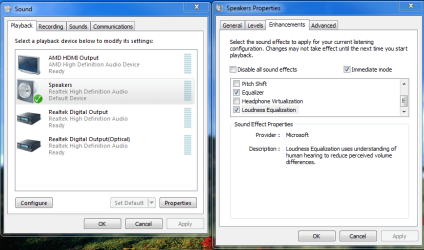
In speaker enhancements, check Loudness Equalization to boost the volume.
Capture.PNG
 

My Computer My Computer

At a glance

Windows 7 Home Premium 64 bitIntel Core i7-4790G.SKILL 8GB (2 x 4GB) DDR3 F3-10666CL9D-8GBNTAMD Radeon R7 250
Computer type
PC/Desktop
Computer Manufacturer/Model Number
Custom Build
OS
Windows 7 Home Premium 64 bit
CPU
Intel Core i7-4790
Motherboard
GA-Z87X-D3H
Memory
G.SKILL 8GB (2 x 4GB) DDR3 F3-10666CL9D-8GBNT
Graphics Card(s)
AMD Radeon R7 250
Sound Card
Realtek ALC892
Monitor(s) Displays
Samsung UN32EH5000, Dell 1703FPT
Screen Resolution
1920 x 1080, 1280 x 1024
Hard Drives
WD5003AZEX
WD10EZEX
Samsung HD103SJ
Samsung 128 GB 840 PRO
PSU
SeaSonic M12II SS-500GM
Case
Fractal Design Define R4
Cooling
Zalman CNPS9900ALED
Keyboard
Logitech K800
Mouse
Logitech M705
Internet Speed
16 Mbps
Antivirus
Avast
Browser
Firefox
Other Info
Bose Companion 2 Multimedia Speakers
Mp3s that are encoded too low can be fixed with this one in seconds without the loss of quality (since there is no new encoding required)

MP3Gain
or what I used to use:
http://www.mptrim.com/

Video streams you would have to demux, work with the audio track and remux it again

-DG
 

My Computer My Computer

At a glance

Windows 7 Ultimate x86DualCore AMD Athlon 64 X2, 2600 MHz 5200+Samsung 2GB DDR2Onboard NVIDIA GeForce 6150SE nForce 430
Computer Manufacturer/Model Number
HP m8000n
OS
Windows 7 Ultimate x86
CPU
DualCore AMD Athlon 64 X2, 2600 MHz 5200+
Motherboard
Asus M2N68-LA (Narra)
Memory
Samsung 2GB DDR2
Graphics Card(s)
Onboard NVIDIA GeForce 6150SE nForce 430
Sound Card
Onboard nVIDIA nForce 6100-430 (MCP61P)
Monitor(s) Displays
Westinghouse 19" LED
Screen Resolution
1280x1024
Hard Drives
SATA II Seagate Barracuda 500GB
USB II WD Elements 500GB
USB II WD My Book 1TB
USB II WD My Book 2TB
PSU
Stock (HP)
Case
Stock (HP)
Cooling
Stock
Keyboard
Logitech Classic KB 200
Mouse
Standard HP opticle USB mouse
You really shouldn't be pushing your output that hard . . as soon as you go beyond 100% you're likely to induce digital distortion, which sounds just awful really. If anyone has to put the volume output up to anywhere near 400% there's either something really wrong with the gain structure of your audio setup or the video file itself was encoded incorrectly (non-unity gain) . . I'm assuming it's the latter in this case.

At the end of the day it's going to be easier to fix the video files than to keep trying to adjust for them . . you can adjust the audio file in the container without affecting the video stream which is great, a single batch process on all the offending files would fix the problem.

IF it's ALL video files then I'd basically do what SledgeDG suggested . . I'd set your media program's volume output at 100%, set windows' volume output at about 90% (most op-amps in consumer audio devices can't handle transients beyond about -5dB) and just turn up the volume on your amp/speakers . .

What amp/speakers are you using by the way?

Thank you for reply!

In my case, the increase is very low: only +1.5dB in the Media Player Classic settings! My ears do not perceive any digital distortion, only the increase of volume!


My Computer My Computer

At a glance

Windows 7 Ultimate x64 SP1
OS
Windows 7 Ultimate x64 SP1
Mp3s that are encoded too low can be fixed with this one in seconds without the loss of quality (since there is no new encoding required)

MP3Gain
or what I used to use:
mpTrim and WavTrim

Video streams you would have to demux, work with the audio track and remux it again

-DG

I use the MP3Gain only for the musics in my MP3 Player.
 

My Computer My Computer

At a glance

Windows 7 Ultimate x64 SP1
OS
Windows 7 Ultimate x64 SP1
Back
Top