How to know what drivers you will need for clean install.

ariel5345

New member
Member
Local time
8:06 AM
Messages
59
Location
Austin
I am upgrading from Vista premium to 7 pro. I'm doing a clean install.
I have read allot to prepare and I am lost when it comes to the following questions.
Yes I know I ask allot of questions but I'm stupid and it's my job. :D


I have read that I need to download all the latest system device drivers before I install.
I would then have to also get directions on how to install as some require special methods
I have gleaned that some will come with installers.
Then I guess the others I would go to device manager right click on a sub menu and click upgrade driver and browse to where I have it stored, right?
In order for me to know what drivers I need I have read the following tips.
1. Run DriverMax and go by the list it provides.
2. Any sub menu in device manager is a driver I will need.
3. Go to my pc manufacturer (hP) and input my model # and OS version to see list
4. Run SIW or Belarc to get a list.
These are the problems:
They all 4 seem to list the drivers differently-very confusing
I have found that some of the list splits some drivers into 2 or 3 names.
In Device manager, Sub menu under Computer says: ACPIx86-based pc. ? This is a driver name?
Every list has different amount of drivers listed. No way this newbie will ever figure it out.

The word "Latest" is in a lot of tutorials, when describing what version of the driver I need. Yet I have heard if it isn't broke don’t fix it.
Hp will not even give a list of drivers for the windows 7 Os.
The drivers HP list for me are all older versions except maybe one or two.
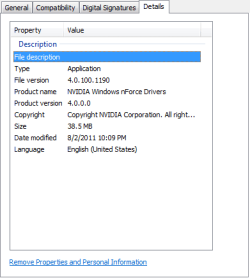
I ran windows compatibility tool and it listed one incompatibility and gave me a download .
The download says this "15.35_nforce_win7_32bit_international_whql (1)" I Don't know what it is.
Cross reference to driver max list it could be either of the following for all I know:
Display adapters
NVIDIA GeForce 7150M / nForce 630M
Network adapters
NVIDIA nForce 10/100 Mbps Ethernet
System Devices
NVIDIA nForce PCI System Management
NVIDIA nForce System Management Controller

Some say let windows update do most drivers.
Some say download all the "Latest" and have the older ones that work right for you.
Some say Upgrade later after clean install.
I can't get a handle on it.
There really need be be a tutorial Named "How to identifying the drivers you should have before a clean install".
The terms are not constant when naming drivers. Chipset/Mother board? CPU/processor? Grahics/video card? It is too confusing for a newbie.
I have studied for 100 hrs or more preparing myself for a clean install and 50% of that on drivers and still can't get it.
I've read: Priority lies with video, sound and network drivers. Is this all I need before hand? And should it be the Latest and not the ones that already are on my system and working?


Other issues:
Brink says that I "may" need to flash Bios in his Windows 7 clean install Tut. Is this the one I need to do?
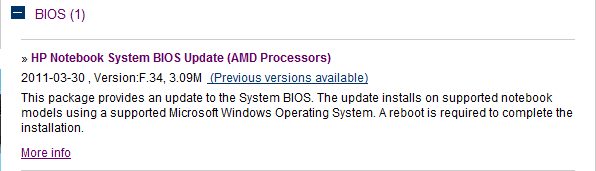
Hp does list an update called Bios. System Bios. Yet when I run their program called Hp support it says everything is up to date. Yet their website section for drivers a system bios update. Hmmm
The term Bios seems to be used as if it refers to a specific thing. Yet then I guess that video cards also have a Bios. I'm confused.
I guess I should do this do this before I load 7 and than when I re-format my system drive during the install this will not be affected. Right?

During the Install the master boot record will be picked up and restored correct?
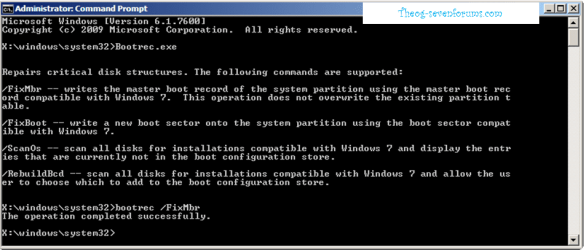
Should I run a MBR hacker program and back it up?

Will my Linux Unbutu live cd be a way for me to reload the MBR if I should need too?
I need a tutorial for the bios flash. I have only found one for graphics cards they are different right? lol See how a tutorial is needed.
 

My Computer My Computer

At a glance

7 professionalYour Processor type and speed - AMD ATHLON(tm...2.5gbNVIDIA GeForce 7150/nForce 64MB
Computer Manufacturer/Model Number
Hp presario v6620us 6500notebook series.
OS
7 professional
CPU
Your Processor type and speed - AMD ATHLON(tm) 64X2 DUAL-COR
Motherboard
Quanta 30CF
Memory
2.5gb
Graphics Card(s)
NVIDIA GeForce 7150/nForce 64MB
Sound Card
conextant smartaudio hd2
Hard Drives
FUJITSU PLATA 160GB IDE
PSU
Wth? is this
Case
The judge threw it out. Not enough evidence.
Cooling
sometimes.
Keyboard
Yep
Mouse
Nope
Internet Speed
fast
This is not XP. Win7 is driver-complete with newer arriving quickly via optional Windows Updates when you enable driver auto-updating: Automatically get recommended drivers and updates for your hardware

Any drivers then missing in Device Manager can be found on the Support Downloads webpage for the Device or Computer model.

I would not change out any drivers given by the installer/Updates unless performance problems are confirmed to be caused by them. Driver programs, like registry and optimizer programs, are not advised in Win7.

Put any wireless driver on a stick just in case so you can get online quickly after install to run your Updates.

Other tips for getting a perfect Win7 install based on hundreds done here - use the ones which apply: Reinstalling Windows 7
 
Put any wireless driver on a stick just in case so you can get online quickly after install to run your Updates.

[/URL]

Is this the wireless? Broadcom 802.11b/g WLAN or this
HP Wireless Assistant
2009-07-23 , Version:3.50.9.1, 3.94M

Thanks for responding
I've read other post of yours before.
Your'e a fan of windows update for drivers but others disagree. Your advice is probably the best especially for those confused as I am. :p
Yet Brink writes this.
• Before doing this*clean*install, you should download and save all of your device drivers to DVD, or some other media, to have them handy to make setting Windows 7 up easier later. Sometimes using the Vista drivers in Windows 7, you will need to use*Compatibility Mode*on the driver for it to*install.


Also what do I do with application that Windows 7 upgrade adviser had me download.
Driver app pic.png


Also I ran Siw and saw many information errors from my bios. Should I flash my Bios before install? The bios would come from the pc manufacturer? In my case HP?
or is the Bios a motherboard thing which in my case is still HP.
This is the update that Hp list for me. Is this the bios that has to be flashed and that i should recruit help performing.
Bios pic.png
I am referring to Brinks following statement In windows 7 clean install. I do have more ram than 2 gb.

• Sometimes you may have a problem with installing Windows 7 with more than 2 GB of RAM installed on some older motherboards. If you have this problem, then you should*install*Windows 7 with a maximum of 2GB of RAM installed and add the rest of the RAM after Windows 7 is fully installed. You may need to flash your motherboard BIOS with the latest version to support more RAM like this. (WARNING*-*DO NOT FLASH THE BIOS if you do not know what you are doing. Please ask for help instead. One mistake can kill your motherboard permanently.)


Thanks Gregrocker.
 

My Computer My Computer

At a glance

7 professionalYour Processor type and speed - AMD ATHLON(tm...2.5gbNVIDIA GeForce 7150/nForce 64MB
Computer Manufacturer/Model Number
Hp presario v6620us 6500notebook series.
OS
7 professional
CPU
Your Processor type and speed - AMD ATHLON(tm) 64X2 DUAL-COR
Motherboard
Quanta 30CF
Memory
2.5gb
Graphics Card(s)
NVIDIA GeForce 7150/nForce 64MB
Sound Card
conextant smartaudio hd2
Hard Drives
FUJITSU PLATA 160GB IDE
PSU
Wth? is this
Case
The judge threw it out. Not enough evidence.
Cooling
sometimes.
Keyboard
Yep
Mouse
Nope
Internet Speed
fast

My Computer My Computer

At a glance

ME/XP/Vista/Win7
OS
ME/XP/Vista/Win7
Look in your Device Manager to see what wireless device you are now using. That will be the device you want driver on stick for just in case installer doesn't give it. If unclear, save both.

You can flash your BIOS if you want. Is there a BIOS update? Just make sure to follow the steps precisely as written, and ask back any questions if you're unsure.

I would use the installer to format as shown in Clean Install tutorial.
 
Last edited:
shouldn't need drivers for win 7 build like the above post(s) said... But if you're nervous, just download the NIC driver.
 

My Computer My Computer

At a glance

7 Pro
OS
7 Pro
shouldn't need drivers for win 7 build like the above post(s) said... But if you're nervous, just download the NIC driver.
Thanks Bradely.
What is the Nic driver also known as (AKA).


2) The priority driver is for the Network card.
View attachment 168462
Thanks Theog.
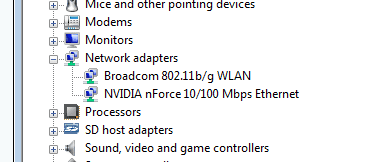
Which one of these is the Network card?

networkWireless.png


Gregrocker Thanks
I looked in the device manager nothing says wireless. Is it one of the above in my pic?

This is why I think someone should write a tutorial on drivers and their AKA's. Listing the other names that are used.
 

My Computer My Computer

At a glance

7 professionalYour Processor type and speed - AMD ATHLON(tm...2.5gbNVIDIA GeForce 7150/nForce 64MB
Computer Manufacturer/Model Number
Hp presario v6620us 6500notebook series.
OS
7 professional
CPU
Your Processor type and speed - AMD ATHLON(tm) 64X2 DUAL-COR
Motherboard
Quanta 30CF
Memory
2.5gb
Graphics Card(s)
NVIDIA GeForce 7150/nForce 64MB
Sound Card
conextant smartaudio hd2
Hard Drives
FUJITSU PLATA 160GB IDE
PSU
Wth? is this
Case
The judge threw it out. Not enough evidence.
Cooling
sometimes.
Keyboard
Yep
Mouse
Nope
Internet Speed
fast
You have a NVIDA nForce 10/100 Mbps Ethernet, wired Network card.
 

My Computer My Computer

At a glance

ME/XP/Vista/Win7
OS
ME/XP/Vista/Win7
You also have the Broadcom LAN (wireless) which should be in the installer.

Is this how you connect, via wireless?
 
Last edited:
You have a NVIDA nForce 10/100 Mbps Ethernet, wired Network card.
Thanks Again Theog
So the ethernet is "the hard wired" card... right? It would be safer for me to have this driver on a stick (Thumbdrive) right?


Thanks Gregrocker: So what is the wireless driver? The broadband one?

I am sorry if I ask stupid questions, but I am stupid. :sarc:
 

My Computer My Computer

At a glance

7 professionalYour Processor type and speed - AMD ATHLON(tm...2.5gbNVIDIA GeForce 7150/nForce 64MB
Computer Manufacturer/Model Number
Hp presario v6620us 6500notebook series.
OS
7 professional
CPU
Your Processor type and speed - AMD ATHLON(tm) 64X2 DUAL-COR
Motherboard
Quanta 30CF
Memory
2.5gb
Graphics Card(s)
NVIDIA GeForce 7150/nForce 64MB
Sound Card
conextant smartaudio hd2
Hard Drives
FUJITSU PLATA 160GB IDE
PSU
Wth? is this
Case
The judge threw it out. Not enough evidence.
Cooling
sometimes.
Keyboard
Yep
Mouse
Nope
Internet Speed
fast
Wireless driver is to connect to internet wirelessly via a router.

Is this how you connect to the internet? If so I'd go to HP Support Downloads webpage for your model computer and put that LAN wireless driver on flash stick or CD just in case it isn't supplied by installer - which it should be.
 
Last edited:
You also have the Broadcom LAN (wireless) which should be in the installer.

Is this how you connect, via wireless?

Yes, and thank you.
 

My Computer My Computer

At a glance

7 professionalYour Processor type and speed - AMD ATHLON(tm...2.5gbNVIDIA GeForce 7150/nForce 64MB
Computer Manufacturer/Model Number
Hp presario v6620us 6500notebook series.
OS
7 professional
CPU
Your Processor type and speed - AMD ATHLON(tm) 64X2 DUAL-COR
Motherboard
Quanta 30CF
Memory
2.5gb
Graphics Card(s)
NVIDIA GeForce 7150/nForce 64MB
Sound Card
conextant smartaudio hd2
Hard Drives
FUJITSU PLATA 160GB IDE
PSU
Wth? is this
Case
The judge threw it out. Not enough evidence.
Cooling
sometimes.
Keyboard
Yep
Mouse
Nope
Internet Speed
fast
W7 is great for automatic driver download but I think for graphics card drivers (eg.Nvidia) you are best downloading from the manufacturers website. I've been caught before.

Aside: Re- your wireless LAN. Make sure it's secure or you might get people freeloading your internet service.
 

My Computer My Computer

At a glance

Windows 7x64 Home Premium SP1Intel i7 2600kG.Skill Ripjaws (DDR3-1600) 2x4GBNvidia GeForce GTS 450; Intel HD Graphics 300...
Computer type
PC/Desktop
Computer Manufacturer/Model Number
Own build
OS
Windows 7x64 Home Premium SP1
CPU
Intel i7 2600k
Motherboard
ASUS P8Z68 Deluxe
Memory
G.Skill Ripjaws (DDR3-1600) 2x4GB
Graphics Card(s)
Nvidia GeForce GTS 450; Intel HD Graphics 3000(GT2+)
Monitor(s) Displays
Dell Ultrasharp IPS panel U2311H, Samsung SyncMaster P2350
Screen Resolution
1920x1080
Hard Drives
Samsung 850 Pro SSD 256GB, Samsung SSD 840 120GB, Seagates 1TB Barracuda ST31000528AS x2
PSU
Seasonic M12II 520W
Case
Lian Li Lancool PC-K60
Cooling
Case: 1x120mm, 3x140mm CPU: Hyper 212+
Keyboard
Logitech MK520 (wireless)
Mouse
Logitech MK520
Internet Speed
6-7 Mbps
Antivirus
Norton Security Premium, Malwarebytes on 2 (MSE on 3rd PC)
Browser
FireFox
Other Info
Audio: Logitech Z523 2.1
W7 is great for automatic driver download but I think for graphics card drivers (eg.Nvidia) you are best downloading from the manufacturers website. I've been caught before.

Can I do this -post install if I have trouble? Won't windows have at least something generic that will work enough till I change it.?
 

My Computer My Computer

At a glance

7 professionalYour Processor type and speed - AMD ATHLON(tm...2.5gbNVIDIA GeForce 7150/nForce 64MB
Computer Manufacturer/Model Number
Hp presario v6620us 6500notebook series.
OS
7 professional
CPU
Your Processor type and speed - AMD ATHLON(tm) 64X2 DUAL-COR
Motherboard
Quanta 30CF
Memory
2.5gb
Graphics Card(s)
NVIDIA GeForce 7150/nForce 64MB
Sound Card
conextant smartaudio hd2
Hard Drives
FUJITSU PLATA 160GB IDE
PSU
Wth? is this
Case
The judge threw it out. Not enough evidence.
Cooling
sometimes.
Keyboard
Yep
Mouse
Nope
Internet Speed
fast
I would download graphics card drivers & network card drivers before hand.
 

My Computer My Computer

At a glance

ME/XP/Vista/Win7
OS
ME/XP/Vista/Win7
I would download graphics card drivers & network card drivers before hand.

Ok.. I will.. Thanks. Now do i download the one that Hp has on file for my system that is up and working presently with my Vista Os. Or do I go directly to the manufactorers website and get the most recent one?
 
Last edited:

My Computer My Computer

At a glance

7 professionalYour Processor type and speed - AMD ATHLON(tm...2.5gbNVIDIA GeForce 7150/nForce 64MB
Computer Manufacturer/Model Number
Hp presario v6620us 6500notebook series.
OS
7 professional
CPU
Your Processor type and speed - AMD ATHLON(tm) 64X2 DUAL-COR
Motherboard
Quanta 30CF
Memory
2.5gb
Graphics Card(s)
NVIDIA GeForce 7150/nForce 64MB
Sound Card
conextant smartaudio hd2
Hard Drives
FUJITSU PLATA 160GB IDE
PSU
Wth? is this
Case
The judge threw it out. Not enough evidence.
Cooling
sometimes.
Keyboard
Yep
Mouse
Nope
Internet Speed
fast
I'd start with the ones on the HP webpage for your model, but don't use them if the installer and/or Updates provides newer drivers.

Later you can compare these to the device manufacturer's drivers if performance dictates doing so.
 
Thanks Gregrocker!
 

My Computer My Computer

At a glance

7 professionalYour Processor type and speed - AMD ATHLON(tm...2.5gbNVIDIA GeForce 7150/nForce 64MB
Computer Manufacturer/Model Number
Hp presario v6620us 6500notebook series.
OS
7 professional
CPU
Your Processor type and speed - AMD ATHLON(tm) 64X2 DUAL-COR
Motherboard
Quanta 30CF
Memory
2.5gb
Graphics Card(s)
NVIDIA GeForce 7150/nForce 64MB
Sound Card
conextant smartaudio hd2
Hard Drives
FUJITSU PLATA 160GB IDE
PSU
Wth? is this
Case
The judge threw it out. Not enough evidence.
Cooling
sometimes.
Keyboard
Yep
Mouse
Nope
Internet Speed
fast
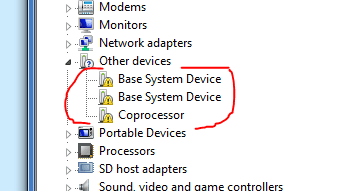
I want to thanks you guys again for all your help. I was over worried. Heck who isn't thier first time around? 7 is installed and running. I have a couple of driver issue and have spent 5 hours on this and hoped you could help.
Missing drivers.PNG

In windows update these are the only two fails.
updatefail.PNG
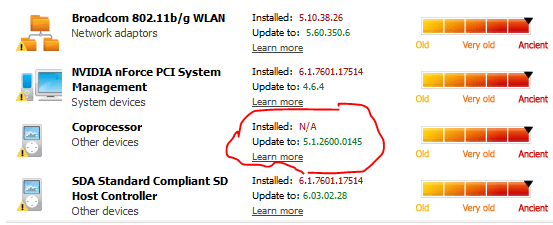
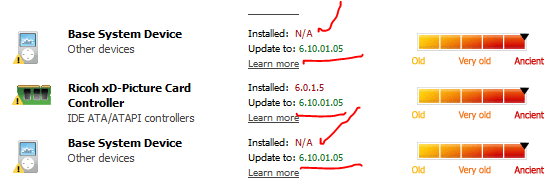
I ran driver scan and here is the results
driverscanner1.PNG
As you can see some of them are the same driver broken down.
driverscanner2.PNG
I have read the other posts about coprocesors and It seems that there are many coprocessors on any one system. So what am I looking for. I googled the number on the driver scan report and get nothing.
 

My Computer My Computer

At a glance

7 professionalYour Processor type and speed - AMD ATHLON(tm...2.5gbNVIDIA GeForce 7150/nForce 64MB
Computer Manufacturer/Model Number
Hp presario v6620us 6500notebook series.
OS
7 professional
CPU
Your Processor type and speed - AMD ATHLON(tm) 64X2 DUAL-COR
Motherboard
Quanta 30CF
Memory
2.5gb
Graphics Card(s)
NVIDIA GeForce 7150/nForce 64MB
Sound Card
conextant smartaudio hd2
Hard Drives
FUJITSU PLATA 160GB IDE
PSU
Wth? is this
Case
The judge threw it out. Not enough evidence.
Cooling
sometimes.
Keyboard
Yep
Mouse
Nope
Internet Speed
fast
If it is your computer, you pretty much should know what hardware is inside it. If not, you should know model numbers and brand so you can look it up on the appropriate website, Dell, HP, etc. I see a lot of people recommend software to find out your hardware, but between materials you were given with the machine when you bought it, or Device Manager, you can see everything you need to see.

When I take someone out to buy a computer, like a family member, I can walk up to it, open Device Manager, and see everything I need to see. If not, then the box should give a list of all the important hardware.
 

My Computer My Computer

At a glance

Windows 7 Ultimate x64 SP1Intel Core i7-260012 GB Patriot Extreme DDR3-1333Nvidia GTX 470
OS
Windows 7 Ultimate x64 SP1
CPU
Intel Core i7-2600
Motherboard
Gigabyte GA-P67A-UD3P-B3
Memory
12 GB Patriot Extreme DDR3-1333
Graphics Card(s)
Nvidia GTX 470
Monitor(s) Displays
Dell UltraSharp 2209WA
Hard Drives
OCZ Agility3 240 GB, WD5001AALS, WD7501AALS
PSU
OCZ ModStream 700W
Case
CoolerMaster HAF 912 Advanced
Cooling
CoolerMaster Hyper 212 Plus
Back
Top