Solved You will need to provide administrator permissions to rename drive

DSD

New member
Local time
8:16 AM
Messages
13
I purchased my computer 11 months ago and had two additional hard drives installed 5 months ago. I had a technician install and format them for me. A couple of days after I brought my computer home. I renamed one of the hard drives successfully. Now 5 months later I am unable to rename the other hard drive due to getting this error "You will need to provide administrator permissions to rename drive". I haven't done anything to change any settings. What would cause this out of the blue?

I have read something about adding my user in the security tab of the properties of the hard drive. Administrator is already listed in the security tab, so that doesn't make sense as I am the administrator with Full rights. In the same dialog box if I click on Advanced and go to the Owner tab. The Owner says SYSTEM. What is the purpose of the Owner being SYSTEM and why?

I checked all the settings on the other hard drive that I renamed 5 months ago and every setting is the same as this hard drive. It seems that something must have caused a change somewhere.

Would a Windows update have changed any of these settings? This isn't making sense when I haven't changed anything on my computer. In fact, I hardly use this computer cause I have a laptop that I use more regularly. Recently I had this computer turned off for at least a month or longer.

I'm looking for an easy way to maybe change a setting that can be changed back the way it was easily after renaming the hard drive.
 

My Computer My Computer

At a glance

Windows 7 Home Premium 64bitIntel Core i7 3.40 GHz8 GB
Computer type
PC/Desktop
Computer Manufacturer/Model Number
Dell XPS8700
OS
Windows 7 Home Premium 64bit
CPU
Intel Core i7 3.40 GHz
Memory
8 GB
Hard Drives
Main Hard Drive
2 Additional Western Digital Hard Drives

Antivirus
McAfee
Browser
Firefox
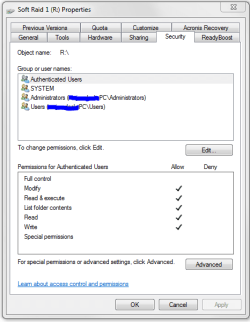
Since your pc was off for so long I would first check to make sure it starts up with the right date and time (your cmos batt might be dead causing security conflicts). Your security has all four of these groups correct?
 

Attachments

  • permissions.PNG
    permissions.PNG
    14.7 KB · Views: 28

My Computer My Computer

At a glance

10 Pro x64Ryzen 9 3900X64GB(4x16GB) DDR4EVGA 1080ti FTW3
Computer type
PC/Desktop
Computer Manufacturer/Model Number
Custom
OS
10 Pro x64
CPU
Ryzen 9 3900X
Motherboard
Asrock x370 Tachi
Memory
64GB(4x16GB) DDR4
Graphics Card(s)
EVGA 1080ti FTW3
Sound Card
ASUS Xonar Essence STX (V4 Bursons), ODAC rev B, NFB-11, O2
Monitor(s) Displays
3xASUS PB278Q/R, Optoma HD142X
Screen Resolution
3x1440p, 1080p
Hard Drives
512GB 850 EVO(OS, Programs)
4TB (Movies)
3TB (Downloads)
3TB (Programs)
1TB HDD (Games)
2x6TB R1 (videos)
PSU
AX760
Case
Fractal Define R5
Cooling
NH-D15S
Keyboard
Massdrop Ctrl with Box Navy's
Mouse
G903, Alioth XXL Mat
Internet Speed
280/40
Antivirus
MBAM, ESET
Browser
Canary 64 Bit
Other Info
I also own a Thinkpad P50 Xeon 4K, X220T, X1C5
Yes it starts up with the right date and time.

Yes that's exactly what my computer shows.
 

My Computer My Computer

At a glance

Windows 7 Home Premium 64bitIntel Core i7 3.40 GHz8 GB
Computer type
PC/Desktop
Computer Manufacturer/Model Number
Dell XPS8700
OS
Windows 7 Home Premium 64bit
CPU
Intel Core i7 3.40 GHz
Memory
8 GB
Hard Drives
Main Hard Drive
2 Additional Western Digital Hard Drives
Antivirus
McAfee
Browser
Firefox
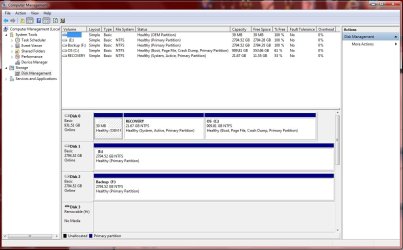
Can you post a pic of disk management like in my shot. We need to be able to see the drive's affected bottom portion (the part with colors).
 

Attachments

  • disk.PNG
    disk.PNG
    38.9 KB · Views: 6

My Computer My Computer

At a glance

10 Pro x64Ryzen 9 3900X64GB(4x16GB) DDR4EVGA 1080ti FTW3
Computer type
PC/Desktop
Computer Manufacturer/Model Number
Custom
OS
10 Pro x64
CPU
Ryzen 9 3900X
Motherboard
Asrock x370 Tachi
Memory
64GB(4x16GB) DDR4
Graphics Card(s)
EVGA 1080ti FTW3
Sound Card
ASUS Xonar Essence STX (V4 Bursons), ODAC rev B, NFB-11, O2
Monitor(s) Displays
3xASUS PB278Q/R, Optoma HD142X
Screen Resolution
3x1440p, 1080p
Hard Drives
512GB 850 EVO(OS, Programs)
4TB (Movies)
3TB (Downloads)
3TB (Programs)
1TB HDD (Games)
2x6TB R1 (videos)
PSU
AX760
Case
Fractal Define R5
Cooling
NH-D15S
Keyboard
Massdrop Ctrl with Box Navy's
Mouse
G903, Alioth XXL Mat
Internet Speed
280/40
Antivirus
MBAM, ESET
Browser
Canary 64 Bit
Other Info
I also own a Thinkpad P50 Xeon 4K, X220T, X1C5
Quick question how and where do I get to that screen in your screenshot (Computer Management)? I've never looked at that before.

Thanks!
 

My Computer My Computer

At a glance

Windows 7 Home Premium 64bitIntel Core i7 3.40 GHz8 GB
Computer type
PC/Desktop
Computer Manufacturer/Model Number
Dell XPS8700
OS
Windows 7 Home Premium 64bit
CPU
Intel Core i7 3.40 GHz
Memory
8 GB
Hard Drives
Main Hard Drive
2 Additional Western Digital Hard Drives
Antivirus
McAfee
Browser
Firefox
Right click computer then choose manage, when it opens on the left is disk management.
 

My Computer My Computer

At a glance

10 Pro x64Ryzen 9 3900X64GB(4x16GB) DDR4EVGA 1080ti FTW3
Computer type
PC/Desktop
Computer Manufacturer/Model Number
Custom
OS
10 Pro x64
CPU
Ryzen 9 3900X
Motherboard
Asrock x370 Tachi
Memory
64GB(4x16GB) DDR4
Graphics Card(s)
EVGA 1080ti FTW3
Sound Card
ASUS Xonar Essence STX (V4 Bursons), ODAC rev B, NFB-11, O2
Monitor(s) Displays
3xASUS PB278Q/R, Optoma HD142X
Screen Resolution
3x1440p, 1080p
Hard Drives
512GB 850 EVO(OS, Programs)
4TB (Movies)
3TB (Downloads)
3TB (Programs)
1TB HDD (Games)
2x6TB R1 (videos)
PSU
AX760
Case
Fractal Define R5
Cooling
NH-D15S
Keyboard
Massdrop Ctrl with Box Navy's
Mouse
G903, Alioth XXL Mat
Internet Speed
280/40
Antivirus
MBAM, ESET
Browser
Canary 64 Bit
Other Info
I also own a Thinkpad P50 Xeon 4K, X220T, X1C5
I've attached the screenshot of the disk management.

Drive (E) shows as "Local Disk" when I view the hard drives in My Computer. I see in disk management it is showing as not being named other than the drive letter.

Drive (F) that is named Backup is the drive that I renamed 5 months ago.
 

Attachments

  • CompMngScrnSht.jpg
    CompMngScrnSht.jpg
    135.7 KB · Views: 5

My Computer My Computer

At a glance

Windows 7 Home Premium 64bitIntel Core i7 3.40 GHz8 GB
Computer type
PC/Desktop
Computer Manufacturer/Model Number
Dell XPS8700
OS
Windows 7 Home Premium 64bit
CPU
Intel Core i7 3.40 GHz
Memory
8 GB
Hard Drives
Main Hard Drive
2 Additional Western Digital Hard Drives
Antivirus
McAfee
Browser
Firefox
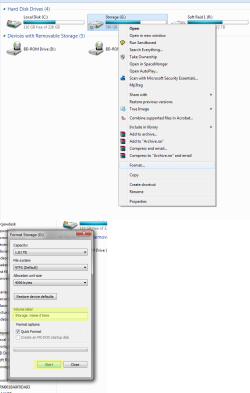
From that pick it all looks good, but it looks like you have nothing in the drives is that correct? if you do not have anything in E can you format it and when formatting it label it what you want? Right click it in explorer and choose format (only if you have nothing in it).
 

My Computer My Computer

At a glance

10 Pro x64Ryzen 9 3900X64GB(4x16GB) DDR4EVGA 1080ti FTW3
Computer type
PC/Desktop
Computer Manufacturer/Model Number
Custom
OS
10 Pro x64
CPU
Ryzen 9 3900X
Motherboard
Asrock x370 Tachi
Memory
64GB(4x16GB) DDR4
Graphics Card(s)
EVGA 1080ti FTW3
Sound Card
ASUS Xonar Essence STX (V4 Bursons), ODAC rev B, NFB-11, O2
Monitor(s) Displays
3xASUS PB278Q/R, Optoma HD142X
Screen Resolution
3x1440p, 1080p
Hard Drives
512GB 850 EVO(OS, Programs)
4TB (Movies)
3TB (Downloads)
3TB (Programs)
1TB HDD (Games)
2x6TB R1 (videos)
PSU
AX760
Case
Fractal Define R5
Cooling
NH-D15S
Keyboard
Massdrop Ctrl with Box Navy's
Mouse
G903, Alioth XXL Mat
Internet Speed
280/40
Antivirus
MBAM, ESET
Browser
Canary 64 Bit
Other Info
I also own a Thinkpad P50 Xeon 4K, X220T, X1C5
I do have a few files on the drive but it isn't showing as taking up any space. I have no idea how to format the drive. Is it possible to name the drive from within computer management?
 

My Computer My Computer

At a glance

Windows 7 Home Premium 64bitIntel Core i7 3.40 GHz8 GB
Computer type
PC/Desktop
Computer Manufacturer/Model Number
Dell XPS8700
OS
Windows 7 Home Premium 64bit
CPU
Intel Core i7 3.40 GHz
Memory
8 GB
Hard Drives
Main Hard Drive
2 Additional Western Digital Hard Drives
Antivirus
McAfee
Browser
Firefox
Copy the info out of the drive to somewhere else then format like so. You can also try to name it buy going to its properties its at the top of the window.
 

Attachments

  • Formating.png
    Formating.png
    35.6 KB · Views: 3

My Computer My Computer

At a glance

10 Pro x64Ryzen 9 3900X64GB(4x16GB) DDR4EVGA 1080ti FTW3
Computer type
PC/Desktop
Computer Manufacturer/Model Number
Custom
OS
10 Pro x64
CPU
Ryzen 9 3900X
Motherboard
Asrock x370 Tachi
Memory
64GB(4x16GB) DDR4
Graphics Card(s)
EVGA 1080ti FTW3
Sound Card
ASUS Xonar Essence STX (V4 Bursons), ODAC rev B, NFB-11, O2
Monitor(s) Displays
3xASUS PB278Q/R, Optoma HD142X
Screen Resolution
3x1440p, 1080p
Hard Drives
512GB 850 EVO(OS, Programs)
4TB (Movies)
3TB (Downloads)
3TB (Programs)
1TB HDD (Games)
2x6TB R1 (videos)
PSU
AX760
Case
Fractal Define R5
Cooling
NH-D15S
Keyboard
Massdrop Ctrl with Box Navy's
Mouse
G903, Alioth XXL Mat
Internet Speed
280/40
Antivirus
MBAM, ESET
Browser
Canary 64 Bit
Other Info
I also own a Thinkpad P50 Xeon 4K, X220T, X1C5
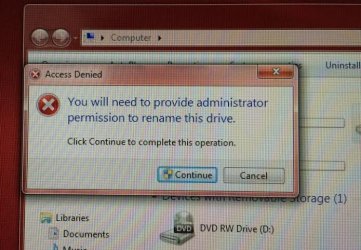
I was looking at the error message that I got again and have attached a screen shot. What would this do if I was to click the continue button on the Access Denied popup?
 

Attachments

  • AccessDeniedScrnSht.jpg
    AccessDeniedScrnSht.jpg
    95 KB · Views: 11

My Computer My Computer

At a glance

Windows 7 Home Premium 64bitIntel Core i7 3.40 GHz8 GB
Computer type
PC/Desktop
Computer Manufacturer/Model Number
Dell XPS8700
OS
Windows 7 Home Premium 64bit
CPU
Intel Core i7 3.40 GHz
Memory
8 GB
Hard Drives
Main Hard Drive
2 Additional Western Digital Hard Drives
Antivirus
McAfee
Browser
Firefox
Oh hit continue and see if it thinks you have the credentials to do it. It will probably just succeed. If it fails you can probably do the same with diskpart but will wait before we explain that as its much more technical.
 

My Computer My Computer

At a glance

10 Pro x64Ryzen 9 3900X64GB(4x16GB) DDR4EVGA 1080ti FTW3
Computer type
PC/Desktop
Computer Manufacturer/Model Number
Custom
OS
10 Pro x64
CPU
Ryzen 9 3900X
Motherboard
Asrock x370 Tachi
Memory
64GB(4x16GB) DDR4
Graphics Card(s)
EVGA 1080ti FTW3
Sound Card
ASUS Xonar Essence STX (V4 Bursons), ODAC rev B, NFB-11, O2
Monitor(s) Displays
3xASUS PB278Q/R, Optoma HD142X
Screen Resolution
3x1440p, 1080p
Hard Drives
512GB 850 EVO(OS, Programs)
4TB (Movies)
3TB (Downloads)
3TB (Programs)
1TB HDD (Games)
2x6TB R1 (videos)
PSU
AX760
Case
Fractal Define R5
Cooling
NH-D15S
Keyboard
Massdrop Ctrl with Box Navy's
Mouse
G903, Alioth XXL Mat
Internet Speed
280/40
Antivirus
MBAM, ESET
Browser
Canary 64 Bit
Other Info
I also own a Thinkpad P50 Xeon 4K, X220T, X1C5
I get that pop-up every time I rename a drive. I just hit continue and everything continues just fine.
 

My Computer My Computer

At a glance

Win 7 Ultimate 64 bitIntel i7-3930KKingston HyperX Genesis 32GB Kit (8x4GB Modul...MSI R7850 Twin Frozr 2GD5/OC Radeon HD 7850 2...
Computer type
PC/Desktop
Computer Manufacturer/Model Number
Custom Build
OS
Win 7 Ultimate 64 bit
CPU
Intel i7-3930K
Motherboard
ASUS P9X79 WS
Memory
Kingston HyperX Genesis 32GB Kit (8x4GB Modules) 1600MHz DDR
Graphics Card(s)
MSI R7850 Twin Frozr 2GD5/OC Radeon HD 7850 2GB 256-bit GDDR
Sound Card
Asus Xonar Essence STX
Monitor(s) Displays
3x Asus VG248QE 24", Vizio 32" TV
Screen Resolution
1920 x 1080, ?
Hard Drives
Samsung 128GB 840 Pro SSD (1),
Samsung 4TB 850 EVO SSDs (4)
Samsung 4TB 850 EVO SSDs (16) external backup drives used in 2.5" hot swap bays in the computer.
PSU
Corsair HX750w
Case
Antec Two Hundred v2 (modified)
Cooling
Cooler Master GeminII S524 120mm (fan replaced with a 140mm)
Keyboard
Logitech G510s
Mouse
Logitech M525 (two in use)
Internet Speed
=< 32Mbps down, 8Mbps up
Antivirus
AVAST!, MBAM, SAS, Spybot S&D (all but MBAM free) Glary Util
Browser
IE11
Other Info
LSI 9211-8i HBA card (8 SATA III ports), 2.5" & 3.5" Hot Swap Bays, HooToo HT-CR001 PCI-E to USB 3.0 Internal Hub + 6 Slot Card Reader, and LG Model CH12LS28 BD-ROM Optical Drive. Also, ScanSnap S1500 ADF duplexing scanner, Canon 9000F flat bed scanner, Corsair SP2500 2.1 speakers, Samsung CLP 415nw laser color printer, Cyberpower PP2200SW UPS
If this thread can be of help to anyone else. Here's what I did. I called my computer tech that installed the drives. He was really helpful and explained that the reason for the popup was that it was Windows way of protecting you from yourself when you make changes to your computer.

I went to the properties dialog box and I hit Apply on the properties dialog box and got the popup a second time then hit continue again and so far everything is fine. My computer tech assured me he could fix it if anything went wrong and if anything went wrong only the drive I was renaming would be affected.

I now have a renamed hard drive. Yay!!!!
 

My Computer My Computer

At a glance

Windows 7 Home Premium 64bitIntel Core i7 3.40 GHz8 GB
Computer type
PC/Desktop
Computer Manufacturer/Model Number
Dell XPS8700
OS
Windows 7 Home Premium 64bit
CPU
Intel Core i7 3.40 GHz
Memory
8 GB
Hard Drives
Main Hard Drive
2 Additional Western Digital Hard Drives
Antivirus
McAfee
Browser
Firefox
Glad you got it sorted out.
 

My Computer My Computer

At a glance

10 Pro x64Ryzen 9 3900X64GB(4x16GB) DDR4EVGA 1080ti FTW3
Computer type
PC/Desktop
Computer Manufacturer/Model Number
Custom
OS
10 Pro x64
CPU
Ryzen 9 3900X
Motherboard
Asrock x370 Tachi
Memory
64GB(4x16GB) DDR4
Graphics Card(s)
EVGA 1080ti FTW3
Sound Card
ASUS Xonar Essence STX (V4 Bursons), ODAC rev B, NFB-11, O2
Monitor(s) Displays
3xASUS PB278Q/R, Optoma HD142X
Screen Resolution
3x1440p, 1080p
Hard Drives
512GB 850 EVO(OS, Programs)
4TB (Movies)
3TB (Downloads)
3TB (Programs)
1TB HDD (Games)
2x6TB R1 (videos)
PSU
AX760
Case
Fractal Define R5
Cooling
NH-D15S
Keyboard
Massdrop Ctrl with Box Navy's
Mouse
G903, Alioth XXL Mat
Internet Speed
280/40
Antivirus
MBAM, ESET
Browser
Canary 64 Bit
Other Info
I also own a Thinkpad P50 Xeon 4K, X220T, X1C5
Back
Top