How To Let The Volume Change When Plugging In Headphones?

qwaszxqwaszx

New member
Local time
1:18 AM
Messages
3
Hi all,

Running Windows 7 64-bit (up-to-date) on an Acer Aspire 6930G here with RealTek HD audio (driver up-to-date). When I plug in my headphones, I'd like the sound level to be low (around 2 or 3), but when using the built-in laptop speakers the volume needs to be at around 50.

Is there any way to make the volume behave the same way it does on an iPhone or iPod Touch when plugging in headphone?

For example: When you plug in your headphones in an iPod Touch, you can set the volume to, say 50%. Now when you unplug your headphones you can change the volume level to 100%, now when you plug in your headphones again the volume will be 50% again.

Sorry if this question has been answered before, I've tried the search function, but did not find the answer.

Thanks in advance :),

qwaszxqwaszx
 

My Computer My Computer

At a glance

Windown 7 64-Bit
OS
Windown 7 64-Bit
Hi qwaszxqwaszx welcome to Seven Forums.

I must admit, I am not familiar with the Realtek sound program, as I use the default Windows one.

However, on my machine at least, when I click the "volume" icon on the bottom right hand corner (next to the clock) it remember's different settings for headphones and speakers, the two are completely independent. Is this not the case for you?
 

My Computer My Computer

At a glance

Windows 10 Pro x64Intel Core i5 7400 @ 3.00GHz8GB 2133Mhz DDR4 (OEM supplied)Gygabyte Windforce GTX 1050Ti (Factory Overcl...
Computer type
PC/Desktop
Computer Manufacturer/Model Number
Medion Erazer (note to self: insert model number) - with custom additions
OS
Windows 10 Pro x64
CPU
Intel Core i5 7400 @ 3.00GHz
Motherboard
OEM supllied with PC
Memory
8GB 2133Mhz DDR4 (OEM supplied)
Graphics Card(s)
Gygabyte Windforce GTX 1050Ti (Factory Overclocked)
Sound Card
Realtek
Monitor(s) Displays
Acer Al1980 + HKC
Screen Resolution
1360*768(HKC) / 1280*1024(Acer)
Hard Drives
1TB Toshiba
1TB WD Caviar Green
120GB Samsung Evo 840
PSU
OEM supplied (no power rating on case)
Case
OEM Supplied
Cooling
Stock
Keyboard
Logitech Wireless
Mouse
Logitect Wireless
Internet Speed
40Mb/s Down 10Mb/s Up
Antivirus
Defender
Browser
Firefox
+1
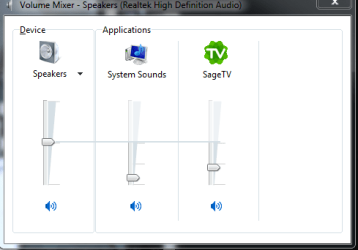
The volume mixer.
Capture.PNG
 

My Computer My Computer

At a glance

Windows 7 Home Premium 64 bitIntel Core i7-4790G.SKILL 8GB (2 x 4GB) DDR3 F3-10666CL9D-8GBNTAMD Radeon R7 250
Computer type
PC/Desktop
Computer Manufacturer/Model Number
Custom Build
OS
Windows 7 Home Premium 64 bit
CPU
Intel Core i7-4790
Motherboard
GA-Z87X-D3H
Memory
G.SKILL 8GB (2 x 4GB) DDR3 F3-10666CL9D-8GBNT
Graphics Card(s)
AMD Radeon R7 250
Sound Card
Realtek ALC892
Monitor(s) Displays
Samsung UN32EH5000, Dell 1703FPT
Screen Resolution
1920 x 1080, 1280 x 1024
Hard Drives
WD5003AZEX
WD10EZEX
Samsung HD103SJ
Samsung 128 GB 840 PRO
PSU
SeaSonic M12II SS-500GM
Case
Fractal Design Define R4
Cooling
Zalman CNPS9900ALED
Keyboard
Logitech K800
Mouse
Logitech M705
Internet Speed
16 Mbps
Antivirus
Avast
Browser
Firefox
Other Info
Bose Companion 2 Multimedia Speakers
Hi qwaszxqwaszx welcome to Seven Forums.

I must admit, I am not familiar with the Realtek sound program, as I use the default Windows one.

However, on my machine at least, when I click the "volume" icon on the bottom right hand corner (next to the clock) it remember's different settings for headphones and speakers, the two are completely independent. Is this not the case for you?

Unfortunately not, I do however get a notification from the Realtek driver when I plug in headphones or remove them.


Thanks for the reply, but in my case it always says "Speakers", with headphones plugged in or without.
 

My Computer My Computer

At a glance

Windown 7 64-Bit
OS
Windown 7 64-Bit
Did you try clicking the "mixer" Icon on the sound bar? With headphones plugged in, this should bring up the screen that p5bdkw posted.
 

My Computer My Computer

At a glance

Windows 10 Pro x64Intel Core i5 7400 @ 3.00GHz8GB 2133Mhz DDR4 (OEM supplied)Gygabyte Windforce GTX 1050Ti (Factory Overcl...
Computer type
PC/Desktop
Computer Manufacturer/Model Number
Medion Erazer (note to self: insert model number) - with custom additions
OS
Windows 10 Pro x64
CPU
Intel Core i5 7400 @ 3.00GHz
Motherboard
OEM supllied with PC
Memory
8GB 2133Mhz DDR4 (OEM supplied)
Graphics Card(s)
Gygabyte Windforce GTX 1050Ti (Factory Overclocked)
Sound Card
Realtek
Monitor(s) Displays
Acer Al1980 + HKC
Screen Resolution
1360*768(HKC) / 1280*1024(Acer)
Hard Drives
1TB Toshiba
1TB WD Caviar Green
120GB Samsung Evo 840
PSU
OEM supplied (no power rating on case)
Case
OEM Supplied
Cooling
Stock
Keyboard
Logitech Wireless
Mouse
Logitect Wireless
Internet Speed
40Mb/s Down 10Mb/s Up
Antivirus
Defender
Browser
Firefox
Did you try clicking the "mixer" Icon on the sound bar? With headphones plugged in, this should bring up the screen that p5bdkw posted.

Thanks for the reply.

Yes, I did try clicking the mixer icon. But with headphones plugged in or without headphones plugged in, it always says "Speakers (High Definition Audio)"... :(
 

My Computer My Computer

At a glance

Windown 7 64-Bit
OS
Windown 7 64-Bit
Same here...

I know the last post was almost a year ago, but I just wanted to say that my old Toshiba laptop had what you are looking for built in, and my new one doesn't.
 

My Computer My Computer

At a glance

Windows 7 Home Premium 64bit
OS
Windows 7 Home Premium 64bit
Back
Top