Solved How to make 1 large partition on a 2 TB external HDD

oldyeller38

oldyeller38
Local time
9:05 PM
Messages
31
Location
L:and-O-Lincoln
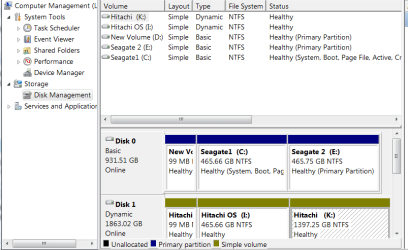
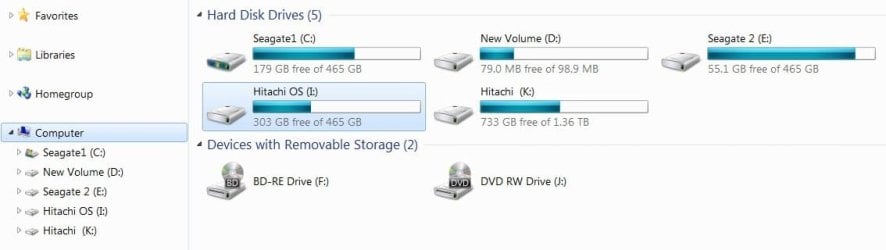
I have a 2 Tb Hdd in an external enclosure that I formatted when I first got it. Formatting as NTFS in Windows gave me 2 partitions; (OS) I is listed as 465 Gbs (has an old backup); the other is (K) 1.36 TB. I want the entire Hdd as 1 large storage unit. How to remove the (OS) I partition without moving data or deleting the large K partition; is it possible?
 

Attachments
  • HDD's Oct. 20, 2015.jpg
    HDD's Oct. 20, 2015.jpg
    31.4 KB · Views: 2
  • Diskmgmt.png
    Diskmgmt.png
    19.1 KB · Views: 2

My Computer My Computer

At a glance

windows 7 Premium 64 bitAMD HDT55TFBRBOX Phenom II 1055T Six Core Pro...Corsair CMX4GX3M1A1333C9 XMS3 8GB DDR3 RAM - ...MSI NVIDIA GeForce GT 610 2GB GDDR3 VGA/DVI/H...
Computer type
PC/Desktop
Computer Manufacturer/Model Number
bare bones from Tiger Direct
OS
windows 7 Premium 64 bit
CPU
AMD HDT55TFBRBOX Phenom II 1055T Six Core Processor - 2.80GH
Motherboard
GIGABYTE GA-M68MT-S2P nForce 630a Motherboard
Memory
Corsair CMX4GX3M1A1333C9 XMS3 8GB DDR3 RAM - PC10666, 1333MH
Graphics Card(s)
MSI NVIDIA GeForce GT 610 2GB GDDR3 VGA/DVI/HDMI Low Profile
Sound Card
SB wireless for i-tunes
Monitor(s) Displays
LG 32" LCD TV
Hard Drives
WD Caviar 500GB Serial ATA HD 7200/16MB/SATA-3G
WD5000AAKS DH (TSD-500AAKS)
Seagate Expansion USB 3.0 HDD-1TB
WD-My Passport 0748 USB 3.0 HDD-1TB
PSU
450W PSU
Case
DiabloTek CPA-0280 Elite ATX Mid Tower Case
Cooling
Thermo controlled 80mm case fan 1500-2500 rpm 31.85 cfm
Keyboard
YKB-LPW2-YUSB Keys-U-See wireless
Mouse
Logitech M-210 wireless
Internet Speed
100 MB
Antivirus
Kaspersky I.S. 2014 & Malwarebytes Anti-maleware
Browser
IE 11
Other Info
USB 3.0 card
SoundBlaster X-FI Xtreme Audio card &
SB for I-Tunes (R)
Canon MX-860 printer
Normally, you'd boot from C on Disk 0, go to Windows Disk Management, right click on I and delete it. Then use something like Partition Wizard to add that freed up space to K.

But I see that disk 1 is "dynamic". Not good. You'd want it to be "basic", like the partitions on Disk 0. Dynamic partitions are not standard, so you must have explicitly chosen dynamic at some point.

So, I'd try to get rid of dynamic partitions altogether.

Certain applications supposedly can convert from dynamic to basic without moving data, but I'd be afraid of that. The better idea would be to copy whatever is on K to some other drive entirely and then delete all partitions from Disk 1 and remake partitions as necessary, all as "basic".
 

My Computer My Computer

At a glance

Windows 7 Home Premium SP1, 64-bitIntel Skylake i5-6600K, not overclocked8 GB HyperX DDR4-2666 (2 x 4 GB)none; graphics are integrated on CPU
Computer type
PC/Desktop
Computer Manufacturer/Model Number
Ignatz Special; 4 speed manual gearbox; factory air conditioning; one of one
OS
Windows 7 Home Premium SP1, 64-bit
CPU
Intel Skylake i5-6600K, not overclocked
Motherboard
AsRock Z170M Extreme 4, micro ATX
Memory
8 GB HyperX DDR4-2666 (2 x 4 GB)
Graphics Card(s)
none; graphics are integrated on CPU
Sound Card
onboard: Realtek ALC1150; external: USB Behringer UF0-202
Monitor(s) Displays
Dell S2340M 23 inch IPS
Screen Resolution
1600 x 900
Hard Drives
System: Crucial MX100 series SSD, 128 GB;
Data: Samsung Spinpoint 103SJ, 1 TB;
Backup: WD Caviar Green WD30EZRX-00D8PB0, 3 TB
PSU
Rosewill SilentNight 500 watt fanless, semi-modular
Case
Antec Solo II
Cooling
Noctua NH-U12S; Noctua F12 intake, Noctua S12A exhaust
Keyboard
Microsoft 200 6JH-00001 USB
Mouse
Dell or Microsoft optical wired; USB
Antivirus
Microsoft Security Essentials and Malwarebytes Premium
Browser
Pale Moon
Other Info
All fans PWM; speeds at idle: CPU circa 500 rpm; intake circa 600 rpm; exhaust circa 600 rpm; CPU temps 27 idle and 47 C load in a warm room (27 C/81 F) when running Intel Extreme Tuning Utility stress test.
Back
Top