
2 TB external HDD CRC errors. CHKDSK stuck for a long time.

Batmash

New member
Local time
9:32 AM
Messages
1
I have a 2 TB Seagate external hard drive that I've been using since 2014 (requires wall adaptor for power). It has been running fine for all these years until a few days back.

I backed up 753 Gigs of data (5055 files) from it out of which 10 files could not be copied due to Cyclic Redundancy Errors.

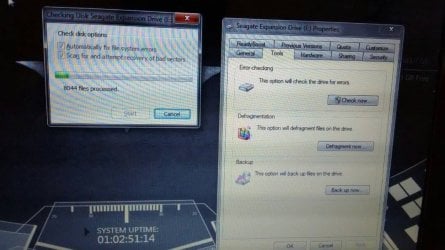
I decided to run CHKDSK to fix the errors, which has been running since yesterday and this is the current state (in the pic).

It has been stuck at 8044 files since this morning, do I abort now or let it run? The hard drive is still spinning and the activity light is blinking.

Should I try a running CHKDSK using CMD instead?
 

Attachments
  • WhatsApp Image 2017-05-23 at 5.24.07 PM.jpeg
    WhatsApp Image 2017-05-23 at 5.24.07 PM.jpeg
    81.1 KB · Views: 1

My Computer My Computer

At a glance

Windows 7 Home Premium Service Pack 1 64 bit
Computer type
PC/Desktop
OS
Windows 7 Home Premium Service Pack 1 64 bit
It is very clear that your Drive has developed many bad sectors. It is no longer reliable. You can abort check disk.

You have already recovered some 753 GB of data. Is that all that you want? Can you forget those 10 files that you found you were unable to copy?

In that case run Seatools for Windows and check the health of your HDD. If it could repair and give a pass well and good. If the tests fail discard the drive.

In the other case, if you want to recover more files/try and recover those 10 files which Windows says is corrupted,you can create a Live Linux pendrive, boot from it and check your luck.

My post #8 here Is there any way of saving a completely unrecognisable hard drive?
 

My Computer My Computer

At a glance

Windows 7 Home Premium 32 bit
OS
Windows 7 Home Premium 32 bit
There is no software like pctools today?
To mark bad sectors, to reevaluate them.
Only to find them.
I used recently minitool with aimei partition tool (both are needed at the same time) to avoid freeze problem with bad sectors.
Aomei has ability to unshock itself after abort check of bad sectors disk.
That is used to find and isolate bad sectors if there are less than 10 in small partition.
You can try and succeed to use seatools for dos (i dont know that seatools for windows work bad sectors check) but i didnot have time to do that...
For 2 TB disk it is a lot of time....over a day probably...

This is approach to use disk, not save data...
 

My Computer My Computer

At a glance

win7 ultimate x64F1 athlon16GB
Computer type
PC/Desktop
Computer Manufacturer/Model Number
personal
OS
win7 ultimate x64
CPU
F1 athlon
Motherboard
a75
Memory
16GB
Hard Drives
2TB Seagate
3TB Seagate
Back
Top