How to make a folder accessible to only the Admin

Doubtingthomas

New member
Member
Local time
10:07 AM
Messages
31
Clicking on the properties/security of the folder , I can add a list of standard users and then deny them access. But I want to go the reverse way. How can I allow folder access only to Myself as Admin. Later on even if I add a user , the user would be automatically debarred from accessing the folders.Thanks.
 

My Computer My Computer

At a glance

Windows 7 SP1 64
OS
Windows 7 SP1 64
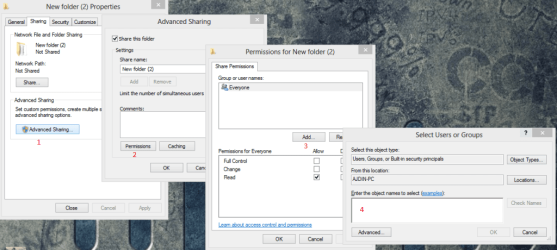
Try this:
 

Attachments

  • 35bblsx.png
    35bblsx.png
    116.1 KB · Views: 29

My Computer My Computer

At a glance

Windows 8 Enterprise 32 bitAMD Athlon II P360 2.33 GBATI Mobility Radeon HD4200
Computer type
Laptop
Computer Manufacturer/Model Number
DELL
OS
Windows 8 Enterprise 32 bit
CPU
AMD Athlon II P360 2.3
Memory
3 GB
Graphics Card(s)
ATI Mobility Radeon HD4200
Antivirus
Kaspersky Internet Security 2013
Browser
Mozilla Firefox
@texhnologic ThankU for the detailed reply. How to get to the snap no 4. What did you click to get to that screen?
 

My Computer My Computer

At a glance

Windows 7 SP1 64
OS
Windows 7 SP1 64
Click on step 3. (Add...) and write the username on the white place where step 4. is marked.
 

My Computer My Computer

At a glance

Windows 8 Enterprise 32 bitAMD Athlon II P360 2.33 GBATI Mobility Radeon HD4200
Computer type
Laptop
Computer Manufacturer/Model Number
DELL
OS
Windows 8 Enterprise 32 bit
CPU
AMD Athlon II P360 2.3
Memory
3 GB
Graphics Card(s)
ATI Mobility Radeon HD4200
Antivirus
Kaspersky Internet Security 2013
Browser
Mozilla Firefox
Sorry mate . Did not work... I ensured only the Admin name is added in the step 4. But I am able to open the folder thru a standard user. Something more is into it.....
 

My Computer My Computer

At a glance

Windows 7 SP1 64
OS
Windows 7 SP1 64
Use the "Security" tab not the Sharing tab.
 

My Computer My Computer

At a glance

Windows 10 Pro (x64)Intel Core i7-3930K (3.2GHz - 4.5GHz)4x Samsung 4GB PC3-12800 DDR3 (16GB 1600MHz)Nvidia Geforce GTX 690
Computer type
PC/Desktop
Computer Manufacturer/Model Number
Alienware Aurora ALX R4
OS
Windows 10 Pro (x64)
CPU
Intel Core i7-3930K (3.2GHz - 4.5GHz)
Motherboard
Alienware Aurora-R4 x79
Memory
4x Samsung 4GB PC3-12800 DDR3 (16GB 1600MHz)
Graphics Card(s)
Nvidia Geforce GTX 690
Sound Card
SteelSeries Siberia Elite
Monitor(s) Displays
Dell UltraSharp U3011
Screen Resolution
2560x1600
Hard Drives
Samsung 850 Pro 256 GB, Seagate 1TB Desktop Hybrid HDD, 2x Western Digital 4TB Green HDD
PSU
875W Some Dell PSU <.<
Case
Alienware Aurora ALX
Cooling
Custom Liquid Cooling (EK CPU & GPU blocks) dual EK 480RAD
Keyboard
Logitech G710+ Mechanical
Mouse
Logitech G700s
Internet Speed
Verizon Fios (50 mbps average)
Other Info
Server: Intel NUC D54250WYK: i5-4250U, 16GB, 256 GB mSATA, Windows Server 2012 R2
@logicearth , I am presently using the security tab to add users and then deny them the access to folders. That seems pretty primitive to me. Why not have only one user and give him the access. Since others do not find a mention , do not give access. Is this type of an arrangement possible. If so kindly state if possible with some pictorial representation. Thanks.
 

My Computer My Computer

At a glance

Windows 7 SP1 64
OS
Windows 7 SP1 64
You don't want users to have access you don't put them in the list. You do not need to deny them access if you just remove them entirely. Put the single user in the list and only that user will have access.
 

My Computer My Computer

At a glance

Windows 10 Pro (x64)Intel Core i7-3930K (3.2GHz - 4.5GHz)4x Samsung 4GB PC3-12800 DDR3 (16GB 1600MHz)Nvidia Geforce GTX 690
Computer type
PC/Desktop
Computer Manufacturer/Model Number
Alienware Aurora ALX R4
OS
Windows 10 Pro (x64)
CPU
Intel Core i7-3930K (3.2GHz - 4.5GHz)
Motherboard
Alienware Aurora-R4 x79
Memory
4x Samsung 4GB PC3-12800 DDR3 (16GB 1600MHz)
Graphics Card(s)
Nvidia Geforce GTX 690
Sound Card
SteelSeries Siberia Elite
Monitor(s) Displays
Dell UltraSharp U3011
Screen Resolution
2560x1600
Hard Drives
Samsung 850 Pro 256 GB, Seagate 1TB Desktop Hybrid HDD, 2x Western Digital 4TB Green HDD
PSU
875W Some Dell PSU <.<
Case
Alienware Aurora ALX
Cooling
Custom Liquid Cooling (EK CPU & GPU blocks) dual EK 480RAD
Keyboard
Logitech G710+ Mechanical
Mouse
Logitech G700s
Internet Speed
Verizon Fios (50 mbps average)
Other Info
Server: Intel NUC D54250WYK: i5-4250U, 16GB, 256 GB mSATA, Windows Server 2012 R2
I am not able to remove user from the list
 

My Computer My Computer

At a glance

Windows 7 SP1 64
OS
Windows 7 SP1 64
Do so from the "Advanced" control. Can access it from the Security and clicking on "Advanced". In some caces you will need to uncheck: "Include inheritable permissions from this object's parent" and select "Add" button when the dialog appears.
 

My Computer My Computer

At a glance

Windows 10 Pro (x64)Intel Core i7-3930K (3.2GHz - 4.5GHz)4x Samsung 4GB PC3-12800 DDR3 (16GB 1600MHz)Nvidia Geforce GTX 690
Computer type
PC/Desktop
Computer Manufacturer/Model Number
Alienware Aurora ALX R4
OS
Windows 10 Pro (x64)
CPU
Intel Core i7-3930K (3.2GHz - 4.5GHz)
Motherboard
Alienware Aurora-R4 x79
Memory
4x Samsung 4GB PC3-12800 DDR3 (16GB 1600MHz)
Graphics Card(s)
Nvidia Geforce GTX 690
Sound Card
SteelSeries Siberia Elite
Monitor(s) Displays
Dell UltraSharp U3011
Screen Resolution
2560x1600
Hard Drives
Samsung 850 Pro 256 GB, Seagate 1TB Desktop Hybrid HDD, 2x Western Digital 4TB Green HDD
PSU
875W Some Dell PSU <.<
Case
Alienware Aurora ALX
Cooling
Custom Liquid Cooling (EK CPU & GPU blocks) dual EK 480RAD
Keyboard
Logitech G710+ Mechanical
Mouse
Logitech G700s
Internet Speed
Verizon Fios (50 mbps average)
Other Info
Server: Intel NUC D54250WYK: i5-4250U, 16GB, 256 GB mSATA, Windows Server 2012 R2
Back
Top