How to make border like "no border" ??

rieyeir

New member
Local time
9:59 AM
Messages
16
i mean like this theme almost 0 border !!:

2nl6xz4.jpg


i've already try "Advanced appearance settings------Border Padding "0""
but that's not narrow enough .

what's the customize pics frameleft,frameright,framebottom should be? size?shape?transparence?
 

My Computer

Computer type
PC/Desktop
OS
Windows 7 Home Premium 32bit.
The only way to change that frame would be to edit the .msstyles

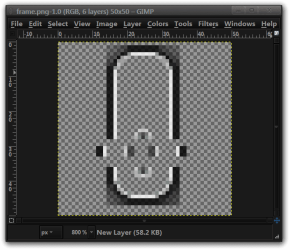
Here is ascreenshot showing what the frame looks like. It is zoomed in at 800%. These are four separate images that I placed on a background to show what they look like.

The sizes are
Top 21x27 pixels

Left, Right 11x3 pixels

Bottom 21x11 pixels

Jerry
frame.png
 

My Computer

Computer type
Laptop
Computer Manufacturer/Model Number
Sager NP9170
OS
Win 7 Pro x64 / Win 10 Pro
CPU
Intel(R) Core(TM) i7-3630QM CPU @ 2.40GHz
Motherboard
CLEVO P170EM
Memory
12 GB
Graphics Card(s)
(1) Intel(R) HD Graphics 4000 (2) NVIDIA GeForce GTX 675M
Sound Card
(1) Realtek High Definition Audio (2) Intel(R) Display Aud
Monitor(s) Displays
17.3
Screen Resolution
1920x1080
Hard Drives
(1) Samsung 860 EVO 500GB(OS) (1) Samsung 860 EVO 500GB(Data)
Keyboard
Backlite
Antivirus
MSE, Malwarebytes Pro
Browser
Firefox
Other Info
DESKTOP: Custom-built.
OS: Win 10 Pro x64.
CASE: Rosewill R5.
CPU: Intel I5 4670K CPU @ 3.40GHz.
CPU COOLER: Cool Master Hyper 212 EVO.
MOTHERBOARD: Asus Z87-A.
MEMORY: Kingston HyperX 2x4 GB.
GPU: Nvidia Geforce 650 TI.
PSU: Corsair TX750.
DRIVES: (1) Samsung 840 120 GB SSD (2) Western Digital blue 500 GB 7200 RPM.
looks like these images are aero mode ? can we do it on basic mode ?
 

My Computer

Computer type
PC/Desktop
OS
Windows 7 Home Premium 32bit.
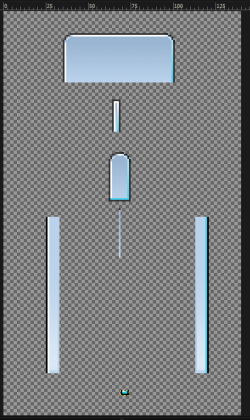
Yes, look at screenshot it is zoomed the top 4 images are for the top frame depending on window size. These are just the active window.
frame.PNG


The images have both Active and Inactive frames so the height doubles with both
Top
Caption #934
66x29 both 66x58
Small #964
5x19 both 5x38
Min #960
13x29 both 13x58
Max #951
1x29 both 1x58

Left #969
8x92 both 8 x184

Right #970
8x92 both 8 x184

Bottom #968
5x3 both 5x6

Jerry
 

My Computer

Computer type
Laptop
Computer Manufacturer/Model Number
Sager NP9170
OS
Win 7 Pro x64 / Win 10 Pro
CPU
Intel(R) Core(TM) i7-3630QM CPU @ 2.40GHz
Motherboard
CLEVO P170EM
Memory
12 GB
Graphics Card(s)
(1) Intel(R) HD Graphics 4000 (2) NVIDIA GeForce GTX 675M
Sound Card
(1) Realtek High Definition Audio (2) Intel(R) Display Aud
Monitor(s) Displays
17.3
Screen Resolution
1920x1080
Hard Drives
(1) Samsung 860 EVO 500GB(OS) (1) Samsung 860 EVO 500GB(Data)
Keyboard
Backlite
Antivirus
MSE, Malwarebytes Pro
Browser
Firefox
Other Info
DESKTOP: Custom-built.
OS: Win 10 Pro x64.
CASE: Rosewill R5.
CPU: Intel I5 4670K CPU @ 3.40GHz.
CPU COOLER: Cool Master Hyper 212 EVO.
MOTHERBOARD: Asus Z87-A.
MEMORY: Kingston HyperX 2x4 GB.
GPU: Nvidia Geforce 650 TI.
PSU: Corsair TX750.
DRIVES: (1) Samsung 840 120 GB SSD (2) Western Digital blue 500 GB 7200 RPM.
dear jerry, i made my customize images on all this size, and of couse it will remain the default border width,not the "0" border i want.

my question is :" how to make customize border frame like "0" border . thanks~
 

My Computer

Computer type
PC/Desktop
OS
Windows 7 Home Premium 32bit.
I do not know how to do that Sorry.

Where did you get the image from in your 1st post, it looks like Vista to me.

Jerry
 

My Computer

Computer type
Laptop
Computer Manufacturer/Model Number
Sager NP9170
OS
Win 7 Pro x64 / Win 10 Pro
CPU
Intel(R) Core(TM) i7-3630QM CPU @ 2.40GHz
Motherboard
CLEVO P170EM
Memory
12 GB
Graphics Card(s)
(1) Intel(R) HD Graphics 4000 (2) NVIDIA GeForce GTX 675M
Sound Card
(1) Realtek High Definition Audio (2) Intel(R) Display Aud
Monitor(s) Displays
17.3
Screen Resolution
1920x1080
Hard Drives
(1) Samsung 860 EVO 500GB(OS) (1) Samsung 860 EVO 500GB(Data)
Keyboard
Backlite
Antivirus
MSE, Malwarebytes Pro
Browser
Firefox
Other Info
DESKTOP: Custom-built.
OS: Win 10 Pro x64.
CASE: Rosewill R5.
CPU: Intel I5 4670K CPU @ 3.40GHz.
CPU COOLER: Cool Master Hyper 212 EVO.
MOTHERBOARD: Asus Z87-A.
MEMORY: Kingston HyperX 2x4 GB.
GPU: Nvidia Geforce 650 TI.
PSU: Corsair TX750.
DRIVES: (1) Samsung 840 120 GB SSD (2) Western Digital blue 500 GB 7200 RPM.
well it's indeed a vista theme, i found it here Inspirat SE for Vista Basic by ~psycoB on deviantART.
I want to make a win7 theme on it's style, and the border is the last step.
?
need help for another question ,how to change these two area's font color ?
(1) (font in red box)
20hoytz.png

(2) font of start menu ----MorePrograms list
2yu0vev.png
 

My Computer

Computer type
PC/Desktop
OS
Windows 7 Home Premium 32bit.
#1
Fonts, Colors & System Metrics > Fonts & System Metrics > WINDOWSTEXT:COLOR

Change test color at
Explorer & Shell > Explorer > TreeView > TreeItem > Hot
All the way through to
Explorer & Shell > Explorer > TreeView > TreeItem > HotSelected


#2

Add text color properties to the following
Start Menu > Menus > Aero > KeyBoard:TreeView > TreeItem > Normal
and
Start Menu > Menus > Aero > Hover:TreeView > TreeItem > Normal

When you click on a folder every textcolor in tree changes to Start Menu > Menus > Aero > Hover:TreeView > TreeItem > Hot

BUT the textcolor on the selected folder changes to StartMenu > Menus > Aero > Keyboard:TreeView > TreeItem > HotSelected > TextColor: Color

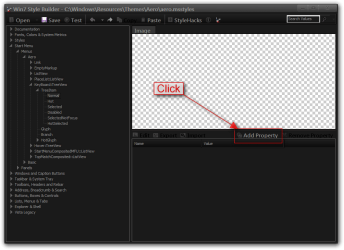
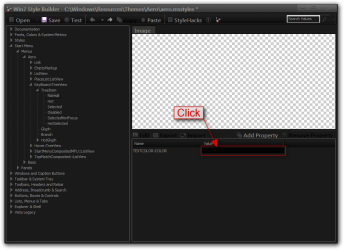
Here is how to add text color properties

Click on Add Property
1.png

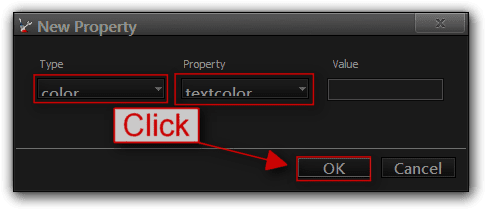
Use the drop-down menu under Type choose color under Property choose textcolor then Click OK
2.png

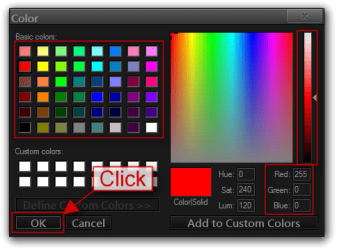
It always picks black as the default color click on the color
3.png

Picked the color you want and then Click OK
4.png

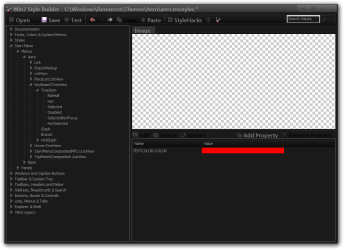
Done
5.png
 

My Computer

Computer type
Laptop
Computer Manufacturer/Model Number
Sager NP9170
OS
Win 7 Pro x64 / Win 10 Pro
CPU
Intel(R) Core(TM) i7-3630QM CPU @ 2.40GHz
Motherboard
CLEVO P170EM
Memory
12 GB
Graphics Card(s)
(1) Intel(R) HD Graphics 4000 (2) NVIDIA GeForce GTX 675M
Sound Card
(1) Realtek High Definition Audio (2) Intel(R) Display Aud
Monitor(s) Displays
17.3
Screen Resolution
1920x1080
Hard Drives
(1) Samsung 860 EVO 500GB(OS) (1) Samsung 860 EVO 500GB(Data)
Keyboard
Backlite
Antivirus
MSE, Malwarebytes Pro
Browser
Firefox
Other Info
DESKTOP: Custom-built.
OS: Win 10 Pro x64.
CASE: Rosewill R5.
CPU: Intel I5 4670K CPU @ 3.40GHz.
CPU COOLER: Cool Master Hyper 212 EVO.
MOTHERBOARD: Asus Z87-A.
MEMORY: Kingston HyperX 2x4 GB.
GPU: Nvidia Geforce 650 TI.
PSU: Corsair TX750.
DRIVES: (1) Samsung 840 120 GB SSD (2) Western Digital blue 500 GB 7200 RPM.
Back
Top