Solved How to make onscreen/window text bold?

jgamer719

New member
Local time
10:56 AM
Messages
26
How do you make the window text bold? When I go into window appearance options, the font settings are greyed out for window text. I have really bad vision and making everything bold would help. By the way, I already tried cleartype settings and that didn't help.
 

My Computer

OS
Windows 7 Ultimate x64
CPU
AMD(FX) 4100 Quad Core 3.6 GHz
Motherboard
Asus M5A97 EVO
Memory
8GB
Graphics Card(s)
Nvidia Geforce GTX 550ti
Monitor(s) Displays
Asus
Screen Resolution
1600x900
Hard Drives
500GB
Mouse
Razer Deathadder
Internet Speed
40↓ 6↑ | 4/10/12
Other Info
Belkin n52te Nostomo Gaming pad
Hi Jgamer719

As far as I'm aware the only way to change the 'Window' font is via a registry change - Please see Change the default System Fonts in Windows 7 - davidjnice.com

HOWEVER MAJOR HEALTH WARNING: Please backup your registry before attempting and don't try unless you are experienced with Registry Editing - you can cause yourself a lot of grief if you make a mistake.

Regards
UKMedia
 

My Computer

Computer Manufacturer/Model Number
Self Build
OS
Windows 7 Ultimate 64Bit (SP 1)
CPU
Intel Core i7 4770K OC
Motherboard
ASUS Maximus VII Ranger
Memory
32GB 1600Mhz DDR3
Graphics Card(s)
MSI GTX580 Twin Frozr II/OC and NVIDIA GTX 970
Sound Card
On-Board and Soundblaster Recon 3 D headset
Monitor(s) Displays
x2 Flat screen 21" LG displays + x1 LG W2363D (3D)
Hard Drives
5 internal Hard Drives:
1 x WD 120GB Solid State
4 x WD 1TB (CAVIAR BLACK 1TB 32MB 7200 SATA) as Raid 5 array
PSU
Dark Power Pro 10 1200W
Case
CoolerMaster HAF 932 Case - Black
Cooling
Thermaltake Contac21 cooler
Keyboard
Cyborg
Mouse
Razor Mamba
Internet Speed
0.5 Mb - (Benefits of rural location!) & 24 MB Sat
Antivirus
MSE
Other Info
Teaming 2 GB network connection to Wired 1GB switch.
Connected to 37TB (Raid 5) of network storage on a wired 1GB lan.
(Mixture of internal hard drives, 1TB, 2TB, 4TB & 16TB Terastations)
Hi Jgamer719

As far as I'm aware the only way to change the 'Window' font is via a registry change - Please see Change the default System Fonts in Windows 7 - davidjnice.com

HOWEVER MAJOR HEALTH WARNING: Please backup your registry before attempting and don't try unless you are experienced with Registry Editing - you can cause yourself a lot of grief if you make a mistake.

Regards
UKMedia

Thanks, however I cannot find where it shows how to make the default text bolder. This only shows how to change the font from Segoe UI to Tahoma.
 

My Computer

OS
Windows 7 Ultimate x64
CPU
AMD(FX) 4100 Quad Core 3.6 GHz
Motherboard
Asus M5A97 EVO
Memory
8GB
Graphics Card(s)
Nvidia Geforce GTX 550ti
Monitor(s) Displays
Asus
Screen Resolution
1600x900
Hard Drives
500GB
Mouse
Razer Deathadder
Internet Speed
40↓ 6↑ | 4/10/12
Other Info
Belkin n52te Nostomo Gaming pad
Just edit to Segoe UI Bold instead of Tahoma.
 

My Computer

Computer Manufacturer/Model Number
Self Build
OS
Windows 7 Ultimate 64Bit (SP 1)
CPU
Intel Core i7 4770K OC
Motherboard
ASUS Maximus VII Ranger
Memory
32GB 1600Mhz DDR3
Graphics Card(s)
MSI GTX580 Twin Frozr II/OC and NVIDIA GTX 970
Sound Card
On-Board and Soundblaster Recon 3 D headset
Monitor(s) Displays
x2 Flat screen 21" LG displays + x1 LG W2363D (3D)
Hard Drives
5 internal Hard Drives:
1 x WD 120GB Solid State
4 x WD 1TB (CAVIAR BLACK 1TB 32MB 7200 SATA) as Raid 5 array
PSU
Dark Power Pro 10 1200W
Case
CoolerMaster HAF 932 Case - Black
Cooling
Thermaltake Contac21 cooler
Keyboard
Cyborg
Mouse
Razor Mamba
Internet Speed
0.5 Mb - (Benefits of rural location!) & 24 MB Sat
Antivirus
MSE
Other Info
Teaming 2 GB network connection to Wired 1GB switch.
Connected to 37TB (Raid 5) of network storage on a wired 1GB lan.
(Mixture of internal hard drives, 1TB, 2TB, 4TB & 16TB Terastations)
In your case I would also recommend to increase the DPI setting here: Control Panel\Appearance and Personalization\Display

Go 150% for a 22" screen and 125% for a 15" screen.
 

My Computer

Computer Manufacturer/Model Number
HP, Dell, Gateway, Toshiba - 4 laptops and 2 desktops
OS
Vista, Windows7, Mint Mate, Zorin, Windows 8
CPU
from 1.6GHz Duo to i7
Monitor(s) Displays
2x HP w2207
Hard Drives
5x HDD, 7x SSD, 12x Externals
Keyboard
with trackball - no mices
Mouse
Trackball mice
Internet Speed
DSL 6000
Just edit to Segoe UI Bold instead of Tahoma.

Lol.....how? I have no idea what I'm doing here, which is why I am looking for specific directions. This is really important. I recently had eye surgery and trying to read tiny letters is putting more strain on my eyes than normal, so I need someone to help me out with this, step by step if needed.
 

My Computer

OS
Windows 7 Ultimate x64
CPU
AMD(FX) 4100 Quad Core 3.6 GHz
Motherboard
Asus M5A97 EVO
Memory
8GB
Graphics Card(s)
Nvidia Geforce GTX 550ti
Monitor(s) Displays
Asus
Screen Resolution
1600x900
Hard Drives
500GB
Mouse
Razer Deathadder
Internet Speed
40↓ 6↑ | 4/10/12
Other Info
Belkin n52te Nostomo Gaming pad
In your case I would also recommend to increase the DPI setting here: Control Panel\Appearance and Personalization\Display

Go 150% for a 22" screen and 125% for a 15" screen.

I have already tried this and it only makes the letters bigger, not bolder. I need them to be bolder, not bigger in size...
 

My Computer

OS
Windows 7 Ultimate x64
CPU
AMD(FX) 4100 Quad Core 3.6 GHz
Motherboard
Asus M5A97 EVO
Memory
8GB
Graphics Card(s)
Nvidia Geforce GTX 550ti
Monitor(s) Displays
Asus
Screen Resolution
1600x900
Hard Drives
500GB
Mouse
Razer Deathadder
Internet Speed
40↓ 6↑ | 4/10/12
Other Info
Belkin n52te Nostomo Gaming pad
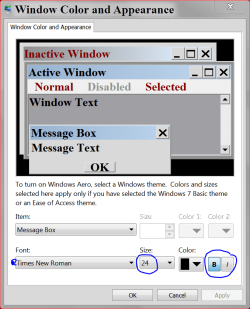
See it this helps.

bold font today.PNG
 

My Computer

Computer type
PC/Desktop
Computer Manufacturer/Model Number
Home made Desktop
OS
Windows 10 Pro. 64/ version 1709 Windows 7 Pro/64
CPU
Intel i7-6800K @ 4.3
Motherboard
ASUS X-99 Deluxe II
Memory
Corsair Platinum 16 gig @2400
Graphics Card(s)
EVGA GTX 1070 OC
Monitor(s) Displays
Asus 27" LED LCD/VE278Q
Screen Resolution
1920-1080 or 1280-720 HDMI
Hard Drives
INTEL SSD 730-240 Gb Sata 3.0/
PSU
EVGA Platium 1200W
Case
Phanteks Luxe Tempered Glass 8 fans/ one radiator
Cooling
XSPC/ Water Cooled CPU
Keyboard
Das 4 Professional
Mouse
Logitech M705/MX Anywhere 2-S
Internet Speed
100 mbits
Antivirus
Microsoft Security Essentials/ Malwarebytes Premium 3.0/ SAS
Browser
I.E. 11 default/Firefox/ ISP Time Warner Cable/Spectrum
Other Info
LG BluRay Burner/
Sound system-KLipsch-THX/
Icy Dock ssd Hot Swap bays.

By seeing this you prompted me to explore this area again and I was able to find the right setting. Thank you very, very much.

However, for some reason when I first went in there the "B" (bold) button was greyed out under the "Window" item and would not let me click it. The window text became bold under another setting, I believe it was Message Box :D.
 

My Computer

OS
Windows 7 Ultimate x64
CPU
AMD(FX) 4100 Quad Core 3.6 GHz
Motherboard
Asus M5A97 EVO
Memory
8GB
Graphics Card(s)
Nvidia Geforce GTX 550ti
Monitor(s) Displays
Asus
Screen Resolution
1600x900
Hard Drives
500GB
Mouse
Razer Deathadder
Internet Speed
40↓ 6↑ | 4/10/12
Other Info
Belkin n52te Nostomo Gaming pad
Just spend a little time in there looking at things. It takes a little tinkering with size and colors.

Keep in mind things will change when you do certain things.
Like using Safe Mode and a few other things. You will notice the change and you will have to set them again.

The Bold button when not activated will look faded just tick on it and it should darken like in the picture I posted. If it doesn't the Bold opting is not their for your other selections.

Hope your eyes heal quickly.
 
Last edited:

My Computer

Computer type
PC/Desktop
Computer Manufacturer/Model Number
Home made Desktop
OS
Windows 10 Pro. 64/ version 1709 Windows 7 Pro/64
CPU
Intel i7-6800K @ 4.3
Motherboard
ASUS X-99 Deluxe II
Memory
Corsair Platinum 16 gig @2400
Graphics Card(s)
EVGA GTX 1070 OC
Monitor(s) Displays
Asus 27" LED LCD/VE278Q
Screen Resolution
1920-1080 or 1280-720 HDMI
Hard Drives
INTEL SSD 730-240 Gb Sata 3.0/
PSU
EVGA Platium 1200W
Case
Phanteks Luxe Tempered Glass 8 fans/ one radiator
Cooling
XSPC/ Water Cooled CPU
Keyboard
Das 4 Professional
Mouse
Logitech M705/MX Anywhere 2-S
Internet Speed
100 mbits
Antivirus
Microsoft Security Essentials/ Malwarebytes Premium 3.0/ SAS
Browser
I.E. 11 default/Firefox/ ISP Time Warner Cable/Spectrum
Other Info
LG BluRay Burner/
Sound system-KLipsch-THX/
Icy Dock ssd Hot Swap bays.
Back
Top