

jgamer719
New member
- Local time
- 9:23 AM
- Messages
- 26
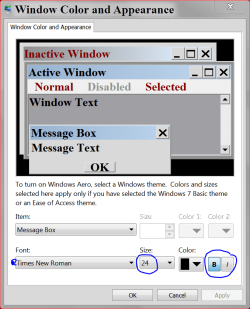
How do you make the window text bold? When I go into window appearance options, the font settings are greyed out for window text. I have really bad vision and making everything bold would help. By the way, I already tried cleartype settings and that didn't help.
My Computer
- OS
- Windows 7 Ultimate x64
- CPU
- AMD(FX) 4100 Quad Core 3.6 GHz
- Motherboard
- Asus M5A97 EVO
- Memory
- 8GB
- Graphics Card(s)
- Nvidia Geforce GTX 550ti
- Monitor(s) Displays
- Asus
- Screen Resolution
- 1600x900
- Hard Drives
- 500GB
- Mouse
- Razer Deathadder
- Internet Speed
- 40↓ 6↑ | 4/10/12
- Other Info
- Belkin n52te Nostomo Gaming pad


 .
.


