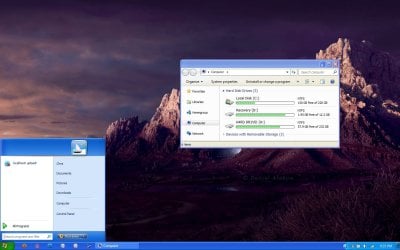
How to make Start Menu look like XP's

RBCC

New member
Member
VIP
Local time
8:36 PM
Messages
119
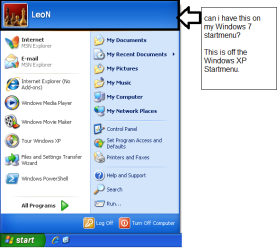
Is there a way to make Windows 7 startmenu look like Windows XP's without losing functionality? With the tab on top? see pic John:D
 

Attachments

  • john.png
    john.png
    25.2 KB · Views: 67

My Computer My Computer

Computer Manufacturer/Model Number
Gateway
OS
Windows 7 Ultimate
CPU
Turion 64 Bit
Memory
2 GIG
The quick answer is yes.

The complete answers requires a 3rd party program and I've forgotten the name thereof but I'm sure somebody here knows it.

Actually, I tried it out and decided that I preferred the Win7 approach.
 

My Computer My Computer

Computer Manufacturer/Model Number
Toshiba Satellite S875D-S7239 laptop
OS
MS Windows 7 Ultimate SP1 64-bit
CPU
AMD A10-4600M
Motherboard
AMD Pumori (Socket FT1)
Memory
6.00 GB Dual-Channel DDR3 @ 798MHz (11-11-12-28)
Graphics Card(s)
AMD Radeon HD 7660G
Sound Card
High Definition Audio Device
Monitor(s) Displays
Generic PnP Monitor (1600x900@60Hz)
Screen Resolution
1600x900@60Hz
Hard Drives
SSD 119GB Corsair CSSD-V128GB2 ATA Device
Keyboard
Standard PS/2 Keyboard
Mouse
HP Wireless Optical Mobile Mouse Model FHA-3410
Internet Speed
What the local pub, local coffee shop offers.
Other Info
Optical Drive:MATSHITA BD-CMB UJ160B ATA Device


Also have an Asus ha1002xp netbook with Win 7 Ultimate installed.
Ahh yes, let me look up the tutorial, I just made it a few days ago...


Not only does this include a method by which to change your start menu to one very similar to the XP start w/out losing any functionality but it also includes changes to remove aero, visual effects, replace the quick launch, replace desktop icons and more.

http://www.sevenforums.com/tutorials/77626-convert-windows-xp-style.html
 
Last edited:

My Computer My Computer

Computer Manufacturer/Model Number
Apple Macbook Pro (April 2009)
OS
W7 Ult. x64 | OS X
CPU
Intel Mobile Core 2 Duo 2.93Ghz [T9800 Penryn]
Motherboard
NVIDIA nForce 730i Rev. B1 [Mac-F2268EC8 (U2E1)]
Memory
4096MB Samsung DDR3 Dual Channel [PC3-8500F 1066Mhz]
Graphics Card(s)
NVIDIA GeForce 9600M GT 512MB [G96M Rev. C1]
Sound Card
SB X-Fi Surround 5.1 USB | Onboard Realtek (Disabled)
Monitor(s) Displays
Acer x223wbd 22" | Apple Anti-Glare 17" (Disabled)
Screen Resolution
{Current} 1440x900 {Acer} 1680x1050 {Apple} 1920x1200
Hard Drives
{Internal}
Seagate Momentus 320GB 2.5" 7200RPM [ST9320421AS]

{Externals}
LaCie 320GB USB 2.0 HDD [301284UR]
LaCie 750GB USB 2.0 FW400 eSATA HDD [301314U]
LaCie 1TB USB 2.0 HDD [301304UR]
PSU
Magsafe
Case
Aluminum/Unibody (MBP52)
Cooling
2 x 6000 RPM Fans
Keyboard
Logitech G-15v2 [PN 920-000379]
Mouse
Logitech G-9 [PN 910-000338]
Internet Speed
12Mbps/2.5Mbps w/ 24Mbps Speed Boost [Comcast]
Other Info
Logitech X-540 Speakers [PN 970223-0122]
Sennheiser PC-151 Headset
If all you want is to change the title of the Windows 7 menu to look like XP, I don't think that's possible, even with a custom theme. The layout is just too different.

There are several tools that let you get the classic start menu on Windows 7. I recommend my own creation Classic Shell: http://classicshell.sourceforge.net/index.html

Classic Shell has a skin that makes it similar to the XP start menu, but there are some key differences (like no recent programs, no pinned programs, and no shutdown buttons at the bottom). Check out the XP Luna skin here: http://classicshell.sourceforge.net/gallery.html#menu

But since one of your requirements is "without losing functionality", you probably don't want to lose the search. I'm aware of only one tool that has search: http://www.classicstartmenu.com/index.html. It is not free though.
 

My Computer My Computer

Computer Manufacturer/Model Number
Me :) I build all my PCs
OS
Windows 7 Home 64, Vista Ultimate 64
All's I wanted was...

Is there to put the tab on the top of the startmenu? John
 

My Computer My Computer

Computer Manufacturer/Model Number
Gateway
OS
Windows 7 Ultimate
CPU
Turion 64 Bit
Memory
2 GIG

My Computer My Computer

Computer type
PC/Desktop
Computer Manufacturer/Model Number
Self Assembled
OS
Microsoft Windows 10 Pro Insider Preview 64-bit
CPU
Intel(R) Core(TM) i3-4130 CPU @ 3.40GHz
Motherboard
Gigabyte Technology Co., Ltd. B85M-D3H
Memory
Corsair Vengence 4GB x2 (8.00GB Dual-Channel DDR3 @ 798MHz)
Graphics Card(s)
2047MB GeForce GTS 450 (ZOTAC International)
Sound Card
Onboard (Realtek High Definition Audio)
Monitor(s) Displays
LG Flatron E2040T
Screen Resolution
1600x900
Hard Drives
Western Digital 1 TB
Seagate 500 GB
PSU
Corsair VS550
Case
Cooler Master K380
Cooling
Cooler Master Seidon 120V Plus
Keyboard
Logitech MK260r
Mouse
Logitech MK260r
Internet Speed
PMPL Broadband
Antivirus
Windows Defender + MBAM
Browser
Firefox
Other Info
Dell Studio 15" Laptop
OMG

We had Windows XP and we wanted to look like Vista or Windows 7, now we have Windows 7 and want to look like Windows XP. Just for fun of it could anyone make theme to make look Windows 7 like Windows 95??? :party::)
 

My Computer My Computer

Computer Manufacturer/Model Number
XGS PII Dragon "Asus"
OS
windows 7 Pro x64
CPU
AMD Phenom II X4 955 Deneb 45nm Technology
Motherboard
ASUSTeK Computer INC. M4A78 PRO (AM2)
Memory
8.0GB Dual-Channel DDR2 @ 401MHz (5-5-5-18)
Graphics Card(s)
ATI Radeon HD 4800 Series (ATI
Sound Card
VIA High Definition Audio
Monitor(s) Displays
DELL 1908FP @ 1280x1024
Screen Resolution
1280x1024
Hard Drives
977GB SAMSUNG SAMSUNG HD103SI ATA Device (IDE)
Keyboard
HID Keyboard Device
Mouse
HID-compliant mouse
Internet Speed
2 Mb/s so far...
If all you want is to change the title of the Windows 7 menu to look like XP, I don't think that's possible, even with a custom theme. The layout is just too different.

There are several tools that let you get the classic start menu on Windows 7. I recommend my own creation Classic Shell: http://classicshell.sourceforge.net/index.html

Classic Shell has a skin that makes it similar to the XP start menu, but there are some key differences (like no recent programs, no pinned programs, and no shutdown buttons at the bottom). Check out the XP Luna skin here: Classic Shell: Gallery

But since one of your requirements is "without losing functionality", you probably don't want to lose the search. I'm aware of only one tool that has search: Windows 7 Classic Start Menu. It is not free though.
Actually, CSMenu has a search bar and everything. I linked to it in my tutorial. Most of the programs you linked to aren't what he asked for and/or you have to pay for them.

I suggest you just follow the tutorial I posted, you can add a theme as well if you like.

http://www.sevenforums.com/tutorials/77626-convert-windows-xp-style.html

How to add your start menu tab:

If all you want is the start menu modification with the tab:


* Download CSMenu & StartKiller
* Install & Index CSMenu then Log Off & Back On
* Start Menu > Right Click on “Show CSMenu” shortcut > “Pin to Taskbar”.
* You should now see two start menu buttons (CSMenu is a bit smaller).
* If you wish to keep both buttons, skip to the next Windows XP conversion. Otherwise:
* Run the StartKiller.exe file, will auto-start after install.
* Now only CSMenu is there.
* To be certain StartKiller runs every time you run Windows: Right Click > Properties > Load on system start-up​
 

My Computer My Computer

Computer Manufacturer/Model Number
Apple Macbook Pro (April 2009)
OS
W7 Ult. x64 | OS X
CPU
Intel Mobile Core 2 Duo 2.93Ghz [T9800 Penryn]
Motherboard
NVIDIA nForce 730i Rev. B1 [Mac-F2268EC8 (U2E1)]
Memory
4096MB Samsung DDR3 Dual Channel [PC3-8500F 1066Mhz]
Graphics Card(s)
NVIDIA GeForce 9600M GT 512MB [G96M Rev. C1]
Sound Card
SB X-Fi Surround 5.1 USB | Onboard Realtek (Disabled)
Monitor(s) Displays
Acer x223wbd 22" | Apple Anti-Glare 17" (Disabled)
Screen Resolution
{Current} 1440x900 {Acer} 1680x1050 {Apple} 1920x1200
Hard Drives
{Internal}
Seagate Momentus 320GB 2.5" 7200RPM [ST9320421AS]

{Externals}
LaCie 320GB USB 2.0 HDD [301284UR]
LaCie 750GB USB 2.0 FW400 eSATA HDD [301314U]
LaCie 1TB USB 2.0 HDD [301304UR]
PSU
Magsafe
Case
Aluminum/Unibody (MBP52)
Cooling
2 x 6000 RPM Fans
Keyboard
Logitech G-15v2 [PN 920-000379]
Mouse
Logitech G-9 [PN 910-000338]
Internet Speed
12Mbps/2.5Mbps w/ 24Mbps Speed Boost [Comcast]
Other Info
Logitech X-540 Speakers [PN 970223-0122]
Sennheiser PC-151 Headset

My Computer My Computer

Computer type
PC/Desktop
Computer Manufacturer/Model Number
Self Assembled
OS
Microsoft Windows 10 Pro Insider Preview 64-bit
CPU
Intel(R) Core(TM) i3-4130 CPU @ 3.40GHz
Motherboard
Gigabyte Technology Co., Ltd. B85M-D3H
Memory
Corsair Vengence 4GB x2 (8.00GB Dual-Channel DDR3 @ 798MHz)
Graphics Card(s)
2047MB GeForce GTS 450 (ZOTAC International)
Sound Card
Onboard (Realtek High Definition Audio)
Monitor(s) Displays
LG Flatron E2040T
Screen Resolution
1600x900
Hard Drives
Western Digital 1 TB
Seagate 500 GB
PSU
Corsair VS550
Case
Cooler Master K380
Cooling
Cooler Master Seidon 120V Plus
Keyboard
Logitech MK260r
Mouse
Logitech MK260r
Internet Speed
PMPL Broadband
Antivirus
Windows Defender + MBAM
Browser
Firefox
Other Info
Dell Studio 15" Laptop
Actually, CSMenu has a search bar and everything. I linked to it in my tutorial. Most of the programs you linked to aren't what he asked for and/or you have to pay for them.

Hmm...

Looks like the program you link to is the same as the one in my post. Until few months ago CSMenu and Classic Start Menu were two separate applications. CSMenu was free, didn't have search, and very old versions of it did require StartKiller (not anymore). Classic Start Menu is not free ($20), DOES have search, and has never needed StartKiller. So please update your tutorial by removing the StartKiller part. No start menu application requires it anymore.

Last year the original developer of CSMenu abandoned the project and the author of Classic Start Menu took over and offered it as a free alternative to his paid software. But it looks like CSMenu can't be downloaded anymore. All links now point to the paid software. I don't know if this is temporarily broken, or done on purpose. Maybe he is trying to rename the paid software to CSMenu (it is a catchy name). Either way, it is not a big loss because CSMenu was never that good to begin with. There were many complaints about bugs (see here: CSMenu | Google Groups) and the (new) author hasn't done anything to fix them.

So if you need search (and have 20 bucks) get Classic Start Menu (it may be officially called CSMenu now).
If you don't need the search, get one of these free applications:
http://classicshell.sourceforge.net/index.html
http://usuarios.multimania.es/coreaffinity/classicwinstartmenu.htm
http://www.vistastartmenu.com/index.html (by the same author as Classic Start Menu we are discussing)
http://www.sevenclassicstart.com/ (this one is NOT FREE, but I include it for completeness)
 

My Computer My Computer

Computer Manufacturer/Model Number
Me :) I build all my PCs
OS
Windows 7 Home 64, Vista Ultimate 64
Great wanted my XP layoout back, vcery usefull trhead thanks guys:)
 

My Computer My Computer

OS
windows 7
Back
Top