Solved How to make start menu transparent

Sakata Gintoki

New member
Local time
10:11 AM
Messages
10
hello everyone,, i'm a newbie in this forum,, this is my 2nd post,,
and i really need some help here,,

I tried to change the image in the start menu (in white background) using restorator to be transparent, but had no effect,,:cry:

when I tried to change to a transparent image, programs in start menu is not visible,, :confused:

here the screen shot,,
 

Attachments

  • Untitled.png
    Untitled.png
    56 KB · Views: 43

My Computer

OS
windows 7 ultimate 32 bit
Hello Sakata and welcome to Seven Forums.

I think you're going to have to find a third party theme that provides a transparency effect. Start Menu 7 may do what you want. If it doesn't you might want to google transparent Windows 7 start menu and see what other people have developed.

Start Menu 7
 

My Computer

Computer type
Laptop
Computer Manufacturer/Model Number
Sony Vaio VPCEB47GM Laptop
OS
Win 7 Pro 64-bit
CPU
Intel i5 2.4 Ghz
Memory
8GB DDR3
Graphics Card(s)
Intel HD 3000
Sound Card
IDT High Definition
Monitor(s) Displays
15.6 WGXA Anti-Glare LED
Screen Resolution
1280x800
Hard Drives
640Gb 7200rpm
Antivirus
MSE
Browser
Opera (primary) with IE9 backup
Welcome to the Seven Forums

It needs to be a dark color or you have it to transparent.
Make it black and use Browsing deviantART or Fullglass.exe

Jerry
 

My Computer

Computer type
Laptop
Computer Manufacturer/Model Number
Sager NP9170
OS
Win 7 Pro x64 / Win 10 Pro
CPU
Intel(R) Core(TM) i7-3630QM CPU @ 2.40GHz
Motherboard
CLEVO P170EM
Memory
12 GB
Graphics Card(s)
(1) Intel(R) HD Graphics 4000 (2) NVIDIA GeForce GTX 675M
Sound Card
(1) Realtek High Definition Audio (2) Intel(R) Display Aud
Monitor(s) Displays
17.3
Screen Resolution
1920x1080
Hard Drives
(1) Samsung 860 EVO 500GB(OS) (1) Samsung 860 EVO 500GB(Data)
Keyboard
Backlite
Antivirus
MSE, Malwarebytes Pro
Browser
Firefox
Other Info
DESKTOP: Custom-built.
OS: Win 10 Pro x64.
CASE: Rosewill R5.
CPU: Intel I5 4670K CPU @ 3.40GHz.
CPU COOLER: Cool Master Hyper 212 EVO.
MOTHERBOARD: Asus Z87-A.
MEMORY: Kingston HyperX 2x4 GB.
GPU: Nvidia Geforce 650 TI.
PSU: Corsair TX750.
DRIVES: (1) Samsung 840 120 GB SSD (2) Western Digital blue 500 GB 7200 RPM.
Hello Sakata and welcome to Seven Forums.

I think you're going to have to find a third party theme that provides a transparency effect. Start Menu 7 may do what you want. If it doesn't you might want to google transparent Windows 7 start menu and see what other people have developed.

Start Menu 7

thanks for the answer, but sorry, it's not what i mean,,

I tried to change the start menu using vista style builder, and want it to appear completely transparent,,

i already install universal theme patcher,,
 

My Computer

OS
windows 7 ultimate 32 bit
Welcome to the Seven Forums

It needs to be a dark color or you have it to transparent.
Make it black and use Browsing deviantART or Fullglass.exe

Jerry

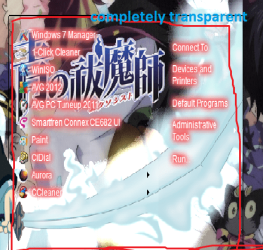
thanks for advice, but I just want to change the default theme (aero) of Windows 7 to be completely transparent,,

like this one,, (This theme was made by lutfikun)
 

Attachments

  • Untitled.png
    Untitled.png
    79.9 KB · Views: 35

My Computer

OS
windows 7 ultimate 32 bit
Earlier you said you are using restorator so that's why I give my answer to use a dark image and one of them programs.

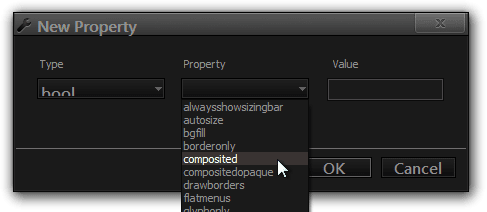
Now you say you have Windows Style Builder now you can go about it a different way, you will need to add a new property at the locations shown in the screenshot below the new property is: Bool Composited.
Then you will need to uncheck the Compositedopaque:Bool and check the Composited:Bool
New Property.png4-07-2010 11-05-12.jpg

Download and look at this theme it is full glass
FULL GLASS FOR WINDOWS 7 THEME | Vishnu Valentino | Ethical Hacking Tutorial, Tips and Trick if you go to Start Menu > Panels > Aero > Top > ProgramsList and chech the image it is transparent but not completely and if you check the color it is black, making a full glass theme is very tough and you will have to experiment with your images to get it right.

Jerry
 

My Computer

Computer type
Laptop
Computer Manufacturer/Model Number
Sager NP9170
OS
Win 7 Pro x64 / Win 10 Pro
CPU
Intel(R) Core(TM) i7-3630QM CPU @ 2.40GHz
Motherboard
CLEVO P170EM
Memory
12 GB
Graphics Card(s)
(1) Intel(R) HD Graphics 4000 (2) NVIDIA GeForce GTX 675M
Sound Card
(1) Realtek High Definition Audio (2) Intel(R) Display Aud
Monitor(s) Displays
17.3
Screen Resolution
1920x1080
Hard Drives
(1) Samsung 860 EVO 500GB(OS) (1) Samsung 860 EVO 500GB(Data)
Keyboard
Backlite
Antivirus
MSE, Malwarebytes Pro
Browser
Firefox
Other Info
DESKTOP: Custom-built.
OS: Win 10 Pro x64.
CASE: Rosewill R5.
CPU: Intel I5 4670K CPU @ 3.40GHz.
CPU COOLER: Cool Master Hyper 212 EVO.
MOTHERBOARD: Asus Z87-A.
MEMORY: Kingston HyperX 2x4 GB.
GPU: Nvidia Geforce 650 TI.
PSU: Corsair TX750.
DRIVES: (1) Samsung 840 120 GB SSD (2) Western Digital blue 500 GB 7200 RPM.
Earlier you said you are using restorator so that's why I give my answer to use a dark image and one of them programs.

Now you say you have Windows Style Builder now you can go about it a different way, you will need to add a new property at the locations shown in the screenshot below the new property is: Bool Composited.
Then you will need to uncheck the Compositedopaque:Bool and check the Composited:Bool
View attachment 238175View attachment 238176

Download and look at this theme it is full glass
FULL GLASS FOR WINDOWS 7 THEME | Vishnu Valentino | Ethical Hacking Tutorial, Tips and Trick if you go to Start Menu > Panels > Aero > Top > ProgramsList and chech the image it is transparent but not completely and if you check the color it is black, making a full glass theme is very tough and you will have to experiment with your images to get it right.

Jerry

yohoho,, sorry bongo,,
yeah, at first i tried to create with restorator,, but when I was looking on the internet I found this program (vista style builder) which it seems easy to use,, theeen, I forgot to edit in my 1st post,, my mistake...

i'm so sorry,, :o

Now, with your advice I'll try to create my own theme,,

thaaaaaaanks for helping,,,,
 

My Computer

OS
windows 7 ultimate 32 bit
You're welcome
 

My Computer

Computer type
Laptop
Computer Manufacturer/Model Number
Sager NP9170
OS
Win 7 Pro x64 / Win 10 Pro
CPU
Intel(R) Core(TM) i7-3630QM CPU @ 2.40GHz
Motherboard
CLEVO P170EM
Memory
12 GB
Graphics Card(s)
(1) Intel(R) HD Graphics 4000 (2) NVIDIA GeForce GTX 675M
Sound Card
(1) Realtek High Definition Audio (2) Intel(R) Display Aud
Monitor(s) Displays
17.3
Screen Resolution
1920x1080
Hard Drives
(1) Samsung 860 EVO 500GB(OS) (1) Samsung 860 EVO 500GB(Data)
Keyboard
Backlite
Antivirus
MSE, Malwarebytes Pro
Browser
Firefox
Other Info
DESKTOP: Custom-built.
OS: Win 10 Pro x64.
CASE: Rosewill R5.
CPU: Intel I5 4670K CPU @ 3.40GHz.
CPU COOLER: Cool Master Hyper 212 EVO.
MOTHERBOARD: Asus Z87-A.
MEMORY: Kingston HyperX 2x4 GB.
GPU: Nvidia Geforce 650 TI.
PSU: Corsair TX750.
DRIVES: (1) Samsung 840 120 GB SSD (2) Western Digital blue 500 GB 7200 RPM.
Back
Top