how to make Virtualization for entire XP computer

nuflia

New member
Member
VIP
Local time
3:14 AM
Messages
138
i have an XP computer that has some software that only run in window XP,
how can i make Virtualization from the entire pc and in any case the computer fails , i can run the Virtualization from a different pc AND use the whole software.
hope my question is clear
 

My Computer My Computer

Computer type
Laptop
Computer Manufacturer/Model Number
Dell studio 1558
OS
Microsoft Windows 7 Home Premium 64-bit 7601 Multiprocessor Free Service Pack 1
CPU
Intel(R) Core(TM) i5 CPU M 460 @ 2.53GHz
Motherboard
Dell Inc. 0874P6
Memory
8GB , SODIMM ,CT51264BF1339.M16F
Graphics Card(s)
ATI Mobility Radeon HD 5400 Series
Sound Card
(1) AMD High Definition Audio Device (2) High Definition A
Monitor(s) Displays
VideoController1
Screen Resolution
1366 x 768 x 4294967296 colors
Hard Drives
TOSHIBA MK5076GSX ATA Device, 500GB
PSU
Dell studio 1558 power supply uint
Case
Dell studio 1558
Cooling
GENUINE DELL STUDIO 1558 CPU COOPER HEATSINK with FAN.
Keyboard
dell keyboard
Mouse
optical external drive
Internet Speed
60Mb/s
Antivirus
Norton Internet Security version 20.4.0.40
Browser
Google chrome

My Computer My Computer

Computer type
Laptop
Computer Manufacturer/Model Number
Macbook pro
OS
8.1 Pro x64
CPU
core2duo
Memory
3GB
Graphics Card(s)
ATI X1600
Antivirus
Defender
Browser
IE11
Thanks for the reply
u mean by using Disk2VHD , i can make virtual machine form my whole windows xp including all the programs that are running in the pc,
can i use this virtual machine in w7 home or it needs to be ultimate and higher
 

My Computer My Computer

Computer type
Laptop
Computer Manufacturer/Model Number
Dell studio 1558
OS
Microsoft Windows 7 Home Premium 64-bit 7601 Multiprocessor Free Service Pack 1
CPU
Intel(R) Core(TM) i5 CPU M 460 @ 2.53GHz
Motherboard
Dell Inc. 0874P6
Memory
8GB , SODIMM ,CT51264BF1339.M16F
Graphics Card(s)
ATI Mobility Radeon HD 5400 Series
Sound Card
(1) AMD High Definition Audio Device (2) High Definition A
Monitor(s) Displays
VideoController1
Screen Resolution
1366 x 768 x 4294967296 colors
Hard Drives
TOSHIBA MK5076GSX ATA Device, 500GB
PSU
Dell studio 1558 power supply uint
Case
Dell studio 1558
Cooling
GENUINE DELL STUDIO 1558 CPU COOPER HEATSINK with FAN.
Keyboard
dell keyboard
Mouse
optical external drive
Internet Speed
60Mb/s
Antivirus
Norton Internet Security version 20.4.0.40
Browser
Google chrome

My Computer My Computer

Computer type
Laptop
Computer Manufacturer/Model Number
HP ENVY 17-1150eg
OS
Windows 10 Pro x64 EN-GB
CPU
1.6 GHz Intel Core i7-720QM Processor
Memory
6 GB
Graphics Card(s)
ATI Mobility Radeon HD 5850 Graphics
Sound Card
Beats sound system with integrated subwoofer
Monitor(s) Displays
17" laptop display, 22" LED and 32" Full HD TV through HDMI
Screen Resolution
1600*900 (1), 1920*1080 (2&3)
Hard Drives
Internal: 2 x 500 GB SATA Hard Disk Drive 7200 rpm
External: 2TB for backups, 3TB USB3 network drive for media
Cooling
As Envy runs a bit warm, I have it on a Cooler Master pad
Keyboard
Logitech diNovo Media Desktop Laser (bluetooth)
Mouse
Logitech Performance Mouse MX
Internet Speed
50/10 Mbps VDSL
Antivirus
Windows Defender 4.3.9431.0
Browser
Maxthon 3.5.2., IE11
THanks Kari,
to make it simple ,
Windows Virtual PC software from Microsoft can be used to make virtual machine from my entire PC using Disk2VHD
so the entire PC including all software can run as virtual machine under w7 or w8
 

My Computer My Computer

Computer type
Laptop
Computer Manufacturer/Model Number
Dell studio 1558
OS
Microsoft Windows 7 Home Premium 64-bit 7601 Multiprocessor Free Service Pack 1
CPU
Intel(R) Core(TM) i5 CPU M 460 @ 2.53GHz
Motherboard
Dell Inc. 0874P6
Memory
8GB , SODIMM ,CT51264BF1339.M16F
Graphics Card(s)
ATI Mobility Radeon HD 5400 Series
Sound Card
(1) AMD High Definition Audio Device (2) High Definition A
Monitor(s) Displays
VideoController1
Screen Resolution
1366 x 768 x 4294967296 colors
Hard Drives
TOSHIBA MK5076GSX ATA Device, 500GB
PSU
Dell studio 1558 power supply uint
Case
Dell studio 1558
Cooling
GENUINE DELL STUDIO 1558 CPU COOPER HEATSINK with FAN.
Keyboard
dell keyboard
Mouse
optical external drive
Internet Speed
60Mb/s
Antivirus
Norton Internet Security version 20.4.0.40
Browser
Google chrome
Yes. Using Disk2VHD, I have even virtualized a Windows XP Pro SP3 with lot of programs running on a VirtualBox virtual machine, then moved the VHD to another computer to be run on Virtual PC which in its turn runs on a Windows 7 virtual machine running on Windows 8 :).
 

My Computer My Computer

Computer type
Laptop
Computer Manufacturer/Model Number
HP ENVY 17-1150eg
OS
Windows 10 Pro x64 EN-GB
CPU
1.6 GHz Intel Core i7-720QM Processor
Memory
6 GB
Graphics Card(s)
ATI Mobility Radeon HD 5850 Graphics
Sound Card
Beats sound system with integrated subwoofer
Monitor(s) Displays
17" laptop display, 22" LED and 32" Full HD TV through HDMI
Screen Resolution
1600*900 (1), 1920*1080 (2&3)
Hard Drives
Internal: 2 x 500 GB SATA Hard Disk Drive 7200 rpm
External: 2TB for backups, 3TB USB3 network drive for media
Cooling
As Envy runs a bit warm, I have it on a Cooler Master pad
Keyboard
Logitech diNovo Media Desktop Laser (bluetooth)
Mouse
Logitech Performance Mouse MX
Internet Speed
50/10 Mbps VDSL
Antivirus
Windows Defender 4.3.9431.0
Browser
Maxthon 3.5.2., IE11
Yes. Use Disk2VHD to make a VHD. That will copy all your programs, data and the XP OS to a file called XPcomputer.vhd or similar.

On Windows 7 you can use Virtual PC as Kari says to run it.

On windows 8 your would have to use Hyper-V as the MS option as Virtual PC is not supported I believe.

On either 7 or 8 (or Linux) Virtualbox would work.
 

My Computer My Computer

Computer type
Laptop
Computer Manufacturer/Model Number
Macbook pro
OS
8.1 Pro x64
CPU
core2duo
Memory
3GB
Graphics Card(s)
ATI X1600
Antivirus
Defender
Browser
IE11
On windows 8 your would have to use Hyper-V as the MS option as Virtual PC is not supported I believe.
Just a fun fact, I run Virtual PC and XP Mode on a Windows 7 Professional vm running on Hyper-V in Windows 8 Pro, and have tested the Disk2VHD created XP vm in the same Windows 7 Hyper-V vm in Virtual PC as I told in my previous post.

This is of course totally trivial information but it tells how flexible virtualization tools today are.
 

My Computer My Computer

Computer type
Laptop
Computer Manufacturer/Model Number
HP ENVY 17-1150eg
OS
Windows 10 Pro x64 EN-GB
CPU
1.6 GHz Intel Core i7-720QM Processor
Memory
6 GB
Graphics Card(s)
ATI Mobility Radeon HD 5850 Graphics
Sound Card
Beats sound system with integrated subwoofer
Monitor(s) Displays
17" laptop display, 22" LED and 32" Full HD TV through HDMI
Screen Resolution
1600*900 (1), 1920*1080 (2&3)
Hard Drives
Internal: 2 x 500 GB SATA Hard Disk Drive 7200 rpm
External: 2TB for backups, 3TB USB3 network drive for media
Cooling
As Envy runs a bit warm, I have it on a Cooler Master pad
Keyboard
Logitech diNovo Media Desktop Laser (bluetooth)
Mouse
Logitech Performance Mouse MX
Internet Speed
50/10 Mbps VDSL
Antivirus
Windows Defender 4.3.9431.0
Browser
Maxthon 3.5.2., IE11
Just a fun fact, I run Virtual PC and XP Mode on a Windows 7 Professional vm running on Hyper-V in Windows 8 Pro, and have tested the Disk2VHD created XP vm in the same Windows 7 Hyper-V vm in Virtual PC as I told in my previous post.
I'll have to think about that for a while - the combinations give me a slight headache:confused:

I'd like to make Hyper-V server (the free one) work but it is too limited really for me - no wifi, bluetooth or anything.
 

My Computer My Computer

Computer type
Laptop
Computer Manufacturer/Model Number
Macbook pro
OS
8.1 Pro x64
CPU
core2duo
Memory
3GB
Graphics Card(s)
ATI X1600
Antivirus
Defender
Browser
IE11
This goes really off topic but:

I'd like to make Hyper-V server (the free one) work but it is too limited really for me - no wifi, bluetooth or anything.

I do not use the built-in Hyper-V Virtual Machine Connection to run my virtual machines, except if the virtual machine can be created as Generation 2 vm.

Instead I connect to virtual machines using RDP. This allows the vm to use host devices, including for instance an external WiFi USB dongle, Bluetooth and so on.
 

My Computer My Computer

Computer type
Laptop
Computer Manufacturer/Model Number
HP ENVY 17-1150eg
OS
Windows 10 Pro x64 EN-GB
CPU
1.6 GHz Intel Core i7-720QM Processor
Memory
6 GB
Graphics Card(s)
ATI Mobility Radeon HD 5850 Graphics
Sound Card
Beats sound system with integrated subwoofer
Monitor(s) Displays
17" laptop display, 22" LED and 32" Full HD TV through HDMI
Screen Resolution
1600*900 (1), 1920*1080 (2&3)
Hard Drives
Internal: 2 x 500 GB SATA Hard Disk Drive 7200 rpm
External: 2TB for backups, 3TB USB3 network drive for media
Cooling
As Envy runs a bit warm, I have it on a Cooler Master pad
Keyboard
Logitech diNovo Media Desktop Laser (bluetooth)
Mouse
Logitech Performance Mouse MX
Internet Speed
50/10 Mbps VDSL
Antivirus
Windows Defender 4.3.9431.0
Browser
Maxthon 3.5.2., IE11
Thanks Kari, to make it simple .....
Sorry Nuflia - my fault - I think you had your answer already. I'm interested in virtualisation and so do go off topic sometimes. I'll open another thread for that (once I can formulate it).
 

My Computer My Computer

Computer type
Laptop
Computer Manufacturer/Model Number
Macbook pro
OS
8.1 Pro x64
CPU
core2duo
Memory
3GB
Graphics Card(s)
ATI X1600
Antivirus
Defender
Browser
IE11
I take the blame, I went OT :). Sorry.
 

My Computer My Computer

Computer type
Laptop
Computer Manufacturer/Model Number
HP ENVY 17-1150eg
OS
Windows 10 Pro x64 EN-GB
CPU
1.6 GHz Intel Core i7-720QM Processor
Memory
6 GB
Graphics Card(s)
ATI Mobility Radeon HD 5850 Graphics
Sound Card
Beats sound system with integrated subwoofer
Monitor(s) Displays
17" laptop display, 22" LED and 32" Full HD TV through HDMI
Screen Resolution
1600*900 (1), 1920*1080 (2&3)
Hard Drives
Internal: 2 x 500 GB SATA Hard Disk Drive 7200 rpm
External: 2TB for backups, 3TB USB3 network drive for media
Cooling
As Envy runs a bit warm, I have it on a Cooler Master pad
Keyboard
Logitech diNovo Media Desktop Laser (bluetooth)
Mouse
Logitech Performance Mouse MX
Internet Speed
50/10 Mbps VDSL
Antivirus
Windows Defender 4.3.9431.0
Browser
Maxthon 3.5.2., IE11
thanks guys for the replies and help
i will try to make the virtual machine and let you know the results
 

My Computer My Computer

Computer type
Laptop
Computer Manufacturer/Model Number
Dell studio 1558
OS
Microsoft Windows 7 Home Premium 64-bit 7601 Multiprocessor Free Service Pack 1
CPU
Intel(R) Core(TM) i5 CPU M 460 @ 2.53GHz
Motherboard
Dell Inc. 0874P6
Memory
8GB , SODIMM ,CT51264BF1339.M16F
Graphics Card(s)
ATI Mobility Radeon HD 5400 Series
Sound Card
(1) AMD High Definition Audio Device (2) High Definition A
Monitor(s) Displays
VideoController1
Screen Resolution
1366 x 768 x 4294967296 colors
Hard Drives
TOSHIBA MK5076GSX ATA Device, 500GB
PSU
Dell studio 1558 power supply uint
Case
Dell studio 1558
Cooling
GENUINE DELL STUDIO 1558 CPU COOPER HEATSINK with FAN.
Keyboard
dell keyboard
Mouse
optical external drive
Internet Speed
60Mb/s
Antivirus
Norton Internet Security version 20.4.0.40
Browser
Google chrome
It will definitely work. Run the Disk2VHD and try it - we'll help - we have both done it and almost certainly others also.
 

My Computer My Computer

Computer type
Laptop
Computer Manufacturer/Model Number
Macbook pro
OS
8.1 Pro x64
CPU
core2duo
Memory
3GB
Graphics Card(s)
ATI X1600
Antivirus
Defender
Browser
IE11
It will definitely work. Run the Disk2VHD and try it - we'll help - we have both done it and almost certainly others also.

thanks for the reply..
after using the Disk2vhd to make VHD, can i use VirtualBox to create the virtual machine
do i need the windows xp iso and keys to complete the virtualization
 

My Computer My Computer

Computer type
Laptop
Computer Manufacturer/Model Number
Dell studio 1558
OS
Microsoft Windows 7 Home Premium 64-bit 7601 Multiprocessor Free Service Pack 1
CPU
Intel(R) Core(TM) i5 CPU M 460 @ 2.53GHz
Motherboard
Dell Inc. 0874P6
Memory
8GB , SODIMM ,CT51264BF1339.M16F
Graphics Card(s)
ATI Mobility Radeon HD 5400 Series
Sound Card
(1) AMD High Definition Audio Device (2) High Definition A
Monitor(s) Displays
VideoController1
Screen Resolution
1366 x 768 x 4294967296 colors
Hard Drives
TOSHIBA MK5076GSX ATA Device, 500GB
PSU
Dell studio 1558 power supply uint
Case
Dell studio 1558
Cooling
GENUINE DELL STUDIO 1558 CPU COOPER HEATSINK with FAN.
Keyboard
dell keyboard
Mouse
optical external drive
Internet Speed
60Mb/s
Antivirus
Norton Internet Security version 20.4.0.40
Browser
Google chrome
Make sure this special note applies.

Note: Physical-to-virtual hard drive migration of a Windows installation is a valid function for customers with Software Assurance and full retail copies of Windows XP, Windows Vista, and Windows 7. Software Assurance provides users valuable benefits—please contact Microsoft Corporation for further information. Windows XP, Windows Vista and Windows 7 installed by Original Equipment Manufacturers (OEM) using OEM versions of these products may not be transferred to a virtual hard drive in accordance with Microsoft licensing terms.
 

My Computer My Computer

Computer type
PC/Desktop
Computer Manufacturer/Model Number
Built 2/11/2011
OS
Windows 7 Pro-x64
CPU
i7-2600 3.4GHz - 3.8GHz Turbo
Motherboard
Intel DH67BL-B3
Memory
8Gb - 2x4GB, Muskin 991770 PC3-1333
Graphics Card(s)
Integrated Intel HD 2000
Sound Card
Integrated Intel 10.1 HD, RealTek ALC892
Monitor(s) Displays
Asus LCD VH222H, Haier HL24XSL2a
Screen Resolution
1920x1080, 1920x1080
Hard Drives
Crucial SSD C300-128Gb,
Western Digital WD5002AALX - 500Gb,
Western Digital WD7501AALS - 750Gb
PSU
Seasonic 650W 80+ Gold Modular
Case
Rosewill Defender
Cooling
Stock CPU, Four 120mm case fans, PCH fan added
Keyboard
Logitech EX100 Y-RBH94 Wireless
Mouse
Logitech EX100 M-RCE95 Wireless
Internet Speed
3.0/1.5 Mbs
Antivirus
Microsoft Security Essentials
Browser
Microsoft Internet Explorer 11
Other Info
Antec Veris Premier-Multimedia IR Station,
Cyber Accoustics-3602 Speakers,
AFT XM-5U Card Reader,
Hauppauge TV-HVR-2250,
Sony LX300 USB Turntable
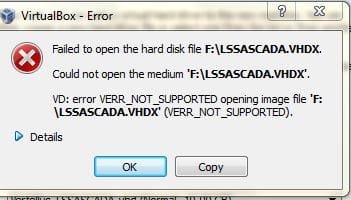
error using VirtualBox-4.3.12-93733-Win

Yes. Using Disk2VHD, I have even virtualized a Windows XP Pro SP3 with lot of programs running on a VirtualBox virtual machine, then moved the VHD to another computer to be run on Virtual PC which in its turn runs on a Windows 7 virtual machine running on Windows 8 :).

i have already used Disk2VHD but when i used VirtualBox-4.3.12-93733-Win to create the virtual machine but i got error message as per attached message
 

Attachments

  • virtual machine.JPG
    virtual machine.JPG
    21.5 KB · Views: 8

My Computer My Computer

Computer type
Laptop
Computer Manufacturer/Model Number
Dell studio 1558
OS
Microsoft Windows 7 Home Premium 64-bit 7601 Multiprocessor Free Service Pack 1
CPU
Intel(R) Core(TM) i5 CPU M 460 @ 2.53GHz
Motherboard
Dell Inc. 0874P6
Memory
8GB , SODIMM ,CT51264BF1339.M16F
Graphics Card(s)
ATI Mobility Radeon HD 5400 Series
Sound Card
(1) AMD High Definition Audio Device (2) High Definition A
Monitor(s) Displays
VideoController1
Screen Resolution
1366 x 768 x 4294967296 colors
Hard Drives
TOSHIBA MK5076GSX ATA Device, 500GB
PSU
Dell studio 1558 power supply uint
Case
Dell studio 1558
Cooling
GENUINE DELL STUDIO 1558 CPU COOPER HEATSINK with FAN.
Keyboard
dell keyboard
Mouse
optical external drive
Internet Speed
60Mb/s
Antivirus
Norton Internet Security version 20.4.0.40
Browser
Google chrome
How-To Convert a VHDX to a virtual hard disk (VHD)

i used Disk2VHD , the created file was with the extension of VHDX
how can i convert it to VHD to be used with VirtualBox
 
Last edited by a moderator:

My Computer My Computer

Computer type
Laptop
Computer Manufacturer/Model Number
Dell studio 1558
OS
Microsoft Windows 7 Home Premium 64-bit 7601 Multiprocessor Free Service Pack 1
CPU
Intel(R) Core(TM) i5 CPU M 460 @ 2.53GHz
Motherboard
Dell Inc. 0874P6
Memory
8GB , SODIMM ,CT51264BF1339.M16F
Graphics Card(s)
ATI Mobility Radeon HD 5400 Series
Sound Card
(1) AMD High Definition Audio Device (2) High Definition A
Monitor(s) Displays
VideoController1
Screen Resolution
1366 x 768 x 4294967296 colors
Hard Drives
TOSHIBA MK5076GSX ATA Device, 500GB
PSU
Dell studio 1558 power supply uint
Case
Dell studio 1558
Cooling
GENUINE DELL STUDIO 1558 CPU COOPER HEATSINK with FAN.
Keyboard
dell keyboard
Mouse
optical external drive
Internet Speed
60Mb/s
Antivirus
Norton Internet Security version 20.4.0.40
Browser
Google chrome
As I mentioned earlier, the Disk2VHD creates virtual hard disks which are meant to run on Windows Virtual PC, although you should be able to run them also on VirtualBox.

I'll do some testing, will then post more.
 

My Computer My Computer

Computer type
Laptop
Computer Manufacturer/Model Number
HP ENVY 17-1150eg
OS
Windows 10 Pro x64 EN-GB
CPU
1.6 GHz Intel Core i7-720QM Processor
Memory
6 GB
Graphics Card(s)
ATI Mobility Radeon HD 5850 Graphics
Sound Card
Beats sound system with integrated subwoofer
Monitor(s) Displays
17" laptop display, 22" LED and 32" Full HD TV through HDMI
Screen Resolution
1600*900 (1), 1920*1080 (2&3)
Hard Drives
Internal: 2 x 500 GB SATA Hard Disk Drive 7200 rpm
External: 2TB for backups, 3TB USB3 network drive for media
Cooling
As Envy runs a bit warm, I have it on a Cooler Master pad
Keyboard
Logitech diNovo Media Desktop Laser (bluetooth)
Mouse
Logitech Performance Mouse MX
Internet Speed
50/10 Mbps VDSL
Antivirus
Windows Defender 4.3.9431.0
Browser
Maxthon 3.5.2., IE11
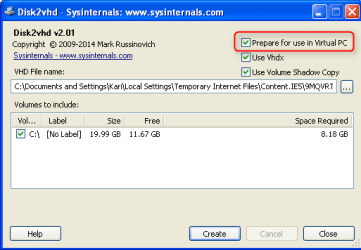
Ok, had not used Disk2VHD in quite a long time. Tested now with various options.

First, to prepare the vhd to be run on Virtual PC:

2014-07-05_06h43_47.png

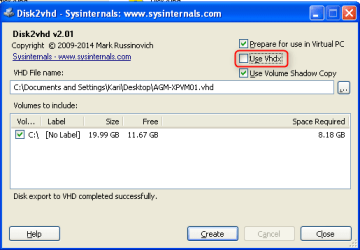
To make a VHD instead of VHDX:

2014-07-05_07h22_34.png

Try the above, deselecting VHDX to create a VHD instead. Resulted vhd file should run on VirtualBox. I will test it later today and post my findings.
 

My Computer My Computer

Computer type
Laptop
Computer Manufacturer/Model Number
HP ENVY 17-1150eg
OS
Windows 10 Pro x64 EN-GB
CPU
1.6 GHz Intel Core i7-720QM Processor
Memory
6 GB
Graphics Card(s)
ATI Mobility Radeon HD 5850 Graphics
Sound Card
Beats sound system with integrated subwoofer
Monitor(s) Displays
17" laptop display, 22" LED and 32" Full HD TV through HDMI
Screen Resolution
1600*900 (1), 1920*1080 (2&3)
Hard Drives
Internal: 2 x 500 GB SATA Hard Disk Drive 7200 rpm
External: 2TB for backups, 3TB USB3 network drive for media
Cooling
As Envy runs a bit warm, I have it on a Cooler Master pad
Keyboard
Logitech diNovo Media Desktop Laser (bluetooth)
Mouse
Logitech Performance Mouse MX
Internet Speed
50/10 Mbps VDSL
Antivirus
Windows Defender 4.3.9431.0
Browser
Maxthon 3.5.2., IE11
Back
Top