
Hey there,
This is my first post. So I'm new here. I have a current problem and hope some of you fine people can help me out. I have looked already on the internet and here on the forum to find a solution before starting another topic. But I couldn't find it.
I will explain the situation as best. In my computer (old Medion) I have currently 3 fysical drivers. One hard drive has 500GB, one hard drive of 1 TB and one hard drive of 3 TB.
A friend of mine had installed the 3TB hard drive which I use for movies and series. Now I decided to move my movies (from the 3TB to the 1 TB). I made a new partition, moved all the data and removed the old partition.
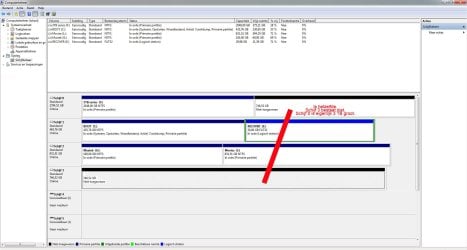
Now I want to expand my Series hard drive. SO I have 746 GB that I want to expand that is not assigned but it will not let me do this. I used a partition wizard.
Problem is the computer thinks that there is another disk. See the screenshot. But it isn't true. How can I solve this problem?
See the screenshot.
This is my first post. So I'm new here. I have a current problem and hope some of you fine people can help me out. I have looked already on the internet and here on the forum to find a solution before starting another topic. But I couldn't find it.
I will explain the situation as best. In my computer (old Medion) I have currently 3 fysical drivers. One hard drive has 500GB, one hard drive of 1 TB and one hard drive of 3 TB.
A friend of mine had installed the 3TB hard drive which I use for movies and series. Now I decided to move my movies (from the 3TB to the 1 TB). I made a new partition, moved all the data and removed the old partition.
Now I want to expand my Series hard drive. SO I have 746 GB that I want to expand that is not assigned but it will not let me do this. I used a partition wizard.
Problem is the computer thinks that there is another disk. See the screenshot. But it isn't true. How can I solve this problem?
See the screenshot.
Attachments
My Computer
At a glance
Windows 7 Home Premium 32 bit
- Computer type
- PC/Desktop
- Computer Manufacturer/Model Number
- Medion
- OS
- Windows 7 Home Premium 32 bit
- Antivirus
- Norton
- Browser
- Mozilla Firefox, Google Chrome


