
Solved How to merge partitions that are on each extreme of disk ?

adri123

New member
Member
Local time
2:43 AM
Messages
73
Hi all,

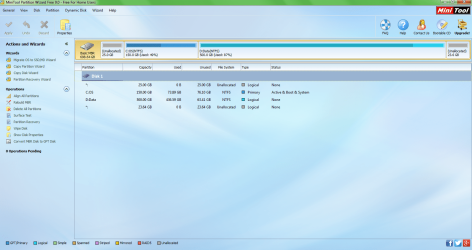
i have two unallocated partitions on each extreme of my disks as shown below.
I would like to merge them. Is that possible ?
If it's not possible directly, do you think it is possible to merge the first unallocated parition with C, then shrink C on the right and give that space to D, then shrink D on the right and give that space to the second unallocated partition on the right ?
In toher words, move the first unallocated parition step by step through the other ones till the extreme right ? :)

I have MiniTool Partition Wizard Free 9.0
partition wizard before changes.png
 

My Computer My Computer

At a glance

Windows 7 Home Premium 64 bitIntel Core i5 2410M @ 2.30GHz Sandy Bridge 32...8,00 GB Dual-Channel DDR3 @ 1333 MHz (PC3-10600)NVIDIA GeForce GT 555M, Intel HD Graphics 3000
Computer type
Laptop
Computer Manufacturer/Model Number
Asus N55SF
OS
Windows 7 Home Premium 64 bit
CPU
Intel Core i5 2410M @ 2.30GHz Sandy Bridge 32nm Technology
Motherboard
ASUSTeK Computer Inc. N55SF
Memory
8,00 GB Dual-Channel DDR3 @ 1333 MHz (PC3-10600)
Graphics Card(s)
NVIDIA GeForce GT 555M, Intel HD Graphics 3000
Sound Card
Realtek High Definition Audio
Screen Resolution
1600x900@60Hz
Hard Drives
699GB Seagate ST9750423AS (SATA) 5400rpm
Other Info
Optical drive: Slimtype DVD A DS8A5SH
Those aren't partitions. They are unallocated space.

You should be able to do add them to whatever you want with Partition Wizard.

With Windows Disk Management, you should be able to add the unallocated space on the far right to D, but only to D.
 

My Computer My Computer

At a glance

Windows 7 Home Premium SP1, 64-bitIntel Skylake i5-6600K, not overclocked8 GB HyperX DDR4-2666 (2 x 4 GB)none; graphics are integrated on CPU
Computer type
PC/Desktop
Computer Manufacturer/Model Number
Ignatz Special; 4 speed manual gearbox; factory air conditioning; one of one
OS
Windows 7 Home Premium SP1, 64-bit
CPU
Intel Skylake i5-6600K, not overclocked
Motherboard
AsRock Z170M Extreme 4, micro ATX
Memory
8 GB HyperX DDR4-2666 (2 x 4 GB)
Graphics Card(s)
none; graphics are integrated on CPU
Sound Card
onboard: Realtek ALC1150; external: USB Behringer UF0-202
Monitor(s) Displays
Dell S2340M 23 inch IPS
Screen Resolution
1600 x 900
Hard Drives
System: Crucial MX100 series SSD, 128 GB;
Data: Samsung Spinpoint 103SJ, 1 TB;
Backup: WD Caviar Green WD30EZRX-00D8PB0, 3 TB
PSU
Rosewill SilentNight 500 watt fanless, semi-modular
Case
Antec Solo II
Cooling
Noctua NH-U12S; Noctua F12 intake, Noctua S12A exhaust
Keyboard
Microsoft 200 6JH-00001 USB
Mouse
Dell or Microsoft optical wired; USB
Antivirus
Microsoft Security Essentials and Malwarebytes Premium
Browser
Pale Moon
Other Info
All fans PWM; speeds at idle: CPU circa 500 rpm; intake circa 600 rpm; exhaust circa 600 rpm; CPU temps 27 idle and 47 C load in a warm room (27 C/81 F) when running Intel Extreme Tuning Utility stress test.
Those aren't partitions. They are unallocated space.

You should be able to do add them to whatever you want with Partition Wizard.

With Windows Disk Management, you should be able to add the unallocated space on the far right to D, but only to D.

Thank you ignatzatsonic! I just did it and it worked perfectly!

Here are some more info for those interested:

Actually I had to move the existing partitions rather than move the unnalocated space.
Because when I was clicking on the unallocated space there weren't any option available to move it, there was only the option to create a partition with it.
So i clicked on the C partition and selected the "Move/Resize" tool, then in the pop up window, I could drag the partition to the left, on the unallocated space. That made the unallocated space go between C and D.
Then I did the same with D. Dragged in to the left. That made the unnalocated space go to the right of D and "merge" with the existing unallocated space on the extreme right. They became one.
Finally I created a partition there, for Windows 8, still leaving some unallocated space in case I want it for something else.
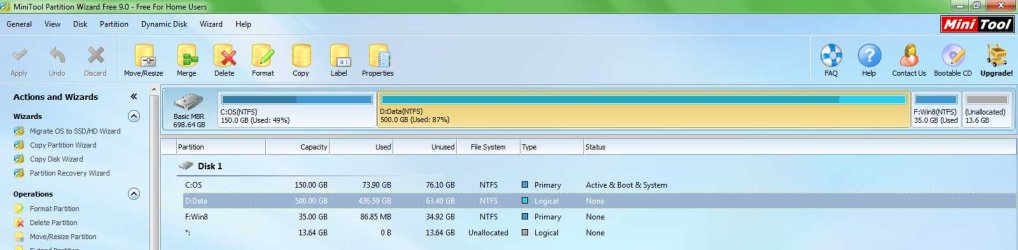
Here is how it looks now. I managed that with the free edition. Thanks!
after.jpg
 

My Computer My Computer

At a glance

Windows 7 Home Premium 64 bitIntel Core i5 2410M @ 2.30GHz Sandy Bridge 32...8,00 GB Dual-Channel DDR3 @ 1333 MHz (PC3-10600)NVIDIA GeForce GT 555M, Intel HD Graphics 3000
Computer type
Laptop
Computer Manufacturer/Model Number
Asus N55SF
OS
Windows 7 Home Premium 64 bit
CPU
Intel Core i5 2410M @ 2.30GHz Sandy Bridge 32nm Technology
Motherboard
ASUSTeK Computer Inc. N55SF
Memory
8,00 GB Dual-Channel DDR3 @ 1333 MHz (PC3-10600)
Graphics Card(s)
NVIDIA GeForce GT 555M, Intel HD Graphics 3000
Sound Card
Realtek High Definition Audio
Screen Resolution
1600x900@60Hz
Hard Drives
699GB Seagate ST9750423AS (SATA) 5400rpm
Other Info
Optical drive: Slimtype DVD A DS8A5SH
Keep in mind that Windows systems create those 2 tiny unallocated spaces on disks for advanced disk tasks. In general they should be left alone.
However most people have no use for these tasks (creating Dynamic Disks, etc) so it really is user's choice. No real harm will be done by removing them.
Linux systems have no use for these spaces so will list them as unallocated, but Windows systems ignore them.
Just so you know.
 

My Computer My Computer

At a glance

Windows 7 64 Bit Home Premium SP1i7-3820GSkill F3-14900CL9Q - 16GBEVGA GeForce GTX660 - Driver 352.86
Computer type
PC/Desktop
Computer Manufacturer/Model Number
Home Built - Jan 2013
OS
Windows 7 64 Bit Home Premium SP1
CPU
i7-3820
Motherboard
Asus P9X79-PRO - Bios 4608
Memory
GSkill F3-14900CL9Q - 16GB
Graphics Card(s)
EVGA GeForce GTX660 - Driver 352.86
Sound Card
On board Realtek ALC898
Monitor(s) Displays
Acer S271HL
Screen Resolution
1920 x 1080
Hard Drives
#1- Samsung 840 Pro Series
#2- Western Digital WD1002FAEX Sata3 Black
#3- Western Digital WD1002FAEX Sata3 Black
PSU
Corsair CMPSU-850TX-V2 - 850 watt (by Seasonic)
Case
Corsair Obsidian 550D
Cooling
Standard 3 120mm case fans, Cooler Master Hyper 212 EVO
Keyboard
MS KC-0405
Mouse
Intellimouse 5-button
Internet Speed
56 Mbits/Sec (on a good day)
Antivirus
Avast & Malwarebytes
Browser
Firefox
Other Info
Asus DVD - DRW-24B1ST 24X
You can still add the 13 GB un allocated to Windows 8
 

My Computer My Computer

At a glance

Windows 10 Pro x64Intel Core i7 6700KGSkill TridentZ RGB 16GB 3600 16-16-16-36EVGA GTX 980 Ti SC x2
Computer type
PC/Desktop
Computer Manufacturer/Model Number
Skylake Special #666
OS
Windows 10 Pro x64
CPU
Intel Core i7 6700K
Motherboard
Asus Sabertooth Z170 Mark 1
Memory
GSkill TridentZ RGB 16GB 3600 16-16-16-36
Graphics Card(s)
EVGA GTX 980 Ti SC x2
Sound Card
Realtek High Definition
Monitor(s) Displays
AOC G2460PG
Screen Resolution
1920 x 1080 144Hz
Hard Drives
Samsung 860 Pro 256GB, Seagate Barracuda 4TB x2
PSU
EVGA 1000 P2, EVGA White Custom Braided Cables
Case
Corsair Vengeance C70 Gunmetal Black
Cooling
Corsair H100i v2, Corsair ML120 x2, Thermal Grizzly Kryonaut
Keyboard
Logitech G910 Orion Spectrum
Mouse
Logitech G700s
Internet Speed
Verizon Fios Quantum Gateway 75/75
Antivirus
Windows Defender, Malwarebytes Free 3.8.3
Browser
Chrome
Other Info
Corsair SP120 x4, LG Blu-ray Drive, Durabrand HT-395 100 Watt Dolby Digital Amp, Corsair H2100 Wireless 7.1 Headset
Keep in mind that Windows systems create those 2 tiny unallocated spaces on disks for advanced disk tasks. In general they should be left alone.
However most people have no use for these tasks (creating Dynamic Disks, etc) so it really is user's choice. No real harm will be done by removing them.
Linux systems have no use for these spaces so will list them as unallocated, but Windows systems ignore them.
Just so you know.

Thank you for the info, but the two unallocated spaces shown in the first post weren't tiny though.
The first one (25 GB) on the exteme left, was from the recovery partition which i deleted because the warranty isn't valid anymore and I have installed another version of windows.
As for the unallocated space on the right (23 GB) was left empty intentionally in case I needed to add something there.
 

My Computer My Computer

At a glance

Windows 7 Home Premium 64 bitIntel Core i5 2410M @ 2.30GHz Sandy Bridge 32...8,00 GB Dual-Channel DDR3 @ 1333 MHz (PC3-10600)NVIDIA GeForce GT 555M, Intel HD Graphics 3000
Computer type
Laptop
Computer Manufacturer/Model Number
Asus N55SF
OS
Windows 7 Home Premium 64 bit
CPU
Intel Core i5 2410M @ 2.30GHz Sandy Bridge 32nm Technology
Motherboard
ASUSTeK Computer Inc. N55SF
Memory
8,00 GB Dual-Channel DDR3 @ 1333 MHz (PC3-10600)
Graphics Card(s)
NVIDIA GeForce GT 555M, Intel HD Graphics 3000
Sound Card
Realtek High Definition Audio
Screen Resolution
1600x900@60Hz
Hard Drives
699GB Seagate ST9750423AS (SATA) 5400rpm
Other Info
Optical drive: Slimtype DVD A DS8A5SH
You can still add the 13 GB un allocated to Windows 8

Thanks, I know, as I said in post #3 :

Finally I created a partition there, for Windows 8, still leaving some unallocated space in case I want it for something else.
 

My Computer My Computer

At a glance

Windows 7 Home Premium 64 bitIntel Core i5 2410M @ 2.30GHz Sandy Bridge 32...8,00 GB Dual-Channel DDR3 @ 1333 MHz (PC3-10600)NVIDIA GeForce GT 555M, Intel HD Graphics 3000
Computer type
Laptop
Computer Manufacturer/Model Number
Asus N55SF
OS
Windows 7 Home Premium 64 bit
CPU
Intel Core i5 2410M @ 2.30GHz Sandy Bridge 32nm Technology
Motherboard
ASUSTeK Computer Inc. N55SF
Memory
8,00 GB Dual-Channel DDR3 @ 1333 MHz (PC3-10600)
Graphics Card(s)
NVIDIA GeForce GT 555M, Intel HD Graphics 3000
Sound Card
Realtek High Definition Audio
Screen Resolution
1600x900@60Hz
Hard Drives
699GB Seagate ST9750423AS (SATA) 5400rpm
Other Info
Optical drive: Slimtype DVD A DS8A5SH
Keep in mind that Windows systems create those 2 tiny unallocated spaces on disks for advanced disk tasks. In general they should be left alone.
However most people have no use for these tasks (creating Dynamic Disks, etc) so it really is user's choice. No real harm will be done by removing them.
Linux systems have no use for these spaces so will list them as unallocated, but Windows systems ignore them.
Just so you know.

Thank you for the info, but the two unallocated spaces shown in the first post weren't tiny though.
The first one (25 GB) on the exteme left, was from the recovery partition which i deleted because the warranty isn't valid anymore and I have installed another version of windows.
As for the unallocated space on the right (23 GB) was left empty intentionally in case I needed to add something there.

You are right. I just looked at the configuration and did not enlarge to read the sizes! Sorry.
The small unallocated I was talking about are 8MB or so.
It is such a recognizable configuration in PW.
 

My Computer My Computer

At a glance

Windows 7 64 Bit Home Premium SP1i7-3820GSkill F3-14900CL9Q - 16GBEVGA GeForce GTX660 - Driver 352.86
Computer type
PC/Desktop
Computer Manufacturer/Model Number
Home Built - Jan 2013
OS
Windows 7 64 Bit Home Premium SP1
CPU
i7-3820
Motherboard
Asus P9X79-PRO - Bios 4608
Memory
GSkill F3-14900CL9Q - 16GB
Graphics Card(s)
EVGA GeForce GTX660 - Driver 352.86
Sound Card
On board Realtek ALC898
Monitor(s) Displays
Acer S271HL
Screen Resolution
1920 x 1080
Hard Drives
#1- Samsung 840 Pro Series
#2- Western Digital WD1002FAEX Sata3 Black
#3- Western Digital WD1002FAEX Sata3 Black
PSU
Corsair CMPSU-850TX-V2 - 850 watt (by Seasonic)
Case
Corsair Obsidian 550D
Cooling
Standard 3 120mm case fans, Cooler Master Hyper 212 EVO
Keyboard
MS KC-0405
Mouse
Intellimouse 5-button
Internet Speed
56 Mbits/Sec (on a good day)
Antivirus
Avast & Malwarebytes
Browser
Firefox
Other Info
Asus DVD - DRW-24B1ST 24X
TVeblen said:
You are right. I just looked at the configuration and did not enlarge to read the sizes! Sorry.
The small unallocated I was talking about are 8MB or so.
It is such a recognizable configuration in PW.

No worries thanks for the info anyway!
 

My Computer My Computer

At a glance

Windows 7 Home Premium 64 bitIntel Core i5 2410M @ 2.30GHz Sandy Bridge 32...8,00 GB Dual-Channel DDR3 @ 1333 MHz (PC3-10600)NVIDIA GeForce GT 555M, Intel HD Graphics 3000
Computer type
Laptop
Computer Manufacturer/Model Number
Asus N55SF
OS
Windows 7 Home Premium 64 bit
CPU
Intel Core i5 2410M @ 2.30GHz Sandy Bridge 32nm Technology
Motherboard
ASUSTeK Computer Inc. N55SF
Memory
8,00 GB Dual-Channel DDR3 @ 1333 MHz (PC3-10600)
Graphics Card(s)
NVIDIA GeForce GT 555M, Intel HD Graphics 3000
Sound Card
Realtek High Definition Audio
Screen Resolution
1600x900@60Hz
Hard Drives
699GB Seagate ST9750423AS (SATA) 5400rpm
Other Info
Optical drive: Slimtype DVD A DS8A5SH
Back
Top