Solved How to mount Dual Layer DVD ISO files in windows 7

qpod25

New member
Member
Local time
7:41 PM
Messages
82
hi,
How is it possible to mount Dual Layer DVD ISO files in windows 7.
using ultraISO to do it is not helpful.
Microsoft OneDrive - Access files anywhere. Create docs with free Office Online.
this is the actual dual layer dvd iso file

magnet:?xt=urn:btih:DKNULNDJWCFN4M7DIM7QK7XH4YYMJF5E&dn=pgdvd042010.iso&tr=http%3A%2F%2Fsnowy.arsc.alaska.edu%3A6969%2Fannounce

any help would be highly appreciated.
Best Regards.
 

My Computer My Computer

At a glance

windows 7 ultimate 32 bitsintel celeron cpu 540 1.86 GHzkingston 4Gbmobile intel(R) 965 Express Chipset Family
Computer type
Laptop
Computer Manufacturer/Model Number
toshiba
OS
windows 7 ultimate 32 bits
CPU
intel celeron cpu 540 1.86 GHz
Motherboard
asus
Memory
kingston 4Gb
Graphics Card(s)
mobile intel(R) 965 Express Chipset Family
Hard Drives
WDC WD800BEVS-22RST0 ATA Device
Antivirus
avast 2017
Browser
ie11,ff54
I've never liked the native Windows function, so I've always used a third-party utility to create a virtual DVD drive that behaves more like a physical DVD drive.* The utility I use is Virtual CloneDrive, which can load ISOs larger than 4.7 GB just like a real dual-layer DVD drive.


* With the native Windows function, the virtual drive is there only as long as an ISO is mounted. When the ISO is unmounted, the "drive" goes away. In contrast, Virtual CloneDrive is always there, just like a real drive. You can use Disk Management to reassign the drive letter--I assign mine as X:, up near V: and W: which I assign to my physical optical drives. To make it behave even more like a real DVD drive, I tick the "Eject unmounts image file" option and untick the "Show Tray Icon" option.
 

My Computer My Computer

At a glance

Windows 7/8.1/10 multibootIntel Core i7-770048GB (2x16GB Crucial DDR4-3200 + 2x8GB Hynix ...Intel HD630 + AMD Radeon R7 450 PCIe
Computer type
PC/Desktop
Computer Manufacturer/Model Number
Dell Optiplex 7050
OS
Windows 7/8.1/10 multiboot
CPU
Intel Core i7-7700
Motherboard
Dell, Intel Q270 chipset
Memory
48GB (2x16GB Crucial DDR4-3200 + 2x8GB Hynix DDR4-2400)
Graphics Card(s)
Intel HD630 + AMD Radeon R7 450 PCIe
Monitor(s) Displays
Asus VC279 (27")
Screen Resolution
1920x1080
Hard Drives
Toshiba M.2 NVMe (256GB),
Samsung 960 Evo (500GB),
WD Red Plus 80EFBX (8TB)
Burning DVD/DL disks

"Keep it simple Sam" (or something like that)


I burn all my ISO's to Disks using one simple program "ImgBurn", and it's FREE. You can download it from their web site, or from several well known Mirror sites.


When burning an ISO, for instance, it will even tell you if the ISO will fit on a standard DVD or if a DL is required. And, after the burn, it will also verify the new disk, if you check the "Verify" box.


Did I mention, It's FREE ?


In a recent attempt to burn a DL disk, one ISO, of a x64 OS, was giving me fits. So I just burned/installed the ISO to a 16 GB Flash Drive, using another little utility called "ISO to USB". If I remember correctly, that program was FREE too. That went off without a hitch. Installing a new OS from a Flash Drive goes much quicker than if you're trying to install from a DVD. And it can't be destroyed by a scratch or finger print.


Good Luck,
TechnoMage :cool:
 

My Computer My Computer

At a glance

Win 7 Pro, SP1, x86, Win-11/Pro/64AMD8GB CrucialVarious
Computer type
PC/Desktop
Computer Manufacturer/Model Number
Various
OS
Win 7 Pro, SP1, x86, Win-11/Pro/64
CPU
AMD
Motherboard
Various
Memory
8GB Crucial
Graphics Card(s)
Various
Sound Card
OnBoard
Monitor(s) Displays
Acer 21.5"
Hard Drives
Crucial SSD, 500 GB
PSU
OEM
Case
SFF Slim Line Case
Cooling
OEM
Keyboard
eMachines
Mouse
Logitech Wireless
Internet Speed
varies
Antivirus
Windows Defender/Super Anti-Spyware
Browser
Firefox
Virtual CloneDrive and WinCDEmu
are not able to mount the image of this file

magnet:?xt=urn:btihKNULNDJWCFN4M7DIM7QK7XH4YYMJF5E&dn=pgdvd042010.iso&tr=http%3A%2F%2Fsnowy.arsc.a laska.edu%3A6969%2Fannounce

correctly!.
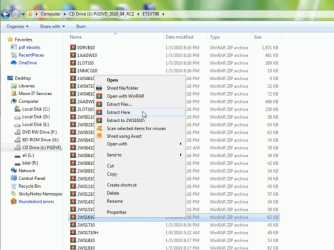
they mount but with the following error.
Microsoft OneDrive - Access files anywhere. Create docs with free Office Online.
what should be done next.
i am unable to mount the image with imageburn.
Best Regards.
 

My Computer My Computer

At a glance

windows 7 ultimate 32 bitsintel celeron cpu 540 1.86 GHzkingston 4Gbmobile intel(R) 965 Express Chipset Family
Computer type
Laptop
Computer Manufacturer/Model Number
toshiba
OS
windows 7 ultimate 32 bits
CPU
intel celeron cpu 540 1.86 GHz
Motherboard
asus
Memory
kingston 4Gb
Graphics Card(s)
mobile intel(R) 965 Express Chipset Family
Hard Drives
WDC WD800BEVS-22RST0 ATA Device
Antivirus
avast 2017
Browser
ie11,ff54
Virtual CloneDrive and WinCDEmu
are not able to mount the image of this file correctly!.
they mount but with the following error.

Looks to me like the utilities are working correctly, and you are indeed able to mount the ISO file properly.

Dual-layer is not the issue here. The problem seems to be you're trying to extract files into the ISO itself--IOW, onto the J: virtual drive. You cannot do that, just as you cannot extract files onto a physical CD or DVD. A virtual DVD drive behaves just like a physical DVD drive. You cannot "Extract Here" when "Here" is the ISO itself.

Just as with a physical DVD, if you want to extract the contents of the RAR files you should first copy the RAR files to your desktop or a writable folder on a hard drive, and then execute the "Extract Here" command on the copies.
 

Attachments

  • Image1.png
    Image1.png
    120.6 KB · Views: 2

My Computer My Computer

At a glance

Windows 7/8.1/10 multibootIntel Core i7-770048GB (2x16GB Crucial DDR4-3200 + 2x8GB Hynix ...Intel HD630 + AMD Radeon R7 450 PCIe
Computer type
PC/Desktop
Computer Manufacturer/Model Number
Dell Optiplex 7050
OS
Windows 7/8.1/10 multiboot
CPU
Intel Core i7-7700
Motherboard
Dell, Intel Q270 chipset
Memory
48GB (2x16GB Crucial DDR4-3200 + 2x8GB Hynix DDR4-2400)
Graphics Card(s)
Intel HD630 + AMD Radeon R7 450 PCIe
Monitor(s) Displays
Asus VC279 (27")
Screen Resolution
1920x1080
Hard Drives
Toshiba M.2 NVMe (256GB),
Samsung 960 Evo (500GB),
WD Red Plus 80EFBX (8TB)
dg1261
Thanks.
Mods my problem is solved.
Please close this thread.
 

My Computer My Computer

At a glance

windows 7 ultimate 32 bitsintel celeron cpu 540 1.86 GHzkingston 4Gbmobile intel(R) 965 Express Chipset Family
Computer type
Laptop
Computer Manufacturer/Model Number
toshiba
OS
windows 7 ultimate 32 bits
CPU
intel celeron cpu 540 1.86 GHz
Motherboard
asus
Memory
kingston 4Gb
Graphics Card(s)
mobile intel(R) 965 Express Chipset Family
Hard Drives
WDC WD800BEVS-22RST0 ATA Device
Antivirus
avast 2017
Browser
ie11,ff54
Back
Top