How to mount multiple partitions on a USB removable drive?

Brian J Hoskins

New member
Local time
9:17 PM
Messages
13
Location
Laugharne, Carmarthenshire, UK
Hi all,

I have a USB flash drive on which I have created two partitions. Due to the way that Windows deals with removable drives, it ignores all but the primary partition on the drive. Therefore it is not possible to mount any of the other partitions using standard Windows software.

On Linux it is possible to mount all of the drive's partitions because it treats removable drives the same way as fixed drives.

I have done a fair bit of research to see if I can find some software for Windows that would allow me to bypass the standard Windows behaviour and mount the extra partitions on the drive. Unfortunately I've not been able to find anything. I did find some information about a Lexar format tool which allows you to flip the RMB bit on a flash drive so that it enumerates itself as a fixed drive instead; solving the problem. Unfortunately this tool doesn't work with all USB flash drives, and it doesn't work with mine.

Has anyone here solved this for themselves? If so can you share your solution?

Thanks!

Brian
 

My Computer My Computer

At a glance

Windows 7 Professional x64INTEL Core i7 4820K4x 4GB DDR3 Performance Desktop Memory - 16GB...
Computer type
PC/Desktop
Computer Manufacturer/Model Number
Custom Build
OS
Windows 7 Professional x64
CPU
INTEL Core i7 4820K
Motherboard
Gigabyte X79-UP4
Memory
4x 4GB DDR3 Performance Desktop Memory - 16GB Total
Hard Drives
2x500GB SATA
PSU
Corsair GS700
Cooling
Coolermaster Sedion CPU Water Cooler
Antivirus
AVG Internet Security
Browser
Chrome

Attachments

  • 2014-10-05_1742.png
    2014-10-05_1742.png
    17.5 KB · Views: 3

My Computer My Computer

At a glance

Vista, Windows7, Mint Mate, Zorin, Windows 8from 1.6GHz Duo to i7
Computer Manufacturer/Model Number
HP, Dell, Gateway, Toshiba - 4 laptops and 2 desktops
OS
Vista, Windows7, Mint Mate, Zorin, Windows 8
CPU
from 1.6GHz Duo to i7
Monitor(s) Displays
2x HP w2207
Hard Drives
5x HDD, 7x SSD, 12x Externals
Keyboard
with trackball - no mices
Mouse
Trackball mice
Internet Speed
DSL 6000
@whs

SanDisk pen drives manufactured between June 2012 and Dec 2013 or about were configured as Fixed Disks, to meet new requirements for Windows 8 Certification.

You had done it on a San Disk pen drive that was manufactured during this time.

This was discussed in a July 2014 post here http://www.sevenforums.com/hardware-devices/338030-partition-usb-pen-drive-3.html#post2842344

You can't do it on a SanDisk pendrive manufactured after Dec 2013 or any other brand pendrive/s which are configured as removable disks.
 
Last edited:

My Computer My Computer

At a glance

Windows 7 Home Premium 32 bit
OS
Windows 7 Home Premium 32 bit
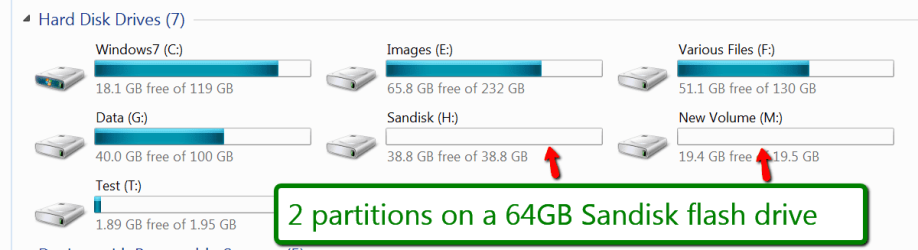
I know. I have seen that earlier. But at least on this flash drive it works.
 

My Computer My Computer

At a glance

Vista, Windows7, Mint Mate, Zorin, Windows 8from 1.6GHz Duo to i7
Computer Manufacturer/Model Number
HP, Dell, Gateway, Toshiba - 4 laptops and 2 desktops
OS
Vista, Windows7, Mint Mate, Zorin, Windows 8
CPU
from 1.6GHz Duo to i7
Monitor(s) Displays
2x HP w2207
Hard Drives
5x HDD, 7x SSD, 12x Externals
Keyboard
with trackball - no mices
Mouse
Trackball mice
Internet Speed
DSL 6000
That doesn't help the OP in anyway :D. "I have a Rolls Royce." :)

To me it appears that the only way the OP can mount any partition in a multipartitioned Pendrive on Windows is to hide all other partitions preceding it, so that Windows will see it as the first partition. He may have to use a third party software to hide the preceding partitions.
 

My Computer My Computer

At a glance

Windows 7 Home Premium 32 bit
OS
Windows 7 Home Premium 32 bit
My point is that you need a special flash drive for multiple partitions. At least with that one it is possible. It does not help either to tell him that it is impossible.
 

My Computer My Computer

At a glance

Vista, Windows7, Mint Mate, Zorin, Windows 8from 1.6GHz Duo to i7
Computer Manufacturer/Model Number
HP, Dell, Gateway, Toshiba - 4 laptops and 2 desktops
OS
Vista, Windows7, Mint Mate, Zorin, Windows 8
CPU
from 1.6GHz Duo to i7
Monitor(s) Displays
2x HP w2207
Hard Drives
5x HDD, 7x SSD, 12x Externals
Keyboard
with trackball - no mices
Mouse
Trackball mice
Internet Speed
DSL 6000
The fact is no such special flash drive is available.If available please tell the OP where to get it. His problem will be solved.:)
 

My Computer My Computer

At a glance

Windows 7 Home Premium 32 bit
OS
Windows 7 Home Premium 32 bit
Thank you both for your replies.

The use of a particular make/model flash drive does not help me right now, as I have already purchased a 128GB drive for use in my application. Still, it is useful to be aware of this in case I am making a future purchase.

Regarding the "it's impossible" response, no this doesn't help me solve my problem but it does help me stop wasting my time on it ;-)

If anyone else has something useful to add please do share.

Thanks,

Brian
 

My Computer My Computer

At a glance

Windows 7 Professional x64INTEL Core i7 4820K4x 4GB DDR3 Performance Desktop Memory - 16GB...
Computer type
PC/Desktop
Computer Manufacturer/Model Number
Custom Build
OS
Windows 7 Professional x64
CPU
INTEL Core i7 4820K
Motherboard
Gigabyte X79-UP4
Memory
4x 4GB DDR3 Performance Desktop Memory - 16GB Total
Hard Drives
2x500GB SATA
PSU
Corsair GS700
Cooling
Coolermaster Sedion CPU Water Cooler
Antivirus
AVG Internet Security
Browser
Chrome
For reference:

I did find some instructions here which claim to solve the problem for 32-bit Windows users only.

Brian
 

My Computer My Computer

At a glance

Windows 7 Professional x64INTEL Core i7 4820K4x 4GB DDR3 Performance Desktop Memory - 16GB...
Computer type
PC/Desktop
Computer Manufacturer/Model Number
Custom Build
OS
Windows 7 Professional x64
CPU
INTEL Core i7 4820K
Motherboard
Gigabyte X79-UP4
Memory
4x 4GB DDR3 Performance Desktop Memory - 16GB Total
Hard Drives
2x500GB SATA
PSU
Corsair GS700
Cooling
Coolermaster Sedion CPU Water Cooler
Antivirus
AVG Internet Security
Browser
Chrome
Back
Top